Edu Camargo
Max Output Level: -90 dBFS

- Total Posts : 13
- Joined: 2015/10/28 23:53:32
- Location: São Paulo, Sp, Brazil
- Status: offline

Hello and a question about automation writing
Hello guys, greetings from Brazil to all of you.
I'm a Sonar user since september and I'm loving the new environment, coming from a hardware-based workstation, Yamaha Motif XS. I'm happy as a blind windows user to reach great results in many areas of this incredible software. I'm about to purchase the Komplete Kontrol S 88 to start making serious music production soon. In fact, I'm already experimenting.
As the subject suggests, I have a question regarding automation recording:
It seems to me due to my circumstances that automation recording is the way to go, at least for now. Whenever I try automation recording, all fader movements during recording work smoothly as expected, but when I play the result, volume or any control skips a lot. I presume this is not the best approach, I'm doing this using the computer keyboard until I'm able to purchase a FaderPort or similar surface. Anyway, am I missing some configuration? Basically I'm working on a project comprised of more than 30 tracks, and using the built-in effects.
My system specs: Mother Board is Asus M5A99X Evo, CPU is AMD FX 8350 and 16gb of RAM. System is Windows 10 Pro 64 Bit installed in an SSD, and user data is stored in an 1TB hard drive.
Thanks in advance for your support.
Peace,
Edu Camargo.
“In the end, the four prophets were three: Moses and Elias...”
|
Edu Camargo
Max Output Level: -90 dBFS
- Total Posts : 13
- Joined: 2015/10/28 23:53:32
- Location: São Paulo, Sp, Brazil
- Status: offline
Re: Hello and a question about automation writing
2016/12/18 04:22:56
(permalink)
Forgot to mention Sonar Version: Sonar Platinum 22.11.0.
post edited by Edu Camargo - 2016/12/18 10:27:44
“In the end, the four prophets were three: Moses and Elias...”
|
Klaus
Max Output Level: -84 dBFS

- Total Posts : 320
- Joined: 2009/07/14 07:34:02
- Location: Cologne, Germany
- Status: offline
Re: Hello and a question about automation writing
2016/12/18 17:30:39
(permalink)
Hi Edu Camargo, would you explain a bit further how you record automation? You said you use the computer keyboard for recording e.g. volume automation, so you don't use a mouse but actually keystrokes on your Qwerty-keyboard for this? Anyway, have a look into the created automation envelopes after recording (via Automation Lanes or by changing the Edit Filter from Clips to Automation...) Can you see the "skipping volume or any other control" behaviour you described in your OP by looking at the envelope? That would be useful to know because it could indicate at which point (recording/writing) the problem occurs. And FWIW, recording and writing automation data works here as it should (and haven't seen more complaints), so your experience is most probably not a common problem but needs a bit more trouble shooting and info. Best, Klaus
post edited by Klaus - 2016/12/18 23:22:39
SONAR Platinum ∞RME HDSPe AIO - Windows 10 64bit - Intel i7 2600K - 16 GB RAM
|
Klaus
Max Output Level: -84 dBFS
- Total Posts : 320
- Joined: 2009/07/14 07:34:02
- Location: Cologne, Germany
- Status: offline
Re: Hello and a question about automation writing
2016/12/18 23:54:36
(permalink)
☼ Best Answerby Edu Camargo 2016/12/19 00:57:39
Hi Edu,
my apologize, I've missed an important point in your post, sorry!
The skips in volume changes could be the result of jumps between two automation nodes.
When you record automation via keystrokes, the line between nodes is not linear or curved, but rather a "jump".
A FaderPort or similar controller is, as you mentioned, probably the best solution.
Best,
Klaus
SONAR Platinum ∞RME HDSPe AIO - Windows 10 64bit - Intel i7 2600K - 16 GB RAM
|
Edu Camargo
Max Output Level: -90 dBFS
- Total Posts : 13
- Joined: 2015/10/28 23:53:32
- Location: São Paulo, Sp, Brazil
- Status: offline
Re: Hello and a question about automation writing
2016/12/19 01:27:22
(permalink)
Hi Klaus, thanks so much for your atention in this regard.
As I was going to reply to you, I use the real time method writing of automation. The jumps I was referring to occurs only when I try to record some rapid fade movements, for example, when you want to fade in some delays in a particular section of a song, or when you apply fades at the end of a track when you don't need much reverb at the end of the song. For more gradual continuous fades I try holding the plus and minus of the numpad to do more fine volume adjustments, and left and right brakets for fast fades in large steps. But I was expecting some abnormality coming from this since the computer keyboard is used to create envelopes and nodes as well. I was about to put the blame on my gigantic project...
Also, while doing the real time writing of automation, how can you do to make the project return its parameters to their initial values when you move to the beginning of the project? Normaly I have to set the value while the playback is rolling.
Since we've mentioned the "FaderPort, I was wondering: Is there a control surface just as portable as this one with more faders to control, or is FaderPort the best bet? Or better saying, what control surface offers the best joint between cost / benefit? My audio interface (Roland Quad-Capture UA-55) got me so caught up on the idea of having the best sound quality in a very portable case and USB-powered, that I felt the need to look for a control surface with the same flexibility. Or even better, (which I think it doesn't exist) an audio interface with control surface functions...
Again, thanks Klaus for your tip. Guess that my need for a surface is more urgent than I ever thought.
Peace,
Edu Camargo.
“In the end, the four prophets were three: Moses and Elias...”
|
thedukewestern
Max Output Level: -83 dBFS

- Total Posts : 387
- Joined: 2008/04/14 12:06:59
- Location: NY
- Status: offline
Re: Hello and a question about automation writing
2016/12/19 09:17:46
(permalink)
Hi Edu. What you are describing does not sound too unusual. I do not know if sonar has any kind of "Thin Automation" command to delete extranous mix points in an envelope - Only because I never really looked. However when I write automation with a mouse etc, I end up with results like the ones you have described.
There are certain times when I will for example, as the song plays through, click on 1 paramater (volume fader in console view... for example) at the beginning and end of a section, and then right click on the envelope and choose one of the curves so the it is smoother than what I would accomplish by hand. The curves are much smoother. Slow Fade, Fast Fade etc,
Be the first one who thinks that you can Sonar Platinum, Windows 7 64 bit - clean install January 2016, Focusrite Pro 40, Outboard Pres, Native Instruments Komplete, Izotope, PSP, Melodyne, Vegetarian
|
57Gregy
Max Output Level: 0 dBFS

- Total Posts : 14404
- Joined: 2004/05/31 17:04:17
- Location: Raleigh, North Carolina
- Status: offline
Re: Hello and a question about automation writing
2016/12/19 09:43:18
(permalink)
Welcome to the forum. For something as simple as fades, hover your cursor over the top corner of the clip until the arrow becomes a triangle. Click and drag the triangle as far as you want the fade in/out. Right-click the triangle to select which fade mode you want. 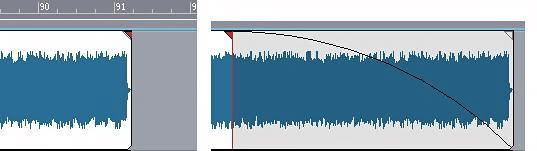
|
Edu Camargo
Max Output Level: -90 dBFS
- Total Posts : 13
- Joined: 2015/10/28 23:53:32
- Location: São Paulo, Sp, Brazil
- Status: offline
Re: Hello and a question about automation writing
2016/12/19 10:40:25
(permalink)
Thanks TheDukeWestern and Greg for your replies.
For the time being I think I'm gonna experiment with things in order to acomplish certain tasks while I'm not with a control surface yet. Gonna take the idle time I have and try new some possibilities in case I need them in the future. The screen reader I use on Windows, NVDA, offers some mouse tricks I might find interesting to try in order to access some clip parameters in Sonar. Normally each audio manipulation I make in Sonar is within tracks / buses because there are many key strokes to perform things (and I still might find myself creating key bindings to options I think are useful). The idea on working full time in Sonar is totally new to me, but I'm loveing it, given the fact that Sonar is the only one on Windows (to my knowledge) still capable of providing us blinds access to its interface's content. It's a big beast, lots of things to explore. Yesterday I've just finished my first comercial production with Sonar and I'm really, really happy with the results I've reached despite some current limitations of my own.
At TheDukeWestern: Sounds like we're part of a few who wants to draw our own fades in our own pase. Never thought the mouse also causes those same weird effects. Normally the mouse is the engeneer's best friend, right?
Again, thanks both for your contribution.
Peace,
Edu.
“In the end, the four prophets were three: Moses and Elias...”
|
thedukewestern
Max Output Level: -83 dBFS
- Total Posts : 387
- Joined: 2008/04/14 12:06:59
- Location: NY
- Status: offline
Re: Hello and a question about automation writing
2016/12/19 10:59:47
(permalink)
Sure thing. What greg is talking about is called Clip Fade. Its really useful for cleaning up audio files "Pre Fader" so its something that can be very helpful. I use that feature alot when I want to say - fade out the input of a guitar into an amp sim plugin with verbs and delays all swishing around - so I dont have any extraneuos noises swishing around as well.
Many times after I do some automation with the mouse, Ill almost always go back and fine tune it. Sometimes if I see that I have a bunch of zig sags and wierd stuff I perhaps unintentionally wrote in the envelope, Ill left click, and choose the eraser tool, erase all the zoop dee doos - then left click again - choose the main multi tool - and then right click in the envelope and choose one of the curves. Linear, slow or fast fade etc.
Good luck Edu!
Be the first one who thinks that you can Sonar Platinum, Windows 7 64 bit - clean install January 2016, Focusrite Pro 40, Outboard Pres, Native Instruments Komplete, Izotope, PSP, Melodyne, Vegetarian
|