Sam4246
Max Output Level: -88 dBFS

- Total Posts : 148
- Joined: 2016/02/27 16:41:26
- Status: offline
Bit Depth Rate question
When I export a project to a wave file I always pick 16 - that is the rate to use to match a CD, right? Seems I recall reading that in the Sonar documentation somewhere.
Why would you use a different rate?
Is there some advantage I am missing?
Just curious. It's been 11 months since I converted from a stand alone digital recorder to my first DAW - which is SPLAT.
Thankfully a good friend strongly suggested SPLAT along with the Waves Platinum bundle. So you can see why even almost a year later I am still going, oh wow, you can do that or asking rookie questions like what is the deal with bit depth rates.
Thanks!
Al
|
gswitz
Max Output Level: -18.5 dBFS

- Total Posts : 5694
- Joined: 2007/06/16 07:17:14
- Location: Richmond Virginia USA
- Status: offline

Re: Bit Depth Rate question
2017/01/04 17:22:34
(permalink)
16 bit for cd.
24 bit otherwise for high definition audio.
MP3 for small and portable.
I never export 32.
Flac doesn't seem to be actually lossless to me. If I save a wave to Flac, export, import, null test, normalize, I don't get silence.
If Flac was lossless, I would save as Flac not 24 bit wave.
For use in movies, you might want 48K samples per second rather than 44.1K.
Saving to double rates like 88.2 or 96 might make sense if you were sending it to be mastered.
StudioCat > I use Windows 10 and Sonar Platinum. I have a touch screen. I make some videos. This one shows how to do a physical loopback on the RME UCX to get many more equalizer nodes.
|
Sam4246
Max Output Level: -88 dBFS
- Total Posts : 148
- Joined: 2016/02/27 16:41:26
- Status: offline
Re: Bit Depth Rate question
2017/01/04 17:39:08
(permalink)
What if I plan to master myself? I plan to export the project at 16 then bring the stereo wave file back into SPLAT and master from there. Would the 16 bit depth rate still be the way to go?
It's like every time I ask a question the forum members answer it and then I have more questions. Ha! So enjoying learning all this with the DAW.
Thanks!
Al
|
promidi
Max Output Level: -66 dBFS

- Total Posts : 1220
- Joined: 2014/11/21 18:46:39
- Location: South Australia
- Status: offline
Re: Bit Depth Rate question
2017/01/04 18:07:10
(permalink)
IMHO I would keep it at 24bit until you are ready to do the final export to CD (or if your exporting to HD - just keep it at 24bit).
Windows 10 64bit fully patched, 16 gig ram . PCR-800 Controller. (Working in Win 10 1809 64bit)CPU: i5 4670. Video: Nvidia GTX560ti (latest drivers). Audio IF: Focusrite 2i2 2nd Gen
Internet always on.
Software: Cakewalk by Bandlab (2018.09 B29)
ASIO mode. 24bit 48khz 256 samples Rapture Pro, AAS GS2, VS-3, EP-4, VA-2, Chromophone 2, Z3TA+ 2, Addictive drums 2, Addictive Keys, Mpowersynth (latest), Iris 2, GPO5, Sampletank 3,
|
DeeringAmps
Max Output Level: -49 dBFS

- Total Posts : 2614
- Joined: 2005/10/03 10:29:25
- Location: Seattle area
- Status: offline
Re: Bit Depth Rate question
2017/01/04 18:34:24
(permalink)
Without a doubt at 24, if you do a "bounce" in SONAR the default is 32; IIRC.
I bounce a mix (32 bit) then "master" that.
I rarely bother with a separate project, bounce a mix, archive the tracks; then "master" the mix (another bounce).
Export that "mastered" track at 44.1k or mp3; whatever.
Then, if ever needed, the "master" could be exported at 24.
Just my workflow.
T
Tom Deering Tascam FW-1884 User Resources Page Firewire "Legacy" Tutorial, Service Manual, Schematic, and Service Bulletins Win10x64 StudioCat Pro Studio Coffee Lake 8086k 32gb RAM  RME UFX (Audio) Tascam FW-1884 (Control) in Win 10x64 Pro
|
Cactus Music
Max Output Level: 0 dBFS

- Total Posts : 8424
- Joined: 2004/02/09 21:34:04
- Status: offline
Re: Bit Depth Rate question
2017/01/04 19:24:03
(permalink)
Leave it at 24 (or 32?) until your ready to burn the CD.
It gives the mastering software room to breath when rendering the audio.
I keep all my masters at 44.1/24 bit these days and do bulk conversion in Gold Wave for the MP'3.
Not much call from clients for CD's other than proofing.
So I only use CD's for proofing mixes and I will export from Sonar at 16 bit to save a step.
Serious albums go off to the next level once I'm done and that's been using Flash drives these days, so those are 44.1 /24.
I also use 16 bit for my backing tracks as there's little to be gained otherwise.
|
Maarkr
Max Output Level: -81 dBFS

- Total Posts : 488
- Joined: 2011/12/10 09:35:33
- Location: Maine
- Status: offline
Re: Bit Depth Rate question
2017/01/04 20:13:00
(permalink)
Maarkr Studio: SPALT Lifetime/BL Cakewalk, Studio One 3.5, UAD, Z3ta+2, IKM, NI, Waves, iZotope, Melda, Reaper i7 3770/Giga Z77 mobo, Win10 Pro-64 w16Gb, MOTU Ultralite MK4, Yamaha HS80M wSub, Live: PX-5S, FA-06, Roland Lucina, Epi Les Paul, Ibanez Bass, Amps, e-drums, Zoom R-16... Latest album release, NEW! Counry Classic at http://genemaarkr.bandcamp.com/
|
Bristol_Jonesey
Max Output Level: 0 dBFS
- Total Posts : 16775
- Joined: 2007/10/08 15:41:17
- Location: Bristol, UK
- Status: offline
Re: Bit Depth Rate question
2017/01/05 04:44:29
(permalink)
I export my songs at 32 bit without dithering so I can bring them into my Album/Mastering project at as high a resolution as possible.
Then for CD, export @ 16bit 44.1KHz WITH dithering.
CbB, Platinum, 64 bit throughoutCustom built i7 3930, 32Gb RAM, 2 x 1Tb Internal HDD, 1 x 1TB system SSD (Win 7), 1 x 500Gb system SSD (Win 10), 2 x 1Tb External HDD's, Dual boot Win 7 & Win 10 64 Bit, Saffire Pro 26, ISA One, Adam P11A,
|
Sanderxpander
Max Output Level: -36.5 dBFS

- Total Posts : 3873
- Joined: 2013/09/30 10:08:24
- Status: offline
Re: Bit Depth Rate question
2017/01/05 06:43:16
(permalink)
I agree with staying in 24 bit for as long as possible. Once you're ready to export and burn your final master to cd and go 16 bit, consider dithering. I see you have the Waves Platinum bundle - in the L2 manual there is a pretty good explanation of what it is and when to use it.
|
sven450
Max Output Level: -72 dBFS

- Total Posts : 945
- Joined: 2004/03/16 08:11:49
- Status: offline
Re: Bit Depth Rate question
2017/01/05 07:20:29
(permalink)
Bristol_Jonesey
I export my songs at 32 bit without dithering so I can bring them into my Album/Mastering project at as high a resolution as possible.
Then for CD, export @ 16bit 44.1KHz WITH dithering.
this is me too
|
Sam4246
Max Output Level: -88 dBFS
- Total Posts : 148
- Joined: 2016/02/27 16:41:26
- Status: offline
Re: Bit Depth Rate question
2017/01/05 09:14:39
(permalink)
Thanks guys for the help. Seems like the bit rate depth you choose is linked to how you are using the song (like in a movie/video or MP3 format, etc).
For my purposes it's just to get a decent sound for my music - I am not a professional audio engineer - just recording my projects, so my usage is probably never going to be as diverse as the professionals' usage.
Looking forward to attempting mastering, screwing it up a million different ways, then getting it correct after much learning.
Never had the tools to master since starting years ago with analog recording.
Now that I do, I had to ask about the bit rate depth.
Al
|
DeeringAmps
Max Output Level: -49 dBFS
- Total Posts : 2614
- Joined: 2005/10/03 10:29:25
- Location: Seattle area
- Status: offline
Re: Bit Depth Rate question
2017/01/05 10:31:42
(permalink)
I'm thinking "most" here have Preferences>Audio>Audio Data set like this: 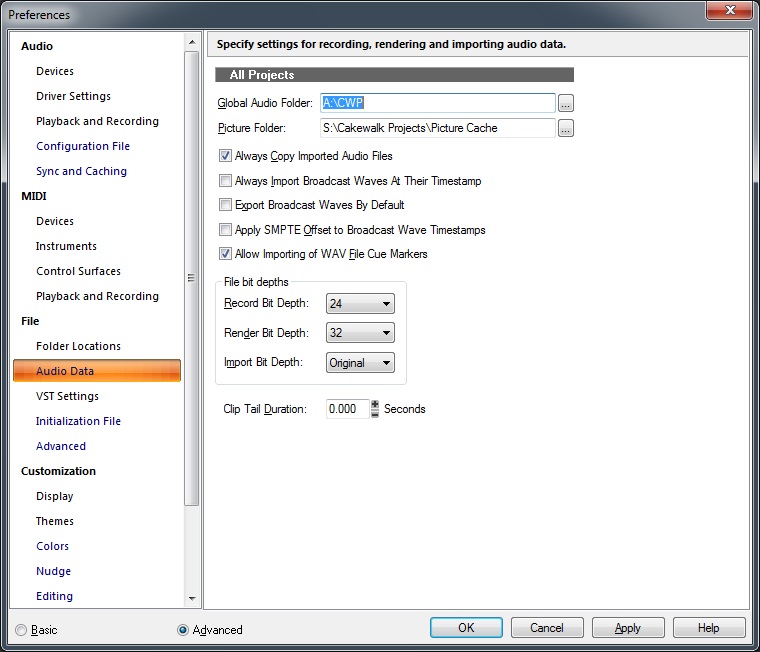 Folder locations will be different, but File bit depths pretty much the default. HTH, T
Tom Deering Tascam FW-1884 User Resources Page Firewire "Legacy" Tutorial, Service Manual, Schematic, and Service Bulletins Win10x64 StudioCat Pro Studio Coffee Lake 8086k 32gb RAM RME UFX (Audio) Tascam FW-1884 (Control) in Win 10x64 Pro
|
Anderton
Max Output Level: 0 dBFS
- Total Posts : 14070
- Joined: 2003/11/06 14:02:03
- Status: offline
Re: Bit Depth Rate question
2017/01/05 13:52:43
(permalink)
Sam4246
Thanks guys for the help. Seems like the bit rate depth you choose is linked to how you are using the song (like in a movie/video or MP3 format, etc).
This is true, but only for when you deliver the final product. Until then, just keep everything at 24 bit and you can't go wrong. Then you can export to an appropriate format - e.g., 16-bit for CDs. Glad you're having fun with the learning experience! It will definitely keep you busy for a while :)
|
bitflipper
01100010 01101001 01110100 01100110 01101100 01101

- Total Posts : 26036
- Joined: 2006/09/17 11:23:23
- Location: Everett, WA USA
- Status: offline
Re: Bit Depth Rate question
2017/01/05 19:10:37
(permalink)
gswitz
Flac doesn't seem to be actually lossless to me. If I save a wave to Flac, export, import, null test, normalize, I don't get silence.
If Flac was lossless, I would save as Flac not 24 bit wave.
Flac is indeed lossless. I suspect your null test was flawed. For example, if the two files under test weren't precisely in phase with one another, or if there was an issue with the conversion on the way in, or a fader wasn't exactly at zero - a lot of small things could potentially color the test. The FLAC encoder actually has a built-in test for verifying that data has not been altered. It generates a hash during the encoding process which will only match the decoded file's hash if the two files are bit-for-bit identical. You'll need the standalone FLAC encoder to run this test, but it's a free download. The command line syntax is FLAC -t {file_name} This decodes a FLAC file internally but doesn't actually write the decoded data out, just performs the checksum function. Because a checksum was created when the wave was originally encoded and stored within the file, all FLAC has to do is decode the file, generate the hash and compare it against the original. You could also encode a wave file, decode it and compare the two. This would take the DAW out of the picture and all the potential testing errors it might entail. If you're interested in test this out, let me know and I'll see if I can't find you some references. I haven't put FLAC on my new computer yet, so this is just from a geezer's unreliable memory.
 All else is in doubt, so this is the truth I cling to. My Stuff
|
bitflipper
01100010 01101001 01110100 01100110 01101100 01101
- Total Posts : 26036
- Joined: 2006/09/17 11:23:23
- Location: Everett, WA USA
- Status: offline
Re: Bit Depth Rate question
2017/01/05 20:10:15
(permalink)
P.S. I found this in the FLAC FAQ. It suggests another reason I didn't think of as to why your test files might not null: wave files contain more than just audio data. I compressed a WAVE file to FLAC, then decompressed to WAVE, and the two weren't identical. Why?WAVE is a complicated standard; many kinds of data besides audio data can be put in it. Most likely what has happened is that the application that created the original WAVE file also added some extra information for it's own use, which FLAC does not store or recreate by default (but can with the --keep-foreign-metadata option) ( see also). The audio data in the two WAVE files will be identical. There are other tools to compare just the audio content of two WAVE files; ExactAudioCopy has such a feature. For the more technically inclined, by default FLAC only stores what is in the 'fmt ' and 'data' sub-chunks of a WAVE file.
All else is in doubt, so this is the truth I cling to. My Stuff
|
DeeringAmps
Max Output Level: -49 dBFS
- Total Posts : 2614
- Joined: 2005/10/03 10:29:25
- Location: Seattle area
- Status: offline
Re: Bit Depth Rate question
2017/01/06 08:56:38
(permalink)
Sometimes I just prefer to "accept" that certain things are "true". I was a pretty good math student, but now it just makes my head hurt. This will make your life "easy": Record at 24 bit = good Dither only once on final export = good 44.1k is "good enough", but if you want to torture your system 96k is "good" if it can handle it... 
Tom Deering Tascam FW-1884 User Resources Page Firewire "Legacy" Tutorial, Service Manual, Schematic, and Service Bulletins Win10x64 StudioCat Pro Studio Coffee Lake 8086k 32gb RAM RME UFX (Audio) Tascam FW-1884 (Control) in Win 10x64 Pro
|
Sanderxpander
Max Output Level: -36.5 dBFS
- Total Posts : 3873
- Joined: 2013/09/30 10:08:24
- Status: offline
Re: Bit Depth Rate question
2017/01/06 09:01:35
(permalink)
Bristol_Jonesey
I export my songs at 32 bit without dithering so I can bring them into my Album/Mastering project at as high a resolution as possible.
Then for CD, export @ 16bit 44.1KHz WITH dithering.
Dithering only makes sense when you change the bit depth downward anyway. There is no benefit at all (in fact a drawback) to exporting anything at the same bit depth and adding dithering. Maybe you knew that and you were just being complete, but I thought it worth mentioning. So I agree, stay at high bit depth as long as possible and when going 16 bit to burn, add dithering.
|
JayCee99
Max Output Level: -83 dBFS

- Total Posts : 353
- Joined: 2011/10/01 12:22:42
- Location: Katy, TX
- Status: offline
Re: Bit Depth Rate question
2017/01/06 10:04:27
(permalink)
☄ Helpfulby Sheanes 2017/01/06 10:29:18
As the bitrate gets higher, the amount of possible values that can be stored for a variable gets higher too. I think it's (2^bitrate) if I'm not mistaken. So for example, at 16 bits there are 2^16 = 65,536 possible values for volume. At 24-bit, it's 16,777,216 possible values.
The more possible values there are, the more dynamic range you can get. 16-bit data can handle a range of about 96 dB while 24 dB can handle a range of 144 dB. So mixing at 24-bit is easier because you can avoid getting values that exceed the top of the dynamic range (clipping). Also, if you play back at 24-bit, it should theoretically sound more dynamic than 16-bit.
The more bits for each data point, the more space that data takes up. The higher the sample rate, the more data points per unit of time, which also increases the space. So that's why they can't go crazy with the bit rate and sample rate on a CD which only holds 700 MB.
Sonar Platinum Audio Interface: Focusrite 18i8 ASIO Interface Keys: Korg Kronos 88, Alesis VI25 Windows 8.1 x64 Laptop, 8GB RAM, i7 CPU
|
wetdentist
Max Output Level: -68 dBFS

- Total Posts : 1129
- Joined: 2007/04/12 19:06:25
- Location: Bethlehem, PA USA
- Status: offline
Re: Bit Depth Rate question
2017/01/08 08:27:02
(permalink)
does anyone ever render to 64 bit audio? if so, why?
3.5 Ghz AMD 6-Core/16 gigs RAM, Roland Quad-Capture, Win 10, Cakewalk by Bandlab, Komplete 10, z3ta+, Z3TA+ 2, Rapture, Maschine 2.7 (MKI & Jam), Melodyne 4 Studio, Ozone 4, Jam Origin MIDI Guitar 2, Schecter Damien Elite, Fender Sonoran w/TronicalTune Plus installed, etc go here to hear Wet Dentist (2000-2016 RIP) my new sounds: The Das Kaput
|
gswitz
Max Output Level: -18.5 dBFS
- Total Posts : 5694
- Joined: 2007/06/16 07:17:14
- Location: Richmond Virginia USA
- Status: offline
Re: Bit Depth Rate question
2017/01/08 08:57:16
(permalink)
wetdentist
does anyone ever render to 64 bit audio? if so, why?
No one I know.
StudioCat > I use Windows 10 and Sonar Platinum. I have a touch screen. I make some videos. This one shows how to do a physical loopback on the RME UCX to get many more equalizer nodes.
|
bitflipper
01100010 01101001 01110100 01100110 01101100 01101
- Total Posts : 26036
- Joined: 2006/09/17 11:23:23
- Location: Everett, WA USA
- Status: offline
Re: Bit Depth Rate question
2017/01/08 10:44:20
(permalink)
I can't think of any good reason for 64-bit exports. Unless your goal is a file that most audio software can't read.
All else is in doubt, so this is the truth I cling to. My Stuff
|