Nutty
Max Output Level: -54.5 dBFS

- Total Posts : 2056
- Joined: 2008/04/11 22:15:30
- Status: offline

Guitarhacker (et al)...Yup...Jamstix
Okay, I wanted to start a new project to try out inserting Jamstix. (I gave up on the 8 track thing for now...I followed the instructions from the last post on this and I got 5; 4 new ones and the Jamsstix track. Four may be enough for me for now, but I'm happy to get one track working right.) I ran into a couple of snags.
First of all, I used the little piano icon on the midi track. I inserted the four notes on the first beat of the first 4 measures (wasn't easy but I managed). How do you copy and paste. I had to do it in mutliples of 4 measures. Surely there is an easier way???
Okay...pasted 4 measures at a time. Whew!! Now I always inserted Jamstix from the insert menu, but I thought I would try to insert it through the FX bin...and MC crashed!! How would I amend your instructions for inserting Jamstix from the insert menu? I ask because I didn't have any sound from Jamstix. Also, will Jamstix automatically adjust to the style/beat as you add other tracks? It's really hard to pick a style until you get the melody down. I guess this is when you go back and add grooves, fills, or whatever you need.
How would the instructions change if you add Jamstix to an exisitng file? For example, using Jamstix to replace an exisiting midi drum track.
Thanks.
Nutty /Annette http://www.soundclick.com/atmmusic Using: Sonar 8 Studio; Band in a Box; PreSonus Firebox; M-Audio Axiom 25; Mics: Audio Technica ATM610, MXL 990/991; M-Audio Studiophile AV 30 Reference Speakers and many guitars
|
RobertB
Max Output Level: 0 dBFS

- Total Posts : 11256
- Joined: 2005/11/19 23:40:50
- Location: Fort Worth, Texas
- Status: offline
RE: Guitarhacker (et al)...Yup...Jamstix
2008/10/04 12:35:17
(permalink)
First of all, I used the little piano icon on the midi track. I inserted the four notes on the first beat of the first 4 measures (wasn't easy but I managed). How do you copy and paste. I had to do it in mutliples of 4 measures. Surely there is an easier way??? There is. If you want this pattern to repeat, you can use Groove Clip Looping. Turn off the in-track piano roll, so you see just the normal MIDI clip. Right click on your four measure MIDI clip. Select Groove Clip Looping from the drop-down menu. You will see the corners of your MIDI clip change from square to triangular snips. Now hover your cursor over the right edge of the clip. You will get a little handle.Click, hold, and drag to the right. The pattern will repeat as many times as you want.
My Soundclick Page SONAR Professional, X3eStudio,W7 64bit, AMD Athlon IIx4 2.8Ghz, 4GB RAM, 64bit, AKAI EIE Pro, Nektar Impact LX61,Alesis DM6,Alesis ControlPad,Yamaha MG10/2,Alesis M1Mk2 monitors,Samson Servo300,assorted guitars,Lava Lamp Shimozu-Kushiari or Bob
|
Nutty
Max Output Level: -54.5 dBFS
- Total Posts : 2056
- Joined: 2008/04/11 22:15:30
- Status: offline
RE: Guitarhacker (et al)...Yup...Jamstix
2008/10/04 12:47:51
(permalink)
Brilliant!! Thank you. Much much faster and accurate! One thing done!
Nutty /Annette http://www.soundclick.com/atmmusic Using: Sonar 8 Studio; Band in a Box; PreSonus Firebox; M-Audio Axiom 25; Mics: Audio Technica ATM610, MXL 990/991; M-Audio Studiophile AV 30 Reference Speakers and many guitars
|
57Gregy
Max Output Level: 0 dBFS
- Total Posts : 14404
- Joined: 2004/05/31 17:04:17
- Location: Raleigh, North Carolina
- Status: offline
RE: Guitarhacker (et al)...Yup...Jamstix
2008/10/04 15:54:30
(permalink)
About drums and the style of drums; I rarely have a set idea how I want the drums to play when I start a song. I begin with a simple MIDI bass drum, high hat and snare to keep time to. I then do any accompanying instruments, vocals, etc. until I get to an almost-finished point. It's then that I start editing the drums, adjusting the kick and high hat patterns, adding fills and breaks. I usually put them on different tracks, too. I broke with this tradition on my current project. I had my Alesis SR-16 connected and set up correctly, somehow, with the drum set I wanted to hear playing, so I went ahead and finished that up. Recorded it into SHS as audio. So now I'm stuck with that drum track, since I'm not sure I can replicate the settings. 
|
Nutty
Max Output Level: -54.5 dBFS
- Total Posts : 2056
- Joined: 2008/04/11 22:15:30
- Status: offline
RE: Guitarhacker (et al)...Yup...Jamstix
2008/10/04 16:29:30
(permalink)
That's a bummer Greg.
So you create your own drums in PRV? I did the drum map tutorial but I don't think it is the same thing? I should give that a try. I may have to, because the one song I'm working on I can't find a good drum beat for it. I'm not very good working in PRV yet though.
Thanks for the tip.
Nutty /Annette http://www.soundclick.com/atmmusic Using: Sonar 8 Studio; Band in a Box; PreSonus Firebox; M-Audio Axiom 25; Mics: Audio Technica ATM610, MXL 990/991; M-Audio Studiophile AV 30 Reference Speakers and many guitars
|
57Gregy
Max Output Level: 0 dBFS
- Total Posts : 14404
- Joined: 2004/05/31 17:04:17
- Location: Raleigh, North Carolina
- Status: offline
RE: Guitarhacker (et al)...Yup...Jamstix
2008/10/04 16:56:37
(permalink)
Yes. A simple keep-time-to drum track takes just a couple of minutes to make. The final, edited/with fills and breaks on different tracks takes considerably longer.
|
57Gregy
Max Output Level: 0 dBFS
- Total Posts : 14404
- Joined: 2004/05/31 17:04:17
- Location: Raleigh, North Carolina
- Status: offline
RE: Guitarhacker (et al)...Yup...Jamstix
2008/10/04 19:02:52
(permalink)
A quick example of a drum track created in the PRV using the GM Basic Kit drum map. Took me all of 4 minutes. A note to anyone not using a GM device and wants to use the drum map with the names of the drums and everything: you don't have to hear it to write it. A short 1 or 2 measure beat should be easy to write, and being MIDI, you can change the speed to suit your song before you start to record audio. After it's written, groove-clipped and looped, you can change the output to your favorite soft synth. 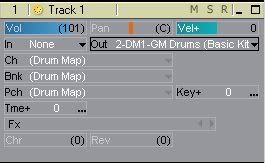 This is the properties pane of the drum map. 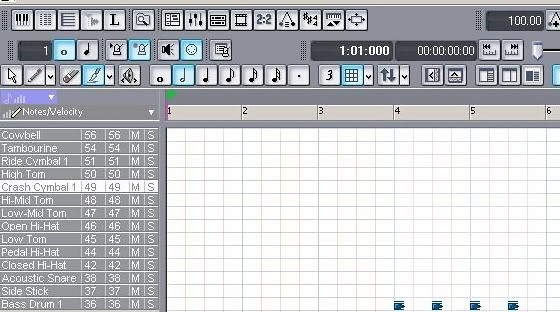 Here I've used a 1/2 note and the brush tool to draw in some bass drum notes. 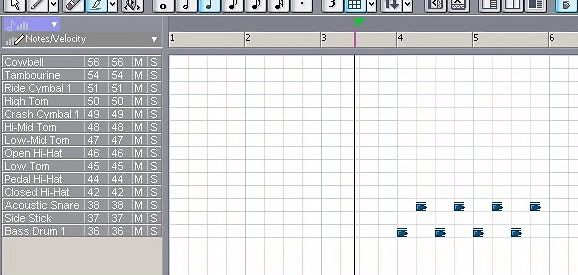 I've used a 1/4 note for the snare. 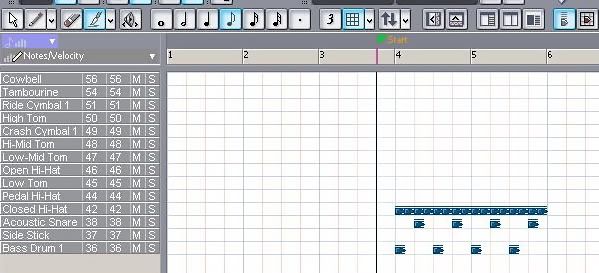 1/8 note for the high hat. 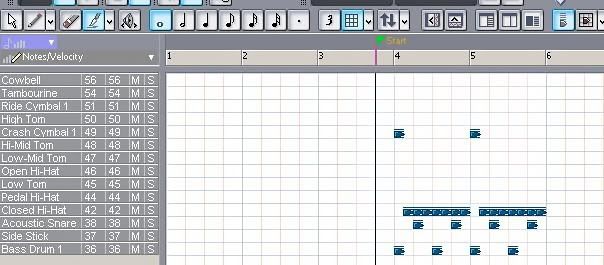 Used a whole note for a couple unnecessary cymbal hits.  Enabled groove clip looping.  Dragged the bottom right edge of the groove clip out a few measures. For the sake of your time, I didn't make it song-length.  I then inserted the TTS-1 and changed the output to it. And here is what it sounds like, the first few measures being my keyboard's MIDI synthesizer and the last measures the TTS-1 soft synth. http://soundclick.com/share?songid=6946487
|
Nutty
Max Output Level: -54.5 dBFS
- Total Posts : 2056
- Joined: 2008/04/11 22:15:30
- Status: offline

RE: Guitarhacker (et al)...Yup...Jamstix
2008/10/04 19:15:49
(permalink)
That's great Greg. Thanks for doing that. I don't know if it is a good idea or not but I'm kind of going back and forth on 2 or 3 songs. One I'm having a hard time with the rhythm, so I was going to try and build it from scratch instead of using Band in a Box, because I never found a suitable style and the timing seems to be an issue there too. This will definitely get me started. EDIT: Sorry Greg, are you using drum map manager? I didn't get a properties pane. I also tried PRV and it gave a different layout. They were blank piano keys, not the list of drums. I know I've seen this before, but it escapes me how to find it. Thanks.
post edited by Nutty - 2008/10/04 19:32:40
Nutty /Annette http://www.soundclick.com/atmmusic Using: Sonar 8 Studio; Band in a Box; PreSonus Firebox; M-Audio Axiom 25; Mics: Audio Technica ATM610, MXL 990/991; M-Audio Studiophile AV 30 Reference Speakers and many guitars
|
Guitarhacker
Max Output Level: 0 dBFS
- Total Posts : 24398
- Joined: 2007/12/07 12:51:18
- Location: NC
- Status: offline
RE: Guitarhacker (et al)...Yup...Jamstix
2008/10/04 20:55:33
(permalink)
OK...I guess I'll weigh in on this thread...
I'll address this aspect... When I start a new project.... I normally insert JS first. I'll open a normal project which starts up with 2 tracks.. one audio..home for JS and midi... since I tell JS to follow midi.... I just pop a few notes into a midi measure and copy & paste it out for the estimated length of the tune. JS is now ready to play... I start the project recording on my new audio sctarch track and let JS play...with the kit, style & drummer I have selected.... Like Greg.... I will record the other instruments and edit JS for fills and other variations just about the last thing I do before mixing.
Nutty... if you have a "ready to go" midi drum track ...say from another recording session or whatever... you simply tell JS to use Midi Module mode...select the kit, and then open the track properties of the existing midi drum track and select JS as the output.... it's very simple...
If JS crashes MC when you insert it... try rebooting the computer, and start from there ...directly into MC and insert JS. Can you open a project that has JS in it already?
My website & music: www.herbhartley.com MC4/5/6/X1e.c, on a Custom DAW Focusrite Firewire Saffire Interface BMI/NSAI "Just as the blade chooses the warrior, so too, the song chooses the writer "
|
Nutty
Max Output Level: -54.5 dBFS
- Total Posts : 2056
- Joined: 2008/04/11 22:15:30
- Status: offline
RE: Guitarhacker (et al)...Yup...Jamstix
2008/10/04 21:42:19
(permalink)
I have an audio file in the works. I'll give it a try with "Jam with Audio". I tried again to insert Jamstix from the FX bin and it crashes and I have to restart my computer. So, I tried to do this tutorial and I did okay until I put it into MC. I could not get any sound no how. http://benvesco.com/tonemonster/home-studio/2008/jamstix-2-tutorial-1-your-own-studio-drummer/ Seems like it is well written. I believe this is the way Robo makes his drum patterns. Anyway, I'll try with the audio and let you know what happens. Is it not difficult to decide on a pattern before hand? Do you every go back and choose a different style or drummer? I find there is only 1 or 2 styles that seem to work. It's either Rock 8th or Rock Custom. The drummer change the style a bit. I wont' give up. Don't get too frustrated with me. When it sinks in...it sinks in. 
Nutty /Annette http://www.soundclick.com/atmmusic Using: Sonar 8 Studio; Band in a Box; PreSonus Firebox; M-Audio Axiom 25; Mics: Audio Technica ATM610, MXL 990/991; M-Audio Studiophile AV 30 Reference Speakers and many guitars
|
Nutty
Max Output Level: -54.5 dBFS
- Total Posts : 2056
- Joined: 2008/04/11 22:15:30
- Status: offline
RE: Guitarhacker (et al)...Yup...Jamstix
2008/10/04 21:53:59
(permalink)
Okay, I'm getting there. I decided to play it save and inserted a midi track. I put the 4 notes in, but it did not copy. It didn't matter because Jamstix is still playing. How do you get it to not play the first two measures? Then I'll have to go your site and see how to adjust the fills and stuff. I'm not using Band in a Box with this project, so it doesn't have the markers already laid out for fills and stuff. This will be a good experience for me. Do I have to save that midi file? Or is all the information in the Jamstix track? Thanks. EDIT: Everything seemed fine and then it stopped playing at measure 120ish and the song ends at measure 154. Doesn't sound so good. Like I mentioned above, the beats are only in the first four bars because the data didn't copy over, so I have no idea why it stopped so early. And I was having one of my best recording yet of course!
post edited by Nutty - 2008/10/04 22:22:11
Nutty /Annette http://www.soundclick.com/atmmusic Using: Sonar 8 Studio; Band in a Box; PreSonus Firebox; M-Audio Axiom 25; Mics: Audio Technica ATM610, MXL 990/991; M-Audio Studiophile AV 30 Reference Speakers and many guitars
|
57Gregy
Max Output Level: 0 dBFS
- Total Posts : 14404
- Joined: 2004/05/31 17:04:17
- Location: Raleigh, North Carolina
- Status: offline
RE: Guitarhacker (et al)...Yup...Jamstix
2008/10/05 00:03:56
(permalink)
I should have been more specific when describing the "GM Basic Kit" drum map. To use the GM maps, you have to be using General MIDI. In MC 'Options>Instruments' select a channel and assign it to General MIDI Drums. 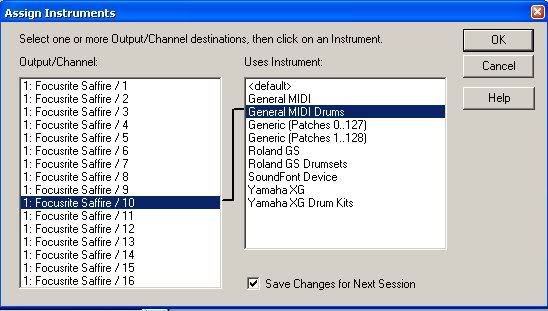 Then when you want to make the drum track, use that channel. The drum map drum lists should be available. You can always change it back to whatever it was before, and the track can be output to any MIDI device or soft synth, too, once completed. Edit: One of the things I like about the drum maps is you can mute or solo individual drums to hear if that part is right.
post edited by 57Gregy - 2008/10/05 00:22:04
|
Nutty
Max Output Level: -54.5 dBFS
- Total Posts : 2056
- Joined: 2008/04/11 22:15:30
- Status: offline
RE: Guitarhacker (et al)...Yup...Jamstix
2008/10/05 10:10:40
(permalink)
Thanks Greg,
Love those screen shots! I just need one more step. How do I open this in PRV? I created the GM maps okay, but I still get the keyboard screen when I go to PRV.
Thanks again for your help.
Nutty /Annette http://www.soundclick.com/atmmusic Using: Sonar 8 Studio; Band in a Box; PreSonus Firebox; M-Audio Axiom 25; Mics: Audio Technica ATM610, MXL 990/991; M-Audio Studiophile AV 30 Reference Speakers and many guitars
|
gamblerschoice
Max Output Level: -43 dBFS

- Total Posts : 3226
- Joined: 2005/02/25 15:55:05
- Location: Johnstown, Pa
- Status: offline
RE: Guitarhacker (et al)...Yup...Jamstix
2008/10/05 20:07:30
(permalink)
In the drop down at the top of the page, pick "view", and then pick "piano roll" or view.
Later
Albert
|
57Gregy
Max Output Level: 0 dBFS
- Total Posts : 14404
- Joined: 2004/05/31 17:04:17
- Location: Raleigh, North Carolina
- Status: offline
RE: Guitarhacker (et al)...Yup...Jamstix
2008/10/05 21:28:42
(permalink)
I just click on the PRV button. If the output, channel, bank and patch settings all read GM Drums and maps, you should get the drum names.
On your MIDI track properties, do you have the same listings as on post 7, image 1 in this thread?
Try right-clicking on the keyboard and a dialog box may appear. Change the setting.
|
Nutty
Max Output Level: -54.5 dBFS
- Total Posts : 2056
- Joined: 2008/04/11 22:15:30
- Status: offline
RE: Guitarhacker (et al)...Yup...Jamstix
2008/10/05 21:38:31
(permalink)
This is the screen I get and the message if I right click on the piano.  I've tried to click on a bunch of different things, but I'm not getting it for some reason.
Nutty /Annette http://www.soundclick.com/atmmusic Using: Sonar 8 Studio; Band in a Box; PreSonus Firebox; M-Audio Axiom 25; Mics: Audio Technica ATM610, MXL 990/991; M-Audio Studiophile AV 30 Reference Speakers and many guitars
|
Guitarhacker
Max Output Level: 0 dBFS
- Total Posts : 24398
- Joined: 2007/12/07 12:51:18
- Location: NC
- Status: offline
RE: Guitarhacker (et al)...Yup...Jamstix
2008/10/05 21:41:56
(permalink)
Nutty... here's what's happening... first choose jam no input... JS will play based on the drummer, kit, & style and the BPM in MC4....
In the default screen in JS...the SONG MENU... lists the existing pattern in the song...how many measures of intro, how many measures to a vers and how many times to repeat the verse/ measures.....
it stops at 120 ish because if you look you'll probably see 2 measures of intro followed by 4 measures that repeat 30 times.... do the math and it = about 122 measures.... click on the numbers and it expands and you can change that number up or down.... add another 30 or so measures and it'll stop near the end of the song...I like to overshoot a few measures...
to start a few measures in.... just highlight the first & second measure in JS and click on the trashcan symbol to delete the measure when it's highlighted... it deletes all beats and will not replay them...unless you tell JS to recompose that measure... delete all unnecessary measures at the end the same way....
Something just occured to me also as to why you might be having problems with crashes and things.... You seem to have alot of different programs and plugins on your computer.... they all take resources, and you might be having conflicts between them.... I would remove all plugins that you have not bought.... stick to one drum program...learn how to use it well, and forget the rest until you become competant with one. Then as you add stuff...do it one thing at a time so you can see if there are conflicts.... just a thought...
My website & music: www.herbhartley.com MC4/5/6/X1e.c, on a Custom DAW Focusrite Firewire Saffire Interface BMI/NSAI "Just as the blade chooses the warrior, so too, the song chooses the writer "
|
Nutty
Max Output Level: -54.5 dBFS
- Total Posts : 2056
- Joined: 2008/04/11 22:15:30
- Status: offline
RE: Guitarhacker (et al)...Yup...Jamstix
2008/10/05 22:11:54
(permalink)
ORIGINAL: Guitarhacker
Nutty... here's what's happening... first choose jam no input... JS will play based on the drummer, kit, & style and the BPM in MC4....
In the default screen in JS...the SONG MENU... lists the existing pattern in the song...how many measures of intro, how many measures to a vers and how many times to repeat the verse/ measures.....
it stops at 120 ish because if you look you'll probably see 2 measures of intro followed by 4 measures that repeat 30 times.... do the math and it = about 122 measures.... click on the numbers and it expands and you can change that number up or down.... add another 30 or so measures and it'll stop near the end of the song...I like to overshoot a few measures...
to start a few measures in.... just highlight the first & second measure in JS and click on the trashcan symbol to delete the measure when it's highlighted... it deletes all beats and will not replay them...unless you tell JS to recompose that measure... delete all unnecessary measures at the end the same way....
Something just occured to me also as to why you might be having problems with crashes and things.... You seem to have alot of different programs and plugins on your computer.... they all take resources, and you might be having conflicts between them.... I would remove all plugins that you have not bought.... stick to one drum program...learn how to use it well, and forget the rest until you become competant with one. Then as you add stuff...do it one thing at a time so you can see if there are conflicts.... just a thought...
I don't think I looked at the default screen. I figured it would play as far as I had copied in MC. I do have a lot of plug ins and other things running at times. It's a bad habit. I hate to miss anything going on.  Sticking with one drum program is a good idea. I usually start with Band in a box. Sometimes I keep their drums or replace them with Jamstix. I have a song now that I can't find anything suitable in BiaB or Jamstix. So, I was going to try and do my own drum pattern. I don't know why I can't find a good beat for it. I've played it on the guitar right now using the metronome. So if I can play it to that you would think I could find a suitable drum pattern. But, I haven't any luck. So, "if I build it, they will come". Do you want to have a listen to the track and see if I should build my own drum pattern? I may need help with this one. Someone told it was Bob Dylan style or maybe James Taylor..I don' t know, but I think it is best to keep it a simple song; unplugged. I can post it on my soundclick page and maybe get some advice on how to proceed. This is a very rough track. The guitar and vocals are done together. I was only aiming on getting the right tempo. This version is 110 bpm and I think it works best so far. It's called "All That Matters To Me"...It's take me a few minutes as I have to convert it first. And remember this is basically lower than a scratch track!!!! Thanks.
Nutty /Annette http://www.soundclick.com/atmmusic Using: Sonar 8 Studio; Band in a Box; PreSonus Firebox; M-Audio Axiom 25; Mics: Audio Technica ATM610, MXL 990/991; M-Audio Studiophile AV 30 Reference Speakers and many guitars
|
RobertB
Max Output Level: 0 dBFS
- Total Posts : 11256
- Joined: 2005/11/19 23:40:50
- Location: Fort Worth, Texas
- Status: offline
RE: Guitarhacker (et al)...Yup...Jamstix
2008/10/05 22:18:31
(permalink)
Annette, Before you do that, has the upload finished on your end?
post edited by RobertB - 2008/10/05 22:20:57
My Soundclick Page SONAR Professional, X3eStudio,W7 64bit, AMD Athlon IIx4 2.8Ghz, 4GB RAM, 64bit, AKAI EIE Pro, Nektar Impact LX61,Alesis DM6,Alesis ControlPad,Yamaha MG10/2,Alesis M1Mk2 monitors,Samson Servo300,assorted guitars,Lava Lamp Shimozu-Kushiari or Bob
|
57Gregy
Max Output Level: 0 dBFS
- Total Posts : 14404
- Joined: 2004/05/31 17:04:17
- Location: Raleigh, North Carolina
- Status: offline
|
Nutty
Max Output Level: -54.5 dBFS
- Total Posts : 2056
- Joined: 2008/04/11 22:15:30
- Status: offline
RE: Guitarhacker (et al)...Yup...Jamstix
2008/10/05 22:22:42
(permalink)
ORIGINAL: RobertB
Annette,
Before you do that, has the upload finished on your end?
Oops..there's about 100 mb left. Those goes Annette...multi-tasking again. Hopefully it won't slow it down. I think the sound click is uploaded already.
Nutty /Annette http://www.soundclick.com/atmmusic Using: Sonar 8 Studio; Band in a Box; PreSonus Firebox; M-Audio Axiom 25; Mics: Audio Technica ATM610, MXL 990/991; M-Audio Studiophile AV 30 Reference Speakers and many guitars
|
Nutty
Max Output Level: -54.5 dBFS
- Total Posts : 2056
- Joined: 2008/04/11 22:15:30
- Status: offline
RE: Guitarhacker (et al)...Yup...Jamstix
2008/10/05 22:32:05
(permalink)
and you set up for a drum map you should get this: I have it now. I might have selected Drum Map Manager. I totally missed the boat on that. Do you have to put anything in for bank and patch? Thanks again for your help and patience.
Nutty /Annette http://www.soundclick.com/atmmusic Using: Sonar 8 Studio; Band in a Box; PreSonus Firebox; M-Audio Axiom 25; Mics: Audio Technica ATM610, MXL 990/991; M-Audio Studiophile AV 30 Reference Speakers and many guitars
|
57Gregy
Max Output Level: 0 dBFS
- Total Posts : 14404
- Joined: 2004/05/31 17:04:17
- Location: Raleigh, North Carolina
- Status: offline
RE: Guitarhacker (et al)...Yup...Jamstix
2008/10/05 22:40:52
(permalink)
No, when you select the drum maps, it will all read "Drum Map". You can select between basic kit and full kit.
You're welcome.
|
Nutty
Max Output Level: -54.5 dBFS
- Total Posts : 2056
- Joined: 2008/04/11 22:15:30
- Status: offline
RE: Guitarhacker (et al)...Yup...Jamstix
2008/10/06 09:54:47
(permalink)
ORIGINAL: Nutty
I can post it on my soundclick page and maybe get some advice on how to proceed. This is a very rough track. The guitar and vocals are done together. I was only aiming on getting the right tempo. This version is 110 bpm and I think it works best so far. It's called "All That Matters To Me"...It's take me a few minutes as I have to convert it first. And remember this is basically lower than a scratch track!!!!
Thanks.
WOW this is definitely worse than a scratch track. It sounds like someone was choking the microphone. Sorry, I'll try and do a better version today. I cut off short too. Is there a limit on the length of a song in soundclick?
Nutty /Annette http://www.soundclick.com/atmmusic Using: Sonar 8 Studio; Band in a Box; PreSonus Firebox; M-Audio Axiom 25; Mics: Audio Technica ATM610, MXL 990/991; M-Audio Studiophile AV 30 Reference Speakers and many guitars
|
Beagle
Max Output Level: 0 dBFS
- Total Posts : 50621
- Joined: 2006/03/29 11:03:12
- Location: Fort Worth, TX
- Status: offline
RE: Guitarhacker (et al)...Yup...Jamstix
2008/10/06 10:12:45
(permalink)
Is there a limit on the length of a song in soundclick? YES, for the free version of soundclick you are limited to 10M file.
|
Guitarhacker
Max Output Level: 0 dBFS
- Total Posts : 24398
- Joined: 2007/12/07 12:51:18
- Location: NC
- Status: offline
RE: Guitarhacker (et al)...Yup...Jamstix
2008/10/06 12:28:28
(permalink)
basically.... convert the wave file to MP3 and it should fit OK in Soundclick..... if you have an MP3 over 10mb...that's a really long song.... 100mb left???? sounds like you tried to upload a wave...
post edited by Guitarhacker - 2008/10/06 12:29:34
My website & music: www.herbhartley.com MC4/5/6/X1e.c, on a Custom DAW Focusrite Firewire Saffire Interface BMI/NSAI "Just as the blade chooses the warrior, so too, the song chooses the writer "
|
Nutty
Max Output Level: -54.5 dBFS
- Total Posts : 2056
- Joined: 2008/04/11 22:15:30
- Status: offline
RE: Guitarhacker (et al)...Yup...Jamstix
2008/10/06 12:38:08
(permalink)
ORIGINAL: Guitarhacker
100mb left???? sounds like you tried to upload a wave...
Sorry for the confusion. That referred to another file I was sending out at the same time. The concern was one file would slow down the other. Seems that both have been received, so that is good!
Nutty /Annette http://www.soundclick.com/atmmusic Using: Sonar 8 Studio; Band in a Box; PreSonus Firebox; M-Audio Axiom 25; Mics: Audio Technica ATM610, MXL 990/991; M-Audio Studiophile AV 30 Reference Speakers and many guitars
|
Guitarhacker
Max Output Level: 0 dBFS
- Total Posts : 24398
- Joined: 2007/12/07 12:51:18
- Location: NC
- Status: offline
RE: Guitarhacker (et al)...Yup...Jamstix
2008/10/06 13:46:15
(permalink)
the two tracks being sent at the same time will get where they are supposed to... however, yeah... they will slow each other down...only so much data flows through the pipe at one time....unless you get a bigger pipe.
My website & music: www.herbhartley.com MC4/5/6/X1e.c, on a Custom DAW Focusrite Firewire Saffire Interface BMI/NSAI "Just as the blade chooses the warrior, so too, the song chooses the writer "
|
gamblerschoice
Max Output Level: -43 dBFS
- Total Posts : 3226
- Joined: 2005/02/25 15:55:05
- Location: Johnstown, Pa
- Status: offline
RE: Guitarhacker (et al)...Yup...Jamstix
2008/10/06 13:56:52
(permalink)
..."unless you get a bigger pipe"....
Yeah, that's it. A bigger pipe. Makes my eyes red just thinking about it. Remember the huge rolling paper that came with that album back a few years ago?
No wait, that's not the kind of pipe you're talking about...
Pay no attention to that man behind the curtain.
Later
Albert
|
Robomusic
Max Output Level: 0 dBFS
- Total Posts : 8943
- Joined: 2004/05/30 00:54:24
- Status: offline
RE: Guitarhacker (et al)...Yup...Jamstix
2008/10/06 14:46:11
(permalink)
|