dank
Max Output Level: -89 dBFS

- Total Posts : 75
- Joined: 2004/03/16 20:49:50
- Location: Phila., Pa.
- Status: offline
Help, Please: Cannot Pan and Lost Master Faders.
I checked the inputs and outputs of all tracks. None is in stereo. I still cannot pan a track. In addition, I lost the master fader and cannot figure how to make it visible. Could that have anything to do with the inability to fade?
Thank you for your time.
Dan
Dell XPS 8300: Intel i7-2600 CPU at 3.40Ghz; 12GB of RAM, Windows 7 Professional, 64-bit operating system; two 1TB hard drives installed. Presonus Firestudio Project. Sonar X1 Producer.
|
Loptec
Max Output Level: -72 dBFS

- Total Posts : 948
- Joined: 2011/02/07 13:29:01
- Location: Sweden
- Status: offline

Re:Help, Please: Cannot Pan and Lost Master Faders.
2013/02/01 10:13:04
(permalink)
if tracks / buses still are routed to the master bus you probably just have hidden the master bus. try and select strips->track manager in console view and see if the box by the master bus is ticked. if it's not; tick it :) if you've deleted the master fader by accident, just right click sowhere in the bus area and insert a new stereo bus. then right click on that bus and choose set as default bus to create a new master/default bus (also rename it to master if you want to) you now have to re-route the tracks and buses to the master though. the fastest way to do this is to select the tracks you want to route and change output while holding down ctrl. this will change the output for all selected tracks the pan problem is strange though.. what's your setup? audio interface and so on.. does the signal pan visually on the hardware output meters? edit:______ sorry.. missed that you've got info about your setup in your signature.. still. it's strange. try and get back the master fader and write again if the pan-problem remains
post edited by Loptec - 2013/02/01 10:20:58
SAMUEL LIDSTRÖM
 DAW: Sonar Platinum (64bit) with Melodyne Studio - Controllers: Roland VS-700C, Cakewalk A-500 Pro, Yamaha P90Desktop Audio Interface: RME HDSPe RayDAT - Laptop Audio Interface: RME Babyface Pro DAW: Sonar Platinum (64bit) with Melodyne Studio - Controllers: Roland VS-700C, Cakewalk A-500 Pro, Yamaha P90Desktop Audio Interface: RME HDSPe RayDAT - Laptop Audio Interface: RME Babyface Pro
|
digi2ns
Max Output Level: -48.5 dBFS

- Total Posts : 2694
- Joined: 2010/11/24 14:27:12
- Location: MICHIGAN
- Status: offline
Re:Help, Please: Cannot Pan and Lost Master Faders.
2013/02/01 10:48:44
(permalink)
Might also check when you get the Master set back up that you didnt hit the Stereo Interleave button somewhere
MIKE --Dell Studio XPS I7/870 2.93 Ghz, 8GB Mem, 2-2TB Barracuda HDs, 500 GB Ext.HDD, Win7/64 --X1 64 Pro Expanded, Dual 21" Monitors --PCR500 --MAUDIO FastTrack Ultra --Mackie 1604 VLZ PRO --Line6 X3 Live --Gibson, Fender, Takamine, Schecter, Washburn http://pogopoppa.wix.com/5thgear# http://soundcloud.com/digi2ns
|
dank
Max Output Level: -89 dBFS
- Total Posts : 75
- Joined: 2004/03/16 20:49:50
- Location: Phila., Pa.
- Status: offline
Re:Help, Please: Cannot Pan and Lost Master Faders.
2013/02/02 04:50:43
(permalink)
What is the stereo interleave button?
Dell XPS 8300: Intel i7-2600 CPU at 3.40Ghz; 12GB of RAM, Windows 7 Professional, 64-bit operating system; two 1TB hard drives installed. Presonus Firestudio Project. Sonar X1 Producer.
|
Loptec
Max Output Level: -72 dBFS
- Total Posts : 948
- Joined: 2011/02/07 13:29:01
- Location: Sweden
- Status: offline
Re:Help, Please: Cannot Pan and Lost Master Faders.
2013/02/02 05:10:52
(permalink)
it toggles the output of a track or a bus between mono and stereo. it doens't matter if the track is mono or stereo; it should pan regardless as long as the bus it's sent to is stereo. however; if you send the track to a bus that is set to mono the signal will stick to the center no matter how you pan the track. you still can pan a mono-bus though, but all sound comming to this bus will merge into a mono-signal edit:___  this is it
post edited by Loptec - 2013/02/02 05:24:37
SAMUEL LIDSTRÖM
DAW: Sonar Platinum (64bit) with Melodyne Studio - Controllers: Roland VS-700C, Cakewalk A-500 Pro, Yamaha P90Desktop Audio Interface: RME HDSPe RayDAT - Laptop Audio Interface: RME Babyface Pro
|
dank
Max Output Level: -89 dBFS
- Total Posts : 75
- Joined: 2004/03/16 20:49:50
- Location: Phila., Pa.
- Status: offline
Re:Help, Please: Cannot Pan and Lost Master Faders.
2013/02/02 13:10:53
(permalink)
Dell XPS 8300: Intel i7-2600 CPU at 3.40Ghz; 12GB of RAM, Windows 7 Professional, 64-bit operating system; two 1TB hard drives installed. Presonus Firestudio Project. Sonar X1 Producer.
|
digi2ns
Max Output Level: -48.5 dBFS
- Total Posts : 2694
- Joined: 2010/11/24 14:27:12
- Location: MICHIGAN
- Status: offline
Re:Help, Please: Cannot Pan and Lost Master Faders.
2013/02/02 13:20:25
(permalink)
dank
Thanks for you help!
Did ya get it figured out?
MIKE --Dell Studio XPS I7/870 2.93 Ghz, 8GB Mem, 2-2TB Barracuda HDs, 500 GB Ext.HDD, Win7/64 --X1 64 Pro Expanded, Dual 21" Monitors --PCR500 --MAUDIO FastTrack Ultra --Mackie 1604 VLZ PRO --Line6 X3 Live --Gibson, Fender, Takamine, Schecter, Washburn http://pogopoppa.wix.com/5thgear# http://soundcloud.com/digi2ns
|
dank
Max Output Level: -89 dBFS
- Total Posts : 75
- Joined: 2004/03/16 20:49:50
- Location: Phila., Pa.
- Status: offline
Re:Help, Please: Cannot Pan and Lost Master Faders.
2013/02/02 16:24:47
(permalink)
No. I right-clicked in the console area and created a new stereo send. I renamed it Master. I went to a vocal track and set the input to None. I made are the interleave was off (gray, not blue).
I went to the Output, hoping to map it to Master. Master is not present. I selected Left Presonus Output 1. The track will not pan. I then changed it to Stereo Presonus Output 1. Same thing.
What am I doing wrong ?
Dell XPS 8300: Intel i7-2600 CPU at 3.40Ghz; 12GB of RAM, Windows 7 Professional, 64-bit operating system; two 1TB hard drives installed. Presonus Firestudio Project. Sonar X1 Producer.
|
dank
Max Output Level: -89 dBFS
- Total Posts : 75
- Joined: 2004/03/16 20:49:50
- Location: Phila., Pa.
- Status: offline
Re:Help, Please: Cannot Pan and Lost Master Faders.
2013/02/02 16:35:43
(permalink)
When I pan a track, I do see that one of the meters drops down; so, why can't I hear the effects of panning?
Dell XPS 8300: Intel i7-2600 CPU at 3.40Ghz; 12GB of RAM, Windows 7 Professional, 64-bit operating system; two 1TB hard drives installed. Presonus Firestudio Project. Sonar X1 Producer.
|
digi2ns
Max Output Level: -48.5 dBFS
- Total Posts : 2694
- Joined: 2010/11/24 14:27:12
- Location: MICHIGAN
- Status: offline
Re:Help, Please: Cannot Pan and Lost Master Faders.
2013/02/02 16:41:20
(permalink)
Not sure whats going on,
When I look at my Stereo Interleave, it is lit up blue
Some of the buttons are lit and some arent when they are activated. The stereo are all lit up
But anyway, mine are lit Blue on all Busses/Master
MIKE --Dell Studio XPS I7/870 2.93 Ghz, 8GB Mem, 2-2TB Barracuda HDs, 500 GB Ext.HDD, Win7/64 --X1 64 Pro Expanded, Dual 21" Monitors --PCR500 --MAUDIO FastTrack Ultra --Mackie 1604 VLZ PRO --Line6 X3 Live --Gibson, Fender, Takamine, Schecter, Washburn http://pogopoppa.wix.com/5thgear# http://soundcloud.com/digi2ns
|
digi2ns
Max Output Level: -48.5 dBFS
- Total Posts : 2694
- Joined: 2010/11/24 14:27:12
- Location: MICHIGAN
- Status: offline
Re:Help, Please: Cannot Pan and Lost Master Faders.
2013/02/02 16:43:55
(permalink)
I have my tracks NARROWED but I believe they are all lit as well 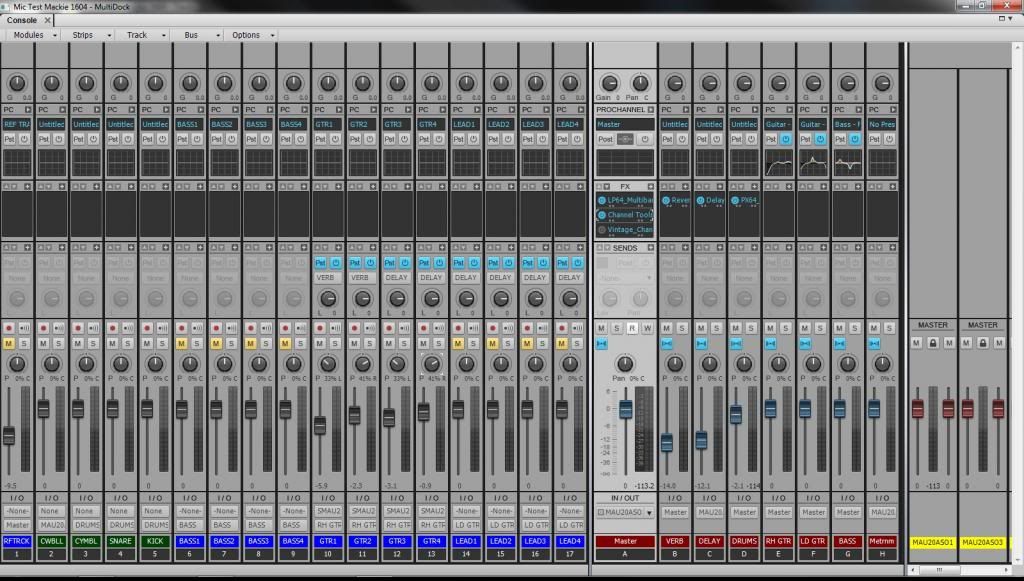
MIKE --Dell Studio XPS I7/870 2.93 Ghz, 8GB Mem, 2-2TB Barracuda HDs, 500 GB Ext.HDD, Win7/64 --X1 64 Pro Expanded, Dual 21" Monitors --PCR500 --MAUDIO FastTrack Ultra --Mackie 1604 VLZ PRO --Line6 X3 Live --Gibson, Fender, Takamine, Schecter, Washburn http://pogopoppa.wix.com/5thgear# http://soundcloud.com/digi2ns
|
digi2ns
Max Output Level: -48.5 dBFS
- Total Posts : 2694
- Joined: 2010/11/24 14:27:12
- Location: MICHIGAN
- Status: offline
Re:Help, Please: Cannot Pan and Lost Master Faders.
2013/02/02 16:50:23
(permalink)
Okay, just checked this Project and all Stereo buttons are Lit Up
As you can see on this project, All panning is done from the tracks then sent to the busses that are panned to the center. Just the way I work
MIKE --Dell Studio XPS I7/870 2.93 Ghz, 8GB Mem, 2-2TB Barracuda HDs, 500 GB Ext.HDD, Win7/64 --X1 64 Pro Expanded, Dual 21" Monitors --PCR500 --MAUDIO FastTrack Ultra --Mackie 1604 VLZ PRO --Line6 X3 Live --Gibson, Fender, Takamine, Schecter, Washburn http://pogopoppa.wix.com/5thgear# http://soundcloud.com/digi2ns
|
digi2ns
Max Output Level: -48.5 dBFS
- Total Posts : 2694
- Joined: 2010/11/24 14:27:12
- Location: MICHIGAN
- Status: offline
Re:Help, Please: Cannot Pan and Lost Master Faders.
2013/02/02 16:53:51
(permalink)
Here is what the maual explains for X1
To use a track’s Stereo/Mono button
1. Open the Track Inspector or Console view.
2. In the track you want to force to either mono or stereo for processing effects, click the Stereo/
Mono button to the desired position:
• When the button is lit, the track streams in stereo.
• When the button is unlit, the track streams in mono.
Mono audio clips may be increased by 3 dB in certain scenarios
There are some situations where the level of a mono clip will be increased by 3 dB if the track's
output interleave (mono/stereo toggle) is set to mono:
• If the track has mixed stereo and mono clips
• The track has a synth selected as its input source
• Input Echo is enabled or the track is armed for recording
In summary, whenever the track output interleave is mono and the data interleave is stereo, mono
data will be increased in level by 3 dB.
MIKE --Dell Studio XPS I7/870 2.93 Ghz, 8GB Mem, 2-2TB Barracuda HDs, 500 GB Ext.HDD, Win7/64 --X1 64 Pro Expanded, Dual 21" Monitors --PCR500 --MAUDIO FastTrack Ultra --Mackie 1604 VLZ PRO --Line6 X3 Live --Gibson, Fender, Takamine, Schecter, Washburn http://pogopoppa.wix.com/5thgear# http://soundcloud.com/digi2ns
|
digi2ns
Max Output Level: -48.5 dBFS
- Total Posts : 2694
- Joined: 2010/11/24 14:27:12
- Location: MICHIGAN
- Status: offline
Re:Help, Please: Cannot Pan and Lost Master Faders.
2013/02/02 17:04:16
(permalink)
dank
No. I right-clicked in the console area and created a new stereo send. I renamed it Master. I went to a vocal track and set the input to None. I made are the interleave was off (gray, not blue).
I went to the Output, hoping to map it to Master. Master is not present. I selected Left Presonus Output 1. The track will not pan. I then changed it to Stereo Presonus Output 1. Same thing.
What am I doing wrong ?
Can you post a Screen Shot of you Console View so we can see it?
MIKE --Dell Studio XPS I7/870 2.93 Ghz, 8GB Mem, 2-2TB Barracuda HDs, 500 GB Ext.HDD, Win7/64 --X1 64 Pro Expanded, Dual 21" Monitors --PCR500 --MAUDIO FastTrack Ultra --Mackie 1604 VLZ PRO --Line6 X3 Live --Gibson, Fender, Takamine, Schecter, Washburn http://pogopoppa.wix.com/5thgear# http://soundcloud.com/digi2ns
|
dank
Max Output Level: -89 dBFS
- Total Posts : 75
- Joined: 2004/03/16 20:49:50
- Location: Phila., Pa.
- Status: offline
Re:Help, Please: Cannot Pan and Lost Master Faders.
2013/02/02 17:19:34
(permalink)
Dell XPS 8300: Intel i7-2600 CPU at 3.40Ghz; 12GB of RAM, Windows 7 Professional, 64-bit operating system; two 1TB hard drives installed. Presonus Firestudio Project. Sonar X1 Producer.
|
digi2ns
Max Output Level: -48.5 dBFS
- Total Posts : 2694
- Joined: 2010/11/24 14:27:12
- Location: MICHIGAN
- Status: offline
Re:Help, Please: Cannot Pan and Lost Master Faders.
2013/02/02 17:26:37
(permalink)
Another interesting Indicator can be found on Page 836 of the manual if you have effects in the F/X bins.
In 64 bit Double Precision Engine,
It will display 2 dots for mono
2 dots with a space and 2 more dots for stereo
These will be under the inserted Effect name in the F/X bin
You can actually see them on my screen shot I posted if you look closely
MIKE --Dell Studio XPS I7/870 2.93 Ghz, 8GB Mem, 2-2TB Barracuda HDs, 500 GB Ext.HDD, Win7/64 --X1 64 Pro Expanded, Dual 21" Monitors --PCR500 --MAUDIO FastTrack Ultra --Mackie 1604 VLZ PRO --Line6 X3 Live --Gibson, Fender, Takamine, Schecter, Washburn http://pogopoppa.wix.com/5thgear# http://soundcloud.com/digi2ns
|
digi2ns
Max Output Level: -48.5 dBFS
- Total Posts : 2694
- Joined: 2010/11/24 14:27:12
- Location: MICHIGAN
- Status: offline
Re:Help, Please: Cannot Pan and Lost Master Faders.
2013/02/02 17:32:44
(permalink)
Im still here even though it shows offline just incase your wondering LOL
Having probs with the screen shot?
MIKE --Dell Studio XPS I7/870 2.93 Ghz, 8GB Mem, 2-2TB Barracuda HDs, 500 GB Ext.HDD, Win7/64 --X1 64 Pro Expanded, Dual 21" Monitors --PCR500 --MAUDIO FastTrack Ultra --Mackie 1604 VLZ PRO --Line6 X3 Live --Gibson, Fender, Takamine, Schecter, Washburn http://pogopoppa.wix.com/5thgear# http://soundcloud.com/digi2ns
|
dank
Max Output Level: -89 dBFS
- Total Posts : 75
- Joined: 2004/03/16 20:49:50
- Location: Phila., Pa.
- Status: offline
Re:Help, Please: Cannot Pan and Lost Master Faders.
2013/02/03 15:28:07
(permalink)
Hi tried your PM'd suggestion, Mike. It did not work.
I went EDIT>SELECT ALL. I then right-clicked on the first track, went to EDIT, then COPY.
I opened the new project (24 Track Audio) and pasted all 19 of my tracks. It worked perfectly.
STILL NO PANNING! UGH!
FWIW, my Presonus Firestudio Project is connected via Firewire.
Dan
Dell XPS 8300: Intel i7-2600 CPU at 3.40Ghz; 12GB of RAM, Windows 7 Professional, 64-bit operating system; two 1TB hard drives installed. Presonus Firestudio Project. Sonar X1 Producer.
|
digi2ns
Max Output Level: -48.5 dBFS
- Total Posts : 2694
- Joined: 2010/11/24 14:27:12
- Location: MICHIGAN
- Status: offline
Re:Help, Please: Cannot Pan and Lost Master Faders.
2013/02/03 16:08:55
(permalink)
Well it must be some setting between Presonus. Im at a lose with out physically being able to get my hands on it.
Maybe try to reload the Presonus Driver, reset and reboot with complete power down.
That would be my last best guess.
Ya might go ahead and do the Wave export of each track and hopefully your new system will make a speedy arrival
Maybe another Presonus User will have some hints for ya.
Wished I could of helped, hate when something kicks your butt like that.
MIKE --Dell Studio XPS I7/870 2.93 Ghz, 8GB Mem, 2-2TB Barracuda HDs, 500 GB Ext.HDD, Win7/64 --X1 64 Pro Expanded, Dual 21" Monitors --PCR500 --MAUDIO FastTrack Ultra --Mackie 1604 VLZ PRO --Line6 X3 Live --Gibson, Fender, Takamine, Schecter, Washburn http://pogopoppa.wix.com/5thgear# http://soundcloud.com/digi2ns
|
digi2ns
Max Output Level: -48.5 dBFS
- Total Posts : 2694
- Joined: 2010/11/24 14:27:12
- Location: MICHIGAN
- Status: offline
Re:Help, Please: Cannot Pan and Lost Master Faders.
2013/02/03 16:22:21
(permalink)
Im reading the manual on it, are you by chance using the Presonus Mixer before it goes into Sonar?
This is something the manual states, not sure if it could be a prob or not
When channels are linked, changing either channel’s level changes both
channels’ levels, and the signals are panned hard left and right.
MIKE --Dell Studio XPS I7/870 2.93 Ghz, 8GB Mem, 2-2TB Barracuda HDs, 500 GB Ext.HDD, Win7/64 --X1 64 Pro Expanded, Dual 21" Monitors --PCR500 --MAUDIO FastTrack Ultra --Mackie 1604 VLZ PRO --Line6 X3 Live --Gibson, Fender, Takamine, Schecter, Washburn http://pogopoppa.wix.com/5thgear# http://soundcloud.com/digi2ns
|
Loptec
Max Output Level: -72 dBFS
- Total Posts : 948
- Joined: 2011/02/07 13:29:01
- Location: Sweden
- Status: offline
Re:Help, Please: Cannot Pan and Lost Master Faders.
2013/02/03 16:23:03
(permalink)
Do you have any plugins on the track you want to pan?
If you have a plugin in the FX-bin of the track, and this VST only support mono I think the pan function won't work.
Try and remove any VSTs on the track you want to pan and see if that works
SAMUEL LIDSTRÖM
DAW: Sonar Platinum (64bit) with Melodyne Studio - Controllers: Roland VS-700C, Cakewalk A-500 Pro, Yamaha P90Desktop Audio Interface: RME HDSPe RayDAT - Laptop Audio Interface: RME Babyface Pro
|
dank
Max Output Level: -89 dBFS
- Total Posts : 75
- Joined: 2004/03/16 20:49:50
- Location: Phila., Pa.
- Status: offline
Re:Help, Please: Cannot Pan and Lost Master Faders.
2013/02/04 10:11:54
(permalink)
Mike,
I'll check the Presonus virtual mixer tonight. Thanks for the possible heads ups.
Loptec,
I don't understand the issue that you're referring to with the VST. I do have plugins on most, if not all, tracks. Again, I'll have to check that tonight when I'm in front of the computer.
Dell XPS 8300: Intel i7-2600 CPU at 3.40Ghz; 12GB of RAM, Windows 7 Professional, 64-bit operating system; two 1TB hard drives installed. Presonus Firestudio Project. Sonar X1 Producer.
|
digi2ns
Max Output Level: -48.5 dBFS
- Total Posts : 2694
- Joined: 2010/11/24 14:27:12
- Location: MICHIGAN
- Status: offline
Re:Help, Please: Cannot Pan and Lost Master Faders.
2013/02/04 12:19:52
(permalink)
Mornin' Dan, Just out of curiousity if ya get time, On this project can you; Insert a new blank track-No effects, Turn the Solo on on that track. Insert a Wave of something you did earlier that is known to pan good, Route that to the Master with NO FX in the Master FX bin And see what we come up with Im curious to see what the meters do, if the pan differs in anyway with just this new solo'd track Does any of your other projects that dont have a problem and they still work okay? There is another thread in Harware ChefMike started with pan probs, he founf a Mono Stereo button on his interface that kept it from panning in SONAR. This is kinda where I was heading with your. Is it a button/setting in Sonar or the Interface. Hopefully the inserting the track setup above will nail down which one it is.
post edited by digi2ns - 2013/02/04 13:48:22
MIKE --Dell Studio XPS I7/870 2.93 Ghz, 8GB Mem, 2-2TB Barracuda HDs, 500 GB Ext.HDD, Win7/64 --X1 64 Pro Expanded, Dual 21" Monitors --PCR500 --MAUDIO FastTrack Ultra --Mackie 1604 VLZ PRO --Line6 X3 Live --Gibson, Fender, Takamine, Schecter, Washburn http://pogopoppa.wix.com/5thgear# http://soundcloud.com/digi2ns
|
soens
Max Output Level: -23.5 dBFS

- Total Posts : 5154
- Joined: 2005/09/16 03:19:55
- Location: Location: Location
- Status: offline
Re:Help, Please: Cannot Pan and Lost Master Faders.
2013/02/04 20:09:39
(permalink)
Did you loose the faders while working in Sonar, or after opening a project?
Did you get the "Busses assigned to a silent output warning? upon opening the project?
If so, check Preferences to see if your audio device is listed and checked.
Steve
|
Loptec
Max Output Level: -72 dBFS
- Total Posts : 948
- Joined: 2011/02/07 13:29:01
- Location: Sweden
- Status: offline
Re:Help, Please: Cannot Pan and Lost Master Faders.
2013/02/05 02:51:10
(permalink)
dank
Loptec,
I don't understand the issue that you're referring to with the VST. I do have plugins on most, if not all, tracks. Again, I'll have to check that tonight when I'm in front of the computer.
instead of explaining I can refer to another similar thread, where I suggested checking the active plugins on the buses / tracks. in this case a plugin was the reason why panning didn't work http://forum.cakewalk.com...7&high=mono+plugin edit:___
this only happens if you output a track to a bus with a mono-plugin and then try to pan the track, though. ..
it shouldn't matter if you've got a mono-plugin on the track you want to pan.. (i was kind of tired when I wrote my previous post so I didn't think straigt.. sorry about that) :P
I think (as suggested above) the best thing would be if you could post some screen shots of the project
post edited by Loptec - 2013/02/05 03:15:08
SAMUEL LIDSTRÖM
DAW: Sonar Platinum (64bit) with Melodyne Studio - Controllers: Roland VS-700C, Cakewalk A-500 Pro, Yamaha P90Desktop Audio Interface: RME HDSPe RayDAT - Laptop Audio Interface: RME Babyface Pro
|
dank
Max Output Level: -89 dBFS
- Total Posts : 75
- Joined: 2004/03/16 20:49:50
- Location: Phila., Pa.
- Status: offline
Re:Help, Please: Cannot Pan and Lost Master Faders.
2013/02/05 22:27:37
(permalink)
Gentlemen,
I want to thank you very much for your kind assistance in trying to help me with the ongoing panning problem. I know that most, if not all, DAWs have a learning curve. I also know that I am never going to become a master engineer, like Geoff Emerick or a great producer ala George Martin or Quincy Jones. Creating, recording and performing music is my passion, not my career.
I am really perplexed and disappointed that I can't solve what I thought was a minor issue. I consider myself pretty tech savvy. I started playing
guitar just about 50 years ago, I have built and wired racks and racks of gear, built four recording studios and numerous PC-based systems. I also own and run the sound gear for my band, much of which is digital.
When one struggles more with the recording software and hardware than with the musical creating process, it's time to step back and take a deep breath. Some of you may remember back in the day, Tascam Porta 05 machines were very popular. Then came the Tascam 644 and 688. You could record 8 tracks on a cassette! Unbelievable.
The next step up the ladder was pairing a Mackie 24/8 Buss recording desk with a Tascam DA-88, a digital tape machine. Brilliant.
By the mid-'90's, Digital Audio Workstations were all the rage. The Brain of the system was the recording software, such as Cakewalk's Pro Audio. Newbies were treated to the experience of being strapped into an astronaught's spacesuit, being lowered in to the space cabin and flying the damn thing, simply by reading a manual.
It would soon become evident that manuals were written by those persons who have little of the knowledge that they are expected to espouse.
I have had a love/hate relationship with Cakewalk for over 16 or 17 years. I have decided that I will no longer pay annual upgrade fees for software that is for my passion, not my my paying job. I bust myself all day as an attorney, and music is my savior, whether practicing with my band, performing a weekend evening show or just fleshing out ideas at home.
I am committed to the principle that if something does not go your way the first time around, give it a second chance. After that, move on.
With all of this said, I have a fairly high-end Apple IMac coming in for delivery . I should hear in the next couple of days.
I have spoken with Logic Pro users and they consistently speak well of this DAW- it is user friendly and demonstrates a logical means of use.
.
My love/hate relationship with Cakewalk will hopefully mellow over time, and I"ll be able to discuss this particular issue with a genuine interest in the outcome.
In the meantime, the new iMac will arrive shortly, and I"ll run it through it paces.
Thank you.
Dan
Dell XPS 8300: Intel i7-2600 CPU at 3.40Ghz; 12GB of RAM, Windows 7 Professional, 64-bit operating system; two 1TB hard drives installed. Presonus Firestudio Project. Sonar X1 Producer.
|
Loptec
Max Output Level: -72 dBFS
- Total Posts : 948
- Joined: 2011/02/07 13:29:01
- Location: Sweden
- Status: offline
Re:Help, Please: Cannot Pan and Lost Master Faders.
2013/02/06 03:47:46
(permalink)
No screen shots and an iMac already on the way. ..Feels like you already had your mind set on giving up. But then again. maybe logic is the one for you (?) Of course logic users will speak well of this daw and say it is user friendly and demonstrates a logical means of use.. why else would they use it? Most people I've met that have had their first encounter with Logic find Logic the total opposite of logical, though. I've also had to work in this software a few times recently and I feel the same. I'm sure it's a learning curve thing though. As stated so many times before, no daw is flawless. Jumping to a different daw may solve things you don't like with your current one. But this will also, most sertainly, make you encounter new annoying things that may (or may not) be even more frustrating. I hope you find the right daw for you, though. Because switching daw (with learning curves, new issues and everything in mind) just is time consuming and never lets you settle down and focus on what it all should be about; making music. dank
Gentlemen,
I want to thank you very much for your kind assistance in trying to help me with the ongoing panning problem. I know that most, if not all, DAWs have a learning curve. I also know that I am never going to become a master engineer, like Geoff Emerick or a great producer ala George Martin or Quincy Jones. Creating, recording and performing music is my passion, not my career.
I am really perplexed and disappointed that I can't solve what I thought was a minor issue. I consider myself pretty tech savvy. I started playing guitar just about 50 years ago, I have built and wired racks and racks of gear, built four recording studios and numerous PC-based systems. I also own and run the sound gear for my band, much of which is digital.
When one struggles more with the recording software and hardware than with the musical creating process, it's time to step back and take a deep breath. Some of you may remember back in the day, Tascam Porta 05 machines were very popular. Then came the Tascam 644 and 688. You could record 8 tracks on a cassette! Unbelievable.
The next step up the ladder was pairing a Mackie 24/8 Buss recording desk with a Tascam DA-88, a digital tape machine. Brilliant.
By the mid-'90's, Digital Audio Workstations were all the rage. The Brain of the system was the recording software, such as Cakewalk's Pro Audio. Newbies were treated to the experience of being strapped into an astronaught's spacesuit, being lowered in to the space cabin and flying the damn thing, simply by reading a manual.
It would soon become evident that manuals were written by those persons who have little of the knowledge that they are expected to espouse.
I have had a love/hate relationship with Cakewalk for over 16 or 17 years. I have decided that I will no longer pay annual upgrade fees for software that is for my passion, not my my paying job. I bust myself all day as an attorney, and music is my savior, whether practicing with my band, performing a weekend evening show or just fleshing out ideas at home.
I am committed to the principle that if something does not go your way the first time around, give it a second chance. After that, move on.
With all of this said, I have a fairly high-end Apple IMac coming in for delivery . I should hear in the next couple of days.
I have spoken with Logic Pro users and they consistently speak well of this DAW- it is user friendly and demonstrates a logical means of use.
.
My love/hate relationship with Cakewalk will hopefully mellow over time, and I"ll be able to discuss this particular issue with a genuine interest in the outcome.
In the meantime, the new iMac will arrive shortly, and I"ll run it through it paces.
Thank you.
Dan
SAMUEL LIDSTRÖM
DAW: Sonar Platinum (64bit) with Melodyne Studio - Controllers: Roland VS-700C, Cakewalk A-500 Pro, Yamaha P90Desktop Audio Interface: RME HDSPe RayDAT - Laptop Audio Interface: RME Babyface Pro
|
dank
Max Output Level: -89 dBFS
- Total Posts : 75
- Joined: 2004/03/16 20:49:50
- Location: Phila., Pa.
- Status: offline
Re:Help, Please: Cannot Pan and Lost Master Faders.
2013/02/06 11:04:42
(permalink)
Loptec,
I hear you loud and clear, and I really do appreciate your efforts in trying to heklp me solve the issue. I haven't given up yet: I have on demo song left in Sonar that is not fully mastered and is plagued by the pan problem. I want to finish that project before I dismantle the PC from the studio. Wore comes to worse, it'll just be heard in mono. That, in and of itself, won't keep my band from getting gigs.
And Mike, thank you for your kind efforts, as well.
Best wishes to you.
Dan
Dell XPS 8300: Intel i7-2600 CPU at 3.40Ghz; 12GB of RAM, Windows 7 Professional, 64-bit operating system; two 1TB hard drives installed. Presonus Firestudio Project. Sonar X1 Producer.
|
digi2ns
Max Output Level: -48.5 dBFS
- Total Posts : 2694
- Joined: 2010/11/24 14:27:12
- Location: MICHIGAN
- Status: offline
Re:Help, Please: Cannot Pan and Lost Master Faders.
2013/02/06 11:42:37
(permalink)
Thanks you Dan,
Hope to see you around and hear some of your work in the songs forum as well once you get your new system or even some of your Sonar work.
Take care
MIKE --Dell Studio XPS I7/870 2.93 Ghz, 8GB Mem, 2-2TB Barracuda HDs, 500 GB Ext.HDD, Win7/64 --X1 64 Pro Expanded, Dual 21" Monitors --PCR500 --MAUDIO FastTrack Ultra --Mackie 1604 VLZ PRO --Line6 X3 Live --Gibson, Fender, Takamine, Schecter, Washburn http://pogopoppa.wix.com/5thgear# http://soundcloud.com/digi2ns
|