2:43AM
Max Output Level: -68 dBFS

- Total Posts : 1147
- Joined: 2013/06/24 07:59:49
- Location: PHX
- Status: offline

Help With MIDI Latency During Playback & Recording
Hello to all, this is my first official post here in the Forums--long time lurker, short time poster! Anyway, I was hoping someone could help me tweak my Sonar Pro to be more considerate towards external synths. It seems that depending on the project, I get more or less MIDI lag during playback and hardware recording. I have included a screenshot to show what I mean. 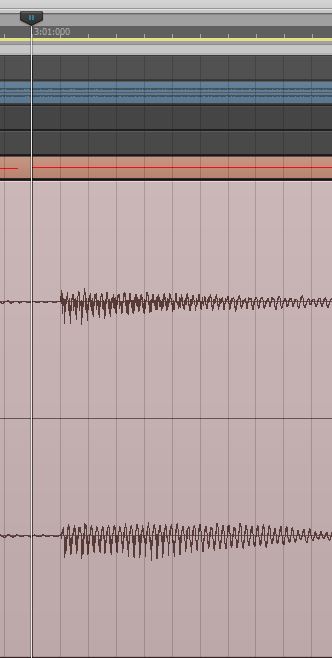 In the screenshot, you see a recorded waveform from an external synth (using a patch with a ZERO attack envelope). Above the waveform is the actual MIDI note, highlighted for clarity by the Now-Time bar. The difference between the MIDI note ON and the start of the audio waveform is about 578 samples @ 48kHz (12ms). This value is not very close to my total ASIO reported round-trip time of only 6.5ms (314 samples). Overall, am I splitting hairs here or should I offset the Record Latency Adjustment to compensate for the delay? The "LTU Checker" program only reports a difference of 5 samples. Should it be my goal have the audio line up as close as possible to when the actual MIDI note is triggered? If so, what is the best way to go about doing it? To me, I can actually hear the slight delay. And it seems that the more plugins I add into a project, the worse it may become. I may be able to go down 1 or 2 settings in the Focusrite MixControl software for buffer size before audio starts crapping out in SONAR, but it only makes a negligible improvement. However, at this time, I would rather have the stability of a slightly larger buffer than balls-to-the-wall small. Thanks for any help. If there is anything else that you may need to know for troubleshooting, please ask. I appreciate the responses.
|
scook
Forum Host

- Total Posts : 24146
- Joined: 2005/07/27 13:43:57
- Location: TX
- Status: offline
Re: Help With MIDI Latency During Playback & Recording
2013/07/03 23:40:59
(permalink)
Are there any plug-ins with look-ahead buffers in the projects? SONAR adds delay to all the tracks to compensate for those plug-ins.
|
2:43AM
Max Output Level: -68 dBFS
- Total Posts : 1147
- Joined: 2013/06/24 07:59:49
- Location: PHX
- Status: offline
Re: Help With MIDI Latency During Playback & Recording
2013/07/03 23:46:40
(permalink)
scook
Are there any plug-ins with look-ahead buffers in the projects? SONAR adds delay to all the tracks to compensate for those plug-ins.
Hmm. Not that I know of. Turning on the PDC button actually makes it a little worse. I just tried it. My current project is more set up for test, with no plugins and the external synth being recorded dry.
|
jb101
Max Output Level: -46 dBFS

- Total Posts : 2946
- Joined: 2011/12/04 05:26:10
- Status: offline
Re: Help With MIDI Latency During Playback & Recording
2013/07/04 03:05:35
(permalink)
Instead of disabling the PDC, try disabling all effects by pressing "E" on your computer keyboard.
I know you say there are no plugins, but it's worth a try.
|
2:43AM
Max Output Level: -68 dBFS
- Total Posts : 1147
- Joined: 2013/06/24 07:59:49
- Location: PHX
- Status: offline
Re: Help With MIDI Latency During Playback & Recording
2013/07/04 11:13:50
(permalink)
jb101
Instead of disabling the PDC, try disabling all effects by pressing "E" on your computer keyboard.
Thanks, jb101. I will give this a shot a report back. Basic question for all regarding the PDC button--is it normally left ON or OFF for most projects? Seems like Sonar compensates for latencies quite well except for its own LP-64 plugins.
|
jb101
Max Output Level: -46 dBFS
- Total Posts : 2946
- Joined: 2011/12/04 05:26:10
- Status: offline
Re: Help With MIDI Latency During Playback & Recording
2013/07/04 11:24:14
(permalink)
I can't think of many reasons why one would want to switch off the PDC, so the button should be left "Off", i.e. grey, and not blue.
I have seen it recommended to press it when you run into latency issues, and did try it myself, but it causes far more problems than it solves. Bypassing any latenc inducing plugins is a far better idea e.g. CPU intensive or Look-Ahead plugs like LP-64 EQ, LP-64 Multiband, PC Concrete Limiter, convolution reverbs like PERfect Space, etc.
It's better not to use this sort of plug until tracking is finished. Insert them at mixing stage, when latency is not an issue. I often increase my buffer size at mixing stage, too.
|
scook
Forum Host
- Total Posts : 24146
- Joined: 2005/07/27 13:43:57
- Location: TX
- Status: offline
Re: Help With MIDI Latency During Playback & Recording
2013/07/04 11:27:53
(permalink)
Normally PDC is on. Any plug-in with a look-ahead buffer needs compensation to keep the tracks in sync regardless of the manufacturer. It is also advisable to use those types of plug-ins after tracking is completed.
Edit: I must be slowing down again. Have to remember to check for posting updates before committing mine.
|
2:43AM
Max Output Level: -68 dBFS
- Total Posts : 1147
- Joined: 2013/06/24 07:59:49
- Location: PHX
- Status: offline
Re: Help With MIDI Latency During Playback & Recording
2013/07/04 12:08:33
(permalink)
OK, I disabled all FX (by clicking the FX button) and recorded the synth input again. Same issue; the delay is the same. Interestingly, I tried each of my hardware synths off the MIDIsport 4x4 interface, and the Waldorf Q seems to be the quickest responder. By "quickest responder" I mean only 1 to 2ms difference! I have a spare MIDIsport 2x2 available, so I thought I'd give that a try for comparison, as to rule out the chance that the older 4x4 interface is slow. After test and recording again, it seems that the 2x2 interface offers slight improvement of about 1ms. However, my measurement techniques could be introducing an error percentage here and there, so I would consider the 2x2 and the 4x4 interfaces the same. So am I just seeing the combination of MIDI data rate delay plus the round trip latency of ASIO/audio-interface? If so, is there a way to compensate for this in buffer size, manual offset, etc.? Any hardware folks out there experience this problem? Maybe there is just no way around the issue, since no matter what, there will always be a delay somewhere in the electronics and chains. I figure the only way to compensate is to somehow push the MIDI notes to automatically fire sooner. However, will this cause bigger issues down the road as projects become more and more complex? Sorry for the complexity of my problems and questions.  Overall, BIG THANKS for the help and conversation thus far. 
|
konradh
Max Output Level: -42 dBFS

- Total Posts : 3325
- Joined: 2006/01/16 16:07:06
- Status: offline
Re: Help With MIDI Latency During Playback & Recording
2013/07/04 14:55:29
(permalink)
I don't know if this applies, but I have to go to Preferences | Drivers | ASIO Panel and set a very short number (like 128 or 256) while recording. I then set it high (like 1024) when mixing with effects like Melodyne. With a high number, the external synth MIDI is so far behind that I can't possibly record in any reasonable manner.
Konrad Current album and more: http://www.themightykonrad.com/ Sonar X1d Producer. V-Studio 700. PC: Intel i7 CPU 3.07GHz, 12 GB RAM. Win 7 64-bit. RealGuitar, RealStrat, RealLPC, Ivory II, Vienna Symphonic, Hollywood Strings, Electr6ity, Acoustic Legends, FabFour, Scarbee Rick/J-Bass/P-Bass, Kontakt 5. NI Session Guitar. Boldersounds, Noisefirm. EZ Drummer 2. EZ Mix. Melodyne Assist. Guitar Rig 4. Tyros 2, JV-1080, Kurzweil PC2R, TC Helicon VoiceWorks+. Rode NT2a, EV RE20. Presonus Eureka. Rokit 6s.
|
js516
Max Output Level: -84 dBFS

- Total Posts : 347
- Joined: 2006/05/17 15:14:53
- Status: offline
Re: Help With MIDI Latency During Playback & Recording
2013/07/04 18:56:08
(permalink)
The issue isn't with Sonar, its your external synths. All hardware synths have some degree of delay when reponding to midi. Some of the older units can be up to 20ms. For example, my k2000 is also around 12 ms while my Radius gets about 8ms. My d110 and td81z gets up to 18ms. There isnt much you can do about it other than nudging the tracks if there is an audiable issue.
Joe Sera Gigabyte GA-990FXA-UD3, AMD FX-8320, Corsair 32GB 1600 Ram, MOTU AVB on USB3, AMD Radeon R7-200
|
2:43AM
Max Output Level: -68 dBFS
- Total Posts : 1147
- Joined: 2013/06/24 07:59:49
- Location: PHX
- Status: offline
Re: Help With MIDI Latency During Playback & Recording
2013/07/13 09:04:01
(permalink)
Thanks for the help, guys. I was able to improve matters by checking the "Use ASIO Reported Latency" parameter in the preferences (see screenshot below). 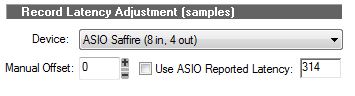 For some reason, this parameter was unchecked, though the Help Guide reports this is checked by default. Weird. So far, it lines up the audio vs. midi fairly well. I imagine if I need to get it just a little bit better, I use the Manual Offset parameter, correct? One question on that, however...does it affect the output/timing of MIDI Sync? Also, what exactly does the Playback buffer size adjustment do? Default is 250ms. I've set mine to 100ms but can hear no difference. 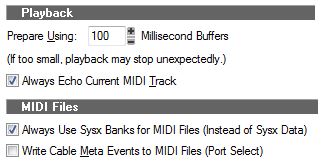 One thing I am experiencing, perhaps related, is that when I move MIDI notes in the Piano Roll or loading sysex files into the Sysex window, I get crackling and a big burden on the CPU. Anyone else experiencing this? I can't imagine either of these tasks as burdensome to a quad-core CPU. Sure it's no i7, but come on...we're talking about tasks stemming from the early days!
|
scook
Forum Host
- Total Posts : 24146
- Joined: 2005/07/27 13:43:57
- Location: TX
- Status: offline
Re: Help With MIDI Latency During Playback & Recording
2013/07/13 09:19:27
(permalink)
|