leebut
Max Output Level: -88 dBFS

- Total Posts : 138
- Joined: 2013/04/05 10:37:59
- Location: UK
- Status: offline
How do I make automation move with edited cuts?
Hi All, When I cut parts of a clip out (Edit > Cut > [Events in track & Delete hole] selected), volume automation remains static. If I check the option 'Track/bus automation', the nodes get messed up or deleted instead of moved to the left. I haven't been able to cure this problem. Any help would be great. Thank you, Lee.
post edited by leebut - 2013/08/16 17:54:47
Sonar X3; Sonar X2a Essential; Music Creator 6 Windows 7 Professional (64-bit) ASUS M5A97 EVO R2; 8Gb DDR3 1866 Vengeance RAM; AMD FX 6300 CPU MOTU Microbook II
|
Bristol_Jonesey
Max Output Level: 0 dBFS

- Total Posts : 16775
- Joined: 2007/10/08 15:41:17
- Location: Bristol, UK
- Status: offline

Re: Hoe do I make automation move with edited cuts?
2013/08/16 16:58:01
(permalink)
Checking bus/track automation should be doing exactly what you want it to do.
I've just tried and I can't replicate what you're seeing. On my system at least, automation moves as expected when you 'Delete Hole'
Are you still on X2 or X2a? If X2, you might want to try installing the update
CbB, Platinum, 64 bit throughoutCustom built i7 3930, 32Gb RAM, 2 x 1Tb Internal HDD, 1 x 1TB system SSD (Win 7), 1 x 500Gb system SSD (Win 10), 2 x 1Tb External HDD's, Dual boot Win 7 & Win 10 64 Bit, Saffire Pro 26, ISA One, Adam P11A,
|
leebut
Max Output Level: -88 dBFS
- Total Posts : 138
- Joined: 2013/04/05 10:37:59
- Location: UK
- Status: offline
Re: Hoe do I make automation move with edited cuts?
2013/08/16 17:51:58
(permalink)
Thank you for helping. This screen capture shows what happens. I'm using Sonar X2a. Thanks, Lee.
Sonar X3; Sonar X2a Essential; Music Creator 6 Windows 7 Professional (64-bit) ASUS M5A97 EVO R2; 8Gb DDR3 1866 Vengeance RAM; AMD FX 6300 CPU MOTU Microbook II
|
Bristol_Jonesey
Max Output Level: 0 dBFS
- Total Posts : 16775
- Joined: 2007/10/08 15:41:17
- Location: Bristol, UK
- Status: offline
Re: Hoe do I make automation move with edited cuts?
2013/08/16 18:16:19
(permalink)
I don't have any video capture software, but I can show you a "before" & "after" obtained by following your exact steps: Before: 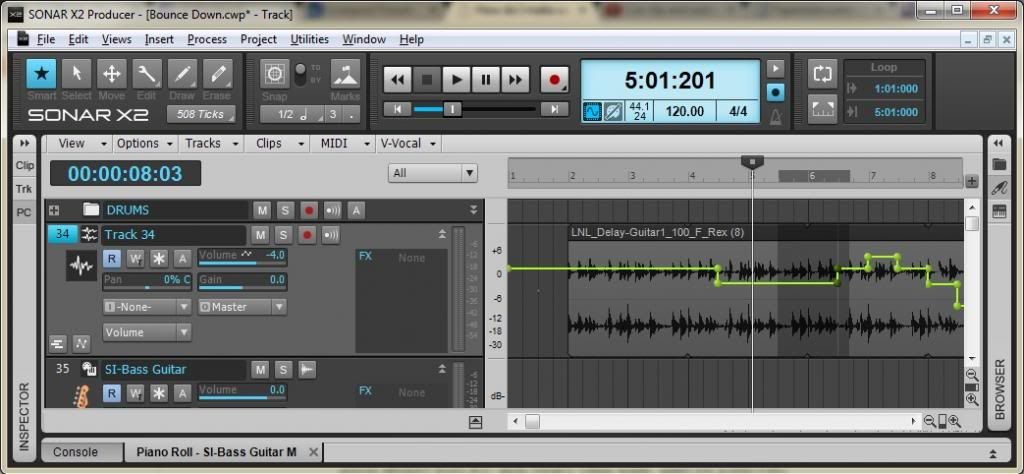 After: 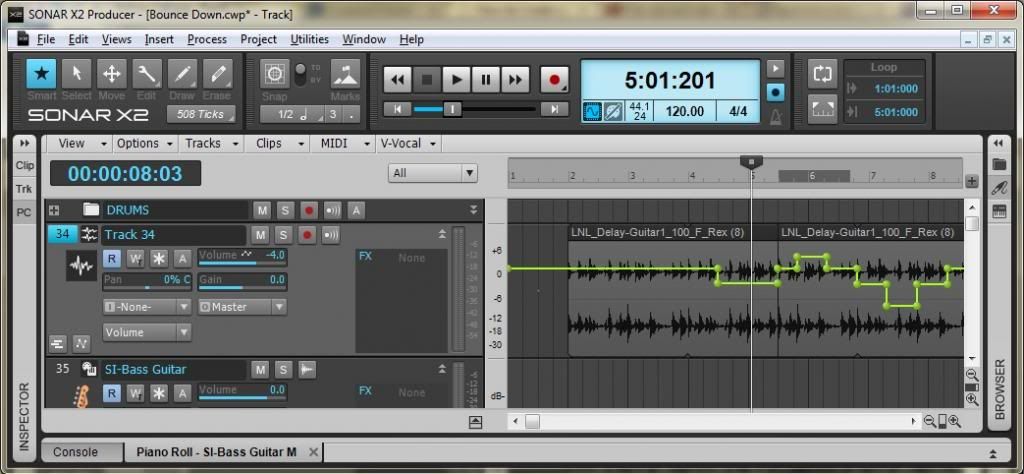 You can clearly see the node integrity has been preserved after cutting out a chunk of audio.
CbB, Platinum, 64 bit throughoutCustom built i7 3930, 32Gb RAM, 2 x 1Tb Internal HDD, 1 x 1TB system SSD (Win 7), 1 x 500Gb system SSD (Win 10), 2 x 1Tb External HDD's, Dual boot Win 7 & Win 10 64 Bit, Saffire Pro 26, ISA One, Adam P11A,
|
leebut
Max Output Level: -88 dBFS
- Total Posts : 138
- Joined: 2013/04/05 10:37:59
- Location: UK
- Status: offline
Re: Hoe do I make automation move with edited cuts?
2013/08/16 18:21:17
(permalink)
The images worked fine.
Seems I have a buggy install as the problem I have happens in every project.
Looks like I'll have to uninstall and start again.
Thanks for posting.
Sonar X3; Sonar X2a Essential; Music Creator 6 Windows 7 Professional (64-bit) ASUS M5A97 EVO R2; 8Gb DDR3 1866 Vengeance RAM; AMD FX 6300 CPU MOTU Microbook II
|
Bristol_Jonesey
Max Output Level: 0 dBFS
- Total Posts : 16775
- Joined: 2007/10/08 15:41:17
- Location: Bristol, UK
- Status: offline
Re: Hoe do I make automation move with edited cuts?
2013/08/16 18:28:59
(permalink)
If you do, make sure you do it properly, i.e. delete the necessary Registry keys before reinstalling
CbB, Platinum, 64 bit throughoutCustom built i7 3930, 32Gb RAM, 2 x 1Tb Internal HDD, 1 x 1TB system SSD (Win 7), 1 x 500Gb system SSD (Win 10), 2 x 1Tb External HDD's, Dual boot Win 7 & Win 10 64 Bit, Saffire Pro 26, ISA One, Adam P11A,
|
leebut
Max Output Level: -88 dBFS
- Total Posts : 138
- Joined: 2013/04/05 10:37:59
- Location: UK
- Status: offline
Re: Hoe do I make automation move with edited cuts?
2013/08/16 19:40:23
(permalink)
I removed all registry keys with Sonar in them and ran a registry cleaner.
After reinstall X2 (no a), the problem still occurs. I don't understand it.
Downloading the X2a patch now.
Sonar X3; Sonar X2a Essential; Music Creator 6 Windows 7 Professional (64-bit) ASUS M5A97 EVO R2; 8Gb DDR3 1866 Vengeance RAM; AMD FX 6300 CPU MOTU Microbook II
|
lawajava
Max Output Level: -55 dBFS

- Total Posts : 2040
- Joined: 2012/05/31 23:23:55
- Location: Seattle
- Status: offline
Re: Hoe do I make automation move with edited cuts?
2013/08/16 22:52:23
(permalink)
Select the area you want to move then choose Cut Special under the Edit menu.
Then choose include automation.
Then choose Paste Special and paste where you want it to go. Check the checkbox for automation when pasting as well.
Two internal 2TB SSDs laptop stuffed with Larry's deals and awesome tools. Studio One is the cat's meow as a DAW now that I've migrated off of Sonar. Using BandLab Cakewalk just to grab old files when migrating songs.
|
leebut
Max Output Level: -88 dBFS
- Total Posts : 138
- Joined: 2013/04/05 10:37:59
- Location: UK
- Status: offline

Re: How do I make automation move with edited cuts?
2013/08/17 03:37:27
(permalink)
Thank you for helping.
I've worked out what was wrong.
When the automation lane is visible, it is necessary to select it as well as the clip, which is not very intuitive.
When the automation lane is not visible, the automation is moved with the cut portion.
I am sure stranger things happen at sea.
Thanks again,
Lee.
Sonar X3; Sonar X2a Essential; Music Creator 6 Windows 7 Professional (64-bit) ASUS M5A97 EVO R2; 8Gb DDR3 1866 Vengeance RAM; AMD FX 6300 CPU MOTU Microbook II
|
Wouter Schijns
Max Output Level: -85 dBFS

- Total Posts : 259
- Joined: 2013/01/30 10:29:18
- Status: offline
Re: How do I make automation move with edited cuts?
2013/08/17 09:37:49
(permalink)
Paste special, then in dialog box check 'Event/clip's' , then check 'automation'. good luck
post edited by Wouter Schijns - 2013/08/17 09:46:26
Medion pc,Line6 GX,Sennheiser280,Roland A500S, SonarX3
|