Skyline_UK
Max Output Level: -54 dBFS

- Total Posts : 2133
- Joined: 2004/04/15 17:55:09
- Location: Midlands, UK
- Status: offline
How do I put track metadata in WAV file?
I've got a 50 minute Sonar live concert project and would like to expoort it to WAV with track numbers and titles. I need to keep it as one file as I want to preserve the inter-track banter. How can I do that, without necessarily investing in another expensive piece of software?
My stuff Intel Sandy Bridge i7 2600 @ 3.4GHz, 4 cores, 8 threads, 16GB RAM.OS & Programs drive: 240GB SSD
Data drives: 1 x 1TB drive RAID mirrored, plus extra 1TB data drive
Windows 10 Home 64 bit
Cakewalk by BandLab 64 bit, Studio One 3, Band In A Box 2016, Ozone 8+ too many other pluginsBandLab page
|
digi2ns
Max Output Level: -48.5 dBFS

- Total Posts : 2694
- Joined: 2010/11/24 14:27:12
- Location: MICHIGAN
- Status: offline

Re:How do I put track metadata in WAV file?
2012/12/19 08:12:03
(permalink)
Hmmm Id like to see that too.
I know I do it with iTUNES but that is per song and not one long project WAV
MIKE --Dell Studio XPS I7/870 2.93 Ghz, 8GB Mem, 2-2TB Barracuda HDs, 500 GB Ext.HDD, Win7/64 --X1 64 Pro Expanded, Dual 21" Monitors --PCR500 --MAUDIO FastTrack Ultra --Mackie 1604 VLZ PRO --Line6 X3 Live --Gibson, Fender, Takamine, Schecter, Washburn http://pogopoppa.wix.com/5thgear# http://soundcloud.com/digi2ns
|
AT
Max Output Level: 0 dBFS

- Total Posts : 10654
- Joined: 2004/01/09 10:42:46
- Location: TeXaS
- Status: offline
Re:How do I put track metadata in WAV file?
2012/12/19 09:21:03
(permalink)
Sound Forge, even the cheap "Studio" version. It doesnt come w/ all the effects you already have in SONAR. The old Pyro would insert tracks, but I don't think the new one does. Besides, SF wouldn't be that more expensive and is an industry standard for a reason.
Inserting track # ain't rocket science - there should be something free out there to do it, but like iTunes, they probably work on compressed files.
@
https://soundcloud.com/a-pleasure-dome
http://www.bnoir-film.com/ there came forth little children out of the city, and mocked him, and said unto him, Go up, thou bald head; go up, thou bald head. 24 And he turned back, and looked on them, and cursed them in the name of the Lord. And there came forth two she bears out of the wood, and tare forty and two children of them.
|
CJaysMusic
Max Output Level: 0 dBFS
- Total Posts : 30423
- Joined: 2006/10/28 01:51:41
- Location: Miami - Fort Lauderdale - Davie
- Status: offline
Re:How do I put track metadata in WAV file?
2012/12/19 10:22:32
(permalink)
You cannot put codes into wave files. You can embedd them into CD's. MP3's and WMA files can be encoded, not wave files. But they degrade sound quality!!
CD architect can encode ISRC codes, UPC codes, Artsit, and sonf name into the actual CD. Pyro can encode tages into MP3's
|
SuperG
Max Output Level: -63 dBFS

- Total Posts : 1371
- Joined: 2012/10/19 16:09:18
- Location: Edgewood, NM
- Status: offline
Re:How do I put track metadata in WAV file?
2012/12/19 11:11:54
(permalink)
CJaysMusic
You cannot put codes into wave files. You can embedd them into CD's. MP3's and WMA files can be encoded, not wave files. But they degrade sound quality!!
CD architect can encode ISRC codes, UPC codes, Artsit, and sonf name into the actual CD. Pyro can encode tages into MP3's
Either CD Architect or SoundForge can can produce a CD similar to what your looking for. For 'inter-track' banter, you simply set the track gap to 0 instead of the normal 2 seconds. You can use the CD-TEXT features which will display album, artist, and track title on CD players so equipped. Many CD ripping programs, including quite a few free ones, are now able to extract track and title information directly from the CD if the CD was encoded using CD-TEXT features.
|
CJaysMusic
Max Output Level: 0 dBFS
- Total Posts : 30423
- Joined: 2006/10/28 01:51:41
- Location: Miami - Fort Lauderdale - Davie
- Status: offline
Re:How do I put track metadata in WAV file?
2012/12/19 11:23:45
(permalink)
For burning Cd's you can do that for wave files. Your quoting me as im wrong and im not SUPERG!!!
MP3's and WMA files can encode tags into the actual audio file!! Wave files cannot do that!!! With Wave files, you can encode them onto the CD itself. just as i said in my post above.
Cj
|
dantarbill
Max Output Level: -57 dBFS

- Total Posts : 1820
- Joined: 2004/12/15 10:48:18
- Location: Monrovia, CA
- Status: offline
Re:How do I put track metadata in WAV file?
2012/12/19 11:36:34
(permalink)
CJaysMusic
For burning Cd's you can do that for wave files. Your quoting me as im wrong and im not SUPERG!!!
MP3's and WMA files can encode tags into the actual audio file!! Wave files cannot do that!!! With Wave files, you can encode them onto the CD itself. just as i said in my post above.
Cj
I'm not sure what "codes" you are looking to embed in your WAV file...but you CAN embed markers (and a surprising amount of other data) in a WAV file. (Check the web for RIFF file format ( http://www.sonicspot.com/guide/wavefiles.html).) I do this all the time in iZotope RX. I use RX on long live recordings to insert named markers for song and speaker transitions. These markers will then show up when I subsequently open the file in WaveLab. What's odd is that WaveLab reads those markers, but if you save the file in WaveLab, the markers will be removed and saved in a separate (.mrk) file.
|
CJaysMusic
Max Output Level: 0 dBFS
- Total Posts : 30423
- Joined: 2006/10/28 01:51:41
- Location: Miami - Fort Lauderdale - Davie
- Status: offline
Re:How do I put track metadata in WAV file?
2012/12/19 11:43:06
(permalink)
I'm not sure what "codes" you are looking to embed in your WAV file... Im not looking for anything. I was answering a question. Whats going on here!! REALLY!! Read the original posters question. I already know. The poster, not me, wants to know and ill quote his post ''Ive got a 50 minute Sonar live concert project and would like to expoort it to WAV with track numbers and titles. I need to keep it as one file as I want to preserve the inter-track banter. How can I do that, without necessarily investing in another expensive piece of software? He is not importing it into another program! He wants it exported with artist embedded into it. Wave files do not do that
You cannot embed song tittles into a wave file. ill say it again. You cannot embed song tittles onto wave files. you can do it with MP3's and WMa files. Ill repeat this for reasons unkown to me. you can do this with MP3's and WMa files. The poster wants to have an exported wave file with artist info embeded into it. You cant do that !!!!!! ill say it agin if anyone is confused. You cant do that!!!!
|
dantarbill
Max Output Level: -57 dBFS
- Total Posts : 1820
- Joined: 2004/12/15 10:48:18
- Location: Monrovia, CA
- Status: offline
Re:How do I put track metadata in WAV file?
2012/12/19 11:51:13
(permalink)
CJaysMusic
You cannot embed song tittles into a wave file.
Ok...Maybe YOU can't do that...but I CAN. Perhaps, if you would like, I can send you a .wav file that has named track markers with song titles attached to the markers. I'll admit that this isn't a common useage for wav files...but the capability is there...perhaps NOT in the software you're using though. Perhaps it's the "tittles" that you can't embed...
|
CJaysMusic
Max Output Level: 0 dBFS
- Total Posts : 30423
- Joined: 2006/10/28 01:51:41
- Location: Miami - Fort Lauderdale - Davie
- Status: offline
Re:How do I put track metadata in WAV file?
2012/12/19 11:55:11
(permalink)
and it will show up in itunes and my car stereo? It wont! A digital wave file cannot be encoded with artist info. It can onlty be encoded if you burn it onto a cd as the cd is the one that gets encoded, not the wave file.
So sure sent it to me and ill see if i see artist info on my stereo and itunes. I already know i wont, but ill amuse you
|
dantarbill
Max Output Level: -57 dBFS
- Total Posts : 1820
- Joined: 2004/12/15 10:48:18
- Location: Monrovia, CA
- Status: offline
Re:How do I put track metadata in WAV file?
2012/12/19 12:59:17
(permalink)
CJaysMusic
and it will show up in itunes and my car stereo? It wont! A digital wave file cannot be encoded with artist info. It can onlty be encoded if you burn it onto a cd as the cd is the one that gets encoded, not the wave file.
So sure sent it to me and ill see if i see artist info on my stereo and itunes. I already know i wont, but ill amuse you
Note that I didn't say it would show up in iTunes or in your car stereo...nor did I say anything about "artist info". The text in named track markers on a CD won't show up on your car stereo either (as far as I know). For that, you need to embed CD Text. See ( https://www.yousendit.com/download/WUJhWUhwTlFwTVVsYzhUQw). If you open this in WaveLab, you'll see the named markers. If you drop it into an audio track in SONAR, it will also insert markers, but they won't have the names that are embedded in the file. You won't see the markers at all in Windows MediaPlayer. Note that "poorly supported" isn't the same as "can't be done".
|
AT
Max Output Level: 0 dBFS
- Total Posts : 10654
- Joined: 2004/01/09 10:42:46
- Location: TeXaS
- Status: offline
Re:How do I put track metadata in WAV file?
2012/12/19 13:23:24
(permalink)
Maybe I misread the OP - I thought he wanted to put the single wav file on a CD w/ tracks w/o breaking the recording into separate projects. The banter between songs will also have to be marked separately.
I've never done that, but one should be able to. Just like you can add "secret" tracks to a CD.
@
https://soundcloud.com/a-pleasure-dome
http://www.bnoir-film.com/ there came forth little children out of the city, and mocked him, and said unto him, Go up, thou bald head; go up, thou bald head. 24 And he turned back, and looked on them, and cursed them in the name of the Lord. And there came forth two she bears out of the wood, and tare forty and two children of them.
|
CJaysMusic
Max Output Level: 0 dBFS
- Total Posts : 30423
- Joined: 2006/10/28 01:51:41
- Location: Miami - Fort Lauderdale - Davie
- Status: offline
Re:How do I put track metadata in WAV file?
2012/12/19 14:04:44
(permalink)
The text in named track markers on a CD won't show up on your car stereo either (as far as I know). For that, you need to embed CD Text.
Exactly.. I guess you read his post again. good for you!! When he just exports a wave file as he said in his post, nothing will show up, unless its an MP3 or WMA file. He says nothnig of burning a CD in his post. He just say export. So that means it will be a wave file, not on a CD. He doesnt say export and burn!! Everyone knows you can encode onto a cd..Well i thought!!
|
frankandfree
Max Output Level: -82 dBFS

- Total Posts : 447
- Joined: 2008/04/26 11:56:32
- Location: Norddeutschland
- Status: offline
Re:How do I put track metadata in WAV file?
2012/12/19 15:47:36
(permalink)
Dan is totally right. You can embed named cue markers and lots more stuff into a simple *.wav file. What a player understands or makes of it is another question. Here is the wav file Dan kindly uploaded for you (OneShot01.wav) as it comes up in R.. err, a DAW that supports the cues and the text: 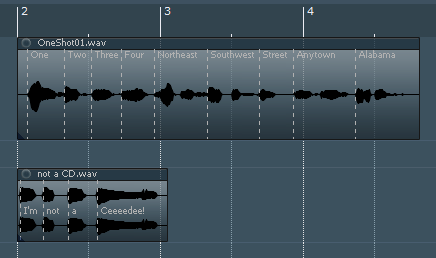 I can write them as well with that DAW. But as AT sais, it's pretty likely there's also freeware which is able to write those chunks.
|
THambrecht
Max Output Level: -73 dBFS

- Total Posts : 867
- Joined: 2010/12/10 06:42:03
- Location: Germany
- Status: offline
Re:How do I put track metadata in WAV file?
2012/12/19 15:55:40
(permalink)
We digitize tapes, vinyl, dat, md ... in broadcast and studio quality for publishers, public institutions and individuals.4 x Intel Quad-CPU, 4GHz Sonar Platinum (Windows 10 - 64Bit) and 14 computers for recording tapes, vinyl ...
4 x RME Fireface 800, 2 x Roland Octa Capture and 4 x Roland Quad Capture, Focusrite .... Studer A80, RP99, EMT948 ...
(Germany) http://www.hambrecht.de
|
frankandfree
Max Output Level: -82 dBFS
- Total Posts : 447
- Joined: 2008/04/26 11:56:32
- Location: Norddeutschland
- Status: offline
Re:How do I put track metadata in WAV file?
2012/12/20 06:51:37
(permalink)
In case there is still feet-stomping going on because there ain't no track numbers in my previous pic, here's a wave file as I understand what the OP is on about - a continuous wave file with positional info, track numbers and titles: (Again, no CD text or special format involved. It's an ordinary wave file. I just created named markers and told the software to embed them in the rendered *.wav file) 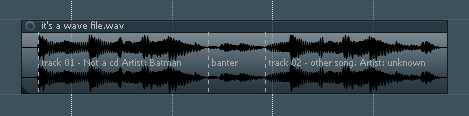 You probably won't get this info displayed in your car stereo, but the OP never asked for that. The cues can be very handy, because you can use them to split/snap/align/navigate or create (named) project markers etc - or get any kind of text info to a collaborator (in case clip notes won't cut it because he uses another DAW than you). I can also embed tempo information and use that to automatically stretch the wav to fit to the project tempo. Then they are basically DIY rex files, just in simple wave file format. Wav is a pretty versatile format  .
|
Skyline_UK
Max Output Level: -54 dBFS
- Total Posts : 2133
- Joined: 2004/04/15 17:55:09
- Location: Midlands, UK
- Status: offline
Re:How do I put track metadata in WAV file?
2012/12/20 12:17:04
(permalink)
I didn't mean to create a kerfuffle.  I assume that cda (CD) file is therefore best. So any recommendations on best software for achieving what I need, i.e. one live CD 'file' track but skippable by the listener to named and numbered tracks?
My stuff Intel Sandy Bridge i7 2600 @ 3.4GHz, 4 cores, 8 threads, 16GB RAM.OS & Programs drive: 240GB SSD
Data drives: 1 x 1TB drive RAID mirrored, plus extra 1TB data drive
Windows 10 Home 64 bit
Cakewalk by BandLab 64 bit, Studio One 3, Band In A Box 2016, Ozone 8+ too many other pluginsBandLab page
|
VariousArtist
Max Output Level: -63 dBFS
- Total Posts : 1397
- Joined: 2003/11/07 15:03:09
- Location: London, UK & California, USA
- Status: offline
Re:How do I put track metadata in WAV file?
2012/12/20 13:10:32
(permalink)
Skyline_UK
I didn't mean to create a kerfuffle.
I assume that cda (CD) file is therefore best. So any recommendations on best software for achieving what I need, i.e. one live CD 'file' track but skippable by the listener to named and numbered tracks?
I hope you find this information useful... Technically you can put metadata into a WAV file. The issue is that it's not supported across the board in the same manner that meta-data embedded in an MP3 file is. So if you put meta-data into your WAV file, don't expect many playback devices or applications to make use of it -- not in the way that your expectations are met with meta-data in MP3 files. If you want listeners to be able to skip through songs, and view titles and song numbers etc., then it depends on how you are delivering the media as well as what their playback mechanisms are. If you are delivering your media on a CD then this should be easy to achieve by using a tool such as the following: http://www.sonycreativesoftware.com/cdarchitect You can embed text about the songs, album name, artists, as well as any identifying information such as ISRC codes, etc. along with the usual ability to specify when a track starts and gaps between tracks, etc. If you are delivering a single WAV file, then I think you will have a hard time achieving your goal -- because of the lack of standard support for meta-data in WAV files you will need to have your listeners use specific playback software that can read that meta-data. To be honest, I've never really come across an instance of this in the "real world". For more information about meta-data in a WAV file from the almighty site of all known wisdome and knowledge: http://en.wikipedia.org/wiki/WAV#Metadata Good luck, and I hope that answers your question...
|
SuperG
Max Output Level: -63 dBFS
- Total Posts : 1371
- Joined: 2012/10/19 16:09:18
- Location: Edgewood, NM
- Status: offline
Re:How do I put track metadata in WAV file?
2012/12/21 15:58:32
(permalink)
CJaysMusic
For burning Cd's you can do that for wave files. Your quoting me as im wrong and im not SUPERG!!!
MP3's and WMA files can encode tags into the actual audio file!! Wave files cannot do that!!! With Wave files, you can encode them onto the CD itself. just as i said in my post above.
Cj
Cj, I didn't intend to quote you as wrong. I'm sorry if it appeared that way. I simply wanted to point out that a viable method for playing music without an intergap delay is possible. The problem with wave files is not that they cannot contain metadata, but that there are very few standards as to just what should be. Wave files are RIFF files, you can create a chunk, stuff it in the file and away you go. When RIFF files are decoded, any chunks that are not understood are simply ignored. The only standards that I'm aware of are the Broadcast Wave File extensions, Scott Studios, and there are some items that WMP recognizes. But, even if you mange to put the metadata you want into a file, you still need a player that does something with it.
|