ramscapri
Max Output Level: -84 dBFS

- Total Posts : 316
- Joined: 2008/03/23 06:02:59
- Status: offline
How to change Key+ setting for multiple selected tracks in X1 versions ?
In Sonar versions previous to X1, key+ setting could be changed for multiple selected tracks by going to the menu Tracks-->Key+ or something like that.
But I didnt get that option when I tried the X1 web trial. Also, it is not to be seen in X1 LE as well. The Key+ option is only there for each track in the inspector section.
Is it that the key+, time+ etc, can be changed for tracks only one by one now in X1 or am I missing something ? I hope I am missing something because it would be cumbersome to change the key+, say, for 20 tracks or more, one by one !
|
Bristol_Jonesey
Max Output Level: 0 dBFS

- Total Posts : 16775
- Joined: 2007/10/08 15:41:17
- Location: Bristol, UK
- Status: offline

Re:How to change Key+ setting for multiple selected tracks in X1 versions ?
2012/05/05 06:32:44
(permalink)
Forgive my ignorance, but what does key+ do?
Whatever it is you're trying to do, in X1, multiple selection & execution of commands is initiated by the Ctrl key.
CbB, Platinum, 64 bit throughoutCustom built i7 3930, 32Gb RAM, 2 x 1Tb Internal HDD, 1 x 1TB system SSD (Win 7), 1 x 500Gb system SSD (Win 10), 2 x 1Tb External HDD's, Dual boot Win 7 & Win 10 64 Bit, Saffire Pro 26, ISA One, Adam P11A,
|
damon777
Max Output Level: -88 dBFS

- Total Posts : 101
- Joined: 2008/05/19 13:14:46
- Location: Mansfield Notts UK.
- Status: offline
Re:How to change Key+ setting for multiple selected tracks in X1 versions ?
2012/05/05 08:23:01
(permalink)
Key+ or - was the option in the tracks menu in 8.5 that allowed you to change the key of multiple tracks at one touch if all were selected....i`d like to know how to do the same in X1 myself Jonesey..any idea?
Dell XPS 430, 8GB Win7 64 VS 100 x2 PCR 500 8.5 PE X1D Expanded X2A Producer E Omnisphere, Stylus, Trillian Alesis M1 620`S Alesis M1 520`S. Novation Nocturn.
|
bmb
Max Output Level: -89 dBFS

- Total Posts : 59
- Joined: 2011/01/22 20:11:21
- Status: offline
Re:How to change Key+ setting for multiple selected tracks in X1 versions ?
2012/05/05 10:14:39
(permalink)
Are we talking midi or audio?
SONAR X1 Expanded (64bit) HP Pavilion dv7 Windows 7 (64bit) 8 gig ram
|
vintagevibe
Max Output Level: -51 dBFS

- Total Posts : 2446
- Joined: 2003/12/15 21:45:06
- Location: Atlanta, Ga
- Status: offline
Re:How to change Key+ setting for multiple selected tracks in X1 versions ?
2012/05/05 10:47:41
(permalink)
They took that function away in X1. 
|
bladetragic
Max Output Level: -80 dBFS

- Total Posts : 503
- Joined: 2009/09/12 04:49:24
- Status: offline
Re:How to change Key+ setting for multiple selected tracks in X1 versions ?
2012/05/05 11:14:58
(permalink)
My guess would be that they took that function away since it is kind of redundant since there is the transpose option under the Process menu, which basically does the same thing.
Just highlight all the tracks you want to change and use the transpose function to move them up or down.
(Assuming we are talking about MIDI here)
|
damon777
Max Output Level: -88 dBFS
- Total Posts : 101
- Joined: 2008/05/19 13:14:46
- Location: Mansfield Notts UK.
- Status: offline
Re:How to change Key+ setting for multiple selected tracks in X1 versions ?
2012/05/05 11:35:58
(permalink)
Yes, we are talking midi here and it is under the "process, transpose" menu now, thanks for that blade!
Dell XPS 430, 8GB Win7 64 VS 100 x2 PCR 500 8.5 PE X1D Expanded X2A Producer E Omnisphere, Stylus, Trillian Alesis M1 620`S Alesis M1 520`S. Novation Nocturn.
|
vintagevibe
Max Output Level: -51 dBFS
- Total Posts : 2446
- Joined: 2003/12/15 21:45:06
- Location: Atlanta, Ga
- Status: offline
Re:How to change Key+ setting for multiple selected tracks in X1 versions ?
2012/05/05 12:34:43
(permalink)
bladetragic
My guess would be that they took that function away since it is kind of redundant since there is the transpose option under the Process menu, which basically does the same thing.
Just highlight all the tracks you want to change and use the transpose function to move them up or down.
(Assuming we are talking about MIDI here)
No it is not redundant since the Key+/- was NON DESTRUCTIVE. If you are trying different keys for a singer you'll never know where you started. If you change the key for any reason and want to go back to the original key you won't know/remember what that key was. Also when you open a file that you haven't worked on in a while you won't know that that key was ever changed. This was an over-site by Cakewalk. You can individually transpose each track + or - but that's a really time suck when you are paying a singer and you are trying different keys.
|
John
Forum Host

- Total Posts : 30467
- Joined: 2003/11/06 11:53:17
- Status: offline
Re:How to change Key+ setting for multiple selected tracks in X1 versions ?
2012/05/05 12:35:16
(permalink)
damon777
Key+ or - was the option in the tracks menu in 8.5 that allowed you to change the key of multiple tracks at one touch if all were selected....i`d like to know how to do the same in X1 myself Jonesey..any idea?
Its still there. 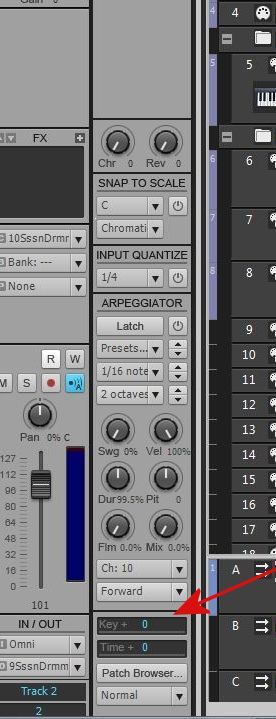
|
vintagevibe
Max Output Level: -51 dBFS
- Total Posts : 2446
- Joined: 2003/12/15 21:45:06
- Location: Atlanta, Ga
- Status: offline
Re:How to change Key+ setting for multiple selected tracks in X1 versions ?
2012/05/05 12:37:32
(permalink)
John
damon777
Key+ or - was the option in the tracks menu in 8.5 that allowed you to change the key of multiple tracks at one touch if all were selected....i`d like to know how to do the same in X1 myself Jonesey..any idea?
Its still there.
Yes it's there but the ctrl-+/- quick group keys don't work.
|
ramscapri
Max Output Level: -84 dBFS
- Total Posts : 316
- Joined: 2008/03/23 06:02:59
- Status: offline
Re:How to change Key+ setting for multiple selected tracks in X1 versions ?
2012/05/06 12:42:07
(permalink)
Rightly put vintagevibe. Process-->Transpose was always there along with Tracks-->Key+ in previous versions. So, its in no way a substitute for key+. As rightly pointed out by vintagevibe, key+ is non-destructive and one can always see what the original key is and how much is transposed non-destructively by key+ whereas process--->transpose can only be reversed either by undo or by actually applying the transpose in reverse, whereas with key+ you simply need to change the number whichever way you want.
The way each one works in piano roll is like this : If Process--->Transpose of 5 steps is applied to a track, a 'C' note is actually moved to 'F' and correspondingly all other notes. Whereas if Key+ of 5 is applied to the track, the original 'C' note in the piano roll stays as 'C', however when you play back, 'C' will play as 'F' and correspondingly all other notes. Now, this feature is great when you have to try different scales and come back to original if needed. To play back the original, you just need to set the key+ back to '0'. The big advantage is that your originally composed keys and scales don't have to be disturbed throughout your project till completion.
Now this feature is retained on each MIDI track as John pointed out, but cant apply to multiple tracks at once because it doesnt appear on the menu anymore from where you could apply it after selecting multiple tracks.
I still hope we are missing it somewhere in the X1 interface because its hard to understand why this useful function should be removed. Same applies to Time+ as well.
|
vintagevibe
Max Output Level: -51 dBFS
- Total Posts : 2446
- Joined: 2003/12/15 21:45:06
- Location: Atlanta, Ga
- Status: offline
Re:How to change Key+ setting for multiple selected tracks in X1 versions ?
2012/05/06 13:35:03
(permalink)
I pointed this out to one of the mods here and they just said "put in a feature feature request". There are so many functions that they took out of X1 that I'd have to spend several hours writing feature requests so I haven't done it. I'm too busy.
|
ramscapri
Max Output Level: -84 dBFS
- Total Posts : 316
- Joined: 2008/03/23 06:02:59
- Status: offline
Re:How to change Key+ setting for multiple selected tracks in X1 versions ?
2012/05/06 15:07:33
(permalink)
vintagevibe
I pointed this out to one of the mods here and they just said "put in a feature feature request". There are so many functions that they took out of X1 that I'd have to spend several hours writing feature requests so I haven't done it. I'm too busy.
Very true about quite a few useful functions being taken out of X1. Its funny though that they ask you to put in feature requests for features that already existed and were taken out for no reason really ! I thought feature requests were for new useful features that one could think of and dont exist yet. X1 is so amazing with this new fresh interface, quick workflow and all, but retaining some of the useful functions would be really nice, especially the complete set of menu bar functions that existed in 8.5 and before. I mean, a menu bar still exists within the skylight which is so good, then why not have the full set of functions that were there previously. That way we could have the best of both worlds, the previous menu oriented one and the new skylight. Anyways, I've just put in a feature request to include the full menu bar functions within X1 (for all versions from LE to Producer, expanded, etc....), hope someone at Cakewalk has a look and considers. Guess a simple patch update should do the trick ? Wonder.....
|
ramscapri
Max Output Level: -84 dBFS
- Total Posts : 316
- Joined: 2008/03/23 06:02:59
- Status: offline
Re:How to change Key+ setting for multiple selected tracks in X1 versions ?
2012/06/10 02:00:10
(permalink)
I see that this was discussed last year too in the thread below : http://forum.cakewalk.com/tm.aspx?m=2330322 Does anyone have an update of whether this has been addressed in any of the latest patches (X1d maybe) or it actually features somewhere within X1 ? Its such a useful feature that clearly existed in versions previous to X1 under the "Tracks" menu. Sad if it is totally removed.
|
ramscapri
Max Output Level: -84 dBFS
- Total Posts : 316
- Joined: 2008/03/23 06:02:59
- Status: offline
Re:How to change Key+ setting for multiple selected tracks in X1 versions ?
2012/06/10 02:02:06
(permalink)
And I received no reply to the feature request that I put and they dont seem to send back any email acknowledging that too.
Does anyone know how a feature request status can be tracked ? Or is it just plain luck that it may or may not be looked at ?
|
FastBikerBoy
Forum Host
- Total Posts : 11326
- Joined: 2008/01/25 16:15:36
- Location: Watton, Norfolk, UK
- Status: offline
Re:How to change Key+ setting for multiple selected tracks in X1 versions ?
2012/06/10 02:45:19
(permalink)
ramscapri
I see that this was discussed last year too in the thread below :
http://forum.cakewalk.com/tm.aspx?m=2330322
Does anyone have an update of whether this has been addressed in any of the latest patches (X1d maybe) or it actually features somewhere within X1 ?
Its such a useful feature that clearly existed in versions previous to X1 under the "Tracks" menu. Sad if it is totally removed.
I don't think it is possible anymore AFAIK. The key+ option does not respond to quick grouping ramscapri
Does anyone know how a feature request status can be tracked ? Or is it just plain luck that it may or may not be looked at ?
The more requests a feature gets, the more likely it is to be addressed. That was posted on here a while ago by someone from CW (I forget who) so I haven't just made it up.
|
ramscapri
Max Output Level: -84 dBFS
- Total Posts : 316
- Joined: 2008/03/23 06:02:59
- Status: offline
Re:How to change Key+ setting for multiple selected tracks in X1 versions ?
2012/06/10 03:11:39
(permalink)
Thanks FastBikerBoy.
Wonder if there is any way for a number of users like us to put in a combined request. This is simply a feature that existed and not any new one. So, surely must not involve any coding from scratch or anything.
I am pretty sure a lot of X1 users would want this feature back but may not have had the time to put in the request. In fact, it would be great to simply have the complete menu options (with all the previous features) that existed in previous versions as X1 has a menu bar anyway. Then why not the complete menu ?
I am pretty damn sure in doing that, many of the problems people have migrating from 7, 8 or 8.5 to X1 will vanish because at least they have the same menu to fall back onto if using the new interface proves difficult in some areas. Of course, the skylight is amazing and a delight to work on. Its just that the transition would be easier and you could have the best of both ways for you to choose from for your workflow.
Brandon, Seth, Robin, Scott ! Could you guys help to push this somehow ? Just a request.....
|