tdehan
Max Output Level: -90 dBFS

- Total Posts : 40
- Joined: 2014/12/22 11:06:43
- Status: offline
How to save MIDI file with muted tracks?
How do I save a MIDI file with muted tracks? Each time I do this and re-open the file the tracks are in-muted. I'm sure there must be a way to do this.
Thanks
Tim
|
bvideo
Max Output Level: -58 dBFS

- Total Posts : 1707
- Joined: 2006/09/02 22:20:02
- Status: offline

Re: How to save MIDI file with muted tracks?
2016/12/12 12:48:16
(permalink)
Short answer, if you save it as a regular Sonar file, cwf, mutes should be preserved. Mutes and most other Sonar features can not be saved in a .mid. If you need it as a .mid, you could set the volume as '0' on the tracks you want muted.
W10 pro, Sonar Platinum, Alesis Multimix 16 FW, MOTU Express 128, Gigabyte Z370 HD3P, i7 8700K, 16 Gigs, ssd + 2 X 2T disks, D50-MEX, JV80, A90EX, M1REX
|
tdehan
Max Output Level: -90 dBFS
- Total Posts : 40
- Joined: 2014/12/22 11:06:43
- Status: offline
Re: How to save MIDI file with muted tracks?
2016/12/14 17:05:24
(permalink)
hmmmmmm... that seems odd as I do have some MIDI files I've acquired along the way that do indeed have muted tracks when you open them in SONAR.
|
brundlefly
Max Output Level: 0 dBFS

- Total Posts : 14250
- Joined: 2007/09/14 14:57:59
- Location: Manitou Spgs, Colorado
- Status: offline
Re: How to save MIDI file with muted tracks?
2016/12/14 18:30:48
(permalink)
Are you sure they still have a .MID extension? Bill's right that the MIDI spec doesn't support saving track mute status in a standard MIDI file, and I don't think there's any other feature of a MIDI fle that would result in SONAR muting the track on opening the file.
SONAR Platinum x64, 2x MOTU 2408/PCIe-424 (24-bit, 48kHz) Win10, I7-6700K @ 4.0GHz, 24GB DDR4, 2TB HDD, 32GB SSD Cache, GeForce GTX 750Ti, 2x 24" 16:10 IPS Monitors
|
tdehan
Max Output Level: -90 dBFS
- Total Posts : 40
- Joined: 2014/12/22 11:06:43
- Status: offline
Re: How to save MIDI file with muted tracks?
2016/12/14 19:08:36
(permalink)
Yup. There are .mid. I actually have a number of them that open with muted tracks. I would attach one here if there was a way to do so.
|
brundlefly
Max Output Level: 0 dBFS
- Total Posts : 14250
- Joined: 2007/09/14 14:57:59
- Location: Manitou Spgs, Colorado
- Status: offline
Re: How to save MIDI file with muted tracks?
2016/12/14 19:45:38
(permalink)
PM'd an e-mail address so you can send me a file if you like.
SONAR Platinum x64, 2x MOTU 2408/PCIe-424 (24-bit, 48kHz) Win10, I7-6700K @ 4.0GHz, 24GB DDR4, 2TB HDD, 32GB SSD Cache, GeForce GTX 750Ti, 2x 24" 16:10 IPS Monitors
|
Bassman002
Max Output Level: -84 dBFS

- Total Posts : 321
- Joined: 2014/12/19 05:51:16
- Status: offline
Re: How to save MIDI file with muted tracks?
2016/12/15 04:34:25
(permalink)
HI:)
>>hmmmmmm... that seems odd as I do have some MIDI files I've acquired along the way that do indeed have muted >>tracks when you open them in SONAR.
Interesting!! I've looked in some of my acquired Midifiles, and there are some files with muted tracks in it!!
I've by hand "MIDI Programmer's Handbook" from Steve de Furia and there's no way to mute any tracks in a standard midi file.
So how does this work??
Would be nice for me to know:)
The only possibility I can think of is to make a ".kar" (Karaoke File) which has different specifications and rename it to *.mid
Possibly....
Bassman.
|
brundlefly
Max Output Level: 0 dBFS
- Total Posts : 14250
- Joined: 2007/09/14 14:57:59
- Location: Manitou Spgs, Colorado
- Status: offline
Re: How to save MIDI file with muted tracks?
2016/12/15 12:25:42
(permalink)
I checked out a file that Tim sent. Looks like SONAR mutes any track that has no MIDI data in it - probably just to make it clear to the user that it's silent. I've often seen MIDI files that have empty tracks where the track name is used to show copyright or other info as in the example Tim sent. But I didn't remember that they get muted; it's been a long time since I worked with 3rd-party GM files.
In any case, this is something SONAR is doing on opening the file based on the track content. It isn't saved with the file. Add a single note event to any of those tracks, save it, re-open it, and the track will be unmuted.
SONAR Platinum x64, 2x MOTU 2408/PCIe-424 (24-bit, 48kHz) Win10, I7-6700K @ 4.0GHz, 24GB DDR4, 2TB HDD, 32GB SSD Cache, GeForce GTX 750Ti, 2x 24" 16:10 IPS Monitors
|
slartabartfast
Max Output Level: -22.5 dBFS

- Total Posts : 5289
- Joined: 2005/10/30 01:38:34
- Status: offline
Re: How to save MIDI file with muted tracks?
2016/12/15 14:22:31
(permalink)
So it cannot be done.
Next question is: why do you want to do it?
Often there is a way to get the result you need without using a feature that does not exist.
|
tdehan
Max Output Level: -90 dBFS
- Total Posts : 40
- Joined: 2014/12/22 11:06:43
- Status: offline
Re: How to save MIDI file with muted tracks?
2016/12/15 14:42:33
(permalink)
That's really odd if Sonar does that with empty tracks. I have many other MIDI files that also have nothing in the track that do not show as muted when opening in Sonar.
|
tdehan
Max Output Level: -90 dBFS
- Total Posts : 40
- Joined: 2014/12/22 11:06:43
- Status: offline
Re: How to save MIDI file with muted tracks?
2016/12/15 14:45:33
(permalink)
slartabartfast
So it cannot be done.
Next question is: why do you want to do it?
Often there is a way to get the result you need without using a feature that does not exist.
With regards as to the why, I have some situations where I don't want certain tracks to play but sometimes I do. It would be terrific to be able to simply mute the tracks I don't want to play at the time and save it that way. Instead what I've been doing is creating copies of the original file and deleting certain tracks and saving and naming them so I know what tracks are not there. If there is an easier way to do that I would appreciate hearing about it.
|
tdehan
Max Output Level: -90 dBFS
- Total Posts : 40
- Joined: 2014/12/22 11:06:43
- Status: offline
Re: How to save MIDI file with muted tracks?
2017/01/13 16:54:31
(permalink)
Ok... let me ask this question. If I cannot save muted MIDI tracks. How do I set the volume of individual tracks? I assume if I can set the volume of individual tracks to zero I should be able to save it. And then if I want to hear that track at another time I would simply turn the volume back up?
Where/how can I change the volume of individual MIDI tracks
|
bvideo
Max Output Level: -58 dBFS
- Total Posts : 1707
- Joined: 2006/09/02 22:20:02
- Status: offline
Re: How to save MIDI file with muted tracks?
2017/01/13 17:25:19
(permalink)
Look for the volume slider on the track header or inspector in Sonar. Set it to zero. If there are no volume events or envelopes anywhere else, that track will not make sound. Then write your .mid file and see if the track got written, etc.
W10 pro, Sonar Platinum, Alesis Multimix 16 FW, MOTU Express 128, Gigabyte Z370 HD3P, i7 8700K, 16 Gigs, ssd + 2 X 2T disks, D50-MEX, JV80, A90EX, M1REX
|
tdehan
Max Output Level: -90 dBFS
- Total Posts : 40
- Joined: 2014/12/22 11:06:43
- Status: offline
Re: How to save MIDI file with muted tracks?
2017/01/13 17:29:40
(permalink)
Unfortunately, I have no idea what the HEADER or INSPECTOR are. Could you please send a screenshot?
|
brundlefly
Max Output Level: 0 dBFS
- Total Posts : 14250
- Joined: 2007/09/14 14:57:59
- Location: Manitou Spgs, Colorado
- Status: offline
Re: How to save MIDI file with muted tracks?
2017/01/13 18:44:29
(permalink)
'Q' is MIDI Volume in this screenshot of a MIDI track header: 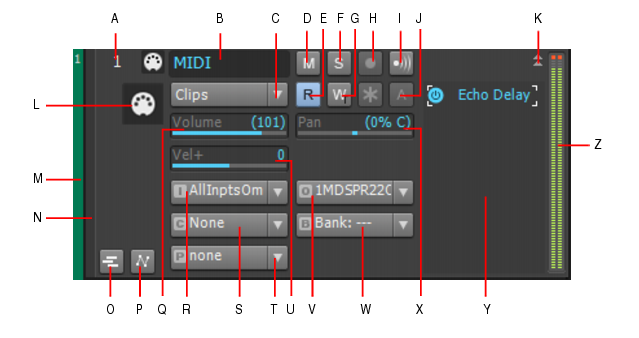 When you save a project as a MIDI file, the value of this control will be written to the file as a CC7 continuous controller event. Conversely, when you open such a file, the CC7=0 event will be read into the Volume control widget in SONAR and removed from the clip. Every time you start playback, SONAR sends a CC7 message on the basis of this control setting, so the result is the same as having the event in the MIDI clip. But l'm starting to wonder why you're saving files as .MID at all. Are you working with these files in another application?
SONAR Platinum x64, 2x MOTU 2408/PCIe-424 (24-bit, 48kHz) Win10, I7-6700K @ 4.0GHz, 24GB DDR4, 2TB HDD, 32GB SSD Cache, GeForce GTX 750Ti, 2x 24" 16:10 IPS Monitors
|
pedro803
Max Output Level: -89 dBFS

- Total Posts : 65
- Joined: 2015/07/23 15:31:34
- Status: offline
Re: How to save MIDI file with muted tracks?
2017/01/13 22:59:50
(permalink)
I haven't tried it with my new cakewalk sonar -- but in the ancient old cakewalk that I started on -- midi files saved as type 0 would not save the muted value of tracks -- also saving Midi in file type 0 (zero) causes all tracks using the same midi channel to collapse down to one track
so if you run a cal to separate the different midi notes on a drum part to different tracks -- then save it as type 0 -- then reopen it your drums will all be back on the same track -- however save it as a type 1 file and it will keep the individual drums separated onto different tracks
Try saving your midi file as a midi file type 1 and I think it might save the muted value for certain tracks
|
pedro803
Max Output Level: -89 dBFS
- Total Posts : 65
- Joined: 2015/07/23 15:31:34
- Status: offline
Re: How to save MIDI file with muted tracks?
2017/01/13 23:02:35
(permalink)
just a little further fyi -- if I remember correctly -- the file type 0 -- was optimized for web use back in the early days of the good old interweb -- so it was a way to really streamline those cheesy midi files that use to play when you would open a page 
|
pedro803
Max Output Level: -89 dBFS
- Total Posts : 65
- Joined: 2015/07/23 15:31:34
- Status: offline
Re: How to save MIDI file with muted tracks?
2017/01/13 23:10:16
(permalink)
OK -- never mind I just tried it and it didn't work -- in fact saved as type 1 it came back with all the blank tracks showing as muted and when saved as file type 0 the blank tracks did not show as muted
so like I said that used to work on my old cakewalk from 1998 -- of course I am not sure where it changed along the way. So I guess the one take away of any use to my comment is that if you ever have multiple midi takes that you want to collapse into one track the just put them on the same midi channel and save it as a midi file type 0
backing sheepishly out of the room with my hat in my hand
|
Cactus Music
Max Output Level: 0 dBFS
- Total Posts : 8424
- Joined: 2004/02/09 21:34:04
- Status: offline
Re: How to save MIDI file with muted tracks?
2017/01/13 23:20:40
(permalink)
There is a danger here if you set a midi files volume to zero and save it, Then you open it and move the volume to say 10, the minute you hit play it will return to zero.
One of Sonars weaknesses is the event list does not show everything. I have to open some files < they are my own creations, in Anvil Studio just to make these changes because there's no way in Sonar to do it. Like PG changes.
What are you using these files for, Live performance?
|
abacab
Max Output Level: -30.5 dBFS

- Total Posts : 4464
- Joined: 2014/12/31 19:34:07
- Status: offline
Re: How to save MIDI file with muted tracks?
2017/01/14 00:22:32
(permalink)
Cactus Music
There is a danger here if you set a midi files volume to zero and save it, Then you open it and move the volume to say 10, the minute you hit play it will return to zero.
One of Sonars weaknesses is the event list does not show everything. I have to open some files < they are my own creations, in Anvil Studio just to make these changes because there's no way in Sonar to do it. Like PG changes.
What are you using these files for, Live performance?
Hey Johnny, that's some interesting info for sure! I have seen some mysterious volume behavior on VST's with acquired MIDI files. When I look in Sonar's event viewer, I cannot see everything that's happening. I will check out Anvil!
DAW: CbB; Sonar Platinum, and others ...
|
pedro803
Max Output Level: -89 dBFS
- Total Posts : 65
- Joined: 2015/07/23 15:31:34
- Status: offline
Re: How to save MIDI file with muted tracks?
2017/01/14 00:30:53
(permalink)
yes Cactus Music I have had trouble with that too -- the volume controller doesn't show up in the event list -- it seems like I remember seeing in another thread somewhere that there is another way to get to it (the volume controller command) but I can't remember what it that method was -- I sure wish I knew because I do spend some time working with old midi files where time is of the essence and I need to be able to control the volumes of the tracks for a remix.
perhaps if I change the volume setting on the midi track header that Brundlefly has referenced above, perhaps that changes the value of any invisible volume control command that would be sitting in the track data?
|
Cactus Music
Max Output Level: 0 dBFS
- Total Posts : 8424
- Joined: 2004/02/09 21:34:04
- Status: offline
Re: How to save MIDI file with muted tracks?
2017/01/14 00:43:37
(permalink)
Anvil is a free sequencer that will remind you of where we all started from in the ancient times.
But it will show you everything about the midi file in easy to understand midi language.
And example of this is you open a midi sequence and then open TTS-1 GUI.
You'll see faders, pan pots, reverb and chorus settings as well as the instrument assignments. Nice. But I what to change it all,, after all what kind of idiot puts reverb on a Bass??
Make changes, rewind hit play, they all revert back. So there's no point using the GUI of any soft synth to make changes. It won't work. Those changes are hidden in Sonar. Why these thing are not on the event list I do not know.
So fine, you make the changes in the track inspector and hope they stick...but the author got fancy and put a PG change in the chorus ..And volume settings in the middle of songs can be elusive.
So the only solution I have found is open the file in a REAL sequencer and delete what you don't want.
If anyone here has figured this one out let me know.
|
abacab
Max Output Level: -30.5 dBFS
- Total Posts : 4464
- Joined: 2014/12/31 19:34:07
- Status: offline
Re: How to save MIDI file with muted tracks?
2017/01/14 00:48:52
(permalink)
Cactus Music
So the only solution I have found is open the file in a REAL sequencer and delete what you don't want.
If anyone here has figured this one out let me know.
I can remember when Cakewalk was a real MIDI sequencer!
DAW: CbB; Sonar Platinum, and others ...
|
Cactus Music
Max Output Level: 0 dBFS
- Total Posts : 8424
- Joined: 2004/02/09 21:34:04
- Status: offline
Re: How to save MIDI file with muted tracks?
2017/01/14 01:10:48
(permalink)
Exactly! And you cou;ld edit everything in the event list too I think. That's where I did all my editing with Dr T.
And this is why I have problems with my own creations. Every sequence had the Tempo ( TM) the patch assignments ( PG ) and channel Volumes where simple cc7 CH 6 110 panning was cc7 ch 6 64 and on and on depending on how deep you wanted to dive into midi control. I would also write in my PG changes for my vocal and guitar effects some in the middle and then at the end of the song so it would kill the reverb so I could talk.
You open my sequences and none of that is to be found on Sonars event list. No that's wrong,, the CC changes are there but that's all.
There are blank tracks for my effect control channels ( 14 and 15 )
I doubt if this ever bothers anybody else here and I have my workaround, but the question often comes up from other trying to work with sequences they downloaded.
|
abacab
Max Output Level: -30.5 dBFS
- Total Posts : 4464
- Joined: 2014/12/31 19:34:07
- Status: offline
Re: How to save MIDI file with muted tracks?
2017/01/14 01:38:07
(permalink)
I agree that all MIDI data should be viewable. No point in dumbing it down.
DAW: CbB; Sonar Platinum, and others ...
|
tdehan
Max Output Level: -90 dBFS
- Total Posts : 40
- Joined: 2014/12/22 11:06:43
- Status: offline
Re: How to save MIDI file with muted tracks?
2017/01/14 11:34:54
(permalink)
brundlefly
'Q' is MIDI Volume in this screenshot of a MIDI track header:
When you save a project as a MIDI file, the value of this control will be written to the file as a CC7 continuous controller event. Conversely, when you open such a file, the CC7=0 event will be read into the Volume control widget in SONAR and removed from the clip. Every time you start playback, SONAR sends a CC7 message on the basis of this control setting, so the result is the same as having the event in the MIDI clip.
But l'm starting to wonder why you're saving files as .MID at all. Are you working with these files in another application?
I will try it again. However, when I adjusted the volume in the header as you show, it appears to have no affect. With regards to your question about wonder why I'm saving files as .mid, why wouldn't I? I am using the files to drive a sound module for live stage performance.
|
Cactus Music
Max Output Level: 0 dBFS
- Total Posts : 8424
- Joined: 2004/02/09 21:34:04
- Status: offline
Re: How to save MIDI file with muted tracks?
2017/01/14 13:28:27
(permalink)
"With regards to your question about wonder why I'm saving files as .mid, why wouldn't I? I am using the files to drive a sound module for live stage performance."
It helps us understand what your trying to do. I now have a very clear idea of what your doing.
I used to use midi files back in the 80's for my backing tracks so been there done that.
And I'm totally aware of the need to kill certain tracks if say that night you have a real bass player.
Back then a friend of mine used a Roland Sound brush and a Dr Synth sound module which all you had to do was push a button to toggle playback channels. The instrument sounds were pretty good in those days but now would be considered cheesy.
I still have my Korg 05 R/W module which was my band in 1991, I got tired of lugging around an Atari computer and in mid 90's switched to Sony Mini disks for a decade. I recorded all my sequences to mini disk using the Korg as a sound source. The transfers had to be in real time at first, later Sony came out with software for drag and drop.
This was cool, was the exact same sound live in a very small box. But I had to pack around a bunch of disks and set lists where not flexible.
But My son started playing bass so now I needed tracks that were just the drums and keyboards. PITA. it was easier just to drag the old Atari around and mute the bass channel in the Korg.
I got my first Laptop in 2004 and have been living in playback heaven ever since.
With the much better VST synths that have hugely improved since those days I still use my old sequences and breath new life into them with Sonars amazing pallet of sounds. My Korg has some pretty cool polysynths but the drums and bass are terrible, I can't believe I subjected all those people to that for almost 15 years!
I've been using WAVE files played back in Win Amp since 2004. At first I used close to the same format as the Korg because all I had was TTS-1 in Guitar Studio. I started recording real bass too. The drums are what have been improving over time for me as I progressed through Session drummer, AD2 and now I'm loving Strike2.
I have no need to change my playback live, it's exactly what I want night after night.
My new project is to use Home Studio instead of Win Amp and have multi channel output and midi back to change my Effects for each song, just like I did in the 80's. Have you ever though about using Sonars playlist? or is this why your wanting muted channels?
|
tdehan
Max Output Level: -90 dBFS
- Total Posts : 40
- Joined: 2014/12/22 11:06:43
- Status: offline
Re: How to save MIDI file with muted tracks?
2017/01/14 15:04:50
(permalink)
I'm using a SR18 for drums and a Yamaha MU50 Tone Generator for some fill in sounds and effects besides also using for drums as well. I am running Sonar through my Microsoft Surface Pro 4 connected to those devices. They don't sound cheesy at all. I also back in the day used to tour with 3 dedicated hardware sequencers, 4 drum machines and 3 racks of keyboards and modules. All of my dedicated hardware sequencers were/are a breeze to program/edit compared to Sonar.
It certainly would be ideal if I was able to mute certain tracks. However, it does appear that I can adjust the volume on some of the tracks and save that. It is certainly a drag trying to go through tracks to find multiple volume (CC7) changes in Sonar. It's actually much easier to do on dedicated hardware sequencers. Perhaps I will go that route to edit the volume on some tracks.
|
Cactus Music
Max Output Level: 0 dBFS
- Total Posts : 8424
- Joined: 2004/02/09 21:34:04
- Status: offline
Re: How to save MIDI file with muted tracks?
2017/01/14 17:46:17
(permalink)
We are not a large enough market anymore, live performers. It's all DJ's now so nobody is making software for us. The Dj's have a lot to choose from, we have only DAW's which are out to lunch for live playback.
I had better software on my Atari for live performance of midi.
Jeff Koftonoffs Midi Performer.
Lyrics would pop up, foot controller. easy set list management. And it never crashed unless the power went out..
|
abacab
Max Output Level: -30.5 dBFS
- Total Posts : 4464
- Joined: 2014/12/31 19:34:07
- Status: offline
Re: How to save MIDI file with muted tracks?
2017/01/14 18:06:48
(permalink)
Cactus Music
Anvil is a free sequencer that will remind you of where we all started from in the ancient times.
But it will show you everything about the midi file in easy to understand midi language.
And example of this is you open a midi sequence and then open TTS-1 GUI.
You'll see faders, pan pots, reverb and chorus settings as well as the instrument assignments. Nice. But I what to change it all,, after all what kind of idiot puts reverb on a Bass??
Make changes, rewind hit play, they all revert back. So there's no point using the GUI of any soft synth to make changes. It won't work. Those changes are hidden in Sonar. Why these thing are not on the event list I do not know.
So fine, you make the changes in the track inspector and hope they stick...but the author got fancy and put a PG change in the chorus ..And volume settings in the middle of songs can be elusive.
So the only solution I have found is open the file in a REAL sequencer and delete what you don't want.
If anyone here has figured this one out let me know.
Hey Johnny, thanks for the tip, have downloaded the Anvil. Should be very handy!  I already had LoopBe30 on-board so it was no trouble to run a virtual MIDI port out of Anvil over to my VST's in Sonar. This way I can audition/test MIDI files in Anvil, while listening to them play back on my Sonar instruments and effects. No audio out needs to be set up in Anvil that way, so no conflict with ASIO. You can also run Anvil MIDI direct to a standalone soft synth this way. There is a freeware one port version of LoopBe1 here > http://www.nerds.de/en/loopbe1.html
DAW: CbB; Sonar Platinum, and others ...
|