frkfir
Max Output Level: -90 dBFS

- Total Posts : 34
- Joined: 2015/12/22 12:20:51
- Status: offline
How to use and "record" visual instrument like "Strings" to a track???
Please Help!
I'm new in sonar and I can't understand, after I choose from "Plugins" tab --> Instrument --> String Section -->
On popup window I checkd "Simple instrument track" and "Synth property page".
Now, I can see the SI-String Section with the violin cello and Bass, --> I arm my track for recording, and click on "rec",
Now how I actually record what I play on keayboed ot take some of the examples in this window???
|
Jesse G
Max Output Level: -32.5 dBFS

- Total Posts : 4282
- Joined: 2004/04/14 01:43:43
- Status: offline

Re: How to use and "record" visual instrument like "Strings" to a track???
2016/01/19 18:45:41
(permalink)
☄ Helpfulby Zargg71 2016/01/19 19:21:37
Insert the SI strings Synth. When the Insert Soft Synth options page opens, select Simple Instrument. The Simple Instrument properties page will open and you can see the instrument. Click the + symbol next to each genre name to reveal the patterns beneath each one. Double click each one to test it and click Stop button to stop playback. If you like the pattern, you can click and drag it to the Simple Instrument track and keep adding others if you like. If you want to record the sounds you hear with your midi keyboard, Arm the Simple instrument track, click the sound you like and leave it, then click the record button and start recording it with your midi Keyboard. Done.
post edited by Jesse G - 2016/01/19 19:01:39
Peace,Jesse G.  A fisher of men <>< ==============================Cakewalk and I are going places together! A fisher of men <>< ==============================Cakewalk and I are going places together!
Cakewalk By Bandlab, Windows 10 Pro- 64 bit, Gigabyte GA-Z97X-SLI, Intel Core i5-4460 Haswell Processor, Crucial Ballistix 32 GB Ram, PNY GeForce GTX 750, Roland Octa-Capture, Mackie Big Knob, Mackie Universal Controller (MCU), KRK V4's, KRK Rockit 6, Korg TR-61 Workstation, M-Audio Code 49 MIDI keyboard controller.[/
|
frkfir
Max Output Level: -90 dBFS
- Total Posts : 34
- Joined: 2015/12/22 12:20:51
- Status: offline
Re: How to use and "record" visual instrument like "Strings" to a track???
2016/01/20 02:51:03
(permalink)
I've already done all the steps you told me.
But the stage where I want, for example, click on record, and I'll play what I want on the keyboard and it will record, it does not work for me.
I don't necessarily want something that is already ready in sonar.
I play with a mouse on the keyboard in the Strings window, because currently I don't have MIDI keyboard.
|
rebel007
Max Output Level: -72 dBFS

- Total Posts : 926
- Joined: 2013/07/17 11:24:29
- Location: Victoria, Australia
- Status: offline
Re: How to use and "record" visual instrument like "Strings" to a track???
2016/01/20 03:58:31
(permalink)
Would the 'Piano Role View' work better for you? It's a great way of inserting on a note by note basis using the mouse or computer keyboard.
Home Built Desktop Computer: Intel Core i5 750: 4Mb RAM: NVidia 210 Silent: Windows 10 32bit: Sonar Platinum: Roland OctaCapture Presario CQ41 Laptop: Intel Core i5 760: 4Mb RAM: Windows 10 32bit: Sonar Platinum (Retired) CbB on HP Pavilion Laptop 64bit: GeForce Video Card: Intel 8550: 256GB SSD 1TB Data Drive: Windows10 64bit
|
frkfir
Max Output Level: -90 dBFS
- Total Posts : 34
- Joined: 2015/12/22 12:20:51
- Status: offline
Re: How to use and "record" visual instrument like "Strings" to a track???
2016/01/20 04:43:14
(permalink)
Wait, Before I get into what's what better to me and how I need to understand, how to use and record this instruments in sonar. I want specifically the sound of the Strings section. Whay when I arm the string track and then click "R" or Record buttin and play somthing, it doesnt place it on the track, its stay blank. Maybe I need to set something like input/output on the the specific track before I strat usung it? (like I do before I start to record my guitar ot my mic). I really need an answer here, because it just stuck me to keep working!!!
post edited by frkfir - 2016/01/20 06:25:03
|
ChazEd
Max Output Level: -88 dBFS

- Total Posts : 121
- Joined: 2014/12/01 05:17:09
- Status: offline
Re: How to use and "record" visual instrument like "Strings" to a track???
2016/01/20 06:26:43
(permalink)
What version of Sonar you have?
You can't record notes played on the built in keyboard in String Section, AFAIK.
If you don't have a midi keyboard, then use the Virtual Controller / Keyboard (Only on Sonar 2015 / MC 7, AKAIK).
Or use the piano roll.
Hope this helps.
Ableton Live 10 Suite x64 Korg Legacy Collection, FXpansion Tremor, Z3ta+ 2 & Rapture Pro Win 10 x64 (Still knocking on wood...) i7 4770, GA-H97-D3H, 16 GB, 7200 1TB + 2TB, RX 580, CX600V2 UA-101 (Thank you, Roland, for the Windows 10 driver!), SM57, MG10/2, MicroKey 37
|
frkfir
Max Output Level: -90 dBFS
- Total Posts : 34
- Joined: 2015/12/22 12:20:51
- Status: offline
Re: How to use and "record" visual instrument like "Strings" to a track???
2016/01/20 06:33:15
(permalink)
I'm using for now Sonar LE. I'm new in this software. Where is what you said : "Virtual Controller / Keyboard Or the piano roll."?? Where is it on thw softwaer and how to use it?? I really can't record my own notes when I press the keyboard that appears on the screen in "String section" with my mouse??
post edited by frkfir - 2016/01/20 06:46:41
|
ChazEd
Max Output Level: -88 dBFS
- Total Posts : 121
- Joined: 2014/12/01 05:17:09
- Status: offline
Re: How to use and "record" visual instrument like "Strings" to a track???
2016/01/20 06:49:39
(permalink)
frkfir
I'm using for now Sonar LE.
I'm new in this software.
Where is what you said :
"Virtual Controller / Keyboard Or the piano roll."??
Where is it on thw softwaer and how to use it??
I really can't record my own notes when I press the keyboard that appears on the screen in "String section" with my mouse??
Only latest versions of Sonar / MC have the Virtual Controller / Keyboard feature. I've tested String Section, Rapture Pro, Lounge Lizard Session 4, MinimoogV and Korg M1. None of them record notes from the built in keyboard. I've tested MinimoogV in Ableton Live 8, and can't record there too. Piano roll is the way to go, in your case. Hope this helps.
Ableton Live 10 Suite x64 Korg Legacy Collection, FXpansion Tremor, Z3ta+ 2 & Rapture Pro Win 10 x64 (Still knocking on wood...) i7 4770, GA-H97-D3H, 16 GB, 7200 1TB + 2TB, RX 580, CX600V2 UA-101 (Thank you, Roland, for the Windows 10 driver!), SM57, MG10/2, MicroKey 37
|
frkfir
Max Output Level: -90 dBFS
- Total Posts : 34
- Joined: 2015/12/22 12:20:51
- Status: offline
Re: How to use and "record" visual instrument like "Strings" to a track???
2016/01/20 08:18:55
(permalink)
And if I have "Roland E9" keyboard, I can pluged her thru my Tascam sound card, and use it like MIDI keybord?
(I have input MIDI on my sound card and I have output MIDI on my Keyboerd)
Then I will sucsess to add my notes to track in String Section?
|
Slugbaby
Max Output Level: -33.5 dBFS

- Total Posts : 4172
- Joined: 2004/10/01 13:57:37
- Location: Toronto, Canada
- Status: offline
Re: How to use and "record" visual instrument like "Strings" to a track???
2016/01/20 08:41:22
(permalink)
That sounds like it will work.
Make sure you record the data from your MIDI Keyboard to the MIDI track feeding the synth.
|
frkfir
Max Output Level: -90 dBFS
- Total Posts : 34
- Joined: 2015/12/22 12:20:51
- Status: offline
Re: How to use and "record" visual instrument like "Strings" to a track???
2016/01/20 09:14:36
(permalink)
Like I said, I dont have MIDI Keyboard, this is a regular Keyboards, Not necessarily just MIDI.
It is still work??
Where Can I find how exatcly to work with?
|
Paul P
Max Output Level: -48.5 dBFS

- Total Posts : 2685
- Joined: 2012/12/08 17:15:47
- Location: Montreal
- Status: offline
Re: How to use and "record" visual instrument like "Strings" to a track???
2016/01/20 10:38:40
(permalink)
frkfir
Like I said, I dont have MIDI Keyboard, this is a regular Keyboards, Not necessarily just MIDI.
EDIT : You do in fact have a midi keyboard but I missed the fact that your sound card has midi in. So all you need is a midi cable. ------------------------------------------------------- Your keyboard has MIDI in and out, but no usb. So you'll need an interface of some kind. The cheapest would be something like M-Audio's Uno, or if you can still find them since they're discontinued (Sweetwater still has it) the Roland UM-ONE. I have the Cakewalk version of the Roland. These interfaces are about 40$. More expensive, but better in the long run would be to buy an audio interface that also has midi connections. Being able to use your real keyboard would be much better than any on-screen virtual keyboard.
post edited by Paul P - 2016/01/20 11:08:44
Sonar Platinum [2017.10], Win7U x64 sp1, Xeon E5-1620 3.6 GHz, Asus P9X79WS, 16 GB ECC, 128gb SSD, HD7950, Mackie Blackjack
|
JonD
Max Output Level: -39 dBFS

- Total Posts : 3617
- Joined: 2003/12/09 11:09:10
- Location: East of Santa Monica
- Status: offline
Re: How to use and "record" visual instrument like "Strings" to a track???
2016/01/20 11:01:35
(permalink)
frkfir
(I have input MIDI on my sound card and I have output MIDI on my Keyboerd)
Then I will sucsess to add my notes to track in String Section?
Yes, your setup will work, you just need to get the right settings. (This assumes you have a physical midi connection between your keyboard and PC. If not, see Paul's post above). In this case, midi output should not be your keyboard. Check out this video on Sonar's midi setup (from Karl, one of our members): https://www.youtube.com/watch?v=-JqUp1Asm8I As you can see, there are a ton of helpful videos on YouTube (as well as Cakewalk's site). You really should take a few minutes to get grounded in the basics. It'll help avoid a lot of frustration later. Good luck and have fun!
post edited by JonD - 2016/01/20 11:11:54
SonarPlat/CWbBL, Win 10 Pro, i7 2600K, Asus P8Z68 Deluxe, 16GB DDR3, Radeon HD5450, TC Electronic Impact Twin, Kawai MP11 Piano, Event ALP Monitors, Beyerdynamic DT770 Pro, Too Many Plugins, My lucky hat.
|
frkfir
Max Output Level: -90 dBFS
- Total Posts : 34
- Joined: 2015/12/22 12:20:51
- Status: offline
Re: How to use and "record" visual instrument like "Strings" to a track???
2016/01/20 12:08:01
(permalink)
So, If I understand correct you guys,
If I plugd my regulat Roland E9 keaybord with midi cable,
I will can use "String Section", and record directly to String track my own notes?
|
Ibanez Laney
Max Output Level: -89 dBFS

- Total Posts : 79
- Joined: 2014/12/28 03:38:07
- Location: Sydney
- Status: offline
Re: How to use and "record" visual instrument like "Strings" to a track???
2016/01/20 12:30:09
(permalink)
frkfir
So, If I understand correct you guys,
If I plugd my regulat Roland E9 keaybord with midi cable,
I will can use "String Section", and record directly to String track my own notes?
Yes.
i7 2600k, 1 x Nvidia 970 + 1 x 560ti, 16GB RAM, 5TB of Spinning Thingys, Focusrite Liquid Sapphire 56 + lots and lots of cables. Sooo many cables.. I think they are breeding.
|
frkfir
Max Output Level: -90 dBFS
- Total Posts : 34
- Joined: 2015/12/22 12:20:51
- Status: offline
Re: How to use and "record" visual instrument like "Strings" to a track???
2016/01/20 13:35:37
(permalink)
Ok,
Thanks!
I'll try that and update if something will nor work properelly.
:)
|
Beepster
Max Output Level: 0 dBFS

- Total Posts : 18001
- Joined: 2012/05/11 19:11:24
- Status: offline
Re: How to use and "record" visual instrument like "Strings" to a track???
2016/01/20 14:08:09
(permalink)
frkfir
Ok,
Thanks!
I'll try that and update if something will nor work properelly.
:)
What was not said is that you need to make sure the MIDI connection is detected and selected in Sonar Preferences. So in Sonar go to "Edit > Preferences > MIDI - Devices" then make sure all MIDI devices are selected. If the only MIDI connection is through your soundcard (which would be a big round "DIN" MIDI cable) then those connections should be listed. Make sure there is a checkmark beside them. If it is a USB keyboard controller (whcih it sounds liek it is not) then that would appear as well if it is installed correctly. Again you would make sure it is checkmarked in the MIDI Preferences area. Now on the MIDI track you insert (using the "Insert Softsynth" dialog) make sure the "MIDI Echo" button is enabled so it can receive live input from your controller. This button looks like a dot with half circles coming off of it (almost like an "Explosive" warning label on an arosol can but not really). Without that on you won't be able to hear it. If you don't get signal from the controller you may need to go to the track "Input" dropdown menu and select "Omni". This will make the track accept all incoming MIDI signals so you don't have to worry about specifying channels. If you use the Insert Synth dialog to insert the SI Strings synth (or any other synth) then everything should be routed automatically so aside from the things I mentioned it shoudl all work. If not come back and explain what happened. Cheers.
|
frkfir
Max Output Level: -90 dBFS
- Total Posts : 34
- Joined: 2015/12/22 12:20:51
- Status: offline
Re: How to use and "record" visual instrument like "Strings" to a track???
2016/01/20 15:36:33
(permalink)
OK,
Thanks you very much for the detailed explanation you wrote me.
I really appreciate it!!!
|
frkfir
Max Output Level: -90 dBFS
- Total Posts : 34
- Joined: 2015/12/22 12:20:51
- Status: offline
Re: How to use and "record" visual instrument like "Strings" to a track???
2016/01/25 18:32:13
(permalink)
Beepster
Hi, I did al thie things you wrote to me here, and for some resone, I still cant figuire out, how to set the right input amd output. Sonar doesnt "get" any sound In, and I can't here any sound that I play from my keaybord. Like I said befor, I'm using Rolnad E 9 , and I pkugged here to my Tascam 2X2, audio interface with MIDI cable. (Out MIDI from keaybord to In MIDI in my audio interface). What can I do???
|
Paul P
Max Output Level: -48.5 dBFS
- Total Posts : 2685
- Joined: 2012/12/08 17:15:47
- Location: Montreal
- Status: offline
Re: How to use and "record" visual instrument like "Strings" to a track???
2016/01/25 18:57:14
(permalink)
In "Preferences / MIDI / Devices" do you see your Tascam listed under "Inputs" ?
If yes, is there a check mark in its box ?
There's no point trying anything else until this is accomplished.
Next, can you tell us what happened at each step of what Beepster posted above in message #17 ?
Sonar Platinum [2017.10], Win7U x64 sp1, Xeon E5-1620 3.6 GHz, Asus P9X79WS, 16 GB ECC, 128gb SSD, HD7950, Mackie Blackjack
|
frkfir
Max Output Level: -90 dBFS
- Total Posts : 34
- Joined: 2015/12/22 12:20:51
- Status: offline
Re: How to use and "record" visual instrument like "Strings" to a track???
2016/01/26 05:03:25
(permalink)
Beepster
What was not said is that you need to make sure the MIDI connection is detected and selected in Sonar Preferences.
So in Sonar go to "Edit > Preferences > MIDI - Devices" then make sure all MIDI devices are selected. If the only MIDI connection is through your soundcard (which would be a big round "DIN" MIDI cable) then those connections should be listed. Make sure there is a checkmark beside them.
Yes, I check mark my audio interface MIDI box. both oh them (input and output), there is another one in Outputs list, but it doesn't checked. (Microsoft GS Wavetable Synth). I already try to mark him to but then there some popup window with with some message. (I could put here screenshot, but it doesnt let me do that here in this forum) Beepster
Now on the MIDI track you insert (using the "Insert Softsynth" dialog) make sure the "MIDI Echo" button is enabled so it can receive live input from your controller. This button looks like a dot with half circles coming off of it (almost like an "Explosive" warning label on an arosol can but not really). Without that on you won't be able to hear it.
I this that I understand what you meen, and I also check that this is marked to. Beepster
If you don't get signal from the controller you may need to go to the track "Input" dropdown menu and select "Omni". This will make the track accept all incoming MIDI signals so you don't have to worry about specifying channels.
I did that and nothing happened. Beepster
If you use the Insert Synth dialog to insert the SI Strings synth (or any other synth) then everything should be routed automatically so aside from the things I mentioned it shoudl all work.
For now nothing is going well :( I tried to insert the SI Strings synth and nothing happened. What can I do now?
|
frkfir
Max Output Level: -90 dBFS
- Total Posts : 34
- Joined: 2015/12/22 12:20:51
- Status: offline
Re: How to use and "record" visual instrument like "Strings" to a track???
2016/01/27 17:49:38
(permalink)
Someone??? 
|
Paul P
Max Output Level: -48.5 dBFS
- Total Posts : 2685
- Joined: 2012/12/08 17:15:47
- Location: Montreal
- Status: offline
Re: How to use and "record" visual instrument like "Strings" to a track???
2016/01/27 18:20:58
(permalink)
frkfir
I tried to insert the SI Strings synth and nothing happened.
In your first post, you said you managed to create a Simple Instrument Track and the Strings plugin appeared, but no sound was produced if you click on the keyboard at the bottom of the plugin window. (Let's worry about your real keyboard later). The track's meter in Track View or the Console View probably showed no activity either. Is your track's "Input Echo"  button ON (blue) ? It's the fourth button right under the name of your track in Track View. Click it ON then click on the plugin's keyboard. Does your track's meter now show activity ? Let us know if you've made it this far and we'll go from there.
Sonar Platinum [2017.10], Win7U x64 sp1, Xeon E5-1620 3.6 GHz, Asus P9X79WS, 16 GB ECC, 128gb SSD, HD7950, Mackie Blackjack
|
Paul P
Max Output Level: -48.5 dBFS
- Total Posts : 2685
- Joined: 2012/12/08 17:15:47
- Location: Montreal
- Status: offline
Re: How to use and "record" visual instrument like "Strings" to a track???
2016/01/27 21:48:25
(permalink)
What are you using for audio output ? Do you have speakers/monitors or headphones hooked up to your Tascam interface ?
If so, yave you configured your Tascam for audio output ? Are you using its ASIO driver ?
In Preferences / Audio / Devices, is your Tascam selected under "Output Drivers" ?
Sonar Platinum [2017.10], Win7U x64 sp1, Xeon E5-1620 3.6 GHz, Asus P9X79WS, 16 GB ECC, 128gb SSD, HD7950, Mackie Blackjack
|
frkfir
Max Output Level: -90 dBFS
- Total Posts : 34
- Joined: 2015/12/22 12:20:51
- Status: offline
Re: How to use and "record" visual instrument like "Strings" to a track???
2016/01/28 03:06:20
(permalink)
The answers for the to two posts you wrote me are: Paul P
In your first post, you said you managed to create a Simple Instrument Track and the Strings plugin appeared, but no sound was produced if you click on the keyboard at the bottom of the plugin window. (Let's worry about your real keyboard later). The track's meter in Track View or the Console View probably showed no activity either.
Is your track's "Input Echo" button ON (blue) ? It's the fourth button right under the name of your track in Track View.
Click it ON then click on the plugin's keyboard. Does your track's meter now show activity ?
1. I can hear sounds when I click on the keyboard at the bottom of the plugin window, with ot without the "Input Echo" button ON (blue). (I tried the two situations). I saide that I can't here any sound when I click on "Record" and try to actually record some strings sounds from the keyboard at the bottom of the plugin window. (and of course, I firs aremed the track that created when I added the "string secrion" and I want to record it.) Paul P
What are you using for audio output ? Do you have speakers/monitors or headphones hooked up to your Tascam interface ?
2. I'm using my audio interface "Tascam 2X2" for input and output. I have speakers that hooked up to my Tascam interface from the back (monitor outputs), and I no hooked up to the headphones input.(Here too, I tried the two situations)? Paul P
If so, yave you configured your Tascam for audio output ? Are you using its ASIO driver ?
In Preferences / Audio / Devices, is your Tascam selected under "Output Drivers" ?
3. I configured my Tascam for audio output, and I'm using ASIO driver. My Tascam is selected under "Output Drivers". In this section (Preferences / Audio / Devices), in the input and output list I can see only my Tascam audio interface, and in both of them it checkd and mark.
|
Kalle Rantaaho
Max Output Level: -5 dBFS

- Total Posts : 7005
- Joined: 2006/01/09 13:07:59
- Location: Finland
- Status: offline
Re: How to use and "record" visual instrument like "Strings" to a track???
2016/01/28 03:21:25
(permalink)
@ 1:
You're not supposed to record anything using the VST UI keyboard. It does not work. If you don't have a MIDI keyboard you write your music either in Piano Roll View or Staff View.
SONAR PE 8.5.3, Asus P5B, 2,4 Ghz Dual Core, 4 Gb RAM, GF 7300, EMU 1820, Bluetube Pre - Kontakt4, Ozone, Addictive Drums, PSP Mixpack2, Melda Creative Pack, Melodyne Plugin etc. The benefit of being a middle aged amateur is the low number of years of frustration ahead of you.
|
Paul P
Max Output Level: -48.5 dBFS
- Total Posts : 2685
- Joined: 2012/12/08 17:15:47
- Location: Montreal
- Status: offline
Re: How to use and "record" visual instrument like "Strings" to a track???
2016/01/28 11:02:05
(permalink)
frkfir
1. I can hear sounds when I click on the keyboard at the bottom of the plugin window, with ot without the "Input Echo" button ON (blue). (I tried the two situations).
Good ! You're half way there.
I saide that I can't here any sound when I click on "Record" and try to actually record some strings sounds from the keyboard at the bottom of the plugin window.
That's normal. We couldn't record like this until recently and you can't with your Sonar LE. Now, set your Instrument Track's "Input" to your Roland keyboard. You can do this in the Track View by selecting "I/O", "Custom", or "All" in the list to the right of the 'clock' in Track View (make sure the track is wide enough so the Input selector is not hidden), or in the Inspector (hit "I" if it's not already visible), or in the Console View. Here's a view of the Input selector in Track View, but the button is the same in all views. 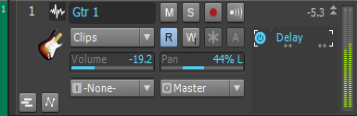 It's the one with "I" in a white box and -None- as its value. Click that. Do you see your Tascam interface in the list of possible inputs ? If yes, select the Tascam + "MIDI Omni" for now. Can you now hear something (or see meter activity) when you play your Roland keyboard ? If you can, then recording should now work. If not, we'll have to go further from here.
Sonar Platinum [2017.10], Win7U x64 sp1, Xeon E5-1620 3.6 GHz, Asus P9X79WS, 16 GB ECC, 128gb SSD, HD7950, Mackie Blackjack
|
frkfir
Max Output Level: -90 dBFS
- Total Posts : 34
- Joined: 2015/12/22 12:20:51
- Status: offline
Re: How to use and "record" visual instrument like "Strings" to a track???
2016/01/28 12:25:49
(permalink)
So,
I did the things the way you told me,
But you didnt tell me what kind of Synth Instrument Track to add, MIDI or Symple,
So I tried rhem both, and unfortunately it is still dont work.
I can't hear something (or see meter activity) when I play on my Roland keyboard.
|
Beepster
Max Output Level: 0 dBFS
- Total Posts : 18001
- Joined: 2012/05/11 19:11:24
- Status: offline
Re: How to use and "record" visual instrument like "Strings" to a track???
2016/01/28 12:59:00
(permalink)
frkfir
So,
I did the things the way you told me,
But you didnt tell me what kind of Synth Instrument Track to add, MIDI or Symple,
So I tried rhem both, and unfortunately it is still dont work.
I can't hear something (or see meter activity) when I play on my Roland keyboard.
He was saying do that on the track you already had working (the one where you had the synth inserted and could get sound from the synth's interface page). So insert your synth the way you did before (the way that worked) then use that Input dropdown to select the MIDI inputs coming from your interface/keyboard. You should really go through the Tutorials at the start of the manual and then navigate to the more in depth explanations in the manual. You should also give the manuals for your keyboard and your interface a read through to make sure there aren't any little tricks or insights holding you up. I'm not going to say these things are "simple" because they aren't but pretty much everything you need to know has been posted here. I think you need to work through it methodically and really understand the fundamentals of what is going on and why. Something, somewhere in the various documentation the answer will reveal itself. That's not meant to be dismissive or rude but I think the process is getting jumbled on your end somehow and some hard study time of the manual(s) should clear it up. FWIW it took me over a year to full understand the interplay between my external MIDI devices, the synths and the tracks in Sonar. If one thing screws up... nothing works. Without looking at your setup I don't think I (or anyone else) could help much more than simply repeating what has already been covered. Good luck.
|
Paul P
Max Output Level: -48.5 dBFS
- Total Posts : 2685
- Joined: 2012/12/08 17:15:47
- Location: Montreal
- Status: offline
Re: How to use and "record" visual instrument like "Strings" to a track???
2016/01/28 13:24:47
(permalink)
frkfir
So,
I did the things the way you told me,
But you didnt tell me what kind of Synth Instrument Track to add, MIDI or Symple,
So I tried rhem both, and unfortunately it is still dont work.
I can't hear something (or see meter activity) when I play on my Roland keyboard.
There is no other kind of "Instrument Track" other than "Simple". There are in total 3 kinds of Tracks : "Simple Instrument", "MIDI" and "Audio". Let's start again. Delete all tracks in your existing project or create a new default project. Select in Sonar's main menu "Insert" + "Soft Synth" + "VST2" + "SI-String Section". ** In your version of Sonar the sequence may not be quite the same. This dialog box will appear, and set yours to be the same. Then click OK.  A "Simple Instrument Track" will appear in your Track View and the SI-String Section plugin will open. Go back to message #27 above and set this track's "Input" as described and let us know what happens. Beepster has some good points to ponder.
Sonar Platinum [2017.10], Win7U x64 sp1, Xeon E5-1620 3.6 GHz, Asus P9X79WS, 16 GB ECC, 128gb SSD, HD7950, Mackie Blackjack
|