kemmrich
Max Output Level: -90 dBFS

- Total Posts : 12
- Joined: 2012/06/14 21:13:48
- Status: offline
I can't figure out how to use Dimension Pro
I searched the forums, tried to find decent looking videos, went through the help file just trying to figure out how to use this Dimension Pro thing. Can it be used as a soft synth (like TTS) where I just tell it to work with a midi track? If so, I don't see any way to accomplish that. I even brought up the standalone version and I couldn't even get the File menu to load in a midi file. I am obviously are missing the BIG first step. Once I get my foot in the door, I should be able to figure it all out. Any good youTube videos that I can watch that would help with this? Every video I found was either a promotional thing or had poor visual quality. Thanks in advance! Kevin
|
tKx5050
Max Output Level: -86 dBFS

- Total Posts : 221
- Joined: 2012/09/10 16:38:51
- Status: offline

Re:I can't figure out how to use Dimension Pro
2013/02/08 12:00:30
(permalink)
I seem to remember you have to run the stand-alone version as Administrator after installing for all the registry settings to be written. Might try that...
Steve Sonar Platinum, Quad-Capture, I7-3770, 32Gb
|
John T
Max Output Level: -7.5 dBFS

- Total Posts : 6783
- Joined: 2006/06/12 10:24:39
- Status: offline
Re:I can't figure out how to use Dimension Pro
2013/02/08 12:00:42
(permalink)
Yes, you can use it just like TTS. How are you adding it to project? Are you using Insert Synth from the Insert menu?
http://johntatlockaudio.com/Self-build PC // 16GB RAM // i7 3770k @ 3.5 Ghz // Nofan 0dB cooler // ASUS P8-Z77 V Pro motherboard // Intel x-25m SSD System Drive // Seagate RAID Array Audio Drive // Windows 10 64 bit // Sonar Platinum (64 bit) // Sonar VS-700 // M-Audio Keystation Pro 88 // KRK RP-6 Monitors // and a bunch of other stuff
|
Grumbleweed_
Max Output Level: -72 dBFS

- Total Posts : 915
- Joined: 2007/11/01 09:13:58
- Location: Southampton, England
- Status: offline
Re:I can't figure out how to use Dimension Pro
2013/02/08 12:03:02
(permalink)
Bear in mind it won't make a sound unless you load a patch!
Grum.
|
daveny5
Max Output Level: 0 dBFS

- Total Posts : 16934
- Joined: 2003/11/06 09:54:36
- Location: North Carolina
- Status: offline
Re:I can't figure out how to use Dimension Pro
2013/02/08 12:03:04
(permalink)
Can it be used as a soft synth (like TTS) where I just tell it to work with a midi track? If so, I don't see any way to accomplish that. It IS a softsynth.... and a good one. All softsynths respond to MIDI data. They don't make any sounds without that. Insert Dimension Pro into the synth rack. If you select Simple Instrument Track from the popup, that's all you need to do. If not, then Dimension Pro will be on a synth track and you need to insert a MIDI track and set the output of the MIDI track to the Dimension Pro. Unlike the TTS-1, however, DPro will only play one sound at a time so for different sounds, you need to load a separate instance of DPro for each. (That's not totally true, there is an advanced function that will let you load 4 sounds into DPro, 1 into each element. See the Help Menu for how to do that.) If you really want to get into Dimension Pro, Cakewalk has a video tutorial that is not too expensive and well worth it if you can get past the instructor's Scottish accent.) :)
Dave Computer: Intel i7, ASROCK H170M, 16GB/5TB+, Windows 10 Pro 64-bit, Sonar Platinum, TASCAM US-16x08, Cakewalk UM-3G MIDI I/F Instruments: SL-880 Keyboard controller, Korg 05R/W, Korg N1R, KORG Wavestation EX Axes: Fender Stratocaster, Line6 Variax 300, Ovation Acoustic, Takamine Nylon Acoustic, Behringer GX212 amp, Shure SM-58 mic, Rode NT1 condenser mic. Outboard: Mackie 1402-VLZ mixer, TC Helicon VoiceLive 2, Digitech Vocalist WS EX, PODXTLive, various stompboxes and stuff. Controllers: Korg nanoKONTROL, Wacom Bamboo Touchpad
|
kemmrich
Max Output Level: -90 dBFS
- Total Posts : 12
- Joined: 2012/06/14 21:13:48
- Status: offline
Re:I can't figure out how to use Dimension Pro
2013/02/08 12:09:14
(permalink)
tKx5050: I finally ran it as an administrator yesterday so I could register it! When I run the standalone dimension pro as an administrator the only option under the File menu was Exit -- is that what you see also? There seems to be nothing in the help file about the menu system at all. Thanks for responding!
John T: I set up a test project with TTS and dimension pro loaded and one midi file (both from Insert Synth from Insert menu). It was a snap to get sound out of the TTS, but no luck with dimension pro. I tried to get the set up the same between them, but again I think I am missing one important piece of information! Thanks! Kevin
|
John
Forum Host

- Total Posts : 30467
- Joined: 2003/11/06 11:53:17
- Status: offline
Re:I can't figure out how to use Dimension Pro
2013/02/08 12:12:20
(permalink)
Its not so much a soft synth as a soft synth sample player. Without loading a patch it will make no sound. In Dim Pro speak its a program that needs to be loaded.
|
John T
Max Output Level: -7.5 dBFS
- Total Posts : 6783
- Joined: 2006/06/12 10:24:39
- Status: offline
Re:I can't figure out how to use Dimension Pro
2013/02/08 12:13:34
(permalink)
If I recall correctly, the standalone version doesn't play back midi files; you play it directly from a controller keyboard.
http://johntatlockaudio.com/Self-build PC // 16GB RAM // i7 3770k @ 3.5 Ghz // Nofan 0dB cooler // ASUS P8-Z77 V Pro motherboard // Intel x-25m SSD System Drive // Seagate RAID Array Audio Drive // Windows 10 64 bit // Sonar Platinum (64 bit) // Sonar VS-700 // M-Audio Keystation Pro 88 // KRK RP-6 Monitors // and a bunch of other stuff
|
kemmrich
Max Output Level: -90 dBFS
- Total Posts : 12
- Joined: 2012/06/14 21:13:48
- Status: offline
Re:I can't figure out how to use Dimension Pro
2013/02/08 12:21:30
(permalink)
grumbleweed4162: I am pretty sure I loaded a patch (it has been a week or so), but I'll try again today.
daveny5: It certainly seems that I was doing it correctly (but I obviously wasn't!). I'll try again tonight. -- and try the "simple instrument track" as another way of doing. Thanks for all the prompt and helpful responses! Kevin
|
Grumbleweed_
Max Output Level: -72 dBFS
- Total Posts : 915
- Joined: 2007/11/01 09:13:58
- Location: Southampton, England
- Status: offline
Re:I can't figure out how to use Dimension Pro
2013/02/08 12:24:00
(permalink)
John T
If I recall correctly, the standalone version doesn't play back midi files; you play it directly from a controller keyboard.
You are correct. Just last night I had a play with the standalone versions of Dim Pro, Rapture and Zeta 2. Great fun. Grum.
|
daveny5
Max Output Level: 0 dBFS
- Total Posts : 16934
- Joined: 2003/11/06 09:54:36
- Location: North Carolina
- Status: offline
Re:I can't figure out how to use Dimension Pro
2013/02/08 12:38:33
(permalink)
If I just want to play my keyboard, I usually will just run the standalone versions of Dimension, Rapture, and Z3tA+ 2. Those all have the "microhost".
Dave Computer: Intel i7, ASROCK H170M, 16GB/5TB+, Windows 10 Pro 64-bit, Sonar Platinum, TASCAM US-16x08, Cakewalk UM-3G MIDI I/F Instruments: SL-880 Keyboard controller, Korg 05R/W, Korg N1R, KORG Wavestation EX Axes: Fender Stratocaster, Line6 Variax 300, Ovation Acoustic, Takamine Nylon Acoustic, Behringer GX212 amp, Shure SM-58 mic, Rode NT1 condenser mic. Outboard: Mackie 1402-VLZ mixer, TC Helicon VoiceLive 2, Digitech Vocalist WS EX, PODXTLive, various stompboxes and stuff. Controllers: Korg nanoKONTROL, Wacom Bamboo Touchpad
|
tKx5050
Max Output Level: -86 dBFS
- Total Posts : 221
- Joined: 2012/09/10 16:38:51
- Status: offline
Re:I can't figure out how to use Dimension Pro
2013/02/08 12:49:31
(permalink)
You don't say what version of Sonar you're running or what comfort level you're at with softsynth's, so please don't take offense.
I have a Test project that I use to figure things out and so it I trash it, no problem.
Why don't you create a test project, add DimPro as a simple instrument track for now, load a patch, with the DimPro track selected, open the PRV, start clicking on the piano keys and see if you're getting playback. If yes, you can draw-in the notes you want or add a midi file to the track.
After getting use to it, if you're still having problems with multiple synths, let us know and we'll try to help.
Steve Sonar Platinum, Quad-Capture, I7-3770, 32Gb
|
AT
Max Output Level: 0 dBFS
- Total Posts : 10654
- Joined: 2004/01/09 10:42:46
- Location: TeXaS
- Status: offline
Re:I can't figure out how to use Dimension Pro
2013/02/08 13:15:46
(permalink)
Load DimPro.
Make sure a Program is loaded.
Make sure the midi controller is set to midi channel1. DimPro responds to 1-4 channels if you have it set for multitimbral. Otherwise, all 4 elements respond to the channel it is set to.
Play.
If it is not loading in a program hit F5 to refresh the browser. Load from browser.
If still having problems, houston, we have a problem. it might be install. I just installed SONAR P on a new 64 bit computer and there is a stranded mutisample folder in C: It is best to talk to tech support. This is a user forum, and while generally knowledgable and helpful and well tempered (and handsome, too - well most of us anyway), it can be hard to fix an anomaly.
The first step to helping us help yourself (and practice for tech support) is to list your system, daw and the process you are doing - step by step.
PS - tts is a gm synth and probably responds to all midi channels w/ one instance and all notes. Dimpro responds to a single channel and, depending upon the patch, not all notes. ONly a dozen keys or so respond if you have a drum, bass doesn't necessary extend above C, and strings and such only respond in their natural range.
@
https://soundcloud.com/a-pleasure-dome
http://www.bnoir-film.com/ there came forth little children out of the city, and mocked him, and said unto him, Go up, thou bald head; go up, thou bald head. 24 And he turned back, and looked on them, and cursed them in the name of the Lord. And there came forth two she bears out of the wood, and tare forty and two children of them.
|
kemmrich
Max Output Level: -90 dBFS
- Total Posts : 12
- Joined: 2012/06/14 21:13:48
- Status: offline
Re:I can't figure out how to use Dimension Pro
2013/02/08 13:20:01
(permalink)
tKx5050: No offense taken, I have sonar x1 producer -- but I have mostly used sonar 8.5.3 studio with audio tracks. Most midi that I have done has been through a kurzweil PC88 keyboard supplying the audio or the TTS softsynth.
I have done some OK stuff with midi, but it is so sporadic, that I have to relearn everything every time it seems. I did set up a test project in X1 and loaded TTS softsynth and a midi track -- easy.
I am really surprised there are no low-level beginner tutorial videos on using dimension pro with a standalone midi track -- maybe not too many people do that. I have a cheesy midi brass horn section, and I wanted to try and get a better sound from it. hence, I thought I would see what dimension pro had to offer.
|
kemmrich
Max Output Level: -90 dBFS
- Total Posts : 12
- Joined: 2012/06/14 21:13:48
- Status: offline
Re:I can't figure out how to use Dimension Pro
2013/02/08 13:28:28
(permalink)
AT: Thanks for chiming in. I'll go back to the drawing board and come back when I have a better list of steps. I just figured someone would say "Hey, here's a great video on YouTube -- go watch that" or "everything you need to know in the help file in section xxx". I don't mind figuring stuff out -- I just can't find ANY technical information on how to use dimension pro with an existing midi file. It seems that unless you are playing through dimension "live" all the time, once you have recorded you part, you are using an "existing midi file".
The responses here have been great, though -- it just means I don't really have a good enough understanding of what dimension pro really is. Kevin
|
tKx5050
Max Output Level: -86 dBFS
- Total Posts : 221
- Joined: 2012/09/10 16:38:51
- Status: offline
Re:I can't figure out how to use Dimension Pro
2013/02/08 13:43:33
(permalink)
I know, I find myself having to relearn certain aspects all the time. If you're triggering from a keyboard the track that receives input is the one that is selected. Don't know if this will help http://www.youtube.com/watch?v=-2bRI-GP79k
Steve Sonar Platinum, Quad-Capture, I7-3770, 32Gb
|
Bristol_Jonesey
Max Output Level: 0 dBFS
- Total Posts : 16775
- Joined: 2007/10/08 15:41:17
- Location: Bristol, UK
- Status: offline
Re:I can't figure out how to use Dimension Pro
2013/02/08 15:00:07
(permalink)
You need to load a program by clicking on "Empty Program" and then select one by double clicking it in the Browser 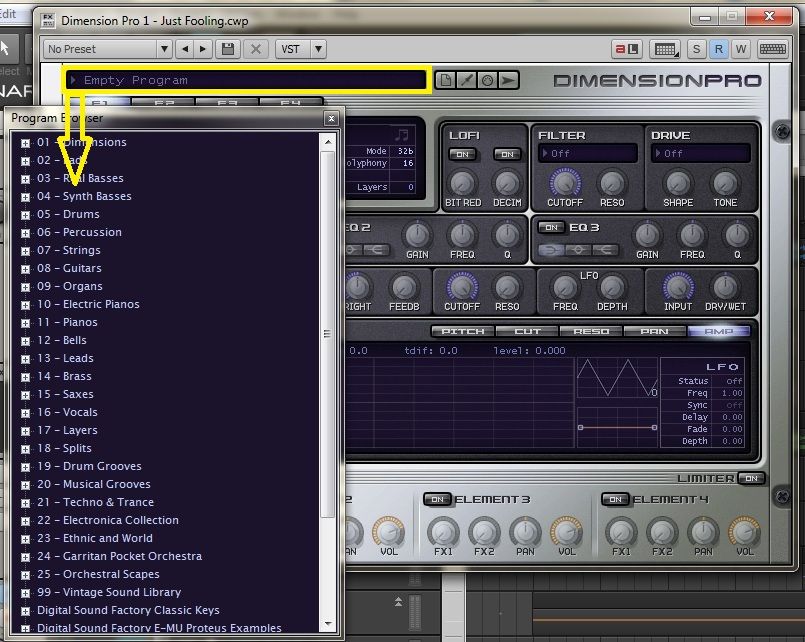
CbB, Platinum, 64 bit throughoutCustom built i7 3930, 32Gb RAM, 2 x 1Tb Internal HDD, 1 x 1TB system SSD (Win 7), 1 x 500Gb system SSD (Win 10), 2 x 1Tb External HDD's, Dual boot Win 7 & Win 10 64 Bit, Saffire Pro 26, ISA One, Adam P11A,
|
kemmrich
Max Output Level: -90 dBFS
- Total Posts : 12
- Joined: 2012/06/14 21:13:48
- Status: offline
Re:I can't figure out how to use Dimension Pro
2013/02/08 17:07:07
(permalink)
Hey I am getting sound out!!! I guess the main problem I had is that when I loaded the dimension pro as a soft synth, I wasn't checking to show the "synth property page" and the "synth rack view" -- so I wasn't setting a program as required.
Once I closed those windows I had the hardest time trying to figure out how to bring them back up! I thought I had clicked on the little symbol that brings that stuff up -- but I guess I didn't.
The good news is it is working. The bad news is that the midi file I have is not too good. I guess I should crank up the keyboard and compose my own horn section. Thanks for all the help -- I knew I was missing just one step in getting started.
|
AT
Max Output Level: 0 dBFS
- Total Posts : 10654
- Joined: 2004/01/09 10:42:46
- Location: TeXaS
- Status: offline
Re:I can't figure out how to use Dimension Pro
2013/02/08 21:04:50
(permalink)
Horns? Usually they are restricted in the range of notes. that might be the problem if the midi file is playing the notes on a midi channel DimPro ain't set to or if the "range" is off.
But glad it is at least making noise. That is about all I can do, anyway. ;-)
https://soundcloud.com/a-pleasure-dome
http://www.bnoir-film.com/ there came forth little children out of the city, and mocked him, and said unto him, Go up, thou bald head; go up, thou bald head. 24 And he turned back, and looked on them, and cursed them in the name of the Lord. And there came forth two she bears out of the wood, and tare forty and two children of them.
|