Beepster
Max Output Level: 0 dBFS

- Total Posts : 18001
- Joined: 2012/05/11 19:11:24
- Status: offline
I can't find BFD...
I asked up stairs but I'm not getting any takers. I've attempted scanning but I think I'm doing something wrong. It was right there in X1. Can you guys help? Thanks.
|
daryl1968
Max Output Level: 0 dBFS
- Total Posts : 10984
- Joined: 2010/06/01 22:51:43
- Location: Englishman in deepest, darkest Wales
- Status: offline

Re:I can't find BFD...
2012/09/26 15:08:45
(permalink)
Beepster, have you looked down the back of the sofa?
|
Beepster
Max Output Level: 0 dBFS
- Total Posts : 18001
- Joined: 2012/05/11 19:11:24
- Status: offline
Re:I can't find BFD...
2012/09/26 15:13:42
(permalink)
|
Beepster
Max Output Level: 0 dBFS
- Total Posts : 18001
- Joined: 2012/05/11 19:11:24
- Status: offline
Re:I can't find BFD...
2012/09/26 15:14:44
(permalink)
Anyway, as soon as I posted this a couple people chimed in. I thought Sonar was supposed to scan for this stuff on startup? This is screwing up my plans for the day.
|
daryl1968
Max Output Level: 0 dBFS
- Total Posts : 10984
- Joined: 2010/06/01 22:51:43
- Location: Englishman in deepest, darkest Wales
- Status: offline
Re:I can't find BFD...
2012/09/26 15:15:47
(permalink)
Beepster
I don't own a sofa. :-(
I'm sorry. Me and my big mouth. Commiserations. Have you looked in the top drawer in the kitchen?
|
spacey
Max Output Level: 0 dBFS
- Total Posts : 8769
- Joined: 2004/05/03 18:53:44
- Status: offline
Re:I can't find BFD...
2012/09/26 15:16:53
(permalink)
If you know where the .dll is located you can point the scan to it.
I've had to do that...don't remember what it was for though.
|
Beepster
Max Output Level: 0 dBFS
- Total Posts : 18001
- Joined: 2012/05/11 19:11:24
- Status: offline
Re:I can't find BFD...
2012/09/26 15:21:50
(permalink)
I'm having a hard time pinpointing where it is and the scan tool is confusing the heck out of me. This seems unnecessarily complicated. I'm pretty danged sure when I installed Eco it tossed the main program into the Cakewalk VST folders but trying to dig through mess is needle in a haystack levels of infuriating.
|
julibee
Max Output Level: -47 dBFS

- Total Posts : 2826
- Joined: 2008/03/28 17:38:15
- Location: San Marcos, CA
- Status: offline
Re:I can't find BFD...
2012/09/26 15:26:27
(permalink)
Beep, can you search your hard drive (not from within sonar) for the location? Memorize the path (or I suppose you could copy it) and go back to the scan tool and make sure that folder is being scanned?
post edited by julibee - 2012/09/26 15:29:42
|
Beepster
Max Output Level: 0 dBFS
- Total Posts : 18001
- Joined: 2012/05/11 19:11:24
- Status: offline
Re:I can't find BFD...
2012/09/26 15:38:26
(permalink)
Thanks, Julibee... I THINK I've found where it is (My Docs > FXpansion) but when I add that folder and press the scan button nothing comes up in the browser. I tried clicking OK then closing X2 to see if that was the right way to do it but nope. I'm just screwing this up somehow. I dug through the Garrigus book and couldn't find anything and the X2 help file on this is just confusing. Maybe I'll just stare at that help file until it sinks in. This should not be this difficult.
|
daryl1968
Max Output Level: 0 dBFS
- Total Posts : 10984
- Joined: 2010/06/01 22:51:43
- Location: Englishman in deepest, darkest Wales
- Status: offline
Re:I can't find BFD...
2012/09/26 15:42:29
(permalink)
ok, sorry to be an arse before.
When you have done all the scans etc, where are you looking for it?
|
daryl1968
Max Output Level: 0 dBFS
- Total Posts : 10984
- Joined: 2010/06/01 22:51:43
- Location: Englishman in deepest, darkest Wales
- Status: offline
Re:I can't find BFD...
2012/09/26 15:43:48
(permalink)
daryl1968
ok, sorry to be an arse before.
When you have done all the scans etc, where are you looking for it?
I mean, are you going straight back to the project and trying to add BFD somewhere from a list?
|
julibee
Max Output Level: -47 dBFS
- Total Posts : 2826
- Joined: 2008/03/28 17:38:15
- Location: San Marcos, CA
- Status: offline
Re:I can't find BFD...
2012/09/26 16:26:38
(permalink)
Is it an issue with 32 vs 64 bit? I don't even know if BFD is 32 or 64 or Both... But I know some of mine don't appear where I think they will due to some being 32 and some being 64 and windows storing them in different places.
|
Beepster
Max Output Level: 0 dBFS
- Total Posts : 18001
- Joined: 2012/05/11 19:11:24
- Status: offline
Re:I can't find BFD...
2012/09/26 16:30:29
(permalink)
I think I've got it figured out guys. I was looking in the wrong places but there was no way for me to know where to look so I uninstalled BFD and watched where it installed, pointed to that folder, scan and I got BFD 32 bit. I wanted 64 bit but I think I screwed up the BFD install so I'm about to try again. Making a bleeding mess of my computer too. I'm gonna wiping the system at some point anyway so I guess it doesn't matter. Cheers and thanks.
|
bapu
Max Output Level: 0 dBFS

- Total Posts : 86000
- Joined: 2006/11/25 21:23:28
- Location: Thousand Oaks, CA
- Status: offline
Re:I can't find BFD...
2012/09/26 16:37:17
(permalink)
Beeps: This is what you are looking for (and chances are it was NOT installed in My Docs, that is usually for settings etc.) Look for BFD2.dll. 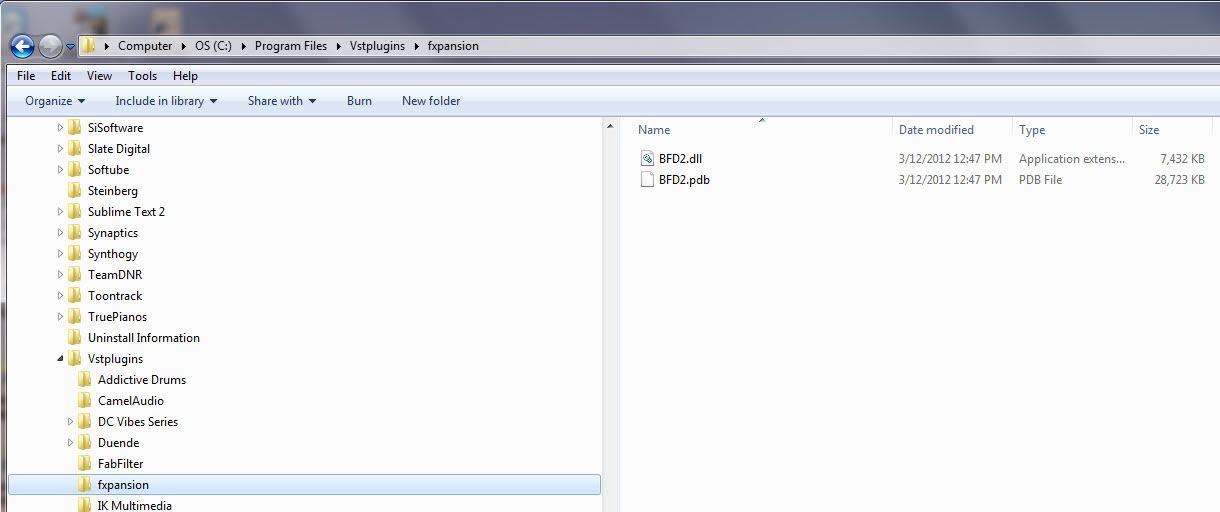 Next, scan is both complicated and simple, here is my Preferences screen for VST scan: 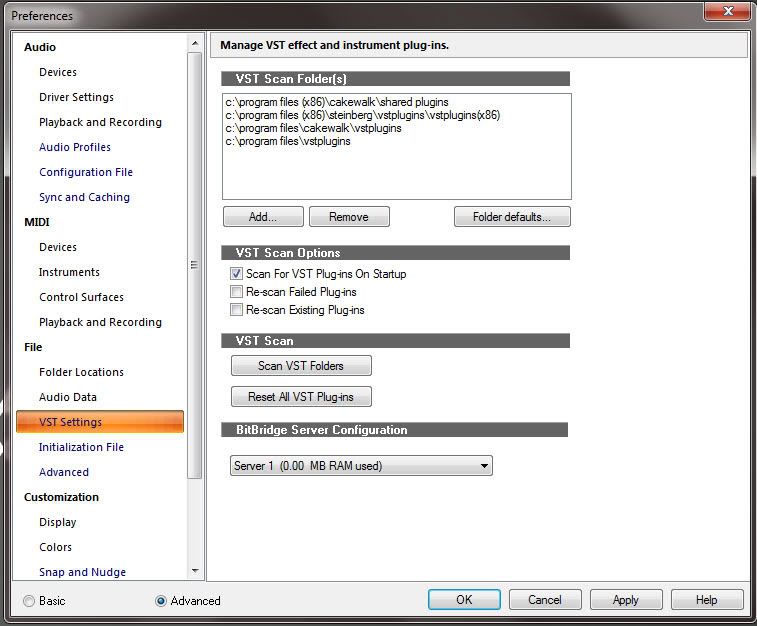 Notice how I have Scan For VST Plug-ins On Startup checked. Notice how I have multiple locations to scan. That was my choice on how I installed my plugs. Sometimes you need to do a "one time" Re-Scan Existing Plug-ins. Just remember to turn it off before you exit SONAR or it will start all over again if you have Scan For VST Plug-ins On Startup checked.
|
Beepster
Max Output Level: 0 dBFS
- Total Posts : 18001
- Joined: 2012/05/11 19:11:24
- Status: offline
Re:I can't find BFD...
2012/09/26 16:41:48
(permalink)
Thanks, bapu. I just put myself through a crash course in VST scanning. I got it sorted now but I've got to reinstall Eco again because I think I forgot to check off the 64 bit version. I also have a doubled up content folder on my E drive and I'm about to have a third. I guess I should just delete those folders before reinstalling. This is the type of stuff that REALLY annoys me about DAWs. Should not be this complex. Cheers.
|
Beepster
Max Output Level: 0 dBFS
- Total Posts : 18001
- Joined: 2012/05/11 19:11:24
- Status: offline
Re:I can't find BFD...
2012/09/26 16:42:48
(permalink)
BTW your scan window looks very similar to what mine does now. ;-)
|
bapu
Max Output Level: 0 dBFS
- Total Posts : 86000
- Joined: 2006/11/25 21:23:28
- Location: Thousand Oaks, CA
- Status: offline
Re:I can't find BFD...
2012/09/26 16:56:46
(permalink)
Beepster
Thanks, bapu. I just put myself through a crash course in VST scanning. I got it sorted now but I've got to reinstall Eco again because I think I forgot to check off the 64 bit version. I also have a doubled up content folder on my E drive and I'm about to have a third. I guess I should just delete those folders before reinstalling. This is the type of stuff that REALLY annoys me about DAWs. Should not be this complex. Cheers.
WHAT??!!?? I have 32 and 64 bit BFD2 on my system and the only use one instance of the content. Samples are NOT bit-rate bound to the vsti (32bit vs 64bit plug). If you mean double the content because of BFD2 and Eco, that different. Yes they are different content folders and IIRC they are not really interchangeable. HTH.
|
bapu
Max Output Level: 0 dBFS
- Total Posts : 86000
- Joined: 2006/11/25 21:23:28
- Location: Thousand Oaks, CA
- Status: offline
Re:I can't find BFD...
2012/09/26 17:01:01
(permalink)
Beepster,
I've found that is it wise to accept what a VSTi manufacturer does in terms of content installation other than specifically designating content location and I never "mix" inter-company product content. IOW, I keep EZdrummer content separate from Superior Drummer content and I keep Eco content separate from BFD2 content.
|
bapu
Max Output Level: 0 dBFS
- Total Posts : 86000
- Joined: 2006/11/25 21:23:28
- Location: Thousand Oaks, CA
- Status: offline
Re:I can't find BFD...
2012/09/26 17:02:34
(permalink)
Do recognize that I no longer have Eco installed. The above was just an "example". But it was real when there were only 32bit versions. Then I had Eco and BFD2 both installed.
|
Beepster
Max Output Level: 0 dBFS
- Total Posts : 18001
- Joined: 2012/05/11 19:11:24
- Status: offline
Re:I can't find BFD...
2012/09/26 17:13:49
(permalink)
It's cool, bapu. I appreciate all the insight... I certainly need it in this area. I realized what the 64 bit issue was. I was using the wrong installer from the files I downloaded many moons ago. I actually have been letting the program part of it install where it wants (x86) and then installing the data on my E drive under a folder I created named BFD Eco. I think the uninstaller MAY have gotten rid of the centents of that folder but left the folder in place so I just deleted it and started from scratch. This is one of those times my Complete Beginners threads paid of. I went back to that original thread and followed my own instructions and it looks like things are working. lol... Thanks, man.
|
bapu
Max Output Level: 0 dBFS
- Total Posts : 86000
- Joined: 2006/11/25 21:23:28
- Location: Thousand Oaks, CA
- Status: offline
Re:I can't find BFD...
2012/09/26 17:14:37
(permalink)
|
Beepster
Max Output Level: 0 dBFS
- Total Posts : 18001
- Joined: 2012/05/11 19:11:24
- Status: offline
Re:I can't find BFD...
2012/09/26 17:23:04
(permalink)
SONNUVA... BFD 64 bit is DEFINITELY installed now because I just opened it as a standalone but X2 is still only seeing the 32 bit version after scanning every I can think of. GAAARRRRRR!!!!
|
Beepster
Max Output Level: 0 dBFS
- Total Posts : 18001
- Joined: 2012/05/11 19:11:24
- Status: offline
Re:I can't find BFD...
2012/09/26 18:30:10
(permalink)
I figured it out. I just posted this in my thread up stairs but it was a team effort between this thread and that one to educate ole Beepster so I'm gonna paster my solution and thanks here as well... seriously thanks guys:
Holy bleeping jebus poop crackers! It turns out I had NOT solved the problem and spent the past hour trying to figure it out. It turns out BFD Eco just throws itself willy nilly all over the darned C drive... AND there is an issue where unless you have the latest update from august it sometimes won't show up in the host at all even if you do manage to find all the files.
So first I reinstalled BFD. Then I made sure I had the latest update (Version 1.5.1.5) from my FXpansion account. As I installed that update I wrote down every one of the install paths. Here they are... tell me if this makes ANY kind of sense...
VST Plugin Path (32 Bit) = C:\Program Files(x86)\VSTPlugins
App Path (32 Bit) = C:\Program Files(x86)\FXpansion\BFD Eco
VST Path (64 Bit) = C:\Program Files\Common Files\Steinberg\VST2
App Path (64 Bit) = C:\Program Files\FXpansion\BFD Eco
It's in completely different folders! So I added all those to the Sonar VST scan thingy, checked off the ReScan options and let it do its thing. I figure this HAS to work. Well I didn't see anything implying BFD 64 bit in my browser BUT there was a new option that simply said BFD Eco. I inserted that into the track view and clicked the little question mark options button in the BFD GUI, went to the About option and SUCCESS! It was telling me that it was the 64 bit version.
I'm pretty mad I wasted my afternoon screwing around with this but at least I know FAR more about how to use the VST scanner (of which I knew NOTHING before today) and I can use BFD 64 bit. What I DON'T get is why I could see it in X1 after a relatively easy install but it turned into this enormous screw around in X2. Obviously this isn't a Sonar issue but the help menu entry on the scanner was no help at all. You wouldn't be able to understand it unless you already knew how to use it. It IS however a really bad default installation which is on FXpansion. We're not all computer geniuses yanno?
Anyway... my anger and frustration is subsiding now and I'm glad it worked out in the end. You guys, as usual, totally saved my sorry arse and I thank you profusely. Cheers.
|
Beepster
Max Output Level: 0 dBFS
- Total Posts : 18001
- Joined: 2012/05/11 19:11:24
- Status: offline
Re:I can't find BFD...
2012/09/26 20:34:14
(permalink)
Alright... I am calm again. Sorry for the outburst. I try to be an even tempered individual but I do occasionally pop. This was one of those times. Just wanna make some music, yanno? Thanks again for the help and I hope no one thinks less of me for losing my cool. Cheers.
|
Beepster
Max Output Level: 0 dBFS
- Total Posts : 18001
- Joined: 2012/05/11 19:11:24
- Status: offline
Re:I can't find BFD...
2012/09/26 20:37:53
(permalink)
Also in my rage I managed to delete the Rock Legends kit which is now reinstalled. As usual anger helped nothing and only made things worse. Calm blue ocean, calm blue ocean, calm blue ocean... ;-)
|