Installed Platinum - No Audio Waveform - Solved
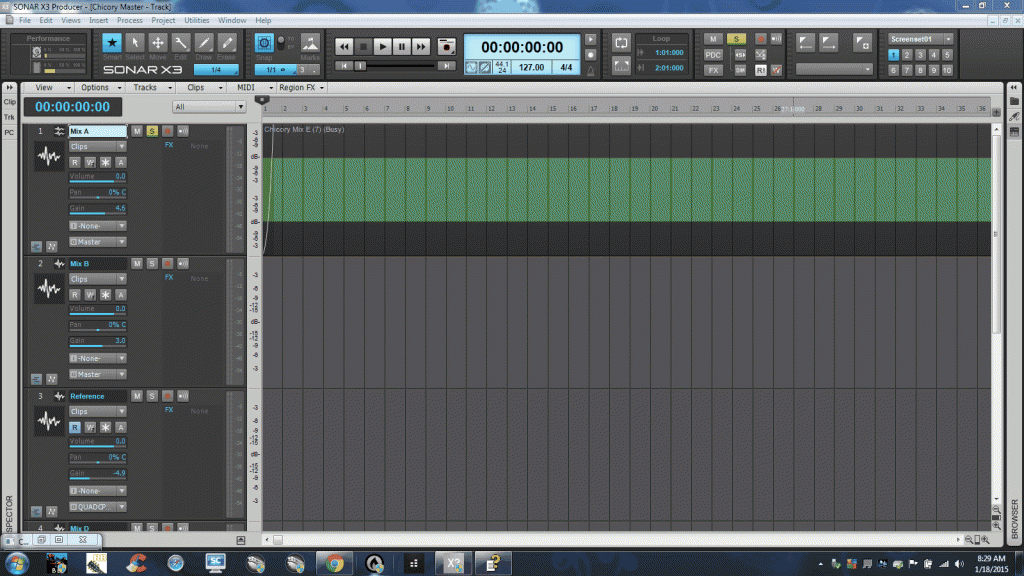
The install was easy, except that now in I'm getting the 'Busy' message on clips, the waveform is not displayed, and I cannot Play the clip. I'm using two drives, C: and Z:, projects are stored on Z: and I've always used the 'Per Project Folders For Audio' option.
In Preferences, C:/Cakewalk Projects/Picture Cache is the path, but I don't see that folder on the C: drive? Maybe it's a hidden folder. I didn't check yet.
During the install SONAR found previous settings and I selected 'Yes' to use them.
This screen capture is of X3, but it's the same problem in Platinum. I assume it's a path/file location problem.
Any suggestions? Thanks.
post edited by olemon - 2015/01/18 10:29:00
https://www.reverbnation.com/scottholson Platinum, Studio One 3 Pro, Win 10 (x64), AMD FX-8350, ASUS M5A97 R2.0, 16GB, RME UCX, Digimax DP88, Faderport 8, Revive Audio Mod Studio Channel, Vintage Audio M72, Summit Audio TLA-50, KRK Rokit 5 G2 Monitors, Guitars
"If you wait till the last minute, it only takes a minute."