Mesh
Max Output Level: 0 dBFS

- Total Posts : 27360
- Joined: 2009/11/27 14:08:08
- Location: Online right here!
- Status: offline
Just a general question here......
I have a ASUS 24" Full HD 1920x1080 monitor that's already setup on my DAW and want to add a second monitor (32" Samsung LED 720p TV). My graphics card (in my sig) has 1 HDMI & 1 DVI. I don't have a lot of space on my computer desk and have to use the top shelf (about 2 1/2 feet higher than the desk top) for the 32" (which I'll be using it as a TV as well).
Since I only have 1 HDMI & 1 DVI, which monitor should I use the HDMI on? Or should I just get an DVI to HDMI converter and use both as HDMI?
The audio for will be going through my Focusrite 2i4 and don't need any audio via the monitors........I just want the bigger one for internet TV/movie purposes and when I'm on Sonar as a second monitor.
Platinum Gaming DAW: AsRock Z77 Overclock FormulaI7 3770k @ 4.5GHz : 16GB RAM G.Skill Ripjaws X 250GB OS SSD : 3TB HDD : 1TB Sample HDDWin 10 Pro x 64 : NH-D14 CPU Cooler HIS IceQ 2GB HD 7870Focusrite Scarlett 2i4The_Forum_Monkeys
|
Mesh
Max Output Level: 0 dBFS
- Total Posts : 27360
- Joined: 2009/11/27 14:08:08
- Location: Online right here!
- Status: offline

Re: Just a general question here......
2016/05/18 13:17:49
(permalink)
Nobody knows? 
Platinum Gaming DAW: AsRock Z77 Overclock FormulaI7 3770k @ 4.5GHz : 16GB RAM G.Skill Ripjaws X 250GB OS SSD : 3TB HDD : 1TB Sample HDDWin 10 Pro x 64 : NH-D14 CPU Cooler HIS IceQ 2GB HD 7870Focusrite Scarlett 2i4The_Forum_Monkeys
|
bayoubill
Max Output Level: 0 dBFS
- Total Posts : 10899
- Joined: 2009/04/27 06:11:12
- Location: Shreveport Louisiana
- Status: offline
Re: Just a general question here......
2016/05/18 13:22:30
(permalink)
Seems to me that you should use the HDMI for the TV,IMHO.
My question is Can I come over to YOUR house?
Nice!
|
Mesh
Max Output Level: 0 dBFS
- Total Posts : 27360
- Joined: 2009/11/27 14:08:08
- Location: Online right here!
- Status: offline
Re: Just a general question here......
2016/05/18 13:33:39
(permalink)
bayoubill
Seems to me that you should use the HDMI for the TV,IMHO.
My question is Can I come over to YOUR house?
Nice!

Platinum Gaming DAW: AsRock Z77 Overclock FormulaI7 3770k @ 4.5GHz : 16GB RAM G.Skill Ripjaws X 250GB OS SSD : 3TB HDD : 1TB Sample HDDWin 10 Pro x 64 : NH-D14 CPU Cooler HIS IceQ 2GB HD 7870Focusrite Scarlett 2i4The_Forum_Monkeys
|
bapu
Max Output Level: 0 dBFS

- Total Posts : 86000
- Joined: 2006/11/25 21:23:28
- Location: Thousand Oaks, CA
- Status: offline
Re: Just a general question here......
2016/05/18 13:53:15
(permalink)
☄ Helpfulby Mesh 2016/05/18 14:27:03
My experience with two monitors is that both must have the same resolution.
Meaning, if I am correct, you need to setup the system to the lower of the highest resolution of both devices.
When I tried dual monitors that were not capable of the highest resolution monitor things got weird.
|
bapu
Max Output Level: 0 dBFS
- Total Posts : 86000
- Joined: 2006/11/25 21:23:28
- Location: Thousand Oaks, CA
- Status: offline
Re: Just a general question here......
2016/05/18 13:53:40
(permalink)
☼ Best Answerby Mesh 2016/05/18 15:42:28
And then again I could just be a wanker.
|
Mesh
Max Output Level: 0 dBFS
- Total Posts : 27360
- Joined: 2009/11/27 14:08:08
- Location: Online right here!
- Status: offline
Re: Just a general question here......
2016/05/18 14:10:13
(permalink)
bapu
My experience with two monitors is that both must have the same resolution.
Meaning, if I am correct, you need to setup the system to the lower of the highest resolution of both devices.
When I tried dual monitors that were not capable of the highest resolution monitor things got weird.
Good point.....I hadn't thought of the resolution affecting the setup.... Hopefully, my graphics card has an option in its software to deal with that......IDK.....will check that out tonight.
Platinum Gaming DAW: AsRock Z77 Overclock FormulaI7 3770k @ 4.5GHz : 16GB RAM G.Skill Ripjaws X 250GB OS SSD : 3TB HDD : 1TB Sample HDDWin 10 Pro x 64 : NH-D14 CPU Cooler HIS IceQ 2GB HD 7870Focusrite Scarlett 2i4The_Forum_Monkeys
|
Beagle
Max Output Level: 0 dBFS
- Total Posts : 50621
- Joined: 2006/03/29 11:03:12
- Location: Fort Worth, TX
- Status: offline
Re: Just a general question here......
2016/05/18 14:57:08
(permalink)
☄ Helpfulby bapu 2016/05/18 15:14:49
bapu
My experience with two monitors is that both must have the same resolution.
Meaning, if I am correct, you need to setup the system to the lower of the highest resolution of both devices.
When I tried dual monitors that were not capable of the highest resolution monitor things got weird.
That's when things got weird?
|
bapu
Max Output Level: 0 dBFS
- Total Posts : 86000
- Joined: 2006/11/25 21:23:28
- Location: Thousand Oaks, CA
- Status: offline
Re: Just a general question here......
2016/05/18 14:57:57
(permalink)
Beagle
bapu
My experience with two monitors is that both must have the same resolution.
Meaning, if I am correct, you need to setup the system to the lower of the highest resolution of both devices.
When I tried dual monitors that were not capable of the highest resolution monitor things got weird.
That's when things got weird?
Well..... weirder.
|
Mesh
Max Output Level: 0 dBFS
- Total Posts : 27360
- Joined: 2009/11/27 14:08:08
- Location: Online right here!
- Status: offline
Re: Just a general question here......
2016/05/18 15:19:46
(permalink)
Platinum Gaming DAW: AsRock Z77 Overclock FormulaI7 3770k @ 4.5GHz : 16GB RAM G.Skill Ripjaws X 250GB OS SSD : 3TB HDD : 1TB Sample HDDWin 10 Pro x 64 : NH-D14 CPU Cooler HIS IceQ 2GB HD 7870Focusrite Scarlett 2i4The_Forum_Monkeys
|
soens
Max Output Level: -23.5 dBFS

- Total Posts : 5154
- Joined: 2005/09/16 03:19:55
- Location: Location: Location
- Status: offline
Re: Just a general question here......
2016/05/18 17:55:43
(permalink)
☄ Helpfulby Mesh 2016/05/19 08:50:48
Use the HDMI for the HD monitor. Of course, you can always try them out either way to see if there's a difference.
Just MHO but it's always nice to have both monitors the same resolution, but they don't have to be, you just won't have the same screen coverage. Your TV is only 720p which means the resolution is probably only 1366 x 768 so you'll loose some coverage over the ASUS. It makes for an odd viewing experience.
I bought a 1920x1080 32" 1080p TV to use as a 2nd monitor but wasn't impressed with the screen quality so I don't use it for that anymore. To my eyes TVs as computer monitors aren't as good as a computer monitors. Like you I also have an ASUS 24" HD monitor which looks much better than the 1080p TV. If it were me I'd go with an identical 24" monitor and leave the TV as a TV.
|
bapu
Max Output Level: 0 dBFS
- Total Posts : 86000
- Joined: 2006/11/25 21:23:28
- Location: Thousand Oaks, CA
- Status: offline
Re: Just a general question here......
2016/05/18 18:03:39
(permalink)
BTW MeshodMan,
Who's the general in this story?
|
craigb
Max Output Level: 0 dBFS
- Total Posts : 41704
- Joined: 2009/01/28 23:13:04
- Location: The Pacific Northwestshire
- Status: offline
Re: Just a general question here......
2016/05/18 19:41:25
(permalink)
Mesh
Nobody knows?
The question was too general. 
Time for all of you to head over to Beyond My DAW!
|
ston
Max Output Level: -71 dBFS

- Total Posts : 965
- Joined: 2008/03/04 12:28:40
- Status: offline
Re: Just a general question here......
2016/05/19 04:58:35
(permalink)
☄ Helpfulby Mesh 2016/05/19 08:50:53
Both digital (there is an analog-y variant of the DVI connector, but let's not go there), you can just use a cable to go DVI->HDMI, so connect 'em up however you want. Won't be a fat lot of difference either way though tbh.
Extend the desktop in the graphcs settings then you can set different resolutions for both screens. In Windows 10 (from 8 onwards I believe), you can even set a different background picture, Wowzah Windows! ;-)
|
Beagle
Max Output Level: 0 dBFS
- Total Posts : 50621
- Joined: 2006/03/29 11:03:12
- Location: Fort Worth, TX
- Status: offline
Re: Just a general question here......
2016/05/19 08:22:51
(permalink)
Seriously, Mesh? A REAL question about computers in the Coffee Hause? shouldn't this be moved to the Computer forum????
|
Mesh
Max Output Level: 0 dBFS
- Total Posts : 27360
- Joined: 2009/11/27 14:08:08
- Location: Online right here!
- Status: offline
Re: Just a general question here......
2016/05/19 08:47:53
(permalink)
☄ Helpfulby bapu 2016/05/19 09:37:15
Beagle
Seriously, Mesh? A REAL question about computers in the Coffee Hause? shouldn't this be moved to the Computer forum????
Since it's just a "general" question AND there's a lot more "general" traffic in the CH, I made a "general's" decision to post it here  . Of course, if you do feel it needs to be moved to the Computer Forum, I have no problem bruddah......(however, it does relate to more or less a "home theatre" (lo-fi) setting than an actual technical/Computer forum Pro setting no?) bapu
BTW MeshodMan,
Who's the general in this story?
Yo bro.....I.B. DUH general!!
Platinum Gaming DAW: AsRock Z77 Overclock FormulaI7 3770k @ 4.5GHz : 16GB RAM G.Skill Ripjaws X 250GB OS SSD : 3TB HDD : 1TB Sample HDDWin 10 Pro x 64 : NH-D14 CPU Cooler HIS IceQ 2GB HD 7870Focusrite Scarlett 2i4The_Forum_Monkeys
|
Beagle
Max Output Level: 0 dBFS
- Total Posts : 50621
- Joined: 2006/03/29 11:03:12
- Location: Fort Worth, TX
- Status: offline
Re: Just a general question here......
2016/05/19 10:05:56
(permalink)
was just a joke, mate.
|
Mesh
Max Output Level: 0 dBFS
- Total Posts : 27360
- Joined: 2009/11/27 14:08:08
- Location: Online right here!
- Status: offline
Re: Just a general question here......
2016/05/19 10:17:43
(permalink)
Beagle
was just a joke, mate.
Ewe were jus yanking me chain? Pulling me leg? Taking the Mickey out on Goofy? I so sowwy.......me just not sure if ewe were being optical or clownical. 
Platinum Gaming DAW: AsRock Z77 Overclock FormulaI7 3770k @ 4.5GHz : 16GB RAM G.Skill Ripjaws X 250GB OS SSD : 3TB HDD : 1TB Sample HDDWin 10 Pro x 64 : NH-D14 CPU Cooler HIS IceQ 2GB HD 7870Focusrite Scarlett 2i4The_Forum_Monkeys
|
Moshkito
Max Output Level: -37.5 dBFS

- Total Posts : 3765
- Joined: 2015/01/26 13:29:07
- Status: offline
Re: Just a general question here......
2016/05/19 10:23:04
(permalink)
Hi,
My preference and understanding goes with Bapu here ... you should have the same monitors connected to a video card that can support both ... and I am not sure that I would use a separate/secondary hook up for it ... I would recommend getting a better video card that can handle 2 monitors easily enough ... and yeah, I think that different resolutions will likely overwork the card a lot.
I have not regretted spending on my first "good" (or "great") video card, and spent about $300 dollars for one, but it has been worth it and then some ... (GTX 970 and GTX 760 and a spare GTX 780 that did not like one motherboard) ... and adding 2 monitors has not been an issue, since my mains are both DELL's and they are very similar in totality.
I'm not the expert on this, however, and recommend a quick stop at the Transilvanian Brainfarming Factory and get their view first ... but in general, I do not think the video card can handle separate displays like that unless it is a duo type card, and those cost a lot, still ... and even I do not use those setups that use two cards on the same computer.
Hope this helps
Music is not about notes and chords! My poem is not about the computer or monitor or letters! It's about how I was able to translate it from my insides!
|
Mesh
Max Output Level: 0 dBFS
- Total Posts : 27360
- Joined: 2009/11/27 14:08:08
- Location: Online right here!
- Status: offline
Re: Just a general question here......
2016/05/19 10:34:12
(permalink)
The graphics card below is what I have and it does have 2 connections for a dual monitor setup (HDMI & DVI)....mine's just not the "Turbo" version, but everything else is the same. 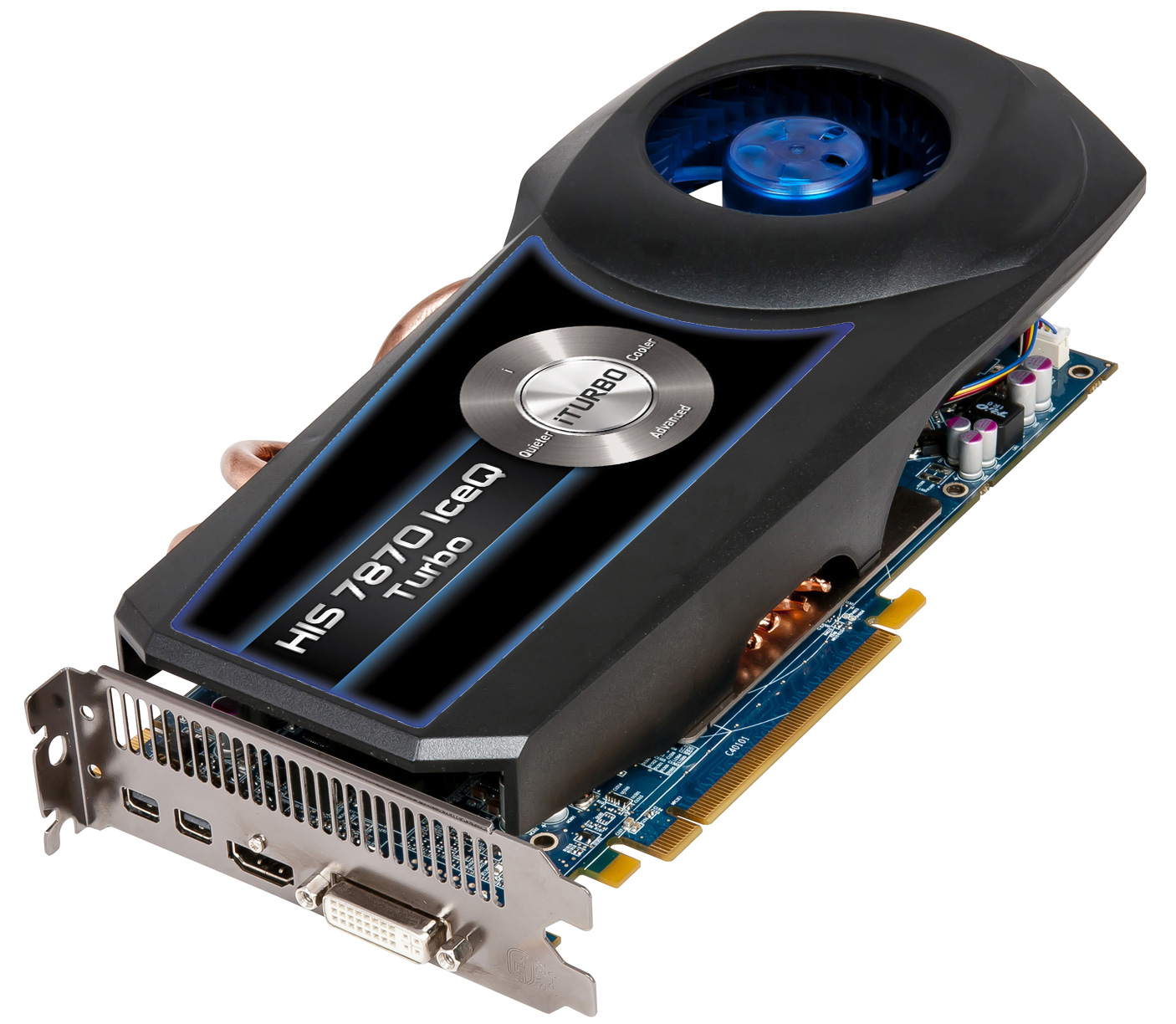
Platinum Gaming DAW: AsRock Z77 Overclock FormulaI7 3770k @ 4.5GHz : 16GB RAM G.Skill Ripjaws X 250GB OS SSD : 3TB HDD : 1TB Sample HDDWin 10 Pro x 64 : NH-D14 CPU Cooler HIS IceQ 2GB HD 7870Focusrite Scarlett 2i4The_Forum_Monkeys
|
Moshkito
Max Output Level: -37.5 dBFS
- Total Posts : 3765
- Joined: 2015/01/26 13:29:07
- Status: offline
Re: Just a general question here......
2016/05/19 10:42:58
(permalink)
Mesh
The graphics card below is what I have and it does have 2 connections for a dual monitor setup (HDMI & DVI)....mine's just not the "Turbo" version, but everything else is the same.
...
http://www.videocardbenchmark.net/high_end_gpus.html I would look for a card that has two HDMI setups ... but that's me ... take a look at the link, so you can see where the 7870 cards "fit" in the scale ... it's a good card, but I'm not sure I would use it for 2 monitors. That's just my preference ... please check with a local computer dive, where the folks have a better understanding of these things ... I used to go around with a copy of this benchmark test so I would know if they are selling me a dead beagle, or a stuffed beagle ... which would be very uncool! But, generally, I went by the list and already knew what processor needed to be in it, and this has been the case for my 4 computers, all of which are "strong" on the video department, and in fact, the DAW computer loves the video card ... it can handle overloads really easy! I like it when Abelton says it's too much and the videocard says ... got more spaghetti sauce?
Music is not about notes and chords! My poem is not about the computer or monitor or letters! It's about how I was able to translate it from my insides!
|
Mesh
Max Output Level: 0 dBFS
- Total Posts : 27360
- Joined: 2009/11/27 14:08:08
- Location: Online right here!
- Status: offline
Re: Just a general question here......
2016/05/19 10:51:57
(permalink)
Instead buying a new video card, I was actually thinking of getting a HDMI to DVI adapter ($5 dealeo) and hook them both up (since my graphics card does support a 2 monitor hook up). Why do you think I shouldn't use this card for 2 monitor? 
Platinum Gaming DAW: AsRock Z77 Overclock FormulaI7 3770k @ 4.5GHz : 16GB RAM G.Skill Ripjaws X 250GB OS SSD : 3TB HDD : 1TB Sample HDDWin 10 Pro x 64 : NH-D14 CPU Cooler HIS IceQ 2GB HD 7870Focusrite Scarlett 2i4The_Forum_Monkeys
|
Moshkito
Max Output Level: -37.5 dBFS
- Total Posts : 3765
- Joined: 2015/01/26 13:29:07
- Status: offline
Re: Just a general question here......
2016/05/19 10:59:28
(permalink)
Mesh
Instead buying a new video card, I was actually thinking of getting a HDMI to DVI adapter ($5 dealeo) and hook them both up (since my graphics card does support a 2 monitor hook up).
Why do you think I shouldn't use this card for 2 monitor?
...
Just me ... probably because I have been around computers and admins since 1990 and got to see many issues with various situations, and the evident result was that ... only a card that actually had two HDMI's could safely and properly handle 2 monitors, without a lot of hassle and issues ... Andy, one of my roomates, probably redid his computer 34 times within 2 years, because of these kinds of situations and poor video cards ... and I learned from my friend and other roomate (admin) that ... geee ... your computers work fine ... sure ... if you get the right stuff! Don't go by me ... check with the local computer shop/nerd and evaluate your choice ... so you know what you are up with before you do it ... generally, I would not recommend 2 different monitors at all, even if you had a really good video card. I think I do not trust your video card.
Music is not about notes and chords! My poem is not about the computer or monitor or letters! It's about how I was able to translate it from my insides!
|
Beagle
Max Output Level: 0 dBFS
- Total Posts : 50621
- Joined: 2006/03/29 11:03:12
- Location: Fort Worth, TX
- Status: offline
Re: Just a general question here......
2016/05/19 11:02:40
(permalink)
☄ Helpfulby Mesh 2016/05/19 11:38:06
|
Beagle
Max Output Level: 0 dBFS
- Total Posts : 50621
- Joined: 2006/03/29 11:03:12
- Location: Fort Worth, TX
- Status: offline
Re: Just a general question here......
2016/05/19 11:03:03
(permalink)
Mesh
The graphics card below is what I have and it does have 2 connections for a dual monitor setup (HDMI & DVI)....mine's just not the "Turbo" version, but everything else is the same.
GEEEEESH! Does that thing have a V8?????
|
Mesh
Max Output Level: 0 dBFS
- Total Posts : 27360
- Joined: 2009/11/27 14:08:08
- Location: Online right here!
- Status: offline
Re: Just a general question here......
2016/05/19 11:26:46
(permalink)
I don't know about V8, but it can handle almost any video game you can throw at it.........sadly, Pedro doesn't trust it.
Platinum Gaming DAW: AsRock Z77 Overclock FormulaI7 3770k @ 4.5GHz : 16GB RAM G.Skill Ripjaws X 250GB OS SSD : 3TB HDD : 1TB Sample HDDWin 10 Pro x 64 : NH-D14 CPU Cooler HIS IceQ 2GB HD 7870Focusrite Scarlett 2i4The_Forum_Monkeys
|
bapu
Max Output Level: 0 dBFS
- Total Posts : 86000
- Joined: 2006/11/25 21:23:28
- Location: Thousand Oaks, CA
- Status: offline
Re: Just a general question here......
2016/05/19 14:01:52
(permalink)
So was this a MAJOR General question of just a HUGE General question?
Lifetime members want to know.
|
Mesh
Max Output Level: 0 dBFS
- Total Posts : 27360
- Joined: 2009/11/27 14:08:08
- Location: Online right here!
- Status: offline
Re: Just a general question here......
2016/05/19 14:41:44
(permalink)
After having a brief consultation with the Major & his two Colonels AND considering it's wartime for some members, it has come to a unanimous decision that it's the 5 star General. So yeah, it's HUGE.......MAJORLY HUGE!! (an accidental Strummy motto......if you read between the lines? )
Platinum Gaming DAW: AsRock Z77 Overclock FormulaI7 3770k @ 4.5GHz : 16GB RAM G.Skill Ripjaws X 250GB OS SSD : 3TB HDD : 1TB Sample HDDWin 10 Pro x 64 : NH-D14 CPU Cooler HIS IceQ 2GB HD 7870Focusrite Scarlett 2i4The_Forum_Monkeys
|
jamesg1213
Max Output Level: 0 dBFS
- Total Posts : 21760
- Joined: 2006/04/18 14:42:48
- Location: SW Scotland
- Status: offline
Re: Just a general question here......
2016/05/19 14:55:43
(permalink)
Jyemz Thrombold's Patented Brisk Weather Pantaloonettes with Inclementometer
|
soens
Max Output Level: -23.5 dBFS
- Total Posts : 5154
- Joined: 2005/09/16 03:19:55
- Location: Location: Location
- Status: offline
Re: Just a general question here......
2016/05/19 15:56:39
(permalink)
Beagle
Mesh
The graphics card below is what I have and it does have 2 connections for a dual monitor setup (HDMI & DVI)....mine's just not the "Turbo" version, but everything else is the same.
GEEEEESH! Does that thing have a V8?????
No. 
|