AGBFunkyBassman
Max Output Level: -90 dBFS

- Total Posts : 32
- Joined: 2014/05/08 02:46:36
- Status: offline
Keyboard Shortcuts Document
Greetings,
I've been trying to find out if there is such a thing as a document that has the keyboard short cuts but laid out in the format of keyboard.
Cant really justify spending £60 and a keyboard from 'Editorkeys' so just something I could prop up against my monitor till I start to remember the commands.
Thanks !
|
heydan
Max Output Level: -88 dBFS

- Total Posts : 149
- Joined: 2010/10/20 10:44:35
- Location: USA
- Status: offline

Re: Keyboard Shortcuts Document
2014/05/08 22:18:37
(permalink)
FunkyB, Am not aware of any ready made documents with the keyboard layout you want. Would this editor keyboard sticker option work for you? http://www.4keyboard.com/sonarxkeyboardstickers-p-493.htmlI've used these economical 4keyboard stickers placed on a clear keyboard cover for several years now. They've been working well for my purposes. Best, HeyDan 
Win 10x64, GigabyteGA-990FXA-UD5, AMD 4.0 Ghz 8core,32G DDR3, Geforce GT630/dual mons, 750G+1T/7200rpm HD, 650WPS, Outboard: Focusrite Saffire 24Pro DSP, mixer-Yamaha MG102c, keyboards-Yamaha PSR E-423, Korg R3 Software: 8.5.3 Prod, X1d Exp, X2aProd, X3e Prod, SonPlat-2016.12 CbB & some plugins.
[/[/
|
vicsant
Max Output Level: -63 dBFS

- Total Posts : 1378
- Joined: 2003/11/06 20:44:33
- Status: offline
Re: Keyboard Shortcuts Document
2014/05/08 22:56:52
(permalink)
Or a PDF file would be great!
|
Bristol_Jonesey
Max Output Level: 0 dBFS

- Total Posts : 16775
- Joined: 2007/10/08 15:41:17
- Location: Bristol, UK
- Status: offline
Re: Keyboard Shortcuts Document
2014/05/09 08:05:31
(permalink)
SOMEwhere, and I'm not even sure which machine it's on, but I have an X2 list in spreadsheet format which fits nicely onto a double sided sheet of A4 which can then be laminated
I haven't got round to doing one for X3 yet - I don't have very much time for anything at the moment, but if this (the X2 version) is any good to you, shoot me a PM and I'll try and find it
CbB, Platinum, 64 bit throughoutCustom built i7 3930, 32Gb RAM, 2 x 1Tb Internal HDD, 1 x 1TB system SSD (Win 7), 1 x 500Gb system SSD (Win 10), 2 x 1Tb External HDD's, Dual boot Win 7 & Win 10 64 Bit, Saffire Pro 26, ISA One, Adam P11A,
|
fb.seeker
Max Output Level: -88 dBFS
- Total Posts : 113
- Joined: 2006/02/24 18:59:14
- Location: 80 Miles north of Sacramento, CA
- Status: offline
Re: Keyboard Shortcuts Document
2014/05/09 10:27:08
(permalink)
☼ Best Answerby AGBFunkyBassman 2014/05/13 04:51:18
http://forum.cakewalk.com...Producer-m2938947.aspx Print to pdf is handy utility for items like this. I have the PDF file only for my own use, not sure of copyright ???Can Pdf LINK be posted on this forum?
post edited by fb.seeker - 2014/05/09 11:41:11
|
AGBFunkyBassman
Max Output Level: -90 dBFS
- Total Posts : 32
- Joined: 2014/05/08 02:46:36
- Status: offline
Re: Keyboard Shortcuts Document
2014/05/09 15:25:15
(permalink)
I'm such a newbie here I cant Pm yet !!!!
FB I've seen the shortcuts provided by Cakewalk but just watend them in a differrnt format I'll Pm when Im allowed
Heydan.... seen those sticker and may still go that route if I can find a spare keyboard
|
fb.seeker
Max Output Level: -88 dBFS
- Total Posts : 113
- Joined: 2006/02/24 18:59:14
- Location: 80 Miles north of Sacramento, CA
- Status: offline
Re: Keyboard Shortcuts Document
2014/05/09 16:50:44
(permalink)
|
ShellstaX
Max Output Level: -80 dBFS

- Total Posts : 502
- Joined: 2014/03/18 11:01:37
- Status: offline
Re: Keyboard Shortcuts Document
2014/05/09 19:06:08
(permalink)
|
mudgel
Max Output Level: 0 dBFS
- Total Posts : 12010
- Joined: 2004/08/13 00:56:05
- Location: Linton Victoria (Near Ballarat)
- Status: offline
Re: Keyboard Shortcuts Document
2014/05/09 21:21:56
(permalink)
I always create my own PDF flip chart from the reference manual which has page after page of keyboard shortcuts. They're set out as per the Sonar window in which they're used. It's pretty easy to do just copy and paste from the PDF or from the Sonar help file which you can access by pressing F1 when Sonar is open.
Mike V. (MUDGEL) STUDIO: Win 10 Pro x64, SPlat & CbB x64, PC: ASUS Z370-A, INTEL i7 8700k, 32GIG DDR4 2400, OC 4.7Ghz. Storage: 7 TB SATA III, 750GiG SSD & Samsung 500 Gig 960 EVO NVMe M.2. Monitors: Adam A7X, JBL 10” Sub. Audio I/O & DSP Server: DIGIGRID IOS & IOX. Screen: Raven MTi + 43" HD 4K TV Monitor. Keyboard Controller: Native Instruments Komplete Kontrol S88.
|
AGBFunkyBassman
Max Output Level: -90 dBFS
- Total Posts : 32
- Joined: 2014/05/08 02:46:36
- Status: offline
Re: Keyboard Shortcuts Document
2014/05/13 05:03:11
(permalink)
mudgel
I always create my own PDF flip chart from the reference manual which has page after page of keyboard shortcuts. They're set out as per the Sonar window in which they're used. It's pretty easy to do just copy and paste from the PDF or from the Sonar help file which you can access by pressing F1 when Sonar is open.
Any chance of a copy ?
|
RJN
Max Output Level: -87 dBFS

- Total Posts : 178
- Joined: 2003/11/16 11:59:16
- Location: Michigan
- Status: offline
Re: Keyboard Shortcuts Document
2014/05/13 06:15:14
(permalink)
I made shortcuts (both mouse & keyboard) into .bmp files suitable for use as SONAR background images. If you set one of your screen-sets to be blank, you can easily jump to an unobstructed view. Images can be downloaded from here.
Rob -------- Core i7, 3.4 GHz, 16Gb RAM, Win 10 Pro (64-bit), 2 Tb HD, SONAR Platinum Producer , Roland Quad Capture, Alesis QS8 rjnorwich.worpress.com
|
ShellstaX
Max Output Level: -80 dBFS
- Total Posts : 502
- Joined: 2014/03/18 11:01:37
- Status: offline
Re: Keyboard Shortcuts Document
2014/05/13 06:20:43
(permalink)
I'll let mudgel answer for himself ... but, I refer you back to @fb.seeker post#5. Alternate link: http://www.cakewalk.com/Documentation?product=SONAR%20X3&language=3&help=Menus1.181.html A cut/paste/reformat (to your liking) is 15 minutes (if). Laminate, bind or even Rolodex with service/purchase from your local office supplies/services store. I use Kingsoft Office Writer which has export to pdf. Something like PrimoPdf (free) hooked into your regular editor can create pdfs. ... or even keep it as your editor's default document format.
|
Bristol_Jonesey
Max Output Level: 0 dBFS
- Total Posts : 16775
- Joined: 2007/10/08 15:41:17
- Location: Bristol, UK
- Status: offline
Re: Keyboard Shortcuts Document
2014/05/13 08:03:57
(permalink)
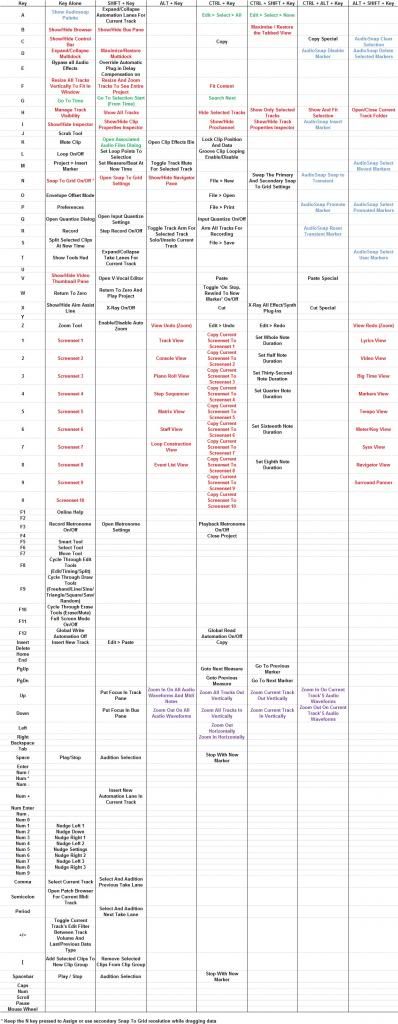 This is what my X2 version looks like:
CbB, Platinum, 64 bit throughoutCustom built i7 3930, 32Gb RAM, 2 x 1Tb Internal HDD, 1 x 1TB system SSD (Win 7), 1 x 500Gb system SSD (Win 10), 2 x 1Tb External HDD's, Dual boot Win 7 & Win 10 64 Bit, Saffire Pro 26, ISA One, Adam P11A,
|
mudgel
Max Output Level: 0 dBFS
- Total Posts : 12010
- Joined: 2004/08/13 00:56:05
- Location: Linton Victoria (Near Ballarat)
- Status: offline
Re: Keyboard Shortcuts Document
2014/05/14 05:31:21
(permalink)
AGBFunkyBassman
mudgel
I always create my own PDF flip chart from the reference manual which has page after page of keyboard shortcuts. They're set out as per the Sonar window in which they're used. It's pretty easy to do just copy and paste from the PDF or from the Sonar help file which you can access by pressing F1 when Sonar is open.
Any chance of a copy ?
Here's a link to my Onedrive. Its an MS Word docx https://onedrive.live.com/redir?resid=DF413F5445183B18%21105 Its Landscape view Flip chart for A4 size paper or use Letter in the US. I've made it as per the sonar Reference Manual ie. per Sonar Views. I placed them in a different order so that none of the charts go over a page. If you print it double sided (duplex) its only 3 sheets of paper which I then laminate. All the best.
Mike V. (MUDGEL) STUDIO: Win 10 Pro x64, SPlat & CbB x64, PC: ASUS Z370-A, INTEL i7 8700k, 32GIG DDR4 2400, OC 4.7Ghz. Storage: 7 TB SATA III, 750GiG SSD & Samsung 500 Gig 960 EVO NVMe M.2. Monitors: Adam A7X, JBL 10” Sub. Audio I/O & DSP Server: DIGIGRID IOS & IOX. Screen: Raven MTi + 43" HD 4K TV Monitor. Keyboard Controller: Native Instruments Komplete Kontrol S88.
|
stevec
Max Output Level: 0 dBFS
- Total Posts : 11546
- Joined: 2003/11/04 15:05:54
- Location: Parkesburg, PA
- Status: offline
Re: Keyboard Shortcuts Document
2014/05/14 14:34:56
(permalink)
☄ Helpfulby Brando 2014/05/15 17:14:59
SteveC https://soundcloud.com/steve-cocchi http://www.soundclick.com/bands/pagemusic.cfm?bandID=39163 SONAR Platinum x64, Intel Q9300 (2.5Ghz), Asus P5N-D, Win7 x64 SP1, 8GB RAM, 1TB internal + ESATA + USB Backup HDDs, ATI Radeon HD5450 1GB RAM + dual ViewSonic VA2431wm Monitors; Focusrite 18i6 (ASIO); Komplete 9, Melodyne Studio 4, Ozone 7 Advanced, Rapture Pro, GPO5, Valhalla Plate, MJUC comp, MDynamic EQ, lots of other freebie VST plugins, synths and Kontakt libraries
|
AGBFunkyBassman
Max Output Level: -90 dBFS
- Total Posts : 32
- Joined: 2014/05/08 02:46:36
- Status: offline
Re: Keyboard Shortcuts Document
2014/05/15 16:53:17
(permalink)
Thanks everybody for your help !
|