martinv
Max Output Level: -88 dBFS

- Total Posts : 138
- Joined: 2012/07/28 02:25:07
- Status: offline
Latency settings for recording and monitoring?
This is my first recording setup where i had to deal with latency. I'm having the issue of trying to record an instrument but hearing it back too late making it difficult to play. I have a Focusrite Saffire PRO-40 interface.
Is it possible to get the latency low enough in SONAR X1 to allow recording of intruments without a noticable delay?
(I know there is the option of using the Focusrite 'MixControl' software to create a monitor mix, but really don't want to use this for several reasons.)
My goal is to use SONAR Sends to create monitor mixes for the musicians i'm recording and allow each of them to hear their own instrument without noticable delays.
|
Guitarpima
Max Output Level: -34 dBFS

- Total Posts : 4125
- Joined: 2005/11/19 23:53:59
- Location: Terra 3
- Status: offline

Re:Latency settings for recording and monitoring?
2012/09/04 23:18:18
(permalink)
You have to set the ASIO buffer as fast as possible. If your project has lots of effects or synths, you should "freeze" those tracks. Freezing the tracks will free up processing power and make setting the latency at a lower/faster setting. You may have to experiment as sometimes lower setting can produce noise.
There is a buffer setting as well that you can lower or raise. Again, you'll have to experiment till you find the right setting.
Notation, the original DAW. Everything else is just rote. We are who we are and no more than another. Humans, you people are crazy. Win 7 x64 X2 Intel DX58SO, Intel i7 920 2.66ghz 12gb DDR3 ASUS ATI EAH5750 650w PSU 4x WD HDs 320gb DVD, DVD RW Eleven Rack, KRK Rokit 8s and 10s sub
|
bitflipper
01100010 01101001 01110100 01100110 01101100 01101

- Total Posts : 26036
- Joined: 2006/09/17 11:23:23
- Location: Everett, WA USA
- Status: offline
Re:Latency settings for recording and monitoring?
2012/09/04 23:24:58
(permalink)
You should be able, with even a modest system, to get latency down to 5ms. That's fast enough to not notice the delay (it's equivalent to standing 5' away from an amplifier). You won't be able to manage it with a lot of latency-inducing effects no matter how hot your computer system is, so avoid adding effects until after tracking is complete. Then you can bump up your buffers because latency doesn't matter during the mixing phase.
 All else is in doubt, so this is the truth I cling to. My Stuff
|
martinv
Max Output Level: -88 dBFS
- Total Posts : 138
- Joined: 2012/07/28 02:25:07
- Status: offline
Re:Latency settings for recording and monitoring?
2012/09/05 00:35:34
(permalink)
Good to hear it should be possible. I'm a little concerned that the Saffire Pro-40 may be the problem? Has anyone here used it with SONAR X1? I downloaded the latest software which helped a little and it added some additional, lower ASIO buffer size settings. Now if I follow correctly even a ASIO of 256 at 44.1k sampling should only be ~5.8ms. Even set lower that 256 I was getting far more than 5.8ms to my ears. It seems i've tried most combinations of settings and it was still a unusable amount of delay. I'll get some more info when I try again tomorrow and post it here.
Now do the effects causing latency, only come in to play when the tracks are playing/recording? So far i'm just playing a bass through a channel without even playing the other tracks.
On the 'Sync and Caching' page, do the File System Playback and Record I/O Buffer Sizes affect latency?
|
bigboi
Max Output Level: -85 dBFS

- Total Posts : 260
- Joined: 2004/03/12 00:30:41
- Status: offline
Re:Latency settings for recording and monitoring?
2012/09/05 01:14:03
(permalink)
Does it come with wmd drivers? See if you can change to those and drop your buffer lower. I always got better results from the wmd drivers...not sure why. Seems most people like ASIO.
I7 920, 8 gigs ram, Newest gigabyte motherboard, 100 gig ssd for operating system and program files, 1 TB 7400 rpm for storage, Full V-Studio system, 2x Motu 2408 MKIII, 2x Motu 24 I/O, Maschine, Kore 2, Virus TI2, Korg m3, Novation Supernova, Novation D-station, Mo Phatt, Elektron Machine Drum, MicroKorg XL, Arturia Origin, Korg Triton, Roland jv2080-completely expanded, Avalon 737SP, 3 Sony premiere monitors, 2 event 20/20 studio monitors, Autotune AVP1, TC Helicon Voiceworks, 1 TC Electronics Powercore 6000, 1 Powercore Firewire
|
noynekker
Max Output Level: -66 dBFS

- Total Posts : 1235
- Joined: 2012/01/12 01:09:45
- Location: POCO, by the river, Canada
- Status: offline
Re:Latency settings for recording and monitoring?
2012/09/05 01:36:17
(permalink)
+1 for WDM drivers . . . slider bar to easily change latency setting.
Freeze tracks if necessary (or archive unused tracks) to get back CPU power, or as bitfilpper says don't add latency-inducing effects until the mixing phase of your recording process.
If you're hearing a delay between hitting notes and hearing notes, it's all about latency settings.
Have you run "Wave Profiler" in Preferences for your soundcard ?
|
tacman7
Max Output Level: -87 dBFS

- Total Posts : 176
- Joined: 2012/06/18 11:48:51
- Status: offline
Re:Latency settings for recording and monitoring?
2012/09/05 11:36:02
(permalink)
That interface should get down pretty quick. You're using the drivers from the manufacturer?
It can also be that you need to get your firewire setup working properly.
I bought a TC sk48 but when I was looking I talked to focusrite and they gave me a list of stuff to do to optimize my firewire setup.
|
martinv
Max Output Level: -88 dBFS
- Total Posts : 138
- Joined: 2012/07/28 02:25:07
- Status: offline
Re:Latency settings for recording and monitoring?
2012/09/05 20:26:09
(permalink)
I found the problem. It was simply the LP64 EQ effect on my Main Bus needed to be turned off. These settings are working now, and I can go a few steps higher before I notice a delay. The actual adjustment has to be made on my Focusrite 'MixControl' Software as the buffer size slider is locked out. After adjustingm it shows up on this Sonar page: 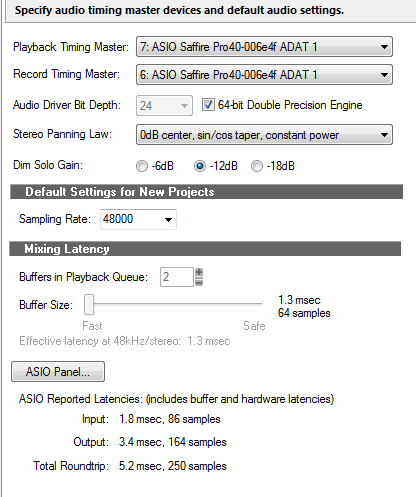
|
Maarkr
Max Output Level: -81 dBFS

- Total Posts : 488
- Joined: 2011/12/10 09:35:33
- Location: Maine
- Status: offline
Re:Latency settings for recording and monitoring?
2012/09/05 20:48:27
(permalink)
I was gonna say... I have a Saffire 24 and I can run like 64 @44.1k in ASIO if I have no other tracks or fx in the master. My safffire 24 doesn't offer WMD drivers, and yes, it;s best to make all adjustments using the focusrite software instead of in the daw software if you can even do it.
Maarkr Studio: SPALT Lifetime/BL Cakewalk, Studio One 3.5, UAD, Z3ta+2, IKM, NI, Waves, iZotope, Melda, Reaper i7 3770/Giga Z77 mobo, Win10 Pro-64 w16Gb, MOTU Ultralite MK4, Yamaha HS80M wSub, Live: PX-5S, FA-06, Roland Lucina, Epi Les Paul, Ibanez Bass, Amps, e-drums, Zoom R-16... Latest album release, NEW! Counry Classic at http://genemaarkr.bandcamp.com/
|