DonM
Max Output Level: -34 dBFS

- Total Posts : 4129
- Joined: 2004/04/26 12:23:12
- Location: Pittsburgh
- Status: offline
Lexicon Pantheon in Platinum {Solved)
All: Solved Look HERE I searched the forum for solutions to get my Lexicon Pantheon registered in Platinum. I found a couple threads regarding X3 solutions and tried them, but to no avail in my new Platinum install. Any advice? I've got this reverb all over projects, and I still have the 8.5.3 rev of Sonar on the workstation with the Lex installed. Any ideas? Thanks -D
post edited by DonM - 2015/01/31 12:39:45
|
scook
Forum Host

- Total Posts : 24146
- Joined: 2005/07/27 13:43:57
- Location: TX
- Status: offline

Re: Lexicon Pantheon in Platinum
2015/01/24 11:32:08
(permalink)
☄ Helpfulby DonM 2015/01/24 11:43:59
Perform an advanced install of 8.5. Since the Pantheon is a DirectX plug-in make sure to install the version which matches the host. IOW, if running 32bit SONAR install 32bit Pantheon, 64bit SONAR requires 64bit Pantheon, running both install both.
|
DonM
Max Output Level: -34 dBFS
- Total Posts : 4129
- Joined: 2004/04/26 12:23:12
- Location: Pittsburgh
- Status: offline
Re: Lexicon Pantheon in Platinum
2015/01/24 11:46:57
(permalink)
scook
Perform an advanced install of 8.5. Since the Pantheon is a DirectX plug-in make sure to install the version which matches the host. IOW, if running 32bit SONAR install 32bit Pantheon, 64bit SONAR requires 64bit Pantheon, running both install both.
Sc: I am in motion with multiple client projects under 8.5.3 - I can't afford to smack that install. I've never done an advanced install in Sonar - I have in some other apps and that slammed my existing install - any guidance on the process … for instance will the Advanced Install allow me to select the DX plugs but leave in place the existing or reinstall the 8.5.3 entirely. If it is the latter I'll wait. Thanks -D
|
scook
Forum Host
- Total Posts : 24146
- Joined: 2005/07/27 13:43:57
- Location: TX
- Status: offline
Re: Lexicon Pantheon in Platinum
2015/01/24 13:01:30
(permalink)
After selecting advanced install, the installer presents a checklist of components to install. It is possible to select a single plug-in, everything or anything in between using the advanced install option.
|
DonM
Max Output Level: -34 dBFS
- Total Posts : 4129
- Joined: 2004/04/26 12:23:12
- Location: Pittsburgh
- Status: offline
Re: Lexicon Pantheon in Platinum
2015/01/24 18:49:48
(permalink)
scook
After selecting advanced install, the installer presents a checklist of components to install. It is possible to select a single plug-in, everything or anything in between using the advanced install option.
S: I am appreciating your responses. I have a test system running same OS and 8.5.3 - I 'tried' to run the installer (starting with the Producer 8.5 all the way through the 8.5.3 patches) All error during installation reporting that I don't have the proper version. I suspect I need to find my Producer 8 DVD's - Which I put in storage this summer thinking I'd never need them again. Should I track down those DVD's? Thanks in advance for your assistance! -D
|
scook
Forum Host
- Total Posts : 24146
- Joined: 2005/07/27 13:43:57
- Location: TX
- Status: offline
Re: Lexicon Pantheon in Platinum
2015/01/24 19:19:31
(permalink)
☄ Helpfulby DonM 2015/01/24 20:43:05
If you downloaded the 8.5 upgrade, yes you will need the SONAR 8 Disk. SONAR 8.5 was the first downloadable upgrade. In order to reduce download time, it relied on an existing SONAR 8 installation. This was the only download upgrade which required a previous release be installed.
post edited by scook - 2015/01/24 19:38:44
|
DonM
Max Output Level: -34 dBFS
- Total Posts : 4129
- Joined: 2004/04/26 12:23:12
- Location: Pittsburgh
- Status: offline
Re: Lexicon Pantheon in Platinum
2015/01/24 20:45:55
(permalink)
scook
If you downloaded the 8.5 upgrade, yes you will need the SONAR 8 Disk. SONAR 8.5 was the first downloadable upgrade. In order to reduce download time, it relied on an existing SONAR 8 installation. This was the only download upgrade which required a previous release be installed.
Yep, That's how I remembered it. Literally this summer I did a massive 'clean up' of the studio and stored my leather case of all my DVD installers since I hadn't used them in years. Too funny. I remember the 8.5 Download days - I was one of the testers of that and remember doing DL tests .... I thank you for your guidance here. I am logging my Platinum 'issues' and doing this install while I am doing a Film Post project for a client (in that other DAW unfortunately) Thanks again. -D
|
Woodyoflop
Max Output Level: -85 dBFS

- Total Posts : 281
- Joined: 2008/11/07 01:14:55
- Location: Georgia and Washington (depending on time of year)
- Status: offline
Re: Lexicon Pantheon in Platinum
2015/01/24 20:57:20
(permalink)
My lexicon pantheon transferred over no issues by itself. I have 8.5 still installed on my computer as well. I don't know why yours didn't work. I guess as last resort just load projects without the lexicon and use other reverbs to replace. I've personally grown to like Breverb a lot actually. I used lexicon for almost anything reverb related but lately I've been using it less and less. Hope you figure it out.
|
Bristol_Jonesey
Max Output Level: 0 dBFS

- Total Posts : 16775
- Joined: 2007/10/08 15:41:17
- Location: Bristol, UK
- Status: offline
Re: Lexicon Pantheon in Platinum
2015/01/25 07:01:11
(permalink)
I briefly played around with the new Rematrix 'verb and first impressions suggest this will be my goto reverb from new on
The word 'lush' springs to mind, or as us Bristolians like to say, 'gurt lush'
CbB, Platinum, 64 bit throughoutCustom built i7 3930, 32Gb RAM, 2 x 1Tb Internal HDD, 1 x 1TB system SSD (Win 7), 1 x 500Gb system SSD (Win 10), 2 x 1Tb External HDD's, Dual boot Win 7 & Win 10 64 Bit, Saffire Pro 26, ISA One, Adam P11A,
|
SteveStrummerUK
Max Output Level: 0 dBFS
- Total Posts : 31112
- Joined: 2006/10/28 10:53:48
- Location: Worcester, England.
- Status: offline
Re: Lexicon Pantheon in Platinum
2015/01/25 07:34:19
(permalink)
Bristol_Jonesey
I briefly played around with the new Rematrix 'verb and first impressions suggest this will be my goto reverb from new on
The word 'lush' springs to mind, or as us Bristolians like to say, 'gurt lush'
Love the accent Col  And I certainly have to agree with you regarding ReMatrix. I'm not much into having a dedicated reverb bus as I tend to add it selectively to tracks that I think it would benefit (and on rhythm guitars I tend to print hardware reverb). For example, here are the two 'Lead Guitar' busses in one of my templates - I've had the FX Bin of #2 pre-populated with my favourite reverbs for a while, and since I got Platinum, I've added ReMatrix in the Pro-Channel alongside them. I can easily switch between each one to see which works best - up until I added ReMatrix, it usually ended up being TruVerb, but I have to say ReMatrix does sound more gurt lushish   If I was in Cakewalk marketing, I would be stood astride the crenulations of Cakewalk Towers shouting loud and often about just how good this reverb is. When you consider how much press new features like Mix Recall have been getting, ReMatrix is fast becoming something of a 'hidden' gem in Platinum.
|
DonM
Max Output Level: -34 dBFS
- Total Posts : 4129
- Joined: 2004/04/26 12:23:12
- Location: Pittsburgh
- Status: offline
Re: Lexicon Pantheon in Platinum
2015/01/26 19:53:14
(permalink)
Bristol_Jonesey
I briefly played around with the new Rematrix 'verb and first impressions suggest this will be my goto reverb from new on
The word 'lush' springs to mind, or as us Bristolians like to say, 'gurt lush'
B: I can't find the ReMatrix 'verb' in my plugins list. ???? Any idea where this thing is hiding? Thanks -D
|
SteveStrummerUK
Max Output Level: 0 dBFS
- Total Posts : 31112
- Joined: 2006/10/28 10:53:48
- Location: Worcester, England.
- Status: offline
Re: Lexicon Pantheon in Platinum
2015/01/26 20:23:19
(permalink)
Hi Don, ReMatrix Solo is a Pro-Channel Module, not a VST.
|
DonM
Max Output Level: -34 dBFS
- Total Posts : 4129
- Joined: 2004/04/26 12:23:12
- Location: Pittsburgh
- Status: offline
Re: Lexicon Pantheon in Platinum
2015/01/26 20:45:25
(permalink)
Steve:
It's really amazing how long I've been away. Some of this stuff is second nature to you guys who have been around the X products :) I figured that as much - so I opened the Pro Channel and when I insert a module - the reverb doesn't seem to be an option. I got a compressor, EQ, and 'Tube'. Seems a bit unintuitive to me that I can't select what modules to load into the PC. Of all of the ironies, my Waves plugins are working perfectly fine. You'd think they'd be giving me attitude, not the Lexicon and my PC modules.
-D
|
DonM
Max Output Level: -34 dBFS
- Total Posts : 4129
- Joined: 2004/04/26 12:23:12
- Location: Pittsburgh
- Status: offline
Re: Lexicon Pantheon in Platinum
2015/01/26 20:53:50
(permalink)
S: My only options? 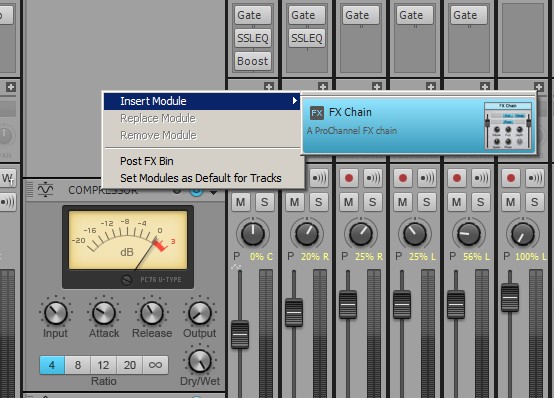
|
SteveStrummerUK
Max Output Level: 0 dBFS
- Total Posts : 31112
- Joined: 2006/10/28 10:53:48
- Location: Worcester, England.
- Status: offline
Re: Lexicon Pantheon in Platinum
2015/01/26 21:07:59
(permalink)
DonM
S:
My only options?
That's where you should see it listed, that doesn't look at all right Don. For starters, the Insert Module> link should show a list of all your Pro Channel Modules. How many Pro Channel Modules should you have? (Edited to remove error)
post edited by SteveStrummerUK - 2015/01/26 21:18:02
|
teego
Max Output Level: -80 dBFS

- Total Posts : 518
- Joined: 2011/02/04 19:40:55
- Status: offline
Re: Lexicon Pantheon in Platinum
2015/01/26 21:14:17
(permalink)
It should show the console emulators and the tape sim and the rematrix at a minimum shouldn't it, and it should show them in the list whether they are already in the PC module or not.
Computer: Intel core2 quad q8400 @2.66ghz, 4 gb memory,64 bit Windows 7 Focusrite Saffire Pro 24, Sonar Platinum Ipswich and Update 1
|
SteveStrummerUK
Max Output Level: 0 dBFS
- Total Posts : 31112
- Joined: 2006/10/28 10:53:48
- Location: Worcester, England.
- Status: offline
Re: Lexicon Pantheon in Platinum
2015/01/26 21:16:51
(permalink)
Of course, sorry about that folks.
I'll edit that bit away to avoid any confusion.
|
John
Forum Host
- Total Posts : 30467
- Joined: 2003/11/06 11:53:17
- Status: offline
Re: Lexicon Pantheon in Platinum
2015/01/26 21:27:34
(permalink)
First off the Lexicon Pantheon is a DX effect.
Rematrix can be found in C:\Program Files\Cakewalk\Shared Utilities\Internal.
That is if your file structure is the same as mine. I'm on Windows 8.1. For Platinum its the default install.
You should have
ProChannel New! REmatrix Solo BREVERB SONAR Tape Emulator Console Emulator Softube Saturation Knob QuadCurve EQ Includes zoom spectrum analysisTube Saturation PC4K S-Type Bus Compressor PC76 U-Type Compressor
The above are PC modules that come with Sonar Platinum.
|
DonM
Max Output Level: -34 dBFS
- Total Posts : 4129
- Joined: 2004/04/26 12:23:12
- Location: Pittsburgh
- Status: offline
Re: Lexicon Pantheon in Platinum
2015/01/27 20:42:02
(permalink)
All: Ok so now it seems I've got a couple of issues in motion. #1 The Lexicon install (DX for sure!) will happen after I get my DVD installer for Producer 8.0 out of storage #and# I finish a huge client mix over the next few weeks [Albany Label CD of Piano Music Sessions [ HERE] #2 I have Platinum but apparently do not have my Pro Channel properly installed … any idea? I can see the Pro Channel components in C:\Program Files\Cakewalk\Shared Utilities\Internal. - but scanning them in the VST utility was to no avail. I appreciate you guys sticking this one out with me during my first week of Platinum. I've moved some of my band's 8.5.3 projects forward into Platinum for our promotional materials and am definitely a fish out of water with some of the newism …. Thanks -D
|
scook
Forum Host
- Total Posts : 24146
- Joined: 2005/07/27 13:43:57
- Location: TX
- Status: offline
Re: Lexicon Pantheon in Platinum
2015/01/27 20:48:43
(permalink)
Assuming all the modules are installed correctly, there is a hidden scan path used by the VST scanner to pickup the PC modules. For 64bit Platinum the path "C:\Program Files\Cakewalk\Shared Utilities\Internal" is stored in the default entry in HKEY_CURRENT_USER\Software\Cakewalk Music Software\SONAR\Cakewalk VST X64\VSTInternalPath
|
DonM
Max Output Level: -34 dBFS
- Total Posts : 4129
- Joined: 2004/04/26 12:23:12
- Location: Pittsburgh
- Status: offline
Re: Lexicon Pantheon in Platinum
2015/01/27 21:01:36
(permalink)
scook
Assuming all the modules are installed correctly, there is a hidden scan path used by the VST scanner to pickup the PC modules. For 64bit Platinum the path "C:\Program Files\Cakewalk\Shared Utilities\Internal" is stored in the default entry in HKEY_CURRENT_USER\Software\Cakewalk Music Software\SONAR\Cakewalk VST X64\VSTInternalPath
S: That is exactly what I went looking for, and it is in fact in the Registry. So it seems despite this entry, the PC is still crippled. It may make sense for me to do a reinstall of Platinum at this point. Thoughts? Thanks -D
|
teego
Max Output Level: -80 dBFS
- Total Posts : 518
- Joined: 2011/02/04 19:40:55
- Status: offline
Re: Lexicon Pantheon in Platinum
2015/01/27 21:14:16
(permalink)
Pull up the plug in manager and towards the bottom it has an options button, click that and it pulls up a list of folders to be scanned for plug ins, make sure that the C:\Program Files\Cakewalk\Shared Utilities\Internal folder is listed in there .
Computer: Intel core2 quad q8400 @2.66ghz, 4 gb memory,64 bit Windows 7 Focusrite Saffire Pro 24, Sonar Platinum Ipswich and Update 1
|
DonM
Max Output Level: -34 dBFS
- Total Posts : 4129
- Joined: 2004/04/26 12:23:12
- Location: Pittsburgh
- Status: offline
Re: Lexicon Pantheon in Platinum
2015/01/27 21:18:42
(permalink)
teego
Pull up the plug in manager and towards the bottom it has an options button, click that and it pulls up a list of folders to be scanned for plug ins, make sure that the C:\Program Files\Cakewalk\Shared Utilities\Internal folder is listed in there .
T: Thanks, adding that folder to the scan was one of the first things I did. Great minds think alike :) -D
|
scook
Forum Host
- Total Posts : 24146
- Joined: 2005/07/27 13:43:57
- Location: TX
- Status: offline
Re: Lexicon Pantheon in Platinum
2015/01/27 21:23:03
(permalink)
IDK, could try the Reinstall option in the C3 for the "Platinum ProChannel Collection" or right-click on the "Platinum ProChannel Collection" option to bring up the context menu and uninstall then install again. I might call tech support.
|
scook
Forum Host
- Total Posts : 24146
- Joined: 2005/07/27 13:43:57
- Location: TX
- Status: offline
Re: Lexicon Pantheon in Platinum
2015/01/27 21:25:17
(permalink)
DonM
teego
Pull up the plug in manager and towards the bottom it has an options button, click that and it pulls up a list of folders to be scanned for plug ins, make sure that the C:\Program Files\Cakewalk\Shared Utilities\Internal folder is listed in there .
T:
Thanks, adding that folder to the scan was one of the first things I did. Great minds think alike :)
-D
No need to add the folder, it is silently added if the VSTInternalPath in the registry is defined.
|
scook
Forum Host
- Total Posts : 24146
- Joined: 2005/07/27 13:43:57
- Location: TX
- Status: offline
Re: Lexicon Pantheon in Platinum
2015/01/27 21:28:39
(permalink)
The modules are being picked up by the scanner otherwise the picture in msg #14 would not have the 1176 compressor in the PC. It is a problem displaying the icons in the pick list. It should not be necessary but have you tried running SONAR as administrator?
|
teego
Max Output Level: -80 dBFS
- Total Posts : 518
- Joined: 2011/02/04 19:40:55
- Status: offline
Re: Lexicon Pantheon in Platinum
2015/01/27 21:32:53
(permalink)
The only other thing I can think of would be to make sure that the path matches the destination exactly, maybe a letter could have been changed or deleted or added inadvertently somewhere. You probably are going to have to call tech support to resolve it as Scook suggested.
Computer: Intel core2 quad q8400 @2.66ghz, 4 gb memory,64 bit Windows 7 Focusrite Saffire Pro 24, Sonar Platinum Ipswich and Update 1
|
John
Forum Host
- Total Posts : 30467
- Joined: 2003/11/06 11:53:17
- Status: offline
Re: Lexicon Pantheon in Platinum
2015/01/27 21:45:03
(permalink)
Before you do anything Dom try a reset and rescan. This can be done from the Plugin Manager.
|
scook
Forum Host
- Total Posts : 24146
- Joined: 2005/07/27 13:43:57
- Location: TX
- Status: offline
Re: Lexicon Pantheon in Platinum
2015/01/27 21:45:31
(permalink)
Another thing to try is a Reset and Rescan. Here are the instructions from X3 but they are the same in the new SONAR http://www.cakewalk.com/S...ommended-for-UpgradersFWIW, Cakewalk has recommended using the Preference screen for VST operations instead of the plug-in manager.
post edited by scook - 2015/01/27 21:57:46
|
DonM
Max Output Level: -34 dBFS
- Total Posts : 4129
- Joined: 2004/04/26 12:23:12
- Location: Pittsburgh
- Status: offline
Re: Lexicon Pantheon in Platinum
2015/01/27 21:55:42
(permalink)
scook
Another thing to try is a Reset and Rescan. Here are the instructions from X3 but they are the same in the new SONAR http://www.cakewalk.com/S...ommended-for-Upgraders
FWIW, Cakewalk has recommended using the Preference screen for VST operations instead of the plug-in manager.
S: That page does a 404 not found :( I did a reinstall of Platinum and reinstalled the boutique FX - but nothing changed. Hmmm. I am experiencing some other seemingly unrelated weirdness - like when I exit Platinum, I can't relaunch it until I go to the Windows Task Manager and stop the Sonarplt.exe process manually. Very weird. Again, I appreciate y'all sticking in there with me. It's quite lonely in the upgrade world ... I am not sure what to try next other than a complete uninstall - thoughts -D
|