• SONAR
  • External Instruments
2016/10/11 08:14:20
APrior
Hi,
 
I am looking to purchase Sonar and was wondering if Sonar can control external Midi instruments, like a Rhythm Wolf. I would like to control the Rhythm Wolf and program drum loops from Sonar via midi  using piano roll. I know this is possible in other DAW's but they charge quite a lot for the functionality.
 
Thanks


2016/10/11 09:21:22
BobF
APrior - I don't have any MIDI hardware that makes noise, but MIDI tracks will most certainly send there content to any MIDI port you choose.  I assume if there was a sound module connected that it would respond accordingly.
 
 
2016/10/11 09:21:22
BobF
DUPE deleted
 
2016/10/11 09:37:36
MarioD
Yes, Sonar can control external hard synths.  I have a few hard synths and Sonar works just fine with them.  Just make sure that your MIDI track output channel matches your hard synth input channel.
2016/10/11 10:34:48
APrior
Hi MarioD and BobF,
 
Thanks for the reply's,
 
The actual problem I have is in Music creator. When I connect up the Rhythm Wolf and bring up the piano roll and I select the corresponding note of the keyboard it activates the bass synth only. This is due to the following midi mapping configuration on the RW.
 
Kick Drum = C2 (Channel 10)
Snare Drum = D2 (Channel 10)
Percussion = E2 (Channel 10)
Open Hihat = F#2 (Channel 10)
Closed Hihat = G#2 (Channel 10)
Bass Synth = All note input on Channel 1
 
I have the output in MC set to the RW but there does not seem to be any midi output channel selector.
Is there any way of mapping the midi notes? If I have to purchase sonar then I will do it.
 
Thanks for your help.  
   
2016/10/11 10:35:38
tenfoot
APrior
Hi,
 
I am looking to purchase Sonar and was wondering if Sonar can control external Midi instruments, like a Rhythm Wolf. I would like to control the Rhythm Wolf and program drum loops from Sonar via midi  using piano roll. I know this is possible in other DAW's but they charge quite a lot for the functionality.
 
Thanks


Welcome to the forum!
 
Controlling and playing external midi instruments is a basic function that any DAW will do. I don't know of any that charge for that particular functionality. However Sonar, like any DAW, will requIre an external midi interface in order to do this. You will find new and perfectly functional usb midi interfaces on ebay from around $5.
 
Good luck with your music!
2016/10/11 10:40:18
tenfoot
Sorry APrior - you posted whist I was typing:) Your device obviously has its own interface, and you most certainly can change the midi channel in the software that you have using the drop down midi channel menu. Here is the guide:
 
https://www.cakewalk.com/Documentation?product=Music%20Creator%206%20Touch&language=3&help=Beginners.05.html#580033
 
Music Creator also has its own forum here:
 
http://forum.cakewalk.com/Music-Creator-f71.aspx
 
2016/10/11 11:51:36
brundlefly
You can leave your keyboard/controller sending on channel 1, but you will need to have separate tracks to record and echo MIDI to the Bass Synth and Drums with a 'forced' output Channel set to 10 on the Drum track(s) to re-write the embedded channel of the MIDI events coming from your controller (and played back after recording).
2016/10/11 13:20:38
APrior
Hi Tenfoot and brundlefly,
 
Thanks very much for the replies,
 
brundlefly - I am a total nube, but this sounds great and I can't wait to learn more abut this subject. Could I trouble you for a little more detail. Sorry once again total nube so any more information would be a great help.
 
Thanks   
2016/10/11 14:22:26
brundlefly
Below is a screenshot of a MIDI track header I borrowed from Music Creator online documentation here:
 
https://www.cakewalk.com/Documentation?product=Music%20Creator%206%20Touch&language=3&help=Playback.16.html
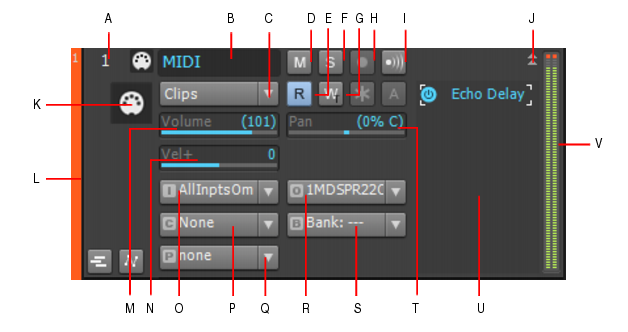
 

You need two tracks like this one. The Output of both would be assigned to whatever hardware MIDI OUT the RW is on (I gather is has both USB MIDI and DIN connections). The output Channel dropdown can remain at 'None' for the Bass track because your keyboard is already sending on channel 1. But the Channel on the Drums track needs to be set to 10 so that the incoming/recorded notes that have with channel 1 'embedded' in the Note On messages will be re-written to 10 on the fly. This incurs no significant processing cost, so don't worry about that.
 
The screenshot show the Input set to AllInputsOmni; I recommend you change this to channel 1 of the specific MIDI IN port your keyboard is on.
 
I assume you have Always Echo Current MIDI Track enabled (the default) in preferences, so whatever track has focus will automatically echo MIDI to the RW (the button labeled 'i' in the screenshot will light up with an 'A' in it for 'auto-echo').
 
Then, if you want to be able to input monitor and record the output of the RW, you need an audio track in Music Creator with input assigned to whichever audio input(s) the RW is connected to on your audio interface, and Input Echo on that track to hear the output of the RW echoed back out to your monitors.
 
Hope that helps.
12
© 2026 APG vNext Commercial Version 5.1

Use My Existing Forum Account

Use My Social Media Account