• SONAR
  • Sonar update not working [SOLVED]
2016/08/20 10:53:59
Beagle
I've been trying for a few weeks to update sonar but I've been unsuccessful.  My current version of sonar is 2016.06(22.6.0.26)
Command Center says the new version available is 2016.07(22.7.0.41)
 
when I try to update, it goes through all of the pop windows asking if I want to install basic/advanced and 64/32bit , accept the license agreement, etc, and then it downloads the file and then it starts EXTRACTING.  but it gets stuck at about 40% through extraction and will not continue no matter how long I wait (I've waited up to an hour before).  I can't even CANCEL.  the button is there, but it does nothing.  to cancel I have to either restart the computer or kill the process in task manager.
 
this is repeatable EVERY time.
 
I'm running win7x64, I am connected to the internet, my command center version is 1.1.6.2
 
even tho I am administrator on this machine and I've deactivated security, I still tried to run as admin also, and the same thing happens.
 
and now when I try to start sonar, I get this message:
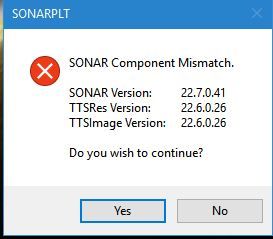


if I select YES, sonar will still open and seems to run fine.
 
any ideas how to fix this?
2016/08/20 11:15:47
scook
Does the Command Center show running 2016.07? If so, I might just manually run the 2106.07 installer, allowing it to overwrite the current installation. If not, the first thing I would try is rollback and reinstall. Either way, I would reboot immediately before attempting either process.
 
 
2016/08/20 11:27:24
AT
Yea, the CC can be funky.  I've updated a few times and it doesn't act like anything has happened.  Either it will work anyway or it will after a re-boot.  I've never seen the message that you posted, tho.
 
@
2016/08/20 11:36:20
ampfixer
It sure sounds like the Sonar program has updated but the GUI components are from a previous version. Perhaps the D/L fault is related to this. I think all the TTS related files are the graphics resources. When in doubt I follow scook's advice.
2016/08/20 14:16:08
Beagle
I tried downloading and installing directly without using CC, did the same thing.
 
I then tried rolling back 2 versions, installed that, opened it, restarted the machine, then opened CC and tried to update to the latest version.
 
same thing

 
any other suggestions?
2016/08/20 14:27:46
scook
Does rolling back work? I ask because it must perform the same extract process. Is there a message wait for reply hidden somewhere or maybe an entry in the Windows Event log? A couple of things to try clear the temp folder and disable antivirus.
2016/08/20 14:51:02
MArwood
You might try - CHKDSK
or disc utilities
2016/08/20 14:58:31
John
Delete the newest version of sonar setup from the DL for CC and start over with CC. I believe you have a corrupted file. 
2016/08/20 15:03:22
Beagle
rolling back worked above.  after I tried to go from the previous version to the current version the same thing happened above.
 
then I tried uninstalling sonar and reinstalling sonar.  now none of the versions will install.  they all get stuck at the extracting files point.  now I'm really hosed.
 
there's not a hidden window.  I checked by using ATL TAB
 
turning off AV didn't help
 
windows event viewer:
each time it locks up trying to extract, windows gives an error report saying sonar platinum setup stopped interacting with windows and was closed.  to see if more information about the problem is available, check the problem history in Security and Maintenance control panel.
 
looked in the security and maintenance control panel - there was nothing except "turn your AV back on"
 
now I can't even run sonar at all.


2016/08/20 15:07:28
Beagle
I have deleted ALL files in the download area of CC and am now attempting to reinstall.  new files are downloading now.  I'll let you know how it goes.  
 
© 2026 APG vNext Commercial Version 5.1

Use My Existing Forum Account

Use My Social Media Account