• SONAR
  • Help Needed For File Movement SOLVED
2016/08/01 20:57:13
bayoubill
I have a new PC. On the old one I had Cakewalk Content and Cakewalk Projects put on an installed drive. I had a screen shot of it but somehow it disappeared from my desktop. Basically the contents and projects were moved to the new drive on my old PC and it worked great. I need help to move all the files I don't need on my C drive to my D drive for data. I only have one small project that's a practice file. Please help. I don't want to mess up this new PC. THANKS!
2016/08/01 21:34:58
bayoubill
I bring this up because I moved the content and projects to the new drive but it wouldn't work saving and retrieving files. I had to get Support to go in with Teamviewer to move other files I was unaware of for it to work properly. I'm not taking the chance on this one.
2016/08/01 22:15:08
chuckebaby
Billy, hi ya doin...
 
See this:
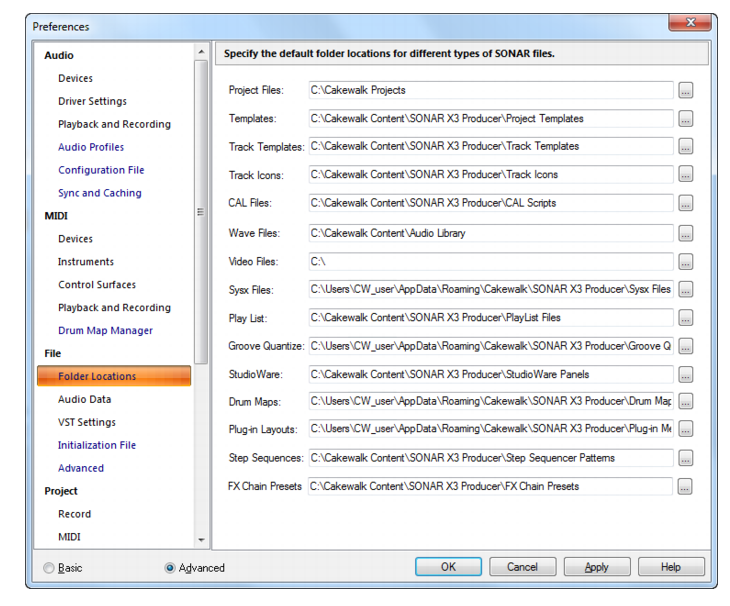
This is where you set up all your project folders and their locations.
in preferences/folder locations.
 
if you need more info:
https://www.cakewalk.com/Documentation?product=SONAR%20X3&language=3&help=Dialogs2.062.html
 
or explain in a little bit more detail what you mean.
Sorry man, all im hearing is " I don't want to mess this up"
 
1- create the new folder on your D:\ drive.
2-Open sonar and go to preferences/folder locations
3-click on Project files ( *See above photo/its the first option )
4-point that towards your new D:\drive folder location.
its a piece of cake buddy
 
However your Cakewalk content is another story, that's like 8 different files that need to be placed on the D:\drive.
you can see them above in photo.
you would have been better off setting that up in Cakewalk Command Center during install.
but can still do it now by moving the Cakewalk Content folder to your D:\drive.
but you'll have to change the paths for all the above: templates, icons, CAL scrips, exc...
 
Its only about 5-7 GB (Cakewalk content) you might better off leaving that and just putting your projects on D.
those are the real Gigabyte killers (projects).
 
Good luck.
2016/08/01 23:06:10
bayoubill
Thanks charlie! I was going to but when I do stuff like that well you know. It was when I moved the content folder everything went nuts. It's easy to do the projects file so I'll go ahead and do that. I have a bunch of files on my old PC I need in projects. I'll do that and leave it alone. Thanks again!
2016/08/02 06:29:15
chuckebaby
no
bayoubill
It was when I moved the content folder everything went nuts.


and understandably so.
if you really wanted, you could move the loop content that's located in your content folder.
that's almost a couple gigs right there,. but TBH, I have it all on my C:\ SSD drive.
my older projects are stored on D, but my current projects are all my C:\ .
 
but I can understand your reasoning.
Congrats on the new PC. I just build a new I7 a few months ago. what a difference a new build makes.
got to love technology.
 
peace
© 2026 APG vNext Commercial Version 5.1

Use My Existing Forum Account

Use My Social Media Account