• SONAR
  • Questions about pasting automation envelopes (p.2)
2014/07/05 14:48:54
sharke
Bristol_Jonesey
sharke
I've had a problem with pasting envelopes as well, but in my case it was the pasted envelope's timing seeming to be slightly off. I had an envelope automating the send level to a delay return so that I could apply delay only to certain notes at the end of musical phrases. The part was all MIDI and hard quantized, and the part I pasted the envelope to was a carbon copy of the first part. Basically I wanted to apply the same envelope to two instances of the same clip. Only when I pasted the envelope, the timing of it was slightly off by a few milliseconds, which you could hear because it was sending the tail end of unwanted notes to the delay return. I was surprised because everything was supposedly slap bang on the grid. 


Not wishing to derail the op's topic, but did you have your now time set to 01:01:000 when performing the paste AND copy?
 
I find that C+P with envelopes works perfectly when following these 2 simple rules


Also not wishing to derail the OP's topic further (which I already did...lol) - yeah I made sure the cursor was bang on the mark for both the copy and the paste. It totally flummoxed me. The one should have been the carbon copy of the other. In the end I gave up and inserted another copy of the synth to simulate the delays I wanted, which gave me more control anyway and also led to a more creative result :)
2014/07/05 15:27:01
Noel Borthwick [Cakewalk]
Please submit a problem report, list the CWBRN number and I will take a look. Make sure you have repeatable steps and preferable include a simple CWP file to reproduce the issue.
 
stickman393
Additional observations:
 
At least in these simple project examples, I can also use normal Ctrl-C/Ctrl-V to copy and paste the envelope between projects:
  • select edit filter = FX Send Level in target;
  • Ctrl-Copy
  • Select target project, with destination bus selected and edit filter = None
  • Ctrl-Paste
  • Envelope shows up, is respected.
I swear, this was the first thing I tried in my "real" projects where I first encountered the problem... and it didn't work. Hence my attempts to find the "right" sequence of actions.
 
I'm not sure what I can do about my "real" project, which has the two envelopes that can't be deleted... I suspect I will have to re-create the bus from scratch. No big deal.
 
I hope this series of posts helps others on the forum who experience issues with envelope pasting. And remember, guys: Change the search results options from "Last 30 days" to "From the beginning".


2014/07/05 17:26:08
stickman393
Hi Noel,
Thanks for responding, and on a holiday too.
 
The tracking number is CWBRN-27091
2014/08/03 19:20:59
stickman393
Now I can't even get this to work reliably within a single project. I've followed the steps described above and the destination bus just does not receive the pasted envelope.  I've double-checked that I've (Ctrl-A)+(Blue'd Track Number) to selected the destination track; Now time at 0:00:00... I don't know where it is going. SONAR thinks it has pasted something.
I'll try to reproduce this starting with an empty project.
2014/08/03 19:51:53
stickman393
I can reproduce this problem with a new, clean project:
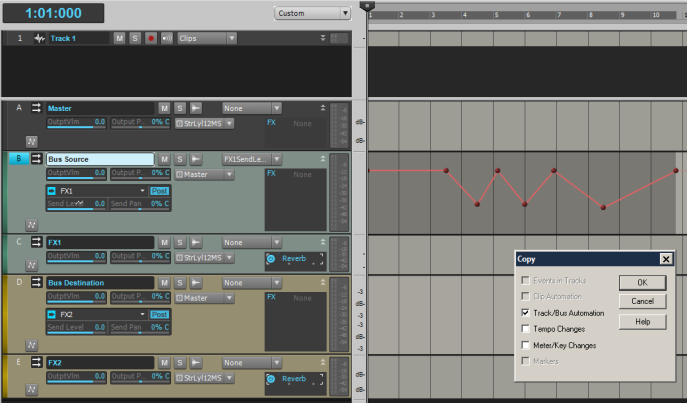
Here we have two busses "Bus Source" and "Bus Destination", each sending to their own dedicated FX bus: "FX1" and "FX2"
I have an envelope controlling the FX1 send on Bus Source, and I wish to copy-paste it to FX2.
1. Ctrl-A
2. Select the Bus so that "B" turns Blue
3. Edit->Copy Special
Observe that only [x] Track/Bus Automation is selected
4. Ctrl-A
5. Select Bus Destination so that "D" turns blue
6. Edit->Paste Special
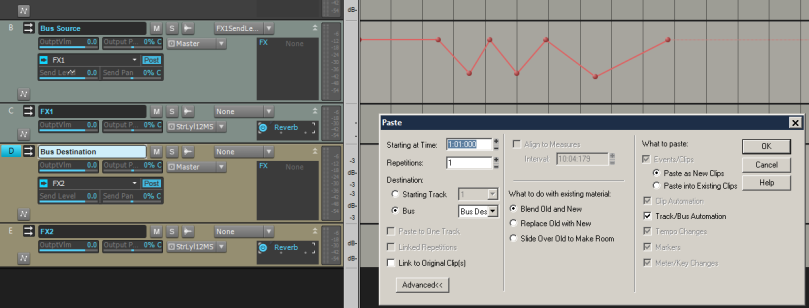
7. Press OK.
Observe: Nothing. I do not see the envelope get pasted into the track.
I've also tried creating a send envelope for FX2 Send Level in Bus Destination "D" and then performing the paste... that doesn't seem to help.
 
If anyone can show me what I'm doing wrong here, I'd be very grateful.


2014/08/03 21:33:39
stickman393
Pasting from Bus Source to a Track (Track 1), however, works as advertised.
Pasting from a Track to a Bus also appears to work.
 
I've verified this kludge works in my "real" project as well as the simple repro one.
 
Therefore, the work-around is: use an intermediate track as a waystation when copying an automation envelope between busses.
 
I've submitted this as a bug.
 
2014/08/04 13:51:53
Splat
I tried it and I couldn't get it work either..
2014/08/04 14:51:41
Anderton
Interesting kludge Stickman, thanks for that.
 
I tried to copy and paste automation envelopes from bus to bus. What I found is sometimes it works with volume and pan automation, but I could not get it to work with parameters like ProChannel effects parameters. I submitted a bug report and as a recipe to reproduce, specifically mentioned copying PC bus compressor envelopes as that seems to fail every time (at least it has every time I've tried).
2014/08/04 19:52:44
stickman393
My bug report was confirmed as submitted to development. I guess it won't be fixed in time for X4... but it's in the system.
So the fact that it is a "Send" envelope rather than a more common Pan or Volume... that seems to make a difference. Interesting.
 
Thanks for reproducing, Craig, and for your own bug submission.
2014/08/04 20:34:34
Anderton
stickman393
My bug report was confirmed as submitted to development. I guess it won't be fixed in time for X4... 


You never know. I've given up trying to guess which bugs would be easy to fix and which would be difficult. Some things that seem trivial apparently require massive re-writes at the deepest and most dangerous levels of the code, while other bugs that I assume would be complex get fixed in a day.
 
One thing I've learned for sure is giving them reproducible steps or a project that exhibits the problem really helps.
© 2025 APG vNext Commercial Version 5.1

Use My Existing Forum Account

Use My Social Media Account