• SONAR
  • New Apollo Twin USB- Sonar Platinum
2016/02/27 17:37:03
pesuchow
I'm having issues using the brand new UA Apollo Twin USB version and SONAR PLATINUM. I  constantly get the message  " audio engine has stopped unexpectedly"   I then have to shut off SONAR and often have to restart the computer. I'm running a brand new computer just built with  Windows 7 Professional 64 bit- I have 32 gigs of RAM and an I 7 3.2GHz. THIS THING SHOULD BE ROCKIN with no problem.
ANY IDEAS????
 
I'm also trying to figure out how to get Sonar to playback the sounds from my UA plugins  while in "monitor mode" of the UA console- IT will only playback the raw audio unless I  record  directly in the Record mode of the UA
 
THANKS !!!!
2016/02/28 04:27:46
Zargg
Hi, and welcome to this forum. Which version UAD software do you have? I had problems with UAD version 8, when in Win7. IRRC I used version 7.8 in Win 7. It could be worth a try.
All the best.
2016/02/28 08:26:32
Billy Buck
 
A new computer system? Did you build it yourself or have a professional DAW builder? You can have the newest, fastest modern computer and it might not perform as well as a 7 year old quad core DAW, if it has not been fined tuned and optimized for the needs of real time audio processing. Have you disabled USB Power Management (all
USB Root Hubs), from the "Device Manager"? Really important tweak for the Apollo Twin USB.
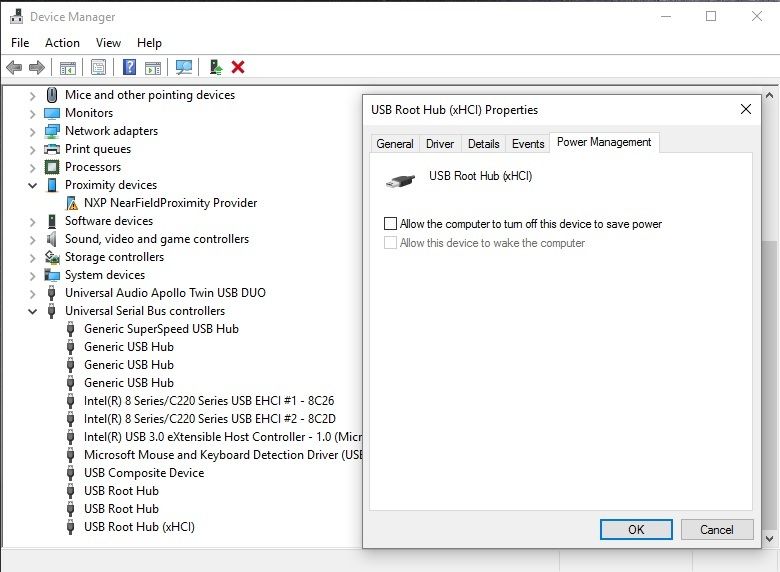

 
Check out this UA video about "Optimizing Windows for Audio" for more info on this and more:

http://www.uaudio.com/blog/optimizing-windows-computer-for-audio/
 
Also check out post #27 from the UAD forum link below for tips on optimizing for real time audio processing . Do watch the linked video in the post about how various devices/drivers can have a detrimental affect on real time audio processing performance in a DAW and the reasoning for doing so. Several posters in the thread already found the solution to their crackling in audio playback after watching the video and doing a bit of trouble shooting.

http://uadforum.com/support-troubleshooting/21696-apollo-twin-usb-crackling-my-monitors-3.html
 
PS: you will probably get a lot more "focused" feedback on any Apollo/UAD issues directly from the UAD forum.

If you have not already, check out the plethora of support information on the UA website:

https://help.uaudio.com/hc/en-us/categories/201163633

I installed my new Apollo Twin USB last weekend and have it is rocking on my 2 year old custom built DAW on Win 10 Pro x64 with all of the latest updates. Working solid with SPlat x64 (Newburyport). The latest SONAR update even fixed a reported bug that would crash SONAR when deleting multiple UAD plug-ins from the FX bin. So all is good now!

Hope this helps,

Billy Buck
 
2016/02/28 08:53:32
Billy Buck
Zargg71
Hi, and welcome to this forum. Which version UAD software do you have? I had problems with UAD version 8, when in Win7. IRRC I used version 7.8 in Win 7. It could be worth a try.
All the best.


The Apollo Twin USB requires the very latest v8.5.2, which is specific to the Twin USB.
 
Cheers,
 
Billy Buck
2016/02/28 08:59:56
Billy Buck
A new computer system? Did you build it yourself or have a professional DAW builder? You can have the newest, fastest modern computer and it might not perform as well as a 7 year old quad core DAW, if it has not been fined tuned and optimized for the needs of real time audio processing. Have you disabled USB Power Management (for all USB Root Hubs) from the "Device Manager"? Really important tweak for the Apollo Twin USB as you want 100% power, 100% of the time for real time audio processing


Check out this UA video about "Optimizing Windows for Audio" for more info:
 
http://www.uaudio.com/blo...ws-computer-for-audio/
2016/02/28 09:09:20
Billy Buck
If you have not already, check out the plethora of support information on the UA website:
 
https://help.uaudio.com/hc/en-us/categories/201163633
 
I installed my new Apollo Twin USB last weekend and have it rocking on my 2 year old custom built DAW on Win 10 Pro x64 with all of the latest updates. Working solid with SPlat x64 (Newburyport). The latest SONAR update even fixed a reported bug that would crash SONAR when deleting multiple UAD plug-ins from the FX bin. So all is good in SPlat now!
 
Cheers and hope this helps,
 
Billy Buck
2016/02/28 09:12:35
Zargg
I will just say that I had nothing but crashes when using UAD 8.xx in Win7. Had to use (IIRC) 7.8 until I updated to Win 10. I have had no problems after updating.
All the best.
2016/02/28 09:21:20
Billy Buck
Interesting, well v8.5.2 (which is the latest most up to date UAD version) is designed for the Twin USB on Windows v7 & v8.1 and works flawlessly in Win 10 Pro x64, as long as your system has been optimized and tweaked for real time audio processing, works fine in SPlat x64. I am also using (2) PCIe cards along with my Twin USB.
 
Cheers,
 
Billy Buck
2016/02/28 11:08:16
Billy Buck
I do really like the new Apollo Console 2.0 for Windows. So many new features and improvements over the previous v1.0, like plug-in & preset management, FX chains, re-sizable console, independent UAD realtime processing per channel, etc. Being able to track/monitor UAD plug-ins in real time independent of the actual DAW buffer latency is crazy cool. In the screen capture, I am playing back a 44/24 SONAR project @ 1024 ASIO with a plethora of UAD/native plug-ins in the FX bins while also tracking/monitoring UAD plug-ins from the Apollo Console with no perceivable latency.


Cheers,
 
Billy Buck
2016/02/28 11:52:26
pesuchow
THANKS SO MUCH BILLY - I have already done much of the  windows optimization you mentioned. One thing HOW DO YOU get SONAR to see all the UAD plugins as you show in the screen shot? Everything is visible and loaded in the UAD CONSOLE, but when I look for UAD in SONAR efx or even scan the plugins in the UAD location it does not show up! Thus I can only record the sounds directly in.  THANKS AGAIN
 
© 2026 APG vNext Commercial Version 5.1

Use My Existing Forum Account

Use My Social Media Account