Johnbee58
...wicked
SONAR doesn't have a "Master" track per se, though you could make one.
I must be seeing things then, because I'm sure in every project I've done there is a channel called MASTER. It has a blue fader and if you move that fader up or down the volume of the entire project goes up or down. It also has an EQ and a drop down arrow marked FX. It comes alongside of a channel called Metronome and another called Preview. Is that just there as a decoration?
This is important for you to fully understand. Its what makes Sonar a very powerful DAW. In the Track View you have the track pane and a buss pane.
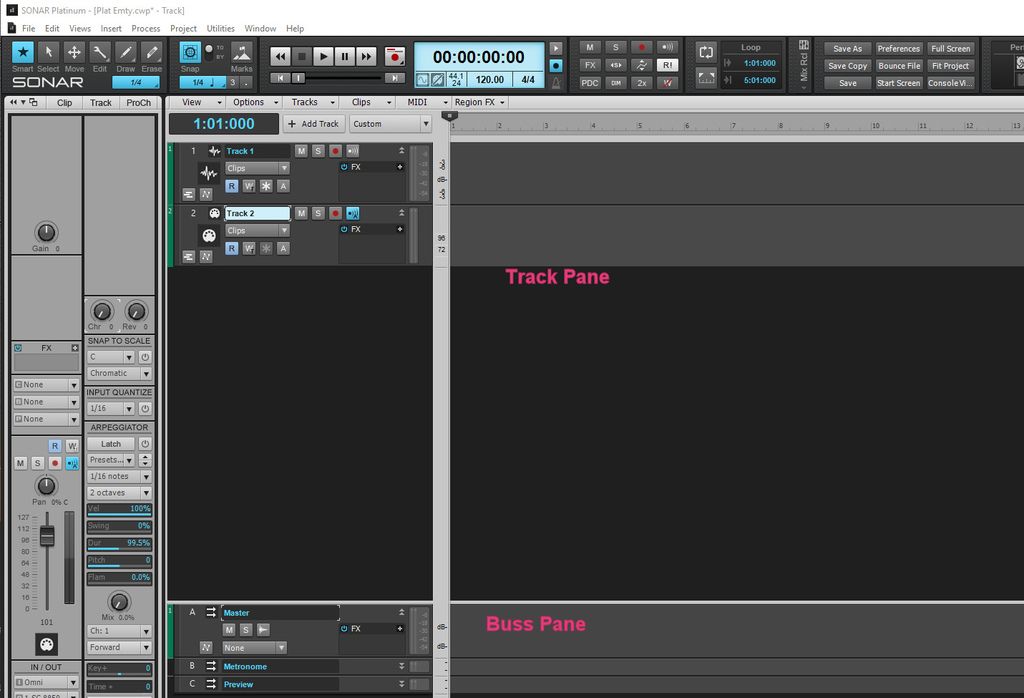
As you see in this picture the track view is divided into two sections and are labeled in the picture.
The buss pane can have any number of buses plus auxiliaries which are just buses used with sends.
The reason those buses are there is its the default setup. The metronome buss is for the output for the guess what, the metronome. The preview buss is for previewing loops and other audio files from the browser.
In a full project with audio and MIDI I often have a buss for drums and instruments and aux 1 for reverb and so on. I have been known to have a master sub buss that feeds the master buss. One has total control over what buses and how many are used in any project.
With Sonar 2016 Platinum you also have aux tracks which can record the output of a track.
I suggest you read up on this in the manual or help file. Its fundamental.