BeepsterMy point was "DISABLE THEM" doesn't say anything. I don't need to see a video of MIDI Loop Recording. I know the workflow. I know what you mean. I know what you want and described ways to acheive it right now AND made suggestions as to how Cakewalk could implement what you want.
To imply that I'm an idiot for not being able to read your mind with your repitition of the vague statement "DISABLE THEM" is irksome and why I've been ignoring it until now.
If you want it to work in a specific way then YOU need to articulate it and in a way that makes sense/will fit into the current program design without breaking everything else.
It can be done. I have ideas for it myself. Articulate your ideas to start a discussion about it. Make a Feature Request with those ideas so the Bakers can see it.
"Disable them!" does not help you acheive your goal.
I WANT you to get what you need to work. It might benefit my own workflow but good gawd, man... explain yourself so there's a chance the ideas can be considered and implemented.
And again... I KNOW WHAT MIDI LOOP RECORDING IS! I know how to do it in SPlat!!!
It's not hard but yeah... it could be improved.
Ok. I'll sit here and write a thesis since you seem to not understand EXACTLY what I am talking about.
Let me start at the beginning. Back in the late 90's when I first began to venture in to the art of midi composition, musicians didn't have the plethora of options that many of us take for granted today. At that time, many musicians used hardware sequencers such as the acclaimed MPC 3000 {See Photo "A"} to sequence all of their midi devices.

Photo "A"
The MPC 3000 was actually very limited as a midi sequencer by today's standards. It could only hold 20 songs at one time. It could only hold 99 sequences at one time. It was limited to 99 tracks, and it only had a 75,000 note capacity. Today's computer based Digital Audio Workstations are only limited by their hardware which is why most of them claim to have "unlimited" audio tracks, midi notes, etc.
With all of it's limitations, the MPC 3000 was actually a very popular midi sequencer. There are some who claim that it had a certain "swing" which hasn't quite been duplicated even with today's high powered computer based DAW's. That claim is often disputed, but no matter what side of that argument you were on, the MPC 3000's reputation as a rock solid midi sequencer was never in question. In 2016, there are many MPC 3000's still in use for it's sequencer and it's "crunchy" and "warm" sounding filters and DAC. Another reason that MPC 3000's are still in use today are because of their simple yet powerful workflow.
The MPC 3000 came equipped with two midi input ports, and four midi output ports {See Photo "B"}, which made it very easy to connect and control all of you midi devices.
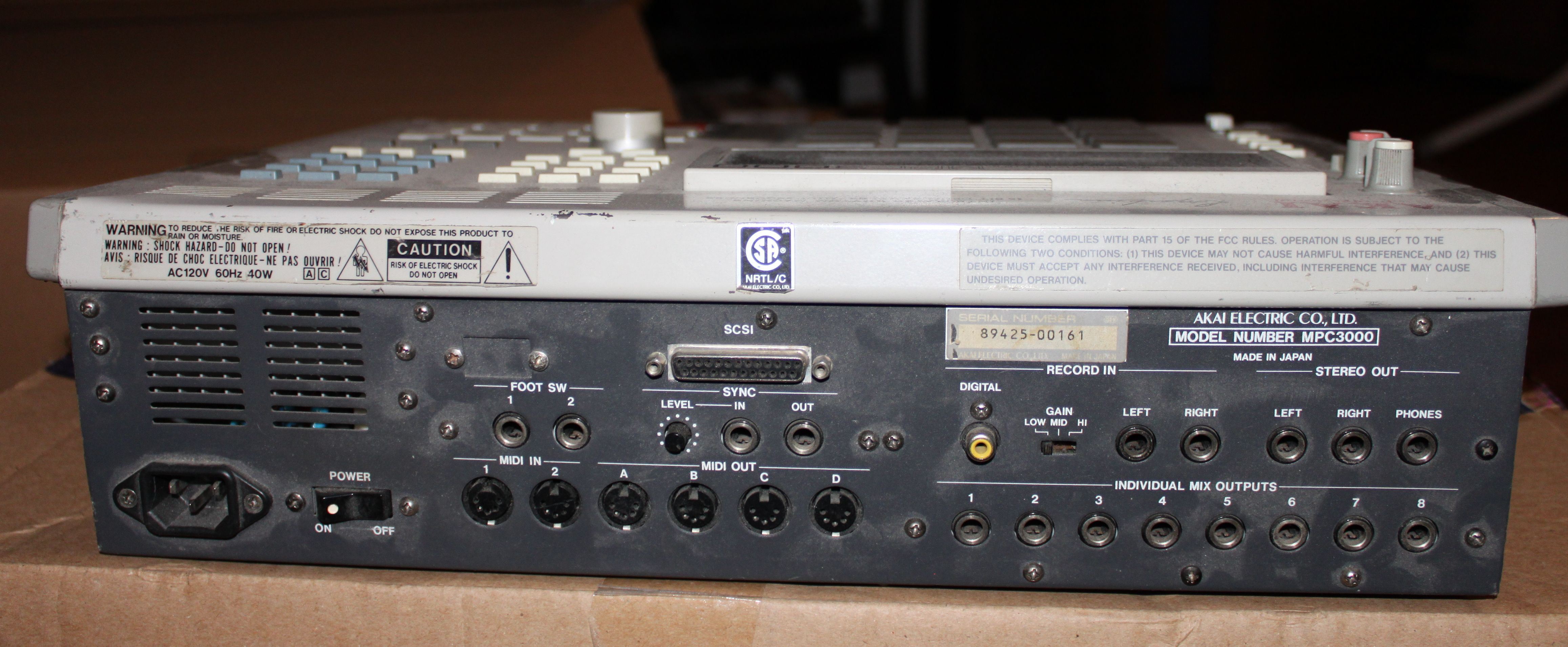
Photo "B"
The MPC only had 16 pads and 4 banks, but it was very often used to sequence keyboards because of it's tightly integrated yet simplistic workflow. The MPC's workflow consisted of composing sequences which could then be compiled together to create songs. Each sequence could be set to whatever length of "bars" you wanted (up to 99). The sequencer would automatically loop back to the beginning of the sequence once the end of the final bar of the sequence was played. This is what's commonly referred to as "midi loop recording". There are a few criteria that the MPC 3000's midi loop recording had that some modern day sequencers just don't seem to follow. Let's take a look at how the MPC 3000 midi loop recording worked.
To record a sequence, you simply had to hit the record button, and then hit the play button. The MPC gave you a 1 bar "count in" and then it began recording. The MPC's sequencer resolution was 96 ppq. All of your midi data would be automatically quantized to whatever settings you wanted. This was done on it's "Timing Correct" page. The MPC would record your performance and once the end of the sequence was reached, it would automatically start at the beginning again (midi loop recording). Once the loop began again, you would hear your performance. If you wanted to add to it, you simply played some more notes on the next pass. The newly recorded midi data would be
merged in to the existing sequence as long as you were in record mode. If you weren't in record mode, and you were playing the sequence, you could actually "punch in" and add notes with the "OVER DUB" button. When using the OVER DUB button, all of your newly composed midi data would still be
merged with the sequence. There was
no "track layering". There were
no "take lanes". All of the midi data that was added in any subsequent pass of the sequencer while in record mode was always automatically
merged to the sequence. It's always consolidated. You still had the ability to edit each individual midi note for pitch, velocity, and note length. You could also delete individual midi notes, but you
NEVER had to dig through any "track layers" or "take lanes" to do so.
There are many modern day DAW's that can record midi data in the same fashion as the MPC as far as
merging midi data in to one consolidated sequence, or clip. From my own personal experience, I can assure you that Ableton Live, Presonus Studio One 3, Native Instruments Maschine, Tracktion Corporation T6, and Propellerhead Reason 8 all have the capability. Sonar used to have this capability. Somewhere along the line, this was lost. I'm not exactly sure what version they scrapped it in favor of it's current "Take Lanes" approach, but no matter what your settings are in Sonar, it's still creating "Take Lanes" instead of truly
merging midi data in to an existing clip while loop recording.
In Sonar, even if you set:
1.) Recording Mode to "Sound on Sound"
2.) Loop Recording to "Store Takes in a Single Track" and
3.) Uncheck "Create New Lanes on Overlap"
Sonar will still create new Take Lanes. You can visibly see them in the Arrangement because the last "pass" will be the only one that is visible in the Arrangement window. The other "Takes" are sort of "hidden" underneath which gives the initial appearance of missing midi data in the arrangement window. Now, I'll admit that the midi edit window will show consolidated midi data, but Sonar forces you to use the edit window to see what's really going on, unless you take the time to go in and consolidate all of your "Take Lanes". I think that Cakewalk forcing you to work like this is unacceptable.
There should be a way that you can simply record midi data in loop mode, or overdub that automatically merges and consolidates any newly recorded midi data to existing data without the need to manually select, flatten and consolidate the mess that's created by "Take Lanes", and the arrangement window should reflect this consolidated midi data without the need to open the midi edit window. There are simply too many other DAW options available, for you to work like Cakewalk forces you to by not having this simple functionality. This is how midi sequencers have always worked. This isn't anything new.
This is what I mean when I say I want to be able to simply "Disable Take Lanes". I'm not against "Take Lanes" if someone wants to use them. I don't have a problem with that. I just want to be able to "Disable Take Lanes". This may not seem like a big deal to some users, and I get that, but it's a big deal to me. It should at least be an option.
Is that explanation thorough enough?
Are you not entertained?????? {See Photo "C"}

Photo "C"