• SONAR
  • Step sequencer workflow/FruityLoops (p.2)
2016/03/01 14:05:15
mettelus
+1 to Session Drummer, but it also comes with the downside that you cannot use loop record mode and overwrite cells with new data.

The best VST for this work that I know of is Geist, which seems to be a VST version of Maschine. Geist also has features very useful to on-the-fly work, such as simply copying a pattern from one trigger to another and modifying (up to 24 per engine) so you are not dealing with SS "clips" like in SONAR that you may never even fire off.
2016/03/01 15:26:03
Royal Yaksman
Here's how you achieve the same workflow within Sonar:

Load FL Studio as a VST in Sonar!

Just make sure to create the corresponding output tracks to capture what you've done in the FL VST.

This way you still get to use FL's sequencer and flexible playlist, whilst utilising Sonar's superior audio tracking and mixing workflow.
2016/03/01 15:49:51
rabeach
Royal Yaksman
Here's how you achieve the same workflow within Sonar:

Load FL Studio as a VST in Sonar!

Just make sure to create the corresponding output tracks to capture what you've done in the FL VST.

This way you still get to use FL's sequencer and flexible playlist, whilst utilising Sonar's superior audio tracking and mixing workflow.

FL Studio I believe is $99 and doesn't it still come with lifetime updates. I bought it about 16 years ago and still get regular updates. 
2016/03/01 15:51:03
rabeach
Jesse G
Wasn't there something like that in Cakewalk's Project 5 v 2.5 years ago?  MMmm, where O' where is Project 5 now??
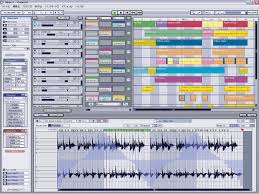


It was a sad day when it was dropped and still is.
2016/03/01 16:16:11
kennywtelejazz
rabeach
Jesse G
Wasn't there something like that in Cakewalk's Project 5 v 2.5 years ago?  MMmm, where O' where is Project 5 now??


It was a sad day when it was dropped and still is.


+ 1 Yes, up to a point ....
it was truly a sad a day for me when P 5  was dropped 
On the other hand , I have used it in Win 8 64 and now in Win 10 64 ,  It smokes the performance I used to get in XP 32 bit ...it is still usable in IMHO ,
Sure the lack of 64 bit memory access gains , not having access to multiple cores and the fact that a modern VST sample based multi synth will bring it to it's knees  ...
all that aside ...which are deal breakers for most people ,,,
I still use it every so often ,
it will load up many of the instruments and plugs that came with SONAR , except for the non 3 rd party SONAR content that is locked to SONAR only .
It still works very nice as a scratch pad ,  FWIW , I still prefer the simplicity and functionality of The P 5 matrix View over the SONAR Matrix View ...
 
My apology to the OP for having gone here on an OT post .
I have tried FL 12 ,  in my case I had a hard time understanding the workflow and the GUI ...still i liked it , may try again ....
I guess even Aliens that like to think that they are pretty smart can feel pretty stupid when they get abducted by humans and human technology
 
Kenny 
 
2016/03/01 17:16:14
Sanderxpander
Kylotan
I've got FL Studio 11 open now and I can only find a way to paint whole patterns into the Playlist, not partial patterns. If I had 3 different patterns, one for each of hihat, kick and snare, then I could certainly paint those independently, and maybe that's what you mean, but that would be equivalent to having 3 separate clips in 3 tracks in Sonar, which can be done fairly easily. (They could all share the same drum map and therefore trigger the same sampler instance.)


Hi, and thanks for checking this out for me. I haven't used FL myself, I just sat next to the guy, so I may be misunderstanding some of the process. He had some kind of step sequencer with basic sampler attached. It could be that they were three step sequencers but it was definitely one window where he built a kick/snare/hats pattern, and then he painted them individually across three tracks, each of which ended up with a single instrument and audio output (meaning he could EQ the snare individually etc.)

If this means he had some way to work on three patterns within one step sequencer I don't know, but I also don't know a way of combinn
2016/03/01 17:20:05
Sanderxpander
Kylotan
I've got FL Studio 11 open now and I can only find a way to paint whole patterns into the Playlist, not partial patterns. If I had 3 different patterns, one for each of hihat, kick and snare, then I could certainly paint those independently, and maybe that's what you mean, but that would be equivalent to having 3 separate clips in 3 tracks in Sonar, which can be done fairly easily. (They could all share the same drum map and therefore trigger the same sampler instance.)


Hi, and thanks for checking this out for me. I haven't used FL myself, I just sat next to the guy, so I may be misunderstanding some of the process. He had some kind of step sequencer with basic sampler attached. It could be that they were three step sequencers but it was definitely one window where he built a kick/snare/hats pattern, and then he painted them individually across three tracks, each of which ended up with a single instrument and audio output (meaning he could EQ the snare individually etc.)

If this means he had some way to work on three patterns within one step sequencer I don't know, but I also don't know a way of combining three step sequencers in a single view in Sonar.

Perhaps he solo'd each one before painting it? I do remember him clicking something and saying he could paint just one or the whole thing.

I looked into getting FL but while the basic version is 99 bucks it goes up quickly with some included fx and I'm not entirely sure which to get. It also wouldn't really solve my problem as I hate trying to sync up timelines between VSTs and host. I could use Maschine in a similar fashion but I much prefer doing all sequencing and song layout in a single host. The whole idea of this is to make something quick and easy, not more convoluted. Thanks for the suggestion though, I didn't even realize you could load FL as VST.
2016/03/01 17:25:51
Sanderxpander
By the way which sampler to use is less important to me than the general workflow. I already own Battery, Session Drummer and Maschine and I'm sure a bunch more VSTs which could act as sample host although the FL "view" with a single step sequencer where you'd just drag a sample to a pattern was appealing. Geist looks cool, but very similar to Maschine which incidentally also loads perfectly fine as VST (I always do).
2016/03/02 06:48:03
Kylotan
SanderxpanderHe had some kind of step sequencer with basic sampler attached. It could be that they were three step sequencers but it was definitely one window where he built a kick/snare/hats pattern, and then he painted them individually across three tracks, each of which ended up with a single instrument and audio output (meaning he could EQ the snare individually etc.)

If this means he had some way to work on three patterns within one step sequencer I don't know, but I also don't know a way of combining three step sequencers in a single view in Sonar.

Okay, I've worked out how he did this, and it is quite neat and powerful.
 
First, FL Studio has a mixer track that can be assigned to each instrument/channel. and that is independent of the patterns and how they're arranged in the playlist. So that aspect is not related.
 
When you put a pattern into the Playlist, that's not like a single clip in Sonar, more like a group of clips stacked vertically across all your channels. So you might have one pattern for a verse, one for a chorus, etc. You paint them into the playlist to create your arrangement. You might also want more granularity, so you might have a pattern for verse percussion and a pattern for verse pads, and paint them above each other in the playlist when you want to hear the whole verse, and just paint the percussion part when you want the pads to drop out.
 
What your friend did, was go one further than that - if you take a full pattern in FL Studio and choose 'Split by channel', it takes your original pattern and replaces it with multiple patterns, each one having just a single instrument/channel that was in the original. You can then paint those parts into the playlist separately, and at this point it looks a lot more like Sonar, with one pattern/clip for each song section for each instrument.
 
But Sonar can't really give you that whole workflow because its step sequencer is limited to one instrument or drum map. But if you could get all your instruments into one step sequencer via a drum map or sampler, then possibly there is a CAL script that replicates the 'split by channel' functionality, but you'd have to duplicate the track and have the same drum map or sampler on each of them to get the same effect.
 
This has inspired me to spend some time with FL Studio again!
2016/03/02 13:53:27
Sanderxpander
Well, thanks for checking. Not entirely surprised but still a little disappointed there is no way to get close in Sonar. I'll experiment some more myself to see what I can come up with.

Glad to hear you got inspired though! :)
© 2026 APG vNext Commercial Version 5.1

Use My Existing Forum Account

Use My Social Media Account