2012/09/18 13:05:51
Jonbouy


This doesn't work with any set up that differs from the one described here with HPET off and turbo on.

So what should I be changing?
 
If I leave HPET on the audio still works but not under any load at all, and midi craps out as soon as you move a mod wheel or bend pitch, HPET off midi is fine, audio is fine and under reasonable loads.
 
Simple as that.

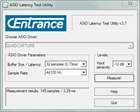
Attached Image(s)
2012/09/18 13:45:52
Goddard
Alegria
HPET adds a minute amount of latency simply because it's an external clock. This is well documented and also applicable to LAPIC.

Well documented where? 


HPET is not an "external" clock (ok, it is "external" to the cpu but it is a system device (in the PCH) with directly accessible registers (addresses in system memory space)).  And no, it does not add any significant latency (very low overhead).


2012/09/19 11:12:12
Alegria
"Goddard"
Well documented where?

One of many articles I reviewed is found here:

  • Performance by Design

    "Goddard"
    And no, it does not add any significant latency (very low overhead).

    I agree and as previously stated...,
    "Alegria"
    In my case, it's no more than approx. 15us.

  • 2012/09/19 13:34:58
    Goddard
    Alegria


    "Goddard"

    Well documented where?

    One of many articles I reviewed is found here:
  • Performance by Design

    "Goddard"

    And no, it does not add any significant latency (very low overhead).

    I agree and as previously stated...,
    "Alegria"

    In my case, it's no more than approx. 15us.
  • Ah, ok, already discussed this in #75 above (here):


    http://forum.cakewalk.com/tm.aspx?high=&m=2628147&mpage=3#2650824


    As said, in future, high rez timing will likely migrate towards "invariant TSC" using RDTSCP, as discussed here:


    http://download.intel.com...software/IA/324264.pdf


    The PC Clock Timing utility I linked to in post #75 displays the results and execution times of different timer calls, although I haven't investigated which timebase(s) the programmer used for those measurements.


    2012/09/19 13:38:06
    Jonbouy
    So what's your peak DPC over a 12 period with your ASIO driver running @32 samples under load?  How often do those peaks occur? What's your RTL figure with that?
     
    As I keep saying which you would construe as an OT personal attack is that having a really low DPC figure, it's meaningless on its own.
     
    Perhaps also you can explain where the performance of my machine WRT to audio production is lacking compared to your proudly declared 'Dedicated' one which we already know is underperforming currently by around 12%.
    2012/09/19 14:07:43
    Goddard
    Jonbouy


    Chuffington...lol I even quite like that.
     
    The midi is fine enough, if I was really picky though I'd be using a dedicated clock outboard and sync everything with that.  I'm only using one in port which is handled by the stock windows driver so I don't use the Quad's facility. 
     
    And yes the spec for the Quad is 48 buffers, just goes to show what can happens with a bit of judicious tweaking to get the best out of your setup.
     
    The interesting thing is that with the 1.5 driver as opposed to the initial release driver there is a switch which is supposedly to reduce CPU usage, with HPET turned off the background DPC figure actually increases by around 150 micro seconds but enables the 32 buffers, the DPC stays constant and perfectly usable even though it looks high at around 230us overall.
     
    With HPET turned on the background DPC stays lower on average but peaks every few seconds and sometimes beyond the threshold of acceptable.
     
    I think there must be some kind of pre-allocation going on with what Roland call VS streaming but whatever it is in practice I could run a few instances of a major sampling package, a big drum sampler whilst being Rewired without getting any sign of glitching @32 buffers.
     
    I tend to run it 64 samples and do everything set that way though sometimes I'll use the 32 sample capability for a bit of tracking monitoring through the app.

    Nice, Chuffles!


    I'm curious. I realize you are using 8.5, but what is your setting in Aud.ini for "Use HardwareSamplePosition"? Also, how many queue buffers?

    What MIDI interface are you using, if not your Quad?
    2012/09/19 14:14:00
    Jonbouy
    I'm just using an M-Audio keyboard via USB with the standard Windows driver.  I am using the Octa's midi out for a vintage module.  I also use a fair bit of Virtual Midi routing ITB using loopMidi.
     
    I'll get the figures from Aud.ini later only I'm not on my DAW partition just now.
    Here ya go.
     
    UseHardwareSamplePosition=1
     
    Queue buffers are at default of 2
    © 2025 APG vNext Commercial Version 5.1

    Use My Existing Forum Account

    Use My Social Media Account