• Hardware
  • Do I really need an 88-key midi controller for use with NI/Orangetree??
2015/09/28 15:26:45
MrGarrison
Hi team
I presently use a 61 key M-Audio Keystation, but have recently purchased Strawberry Orange Tree Guitars (and of course Kontakt to run it).
I would appreciate some feedback on whether getting an 88-key controller would be suitable for running Orange Tree, or will my 61-key do the job. I don't want to have to use the 'Octave Up/Down' functions on my 61-key every 5 seconds to activate articulations so hopefully you get what I'm asking.
 
Many thanks in advance
Bob
2015/09/28 16:08:07
Vastman
your keystation should be fine... Strawberry doesn't use all of your keyboard so you can assign the keyswitches to the lower register... However, he does offer lots of keyswitching...Banshee might be a bit more problematic as it has an extended range.
 
The nektar lx88 is a great little keyboard however... and it has a sonar template for transport control and a lot of faders/knobs/pads... as you get into things, such as "piano" or orchestral packages you'll probably wanna go bigger...  but for now you should be fine.  The easiest way to figure is to lay out all the keyswitches you want, save that instrument or multi in kontakt, btw.... and see if you have enough keys left!
 
btw, learning to set up/save kontakt instruments... lots of youtubes out there if you don't know how.
 
Have fun!
 
btw, there's an ongoing discussion on 88 keyboards at VI Control here
 
 
2015/09/29 08:45:02
dcumpian
No, you don't. However, it is much easier if you want to switch articulations while playing live. I generally don't do that and record the midi, then go back and switch articulations as needed in the PRV. It is certainly more tedious, but I don't have to think about articulations while playing.
 
Regards,
Dan
 
2015/09/29 12:34:38
bitflipper
I don't use keyswitches live, but instead plug them in after recording the MIDI track. Consequently, I could use just about any controller.
 
Futhermore, I usually apply the keyswitches to a separate MIDI track from the main performance. On the rare occasions when I do need to "play" the keyswitches in real time, I can use any controller because it's still a separate pass.
 
Another advantage to putting keyswitch events into a separate track is I can easily transpose them so there isn't so much white space between them and the notes in the PRV. It's a lot easier to program keyswitches if you don't have to scroll the PRV. It also makes it easier to stack keyswitches for multiple virtual instruments on one screen, e.g. violin/viola/cello/bass.
 
There is yet another option, which I saw Jordan Rudess using in a video, and that is to pick up a separate keyboard controller just for keyswitching. I've got one of these, which I could use that way although mostly it's just for packing along on road trips. It's tiny - small enough to set atop my main controller, close to the pitchbend and modwheel.
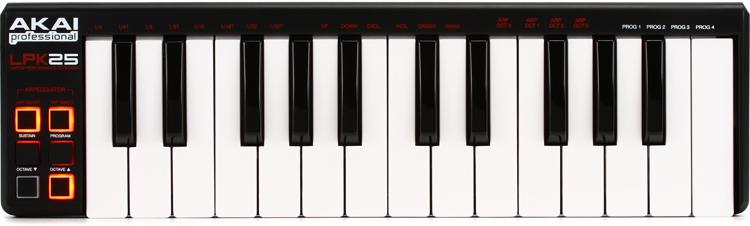
 

© 2025 APG vNext Commercial Version 5.1

Use My Existing Forum Account

Use My Social Media Account