• SONAR
  • Having trouble hearing the metronome using X2 Studio 64 bit
2015/12/31 13:26:44
copperlix
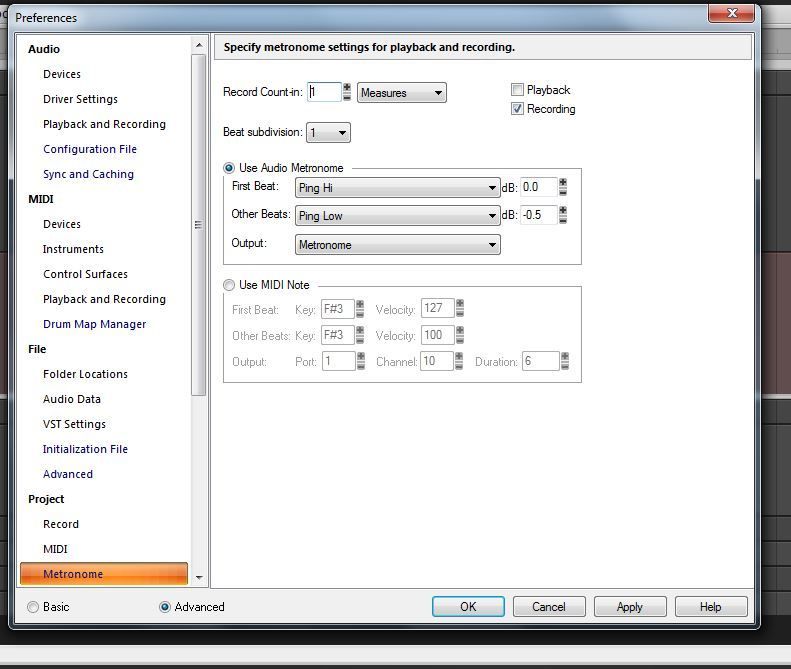
My metronome acts like it's working, but I can't hear it. By that I mean that I can see it wait one measure before recording, as I have set it, but I get no sound.
 
For some context, many years ago I was comfortable using Sonar 2 and 3, but haven't done much at all since then. I did upgrade to X2 Studio a couple of years ago, but that interface is so different from Sonar 3, and I haven't really ever got familiar enough with it. So, it's quite possible that I'm just missing a check box somewhere. Although, I did check my preferences to make sure that the metronome is enabled for recording. I have included a screen shot. I also just installed the latest patch for X2 Studio, but that did not resolve it.
 
I'm pretty sure that I did have the metronome working fine the last time I tried to use Sonar, which was about a year ago, but I have forgotten almost everything I learned since then.
 
Any ideas?
 
Thanks
 
 
2015/12/31 13:30:56
scook
Maybe the audio files are missing. Hold the SHIFT key while starting SONAR. If the files are missing, this will restore them.
2015/12/31 13:32:59
Beepster
Do you see the Metronome Bus in the Bus Pane?
 
Can you describe what is happening there (like do you see the meter activating? What is it routed to? Etc...)
 
If you don't see the Metronome Bus then you need insert a bus for it and set it up. I've never had to do this so check the manual or one of the other guys can help.
 
Cheers.
2015/12/31 13:37:23
copperlix
I do see the metronome bus.
 
Also, the audio files are there in the correct folder. However, when I first tried to play the audio files outside of Sonar, they would not play. Then I downloaded a new metronome audio package from this site and I could play the new audio files with Windows Media Player. So, I thought I had solved, but I went back into Sonar and still could not hear the metronome.
2015/12/31 13:47:51
copperlix
Do you see anything wrong in this screen shot?
 

2015/12/31 13:55:20
scook
No, however I/O details for the bus are not shown in the image.
 
Starting with a new project using an unaltered Cakewalk version of the normal template, does the metronome work?
2015/12/31 13:55:57
Beepster
Is the Bus output being sent to the Master bus?
2015/12/31 14:00:30
copperlix
scook
Starting with a new project using an unaltered Cakewalk version of the normal template, does the metronome work?

Metronome still does not work in a new project, neither in an old project that it once worked in.

Beepster
Is the Bus output being sent to the Master bus?

No, it is sent to "Metronome".
 
 
2015/12/31 14:00:45
Beepster
Also we cannot see the Gain and Volume controls for the bus so of course make sure those aren't turned all the way down and there are no envelopes silencing the track somehow.
2015/12/31 14:02:53
Beepster
copperlix
scook
Starting with a new project using an unaltered Cakewalk version of the normal template, does the metronome work?

Metronome still does not work in a new project, neither in an old project that it once worked in.

Beepster
Is the Bus output being sent to the Master bus?

No, it is sent to "Metronome".


It should be going to the Master bus or to the Mains. Not sure how it could be set to send to itself... or maybe that is part of some Metronome bus quirk I am not aware of.
 
If you look in the Console View "Bus" area the output will be at the very bottom. I'm not at my DAW otherwise I'd tell you what mine is outputting to.
12
© 2026 APG vNext Commercial Version 5.1

Use My Existing Forum Account

Use My Social Media Account