• SONAR
  • Request for Installation Guidance: Upgrading X3 Pro to Platinum
2015/10/31 13:23:37
chamlin
I paid for Platinum in February and never installed the upgrade, in part because my SSD OS/Programs drive was running out of space. I only have around 20 GB of space left on my 2 year old 180 GB SSD (only used for OS and Programs).
 
At the time of X3 Pro installation, I chose to have my Sonar projects and Cakewalk Content on a separate drive (S:).
 http://screencast.com/t/D0vEtWIcyVWm
 
But it appears that much of the Cakewalk content was duplicated in the C: drive's 64-bit Program section:
  http://screencast.com/t/Ro5IfEHyl9Bb
 
And there is also the C: drive's 32-bit Program section (installed Sonar X3 32-bit to use DrumCore, which I can live without.)
  http://screencast.com/t/qxX3kxsaRmvA
 
So...here I am at a choice point. I want to clean this up with the new install, and I'm not against uninstalling everything for a clean installation. Can really use some guidance regarding:
  1. I've read that the easiest installations and monthly updates are to just hand it over to the CCC and let it do it's thing, which appears to install everything to the C: drive. Accurate? Does that work well?
  2. If I did that, since my C: drive (OS & Programs) is about to go into "red flag" zone in terms of space available, is it best to upgrade from the 180 GB SSD to a 256 GB SSD to accommodate Platinum's size and expanding content? Or a 500 GB? (I would clone the existing drive to a larger drive, then install Platinum.)
  3. Should I uninstall all my prior installations or just install over them...and if just installing over them, what should I do about all the duplicate content?
I would benefit from simplicity at this point.
 
Gratitude,
Chamlin
2015/10/31 13:53:44
Wookiee
Install the CCC and login, the click on the Cog gear gadget.  Click on the Paths tab, you can then chose where to install some of the program, i.e 32 and 64 bit plugs, Where the stuff is downloaded to for installs, I have that set to another drive and where the Cakewalk Content is installed.
 
You would probably benefit from a drive upgrade to at least 256 or larger.
 
SONAR Platinum will install in its own directory, however the common bits will overwrite as appropriate.
 
If you do decided to uninstall do a custom one and be selective.
2015/10/31 14:06:32
scook
If you can afford it, a larger SSD would defer the problem for some time, possibly forever.
 
Letting the Command Center handle updates is the least painful route. Using the verbose setting and alternate paths provided in the Command Center configuration can also help, if you choose to install things in other than default paths. Relocate the download path and/or removed the installers from the path after installation.
 
Just as with every version of SONAR there is a tremendous amount of overlap between X3 and the new SONAR. More than half the disk space is used by samples and audio loops. There are no changes in the sample libraries which install with the sfz synths (DPro, Cakewalk Sound Center, Rapture Session Drummer and Studio Instruments). I would not mess with uninstalling the previous version, it is not going to return much disk space because of the amount of shared data between releases.
2015/10/31 14:12:50
chamlin
Wouldn't uninstalling remove all the multiple iterations I seem to have of Dpro? Or perhaps, once CCC installs everything to the C: drive, I can just delete all the content on my S: drive.
 
If I did that, will my current preferences/settings be carried over, and possibly cause Platinum to not know where to find Dpro, etc.?
2015/10/31 14:20:13
scook
No, they overwrite themselves. If you have altered the registry or used directory junctions to alter content locations, the installers will honor the changes and install accordingly. FWIW, there are no changes to DPro or Rapture content or programs. The installers where changed to work with the Command Center.
2015/10/31 14:53:58
chamlin
Thanks guys. I'll clone to a 500 GB SSD; allow CCC to choose where to put everything; check my settings and then clean up.
2015/12/19 17:40:32
chamlin
UPDATE: I have replaced my C: OS drive with a 512 GB SSD. Prior to installing CCC and letting it put everything wherever the heck it so desires for simplicity sake, I'd like to clean some things up and can use your holiday spirit assistance in terms of where folders and content should reside and how to move them in preparation for the install.
  • Windows 7 Pro system, 16 GB RAM.
  • Sonar X3 Pro: 64-bit and 32-bit (for DrumCore 3) installed --- going to Platinum
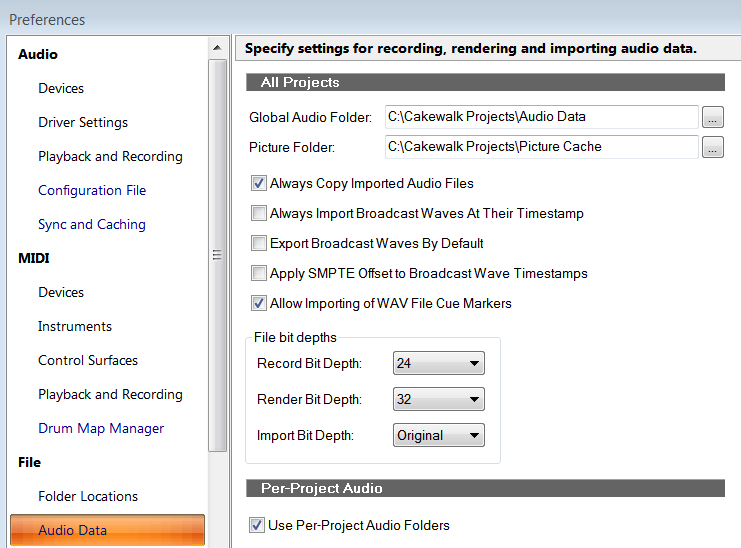
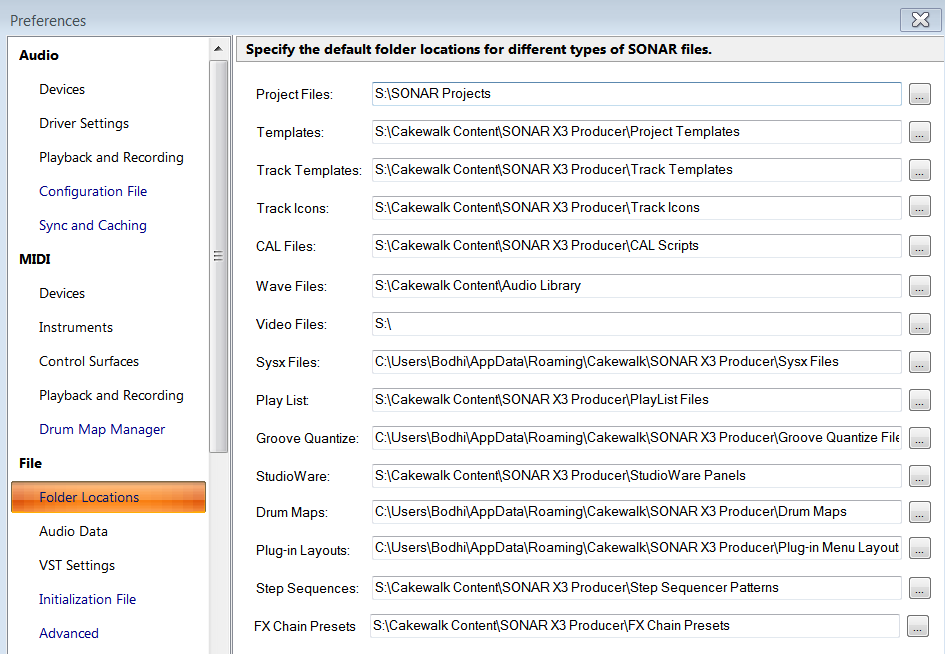
1.  With plenty of C: drive space, and unless there is an important reason to NOT do this, I'd like to have everything except the actual project files just reside on the C: drive. That will allow me to dedicate my S: drive space to just the project folders, with the "Per project" audio data.
 
My system seems to have stuff all over the place. Dimension content is on the S: drive, Dimension Pro on the C: drive. And I just noticed that in the C: root "Cakewalk Projects" folder, there is audio data from one of my songs that has always had the "Per Project Audio" box checked. ???
 
 Questions: A.  Which of these should I NOT change from S: to C: (other than Project Files)?
                  B.  If I change these will Sonar automatically adjust this for all existing projects, or will projects be
                       confused as to where things are?
                  C.  Do I need to move the actual content of these folders or will Sonar automatically do so?
 
                  D.  How can I safely move that audio data to the proper folder on my S: drive?


2015/12/20 01:54:49
Paul P
Since you have a huge SSD, I'd just let the various installers put things where they want.  That way you're (just about) guaranteed that things will go smoothly and, more importantly, in the future things will continue to go smoothly without your having to worring about what to do.  Myself, I'm constantly fighting with the various installers and 'service centers' because my main SSD is only 128 gb and has more or less run out of room.  Fighting I could do without.
 
I'm very seriously considering going to a much larger SSD just to not have to worry about things like this.
 
2015/12/20 01:58:14
chamlin
Thanks, Paul. But if I currently have my preferences set up with many things routed to the S: drive, what will happen to existing projects looking for the files?
2015/12/20 02:18:27
Paul P
chamlin
Thanks, Paul. But if I currently have my preferences set up with many things routed to the S: drive, what will happen to existing projects looking for the files?


Apart from your Sonar projects which can be moved at will (I believe), you're probably better off reinstalling things to your SSD.  Especially big things like DimPro and SD3 multisamples and any other sample libraries.  If I were you, I'd put everything except your Sonar projects on the SSD (unless your projects are huge and you don't want to wait for them to load).
 
I'd hope that reinstalling things would redirect the needs of your existing projects to the new locations, but I can't guarantee that (someone else would be better placed to comment here).  There's not much need to have your audio files on the ssd, but everything else would benefit from it and with 512 gb you shouldn't have any space problems (for the moment I can only dream of having that much ssd space available).
 
12
© 2026 APG vNext Commercial Version 5.1

Use My Existing Forum Account

Use My Social Media Account