• SONAR
  • Sonar X3 and "Sends" (p.4)
2015/12/18 11:06:10
greg54
Bristol_Jonesey
But where I do agree with John is that you should use this directly in the Fx bin of your vocal track - forget about bussing it for now.


I tried it directly on my vocal track, and it does not work.   No stereo plugin has worked.   So I'm at a loss as to what the problem is...
 
Thanks!
Greg
2015/12/18 11:37:31
Beepster
John


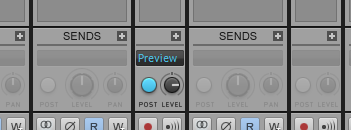
Look at the picture John posted here. If you look at the track to the left of the one with the active Send that says "Preview" you will see that track strip is widened (not set to "narrow"). Look at the bottom of what you can see of that strip. On the far left there is a button that looks like two circles overlapping (kind of a sideways figure 8).
 
That is the interleave button. Look on your vocal track for that button. You may need to set the track strip(s) to their full size to see it (so disable the "Narrow Strips" option).
 
If that button does not look like a figure 8 but instead a single circle with a little doohickey sticking out of it... the track Interleave is set to mono. Click it to set it to Stereo and now your stereo effect will work in the FX bin.
 
What this button does is allow the track to output as stereo (or restrict it to mono). Without it set to stereo output your stereo effect will not output properly because it will be dumped down to mono... which is no good.
 
If this is confusing look in your Reference Guide under the entries about "Interleave", "Console View", "Track Strips", etc.
 
Cheers.
2015/12/18 11:46:38
greg54
Hi Beepster:   It's not confusing.   I have set my strips to "wide."   Thanks for explaining about the interleave.   I will check it out and see if that helps.
 
Thanks!
Greg
2015/12/18 12:33:31
Beepster
The interleave thing screwed me up at first too but it's really important so make sure you really figure out how it affects everything. 
It's one of those things that's easy to ignore/forget about but can cause a LOT of infuriating/confusing problems.
 
However... I'm only guessing the problem is the interleave setting. It probably is but if the track was already set to Stereo and pressing that button doesn't change/fix anything there may be something else going on.
 
Also make sure any "downstream" busses are set to stereo interleave as well because ANYTHING in the signal chain that forces the signal to mono (even inside FX themselves) can screw up your desired stereo image. You really gotta keep track of it.
 
I learned all that the hard way... lulz.
 
Cheers and good luck.
2015/12/18 13:17:20
John
From the manual.
 
"bx_stereomaker should be in a 1-in/2-out configuration in ProTools or as a 2-in/2-out
plugin in most AU/VST-hosts. Use it on MONO audio signals, this is not a spreader for
stereo mixes etc. (we offer bx_control and bx_digital if you want to spread stereo
signals and mixes though)."
 
My comment.
What that means is in Sonar the track needs to be in a stereo interleave to work. 
2015/12/18 15:24:03
greg54
Beepster, John:   Thanks for your help!!  I really appreciate it!  It's working.   :)
 
Thanks!
Greg
2015/12/18 15:38:34
Beepster
Awesome...
 
Have fun.
2015/12/18 16:05:15
Bristol_Jonesey
John
From the manual.
 
"bx_stereomaker should be in a 1-in/2-out configuration in ProTools or as a 2-in/2-out
plugin in most AU/VST-hosts. Use it on MONO audio signals, this is not a spreader for
stereo mixes etc. (we offer bx_control and bx_digital if you want to spread stereo
signals and mixes though)."
 
My comment.
What that means is in Sonar the track needs to be in a stereo interleave to work. 


Good spot John, didn't see that bit!
 
OP, change your track interleave to stereo
2015/12/18 17:30:35
greg54
Thanks!
 
Greg
© 2026 APG vNext Commercial Version 5.1

Use My Existing Forum Account

Use My Social Media Account