• SONAR
  • [Solved] CPU anomaly
2015/12/05 13:43:36
jshep0102
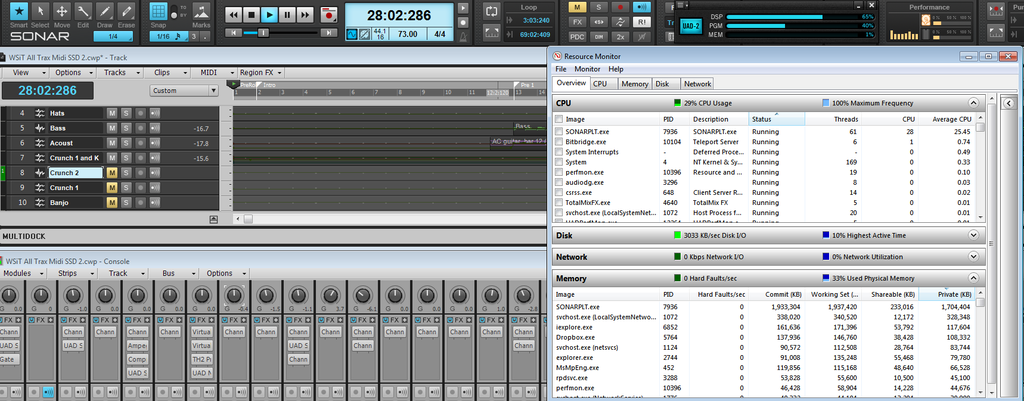
My spec is posted in my signature. Latest drivers for everything. I have a project at 44.1k 16 bit. 64 bit processing off, as it seemed even worse. 30 audio tracks, 1 soft synth with 12 tracks (SSD 4), 12 busses, and all my usual plugs. Here's a pic of the Sonar CPU/cores and the resource monitor, as well as UAD, which isn't near topping out. If I don't set latency to 2048, project will not run. Is there a CPU percentage that you can kind of figure this will tend to rear it's head?
 
Is there anything I should be looking at as possible culprits? If I missed any pertinent info, I apologize. Thanks!
 
Audio drive is 40%, defragged and Seagate Barracuda sata 3 7200rpm. " /> 
2015/12/05 14:23:10
jshep0102
I disabled all plugins. CPU only showing a blip on 1st core in Sonar. I still can't play the soft synth (even stopped) without audio cracks/pops at 256 samples. I also tried setting a 256 read cache to no avail.
2015/12/05 14:41:17
scook
I don't use SSD but I noticed it can be setup to stream samples. I would disable sample streaming and see if it helps.
2015/12/05 14:49:05
Doktor Avalanche
Quit dropbox for starters. If you are running a Samsung SSD recommend downloading Magician as well. Also temp disable antivirus?  Have you set min/max CPU to 100 in windows power management? Edited the config file in Sonar preferences for the CPU type?
 
Can you download latest latencymon, post a screenshot of the drivers tab sorted in order of dpc latency?
2015/12/05 15:04:04
jshep0102
Thanks to both for advice. I did all " />the above. I do turn antivirus off when I'm working.
 
I took every plug out of SPLAT and deleted all tracks except  SSD 4. Still static at 256 samples.
2015/12/05 15:31:23
jshep0102
I just crashed. system32 mscvr120.dll. C++ for Visual Studio driver. No clue.
 
 Hey scook,it was disabled. I set it to stream and was able to down to 512. Nowhere near being able to play accuaretly. I used to bew able to run a load of stuff at 32samples while playing a soft synth. No clue where this went south.
2015/12/05 15:42:48
scook
Yes. By turning off streaming, synths load all the samples into memory rather than streaming them from disk while the project is playing. The reason to use streaming is when there is not enough memory to load all the samples. Streaming also should result in projects loading faster because the samples are not loaded until they are needed. On the other hand, loading all the samples at once into memory reduces disk reads while the project is playing.
2015/12/05 15:52:32
jshep0102
Oddly, it works better with streaming than in memory. There's only 280MB of samples used. 128 just drops out altogether. System restore, maybe?
 
2015/12/05 15:56:50
scook
IDK, I have no experience with Slate. I know there are others here that do.
2015/12/05 16:12:51
jshep0102
I'm thinking this is much deeper than SSD4. It's not caused me problems for years.
 
I thought I'd restore to a point I was certain things were solid. There is only 1 restore point from 2 days ago. I know I created a half dozen in the last month. And there should be the ones from updates, right?
 
12
© 2026 APG vNext Commercial Version 5.1

Use My Existing Forum Account

Use My Social Media Account