• SONAR
  • Export audio working wrongly
2014/11/22 15:38:34
Alatar
Hi,
Recently I bought Sonar X3 Studio. But I have a problem.
 
The Export Audio functionality does not work correctly. The audio levels are wrong.
I have several tracks in my project. When I export the audio, some tracks are too loud and some tracks are too soft. So the exported audio sounds different from what I hear in Sonar. Even more strangely, this happens randomly. So sometimes it works OK, but often not.
 
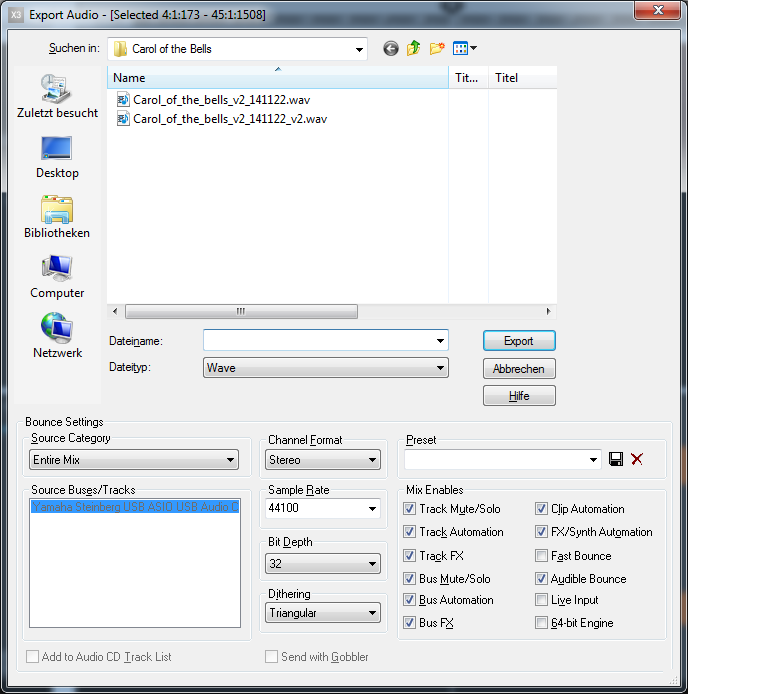
I already tried to deselect "fast bounce". But that does not help. Using the 64 bit engine does not help either.
 
Hope someone can help me.
My version of Sonar is "X31 build 209". My OS is Win 7 64 bit.
Plugins used in my project:
-Kontakt Full version 5.4.1211
-Storm Choir II (Kontakt library)
-Altiverb 7
 
Here you see a screenshot of my Export Audio settings. Additionally I had selected all tracks of my project.
 
Regards,
//Martin
2014/11/22 16:10:53
scook
Are all tracks and buses routed to a master bus? If not, it may be a good idea to add one. This may help in getting consistent results.
 
What software is used to play the exports?
 
BTW, there is no need to dither when exporting 32bit waves.
2014/11/22 16:29:28
Anderton
Also make sure that all tracks are selected. Also, I'd recommend Fast Bounce.
2014/11/22 16:54:19
Alatar
Hi,
thanks for the fast replies. Good hint about the dithering. Maybe it helps to uncheck.
Yes, all tracks are routed to a Master bus.
I listened to the result both through Audacity and through Sonar.
 
I used fast bounce before. No difference.
And yes, all tracks are selected.
2014/11/22 17:04:15
Anderton
Unchecking dithering won't make a difference in the overall levels. BTW Fast Bounce is essential when doing MIDI projects with automation.
 
I export all the time without issues. Some track level variations that are consistent could be due to something that's misset, but your mentioning "random" is very unusual. Does this mean that if you export, for example, five times in a row and each one has a different mix?
 
Do you have any sends involved?
2014/11/22 19:47:17
johnnyV
Don't know why but I have always used "select none". Because way back when someone here recommended this and it has always worked. The other day I used "select all" and I got a weird mix without the reverb bus?  So I returned to select none and it worked. But wonder why this happened I then found my reverb bus was being sent to output 1/2 instead of the Master.. So-
Always mute your master bus to check that all your tracks are being sent there. You should hear nothing. 
 
And one small point, export at 16 Bit  if it's heading for a CD. 
2014/11/22 22:01:21
BENT
FWIW, I think it's a good idea to bounce all tracks to one clip in a new track first, top and tail it with an automation envelope and then compare this new audio track against all the others. If you slipped up somewhere you will hear it before exporting.   
2014/11/22 22:08:23
Anderton
BENT
FWIW, I think it's a good idea to bounce all tracks to one clip in a new track first, top and tail it with an automation envelope and then compare this new audio track against all the others. If you slipped up somewhere you will hear it before exporting.   


Glad you brought this up. I hardly ever export, I bounce the tracks to create a final mix. Then when I save the project, that mix gets stored with the project. Sometimes I do a few mixes, and use exclusive solo to switch between them to evaluate which is better.
 
When I have a mix I like, if I need to export it, I just drag it to the desktop after first making sure the audio rendering is set properly in preferences. 
2014/11/22 22:31:23
BENT
Anderton
 
When I have a mix I like, if I need to export it, I just drag it to the desktop after first making sure the audio rendering is set properly in preferences. 


Exactly what I do with mastering variants. Also if you bounce all clips to new track, then use groups to Solo/Mute track, you have a quick "one click" instantaneous glitch free A/B of bounced track or all others  
2014/11/24 04:32:20
robert_e_bone
Alatar
Hi,
thanks for the fast replies. Good hint about the dithering. Maybe it helps to uncheck.
Yes, all tracks are routed to a Master bus.
I listened to the result both through Audacity and through Sonar.
 
I used fast bounce before. No difference.
And yes, all tracks are selected.


While it certainly may not account for all of the differences you are hearing, is it possible that panning laws in Sonar are different then what is set in Audacity? (I have never even looked at Audacity so this is a wild guess).
 
Bob Bone
12
© 2026 APG vNext Commercial Version 5.1

Use My Existing Forum Account

Use My Social Media Account