• SONAR
  • 2 instrument tracks seem layered. What do I do wrong? VST
2014/05/05 18:36:03
EricDeluxe
Hello
 
This is probably just me that don't understand midi settings correctly. However I would like to get some help...
I have a project, and it seem like two tracks are "layered", but something seem strange...
 
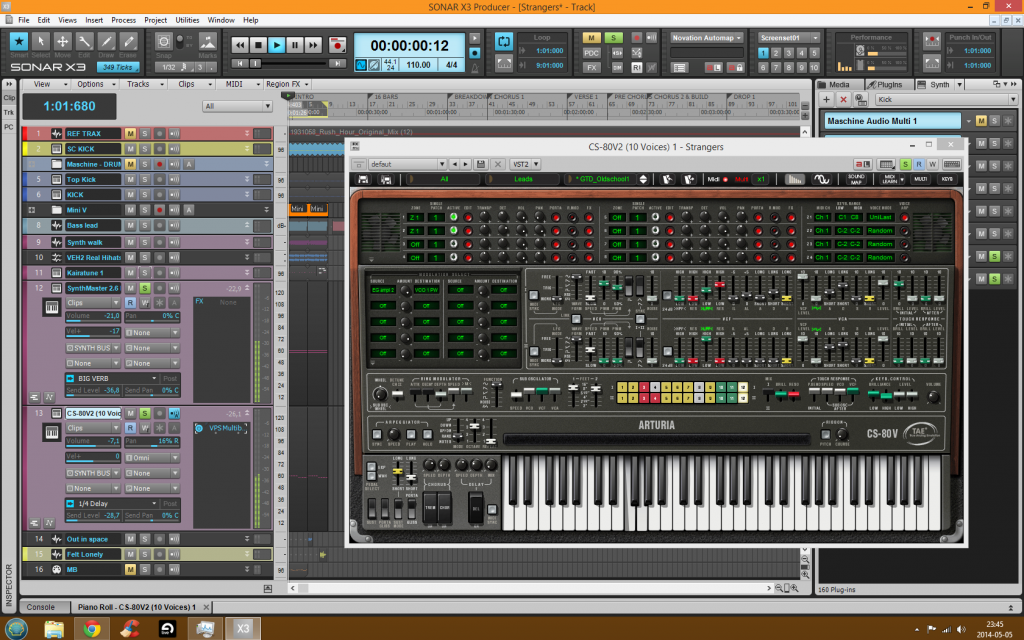
As shown in the image below; I have two instrument tracks (12 + 13) with two different VSTs (SynthMaster and CS-80)
Track 12 is a pad sound of F4 and G4 playing simultaneously over 9 bars.
Track 13 is a synth lead changing from G4 to F4 over 9 bars.
 
Now the strange part:
- When clicking track 12 (SynthMaster 2.6) (getting highlighted), the keyboard on the CS-80 synth plays the keys from track 13. i.e changing from G4 to F4 and back again. Track 12 is NOT the CS-80 synth.
- When clicking track 13 (the CS-80), the keyboard on the CS-80 synth plays G4 and F4 at once, even though it should switch between G4 and F4. 
 
Is this somewhat related to Omni settings in midi in, or what do I miss??
2014/05/06 10:29:42
Anderton
Omni mode on a MIDI input means "respond to any MIDI data coming in on any channel." See if assigning each synth to its own unique input channel and output channel solves this problem. Also, did you enable MIDI output when inserting the synths? That might allow the synth's keyboard to transmit MIDI data, so the other one - if set to Omni mode - picks it up.
 
It's hard to give a definitive answer at a distance but check out those two factors.
2014/05/06 19:00:48
EricDeluxe
Ahh, seem logical:) Will check it out tomorrow.

I believe I set Enable midi out on at least one synth...

Thanks!
2015/06/14 17:10:01
Farfisa1973
Have you looked to see what actual MIDI CH & not just the track Ch# that each track has assigned ?
 
Also if you want to drive 48 tracks all with different Virtual or Soft synths if you put them ALL on the same channel equal to
MIDI OMNI mode then all Ch's will play with little control all assigned or chosen VST's .
 
 If you want each channel and track to be Individual from one another using they're own recorded Data per Track nothing shared use & assign different Midi Ch's per track & Specific Soft Synth or Plug_in.
 
Then just chose any one of 1 of the 16 MIDI ch's & assign a MIDI Ch#X per each Record Track, if multiple tracks are on the same
MIDI Ch They can & will trigger other tracks #'s.  So its not a difficult fix, you just may have over looked this. If you notice everything was fine at first but the problem happens at the Bridge look for a Patch or Channel switch at that point in the song.
 
© 2026 APG vNext Commercial Version 5.1

Use My Existing Forum Account

Use My Social Media Account