• SONAR
  • Using Command Center: a Guide also there are instructions for manually installing
2015/03/01 19:40:58
John
Note; I posted this in another thread. I thought after I posted it it may be better as its own thread. 
 
I'm going to attempt a users guide to installing Sonar platinum. This is for a normal default install. See below for how to install when a custom install is needed
 
First Download Cakewalk Command Center I will refer to it as C3 hereafter. 
 
You can get it here https://www.cakewalk.com/Command-Center
 
Once it is installed and you have purchased Sonar run it and you should see something like this.
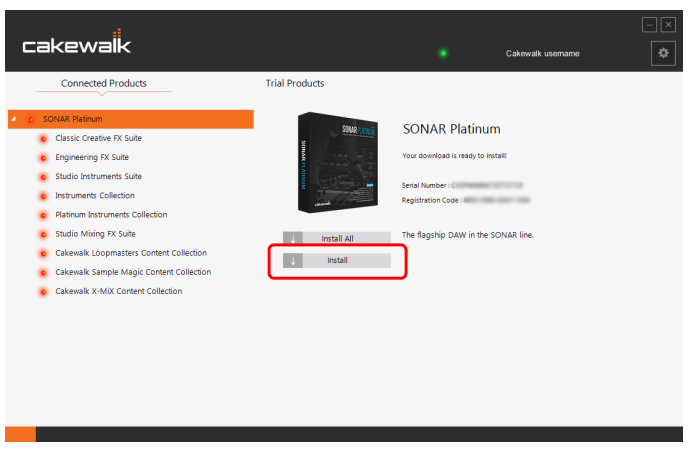
 
 
Notice a couple of things here. One Sonar is listed at the top of a longer menu with a lot of red lights. These indicate not installed by C3. If they were yellow it means it has been installed by C3 but there is an update for it. Green means all is well and up to date. 
 
Clicking on each item will either install or update it. You may also have an option to reinstall or uninstall.
The is some customization for C3 and the option menu is located to the right top. Its a little cog wheel looking icon. It will let you set a path for VSTs and the like. It will not let you install Sonar in a non default directory or disk.  
 
What if you need to have a custom install!
 
You still use C3 to download the install files but before exit C3 and on a Win 8/8.1 system goto ProgramData/Cakewalk/ Platinum/ Command Center/ Download.
 
There you will see all the downloaded files that can be installed directly. Just double click on each one in order to start the install for that item. This will give you full user control on where and what is installed. 
 
Anther reason to use the manual method is if you need to install the 32 bit version on a 64 bit system. C3 has no option to select which version to install. You can use it to install the normal 64 bit version than do a manual install to also install the 32 bit version.
 
Note 
It is important to authorize via this https://www.cakewalk.com/My-Account/Offline-Activation  This is for off line activation.
This came from Ryan Munnis of CW. 
 
Any questions, I will attempt to answer. 
 
 
2015/03/01 19:53:34
OldTimerNewComer
thanks, John. way cool.
2b clear; are you  saying run the installer(s) individually,
(while connected)
and C3 will know about my custom install?
 
Thanks,
Mel
2015/03/01 20:01:46
John
No, I'm not. C3 is a little brain dead. It has no idea what has already been installed from an older version such as X3. It wont see a custom install either. It has to go through its routine and flag all it installs. In this case where one is using the manual method C3 wont have any clue. However this wont cause a problem for the user except having notification of an update. 
 
That is why I recommend using C3 for the complete install of everything. This also includes activation. C3 takes care of that too.  
2015/03/01 20:08:44
OldTimerNewComer
ok I SEE.
 
The reason my install went so well is because
I accepted all the default install stuff...
A record was made for C3, that did not exist b4
running C3.
 
Thanks
Mel
2015/03/02 00:14:59
Anderton
John, this is great - thank you!!! I think this needs to be included in the eZine for the next update. If more things get added in this thread, so much the better.
 
 
2015/03/02 01:08:03
Larry Jones
John
 
You still use C3 to download the install files but before exit C3 and on a Win 8 system go to ProgramData/Cakewalk/ Platinum/ Command Center/ Download.

There you will see all the downloaded files that can be installed directly. Just double click on each one in order to start the install for that item. This will give you full user control on where and what is installed. 


John - I don't think I saw a way to use C3 to download an installation file only. It jumps directly from download to install, doesn't it? If you know a way to use C3 for download only, then install manually, please share.
Thanks!
2015/03/02 09:09:33
John
Yes Larry, you have that right.  This is more for those that need to install the 32 bit version on a 64 bit system. 
2015/03/02 09:12:32
John
Anderton
John, this is great - thank you!!! I think this needs to be included in the eZine for the next update. If more things get added in this thread, so much the better.


Craig I am honored. 
2015/03/02 09:35:22
gothic.angel
John
 
What if you need to have a custom install!

You still use C3 to download the install files but before exit C3 and on a Win 8 system goto ProframData/Cakewalk/ Platinum/ Command Center/ Download.

There you will see all the downloaded files that can be installed directly. Just double click on each one in order to start the install for that item. This will give you full user control on where and what is installed. 

Any questions I will attempt to answer. 


Hi John... helpful as always....
 
about to upgrade, but I'm not a fan of these kind of "command center" and the like... as I always want to have full control on my system and software installations...
 
thus your point above is very good to know....... ;-)
2015/03/02 09:47:36
John
I think if we press CW on this they will improve C3 for the future. They have said as much in other posts. 
 
Its a very cool way to install Sonar. Its only problem is CW has always accommodated custom installs but C3 is incapable of handling one. I don't blame them for this oversight because this is its first iteration.      
© 2026 APG vNext Commercial Version 5.1

Use My Existing Forum Account

Use My Social Media Account