• SONAR
  • Sonar froze mId-project - File now appears to be corrupted (I lost hours of work) [SOLVED]
2015/04/29 08:36:10
skitch_84
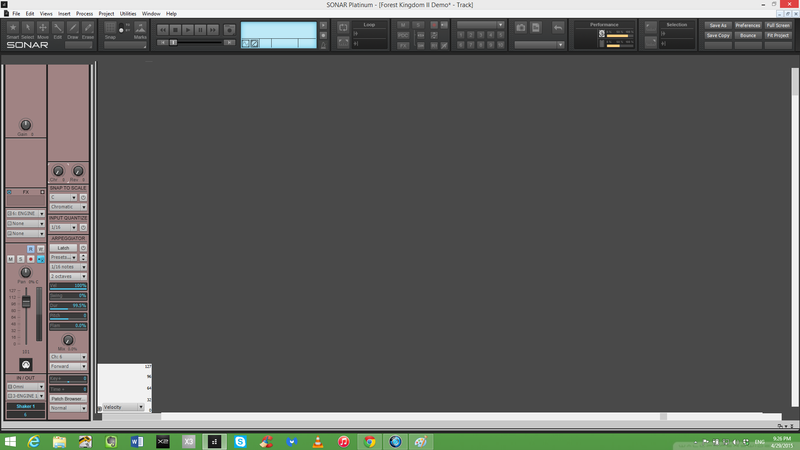
I posted a few days ago that Sonar Platinum has been more and more unstable for me lately. Well, today the worst thing that could have happened did. I've been working on a new composition for the past few days. Just now during playback Sonar froze. The music would continue playing and continue looping (I had a loop point set) but I couldn't click on anything. I had to kill Sonar with Ctrl+Alt+Del. When I attempted to load my project again, it stays frozen like this (see image) and won't load my project. I don't know what's going on, but it seems it corrupted my project file in some way. While I do have a backup from when I finished working on it yesterday, I lost many hours' worth of composing today. Please tell me there's a way to recover this project file. 
2015/04/29 08:40:18
Bristol_Jonesey
Have you tried opening it in Safe Mode?
2015/04/29 08:48:49
skitch_84
Bristol_Jonesey
Have you tried opening it in Safe Mode?


I just tried to and a dialogue box came up saying

"SONAR will now personalize your user settings by copying application data files.
This may take a few moments. Click OK to continue or Cancel to abort the personalization."

Should I press OK?
2015/04/29 09:02:45
skitch_84
Okay, so I managed to open the project in Safe Mode. I chose to not load any plugins. I was presented with just the MIDI data, which is the most important part. My plan was to copy and past all of the MIDI data over to a brand new project and then just reinsert all of the VST instruments I had in the original project. However, now my project is frozen in Safe Mode! I was simply dragging the beginning and end of all of the MIDI tracks so that they start and end at the same measure so that I can easily copy and paste. I got all the way to the last track but now Sonar is frozen again. This is with ZERO plugins loaded. What is going on? 
2015/04/29 09:14:37
skitch_84
I attempted to open it again in Safe Mode. My plan is to copy and paste the midi data over to a new track, but I simply can't open a new project while this corrupt project is open. I need to have both projects (the original project and a new project) open at the same time in order to copy the data over to the new one. If I can't open both projects at the same time, how do I copy the MIDI data over? Any other methods?
2015/04/29 09:25:11
Kalle Rantaaho
Try dragging the MIDI clips to Work Desk (one at a time). That should create independent MIDI-files.
2015/04/29 11:09:46
tlw
It's for times like this that frequent incremental autosaves were invented......
2015/04/29 12:43:45
DRanck
Sorry to hear about your problem. I've made a habit of saving copies of projects under a different name after each major change. I do this in other programs too. Just to be safe.
2015/04/29 12:51:08
scook
If it opens in safe mode, save the project as a MIDI file then open the MIDI file. Might save some time over export/import.
2015/04/29 13:35:47
paulo
I'm not saying that this definitely will work, but it has worked for me as recenty as yesterday, but try opening in safe mode and then saying yes to all plugins and see what happens. I had the same problem in X3 yesterday and did this and it sorted itself and plays fine now. Strange thing was that when it kept freezing it also did it on my 2 back up copies of the same project, but once I did the safe mode thing to one, the others then opened fine too.
12
© 2026 APG vNext Commercial Version 5.1

Use My Existing Forum Account

Use My Social Media Account