• SONAR
  • Mixes Sound Different (p.2)
2015/04/14 20:59:03
RobertB
Watch out for this section:
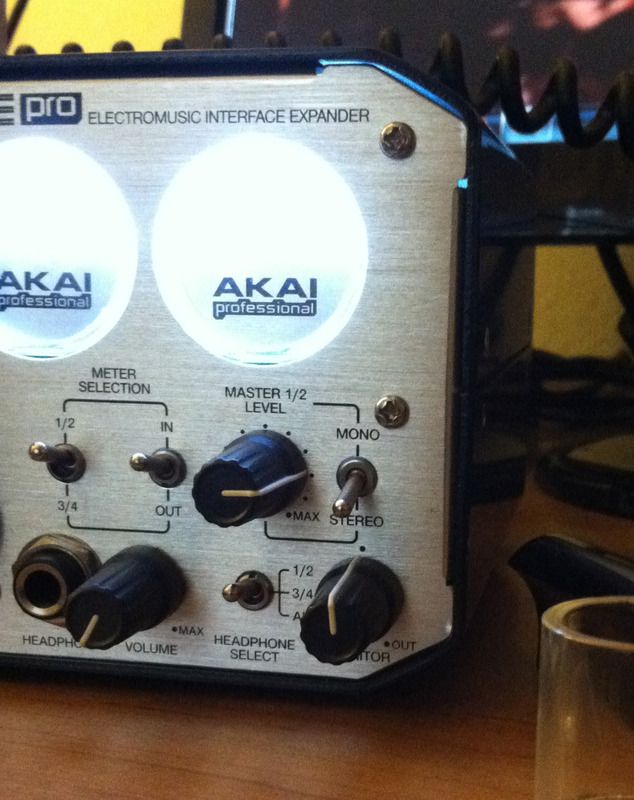
If I were to select Out 1 here, my levels would be attenuated because of the position of the Monitor knob.
My personal preference is to select the Master Bus as the export source. This give me a hard reference within Sonar, and is not subject to monitoring.
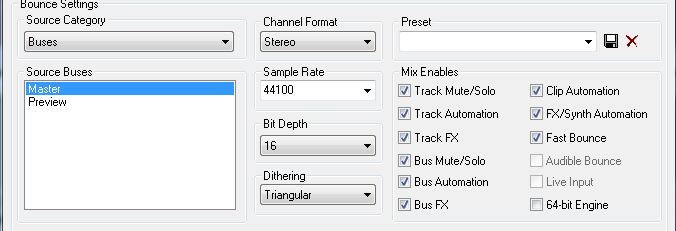
For some reason, effects are no longer, um, effective, in the Master Bus, so all of my tracks and buses ultimately filter down to the Preview bus. The Preview Bus output is set to the Master Bus. I have a limiter and Voxengo SPAN in the Preview Bus as a final view of my project output.
This gives me the true output from Sonar, and I can trust it.
ymmv, hth.
 
ps: Good to see another EIE Pro user. It's an awesome interface, and deserves more exposure.
2015/04/15 04:36:33
Bristol_Jonesey
Ricebug
To answer some of these, here's how I export a finished song:


...which I learned from watching Groove3 tutorials. (http://www.groove3.com/str/SONAR-X3-Explained.html)
 
@jonesy: WMP is set at default settings--no EQ.
@Cactus Music: My interface has no GUI mixer. If it did, I wouldn't use it anyway.
@Sanderxpander: I always review in stereo.
 
I'll try a couple of the things suggested. Also, I always burn a CD and play it in the car stereo, as it seems to emphasize a bad mix. The home stereo is pretty forgiving but the car is more honest.
 
EDIT: OK, I just bounced the mix to MAIN OUTPUTS. The mix sounds like I want it (in WMP). However, the waveform acoustic guitar did not get added. Strange, as my vocal tracks are wave files, and they got mixed.


Make sure your acoustic 
Ricebug
To answer some of these, here's how I export a finished song:


...which I learned from watching Groove3 tutorials. (http://www.groove3.com/str/SONAR-X3-Explained.html)
 
@jonesy: WMP is set at default settings--no EQ.
@Cactus Music: My interface has no GUI mixer. If it did, I wouldn't use it anyway.
@Sanderxpander: I always review in stereo.
 
I'll try a couple of the things suggested. Also, I always burn a CD and play it in the car stereo, as it seems to emphasize a bad mix. The home stereo is pretty forgiving but the car is more honest.
 
EDIT: OK, I just bounced the mix to MAIN OUTPUTS. The mix sounds like I want it (in WMP). However, the waveform acoustic guitar did not get added. Strange, as my vocal tracks are wave files, and they got mixed.


Make sure your acoustic guitar tracks have their output set to your master bus.
 
If you mute your master bus you should hear total silence. If you can hear something, there is a routing problem somewhere in your project.
2015/04/15 04:45:14
lfm
Bristol_Jonesey
Make sure your acoustic guitar tracks have their output set to your master bus.


This - I made that mistake a couple of times. Look over all your busses and tracks where they go.
Inspector show you one level extra on the right side where the selected track go.
 
Only master should go to hardware outs.
2015/04/15 08:53:59
Ricebug
RobertBps: Good to see another EIE Pro user. It's an awesome interface, and deserves more exposure.
The ASIO4ALL driver apparently gave the AKAI a bad rep. I had D/L'd and installed it before I even bought the AKAI, and the interface latched onto it. Also, the latest driver update from AKAI is corrupt, so keep with the one before that.


Once I removed ASIO4ALL, 99% of the problems went away.
 
Anyway, back on target... thanks for all the good info, guys. I'm going to buy the book from Amazon, just to see what else I'm doing wrong. http://www.amazon.com/SONAR-X3-Power-Comprehensive-Guide/dp/1305090195/ref=sr_1_2?s=books&ie=UTF8&qid=1429102309&sr=1-2&keywords=sonar
 
The Groove3 site is good, but they don't get into any hardware stuff at all.
12
© 2026 APG vNext Commercial Version 5.1

Use My Existing Forum Account

Use My Social Media Account