• SONAR
  • Track Panning bugged on random tracks
2015/03/11 20:06:15
martinv
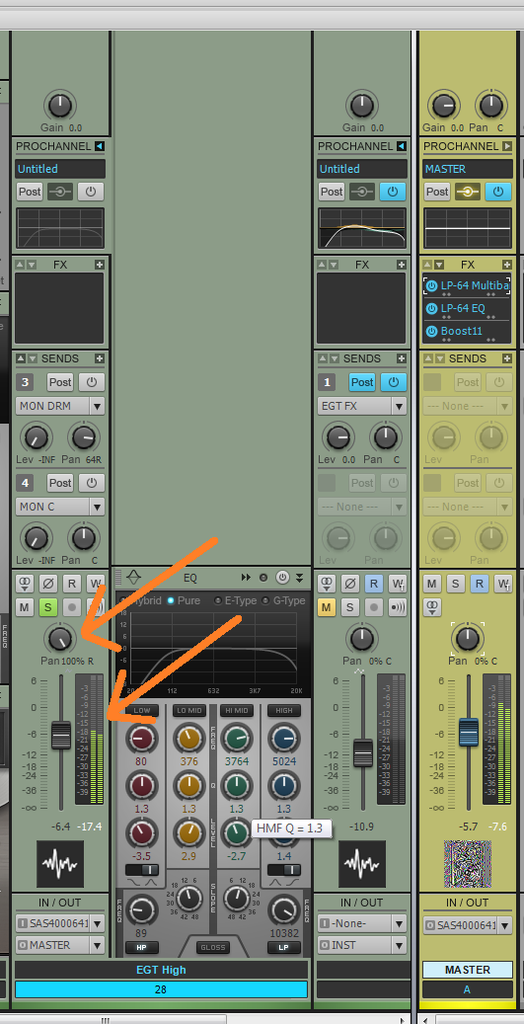
As shown in the picture below.  The track is panned fully right, but there is audio and the meter displays signal in the left.
This issue has appeared on seemingly random tracks and buses.   If I clone the track, the issue is cloned, even if I pasted in audio from an unaffected track.  If I create a new track and copy/pastes the audio, the issue does not follow.
 
Any ideas?


2015/03/11 20:26:21
martinv
More info:  I saved the track with the panning issue as an audio track template.  If I insert a track using this template the panning issue is also present on any audio I add to the track.
2015/03/11 20:33:45
brundlefly
I'm guessing the track was panned left in Offset mode. Click the Envelope/Offset mode button in the Mix module (or use shortcut O in X3 and earlier), and have a look.
2015/03/12 15:27:51
stevec
It looks like the track's interleave is set to stereo.
 
2015/03/12 21:56:27
Anderton
I'd go with the Offset Mode theory.
© 2026 APG vNext Commercial Version 5.1

Use My Existing Forum Account

Use My Social Media Account