• SONAR
  • [Solved] Silent Busses Detected...eh?
2013/09/09 09:36:33
ston
I've been getting this error very recently:
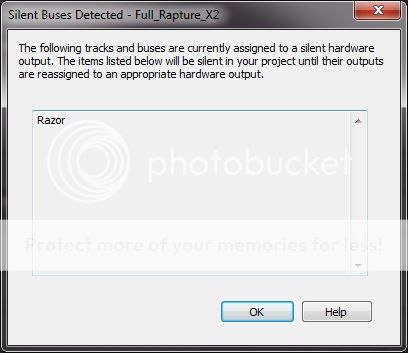


The bus Razor is on (output to) certainly isn't silent, it's the master bus!
 
This has started happening when I open the project, since putting an instance of Camel Space in the FX bin of the channel that Razor is on.  I've only just got this effects plugin, so was wondering if anybody else has seen this behaviour?  Razor is running in Reaktor player, but hasn't caused any problems before now.
 
Cheers :-)
2013/09/09 09:39:51
Jim Roseberry
Have you changed your audio interface?
If so, the old project/s reference the previous audio interface.
Once you reassign the outputs and save the project, all will be fine.
2013/09/09 09:55:25
sharke
I have projects which show me this message every time and I've never been able to make head nor tail of it. I have never changed my audio interface and the tracks and buses listed are most certainly not assigned to silent hardware outputs - they're all audible and working properly. I gave up trying to work out what it meant and have simply put it down to a bug. In a couple of cases the messages randomly stopped appearing. 
2013/09/09 10:03:57
ltb
sharke
I have projects which show me this message every time and I've never been able to make head nor tail of it. I have never changed my audio interface and the tracks and buses listed are most certainly not assigned to silent hardware outputs - they're all audible and working properly. I gave up trying to work out what it meant and have simply put it down to a bug. In a couple of cases the messages randomly stopped appearing. 


You can always turn the warning off by going into into Preferences | Initialization file, look for WarnSilentBuses then set it to 0.
2013/09/09 10:06:04
scook
I was under the impression that once the error is detected, a flag is set in the project and it does not ever get reset. If the warning message is a problem, it can be suppressed by setting WarnSilentBuses to 0 in Preferences > File > Initialization File. To get to the "Initialization File" setting make sure the Advanced radio button is selected at the bottom of the Preferences dialog.
2013/09/09 10:06:34
ston
Jim Roseberry
Have you changed your audio interface?

Not for the last 15 years and I intend to keep it for that long again! :-D
 
@ Carl, thx for the tip, I'll probably just do that.  It's not that big a deal, just a bit weird.
2013/09/09 19:58:28
jackson white
Have you checked your sends? Every time I've seen this I've had a send with a deleted FX or something like that.
 
I selected -Delete Send- instead of --None-- and got rid of the message.
 
The Console View might help pick out the culprit as well.
 
2013/09/10 03:35:25
ston
Actually, that could be it, thanks.  I couldn't see how to delete the send so set it to 'none'.  'Delete Send' is in the drop-down list of send targets is it?
2013/09/10 05:44:28
cajuns2020
I think this problem appears after I have moved my interface to a different USB port.  I do believe I am suppose to use the same USB port each time, right? Maybe the solution.
2013/09/10 10:14:18
DW_Mike
carl
sharke
I have projects which show me this message every time and I've never been able to make head nor tail of it. I have never changed my audio interface and the tracks and buses listed are most certainly not assigned to silent hardware outputs - they're all audible and working properly. I gave up trying to work out what it meant and have simply put it down to a bug. In a couple of cases the messages randomly stopped appearing. 


You can always turn the warning off by going into into Preferences | Initialization file, look for WarnSilentBuses then set it to 0.


That's what I did.
Used to get this warning in X1. Setting must have copied from previous install.
Now with the new PC and fresh install I get it on occasion in X2. Was looking for that tip.
Thanks Carl.
 
Mike 
12
© 2026 APG vNext Commercial Version 5.1

Use My Existing Forum Account

Use My Social Media Account