ChazEd
You can use AD2 to humanize your drums.
You can import your drum midi files into AD2, transform them, and bring them back to your DAW.
It's pretty easy:
https://www.youtube.com/watch?v=jg0NklSRlWY
Hope this helps
It's even easier than that.
Grab the midi track (it can even be step sequencer), and drag it into the the transform area that shows the beat. No need o mess around with folders. Because of this, you can work through 4 bars at a time easily and quickly. creating subtle variations.
Messing with the 8th and 16th accents is then adjusting the velocity balance of each part of the kit really does transform.
I've posted about this many times, but I still think it's overlooked, and is an amazing part of AD2.
As a quick experiment (just to see how cool this thing is); create a straight beat in step sequencer, with 16th hi hats, a BDrum on the and off the beat, maybe a 16th, Snares on 2 and 4. Don't touch the velocities in step sequencer, leave them all at 100.
Drag the midi clip (no need to convert) into the area rhythm display at the bottom of AD2 Transform section.
Add a little 8th and 16th accent.
Adjust the velocity range.
Pull the kick/snare/hats up and down as groups (this a great function when you, 4 articulations of closed hats going on, with a foot closed and two open articulations).
Add a little random to the velocities (I don't bother wit the timing, as it's clear when working with a one bar loop, it not random from bar to bar, and fixed to each bar (better for longer loops if random velocity is your thing))
And now the static sequencer beat has a lot more feel, without working through each hit individually.
Click on the Rhythm display area and drag it back to the midi track transformed.
This dragging back is also great if you have a a busy rhythm with lots of articulations that you want on different midi tracks. It you wanted the hats on one track, solo the hats in the transform tool in AD2 and then drag just the hats to a track. This great to add further subtle changes, taking hats to it's own track, copping out over many bars, the using the velocity transform in PRV to create subtle ramps and falls dynamically to fit the music.

I wish there was swing tool in AD2, so a tend to lean on the MFX for swing and Random. With Kick and and snare on one track and hats on another, you can have two different MFX on each one.
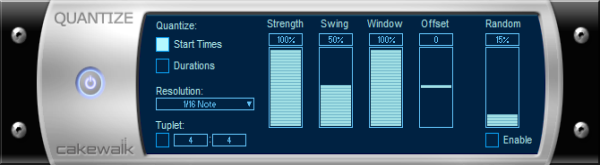
Here's a cool video on swing. Interestingly the slower the beat the more swing you can use it seems