• SONAR
  • MIDI Keyboard Worked on X3 1st Time, Hasn't Since
2014/12/16 13:33:04
xadins
EDIT: FIXED
 
So I could practice while away from home, I downloaded Sonar X3 onto my laptop to run my MIDI keyboard into. Once I had it downloaded, I hooked everything up to see if it would even work, and it did with no issues or hangups whatsoever.
 
I have so far been unable to replicate those results. I finally got it to acknowledge my laptop's speakers again (after downloading ASIO4all) and I know that it realizes I'm sending inputs through the keyboard (the MIDI track lights up when keys are pressed/depressed). I've also double-checked that the MIDI output is set to TTS-1, exactly as it is on my currently-functioning desktop setup. But I cannot get TTS-1 to respond to the MIDI inputs. I'm now in the process of reinstalling X3 to see if that fixes anything.
 
Any ideas if a reinstall doesn't fix it?
2014/12/16 14:24:52
Wookiee
Check your USB power settings.
 
Check you have assigned USB I/O (Try setting these when running Sonar as Admin) in SONAR.
2014/12/16 14:43:53
dwardzala
Do you have input echo enabled?
2014/12/16 14:44:08
kakku
Did you use the same USB port?
2014/12/16 15:07:18
xadins
dwardzala
Do you have input echo enabled?


Yes.
 
kakku
Did you use the same USB port?

I honestly don't remember which port I used the first time, so I've tried them all with the same results: the MIDI channel shows that it's receiving input from the keyboard, but it isn't translating over to the VST.
 
Also, reinstalling didn't fix the issue.
2014/12/16 15:16:39
dwardzala
If you are getting MIDI in, then it is an output routing issue.  Do you have other software (iTunes, browser, etc.) open when you are running sonar?  Those other programs may have taken control of your output drivers.  Close everything else but sonar and try.
 
Also, check your channel assignment in the VST to make sure it is the same as the input.
2014/12/16 16:06:41
xadins
dwardzala
If you are getting MIDI in, then it is an output routing issue.  Do you have other software (iTunes, browser, etc.) open when you are running sonar?  Those other programs may have taken control of your output drivers.  Close everything else but sonar and try.
 
Also, check your channel assignment in the VST to make sure it is the same as the input.


Only programs open are Sonar and Steam (which has to be up because I got Sonar through it). Took a screenshot in hopes that it might help somehow:
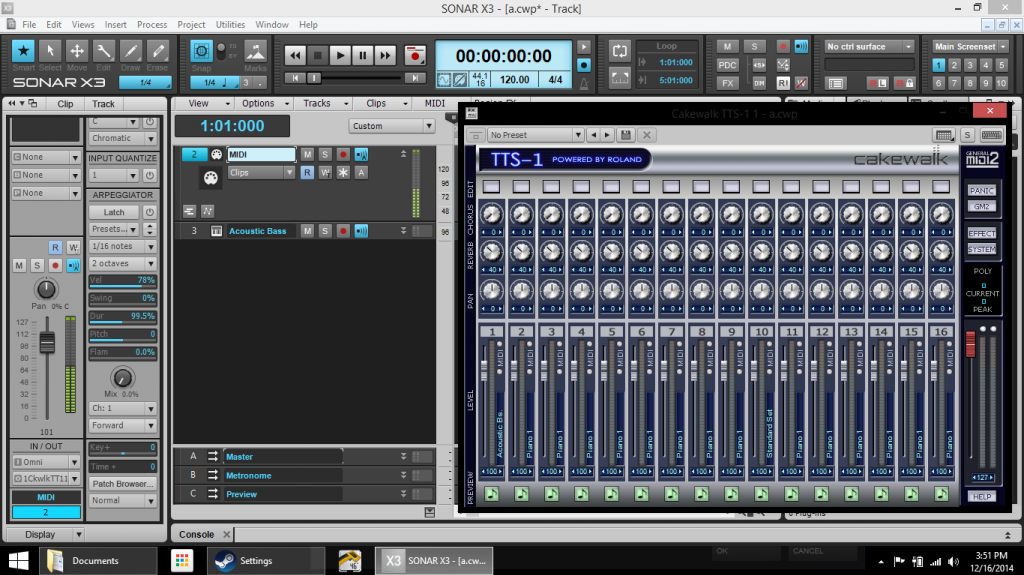
Like I said, you can see it's getting MIDI in, TTS-1 selected as the output, TTS-1 has its input set to Omni but isn't getting anything. Not that it probably makes any difference, but getting the keyboard to work on my desktop was pretty much effortless: plug in the keyboard, X3 recognizes it, set MIDI to it for input, open TTS-1, start playing. So it boggles my mind that the exact same routine isn't working here, y'know?
2014/12/16 16:22:53
scook
The image shows a MIDI track connected to TTS-1 but there is no audio track connected to TTS-1 for playback. This is why there is no meter activity in TTS-1. Add an audio track and set the input to TTS-1 .
2014/12/16 16:31:11
xadins
scook
The image shows a MIDI track connected to TTS-1 but there is no audio track connected to TTS-1 for playback. This is why there is no meter activity in TTS-1. Add an audio track and set the input to TTS-1 .


The 3rd track, labelled "Acoustic Bass", is connected to TTS-1 -- it's a bit hard to see, but the first channel on the TTS-1 window says Acoustic Bass as well. Depending on how you open it, it sometimes creates the track with the name of the instrument you chose through the VST
2014/12/16 16:37:20
xadins
UPDATE: Apparently, the gremlins infesting my laptop have decided to jump ship. I plugged in my headphones and suddenly everything works again! Thanks for the suggestions folks.
 
12
© 2026 APG vNext Commercial Version 5.1

Use My Existing Forum Account

Use My Social Media Account