• SONAR
  • Question on Channel Tools L and R Width Controls (p.6)
2014/11/01 12:20:14
gswitz
Craig,
 
Post 44 I think has finally helped me understand how you use the width control. I now believe I was wrong about the phase inverted stereo swapped business I mentioned. Sorry for misleading anyone. I was only trying to understand it.
 
I think I'm at last getting a grip on it, and it's pretty simple, really. I was looking for something more complicated, and when I noticed what the mid-gain nob was doing, it made me suspect that the same trick might be in use for the width... especially since that trick is used to create a sense of width in the mid-side technique that isn't real. It's a mono side channel panned left and right and phase inverted.
 
So instead of having to mess with the volume fader in conjunction with the pan, you can use the width sliders.
 
Does it sound like I'm cluing in?
 
You wouldn't invert the phase of the 2 tracks you used to spread the stereo, would you? If you did (if channel tools does) then you can anticipate minor changes to the track when you flip mono.
2014/11/01 12:35:18
drewfx1
Anderton
As I've mentioned before, many of my responses are directed to those "on the sidelines" reading the thread for their own edification as opposed to responding solely to those posting in the thread.

 
I was just having some fun with you Craig based on your "fewer words" comment last night. 
 

I felt that with all the talk of math, vectorscopes, and theory, it would be helpful for people who are more interested in making music than arguing how many angels can dance on the head of a pin to have an explanation from a practical standpoint why Channel Tools can be useful, a real-world example of how to apply it


I don't think trying to figure out exactly what a processor is doing to a signal is an impractical discussion. And I don't think it's helpful to imply that understanding this sort of thing isn't useful in the real world.
 
My impression was that "all the talk of math, vectorscopes, and theory" was because the OP wanted to know exactly what was going on technically and I think there was some disconnect between that and your approaching it more from a "how to use it" standpoint.
 
Personally I think those are both useful discussions, but not necessarily at the same time. 
2014/11/01 13:29:10
The Maillard Reaction

 
I'm thinking the "width" buttons could have been called "more". :-)
 
I wouldn't have thought much about it, but when David posed a specific question about the "width" parameter I realized I hadn't thought about it much, so I spent a few minutes thinking about it.


2014/11/01 13:32:40
Anderton
drewfx1
I don't think trying to figure out exactly what a processor is doing to a signal is an impractical discussion. And I don't think it's helpful to imply that understanding this sort of thing isn't useful in the real world.


Agreed. Nothing I said implied that understanding how things work isn't useful in the real world. I didn't expect anyone to infer that I felt what I wrote should replace anything. I wanted to supplement the discussion with tools that would allow people to do their own experiments, and therefore apply theory to practice. This way they could make up their own minds about the validity of the various opinions and speculation, and determine suitability for their own workflow and applications instead of taking anyone's word for it.
 
I think it's possible to make use of a tool without understanding the theory behind it, although knowing the theory will almost always help you apply a tool more thoroughly or appropriately. However, I think any discussion of the theory behind tools designed for music production doesn't have much value without explaining how and why that tool would be actually be used, and what purpose it would serve.
2014/11/01 13:33:06
bitflipper
I don't think trying to figure out exactly what a processor is doing to a signal is an impractical discussion. And I don't think it's helpful to imply that understanding this sort of thing isn't useful in the real world.

I couldn't agree more.
 
Pilots have to study aeronautics, race car drivers have to understand physics and automotive engineering. And anybody claiming to be an audio engineer needs to understand at least a little about audio, digital signal processing, acoustics, psycho-acoustics, electronics, and even the human auditory system. Otherwise, you're just a monkey twisting knobs until it sounds good.
2014/11/01 13:37:45
Anderton
gswitz
Post 44 I think has finally helped me understand how you use the width control. I now believe I was wrong about the phase inverted stereo swapped business I mentioned. Sorry for misleading anyone. I was only trying to understand it.


I think part of the confusion is that the plug-in is Channel Tools, not Channel Tool. There are phase, delay, and M/S tricks you can do that are unrelated to my example of setting precise widths in a stereo soundstage. What I'm doing is simple from a theoretical standpoint, and has a precedent with the way things were done with analog consoles, which got carried over to Pro Tools and has now been improved within SONAR. However, even basic CT functions can produce quite sophisticated results with real-world music production.
2014/11/01 13:46:14
Anderton
bitflipper
I don't think trying to figure out exactly what a processor is doing to a signal is an impractical discussion. And I don't think it's helpful to imply that understanding this sort of thing isn't useful in the real world.

I couldn't agree more.
 
Pilots have to study aeronautics, race car drivers have to understand physics and automotive engineering. And anybody claiming to be an audio engineer needs to understand at least a little about audio, digital signal processing, acoustics, psycho-acoustics, electronics, and even the human auditory system. Otherwise, you're just a monkey twisting knobs until it sounds good.


I think it's obvious I never implied that knowing how things work isn't useful. However, not all musical elements involve engineering. I know producers who really don't know much theory, but they know which knobs to twist to get the sounds they want. For example, they have no idea what diffusion does in a digital reverb, but they know that higher diffusion works best for percussive sounds and lower diffusion for sustained sounds. Someone who knows how diffusion works is at a disadvantage if they can't relate that knowledge to applying proper processing to the source material that needs to be processed.
 
There are also many examples of musicians who don't know music theory but produce works with astonishing emotional impact. Then again, I think part of the reason why Bach's work endures to this day and, at least IMHO, has never been equalled in terms of the economical usage of harmony and counterpoint is because he was so well-versed in music theory.
2014/11/01 14:30:00
drewfx1
I think we actually agree Craig and I understand where you're coming from. 
 
I just thought your particular choice of words in appealing to those who might not be interested in the technical nitty gritty stuff was quite inadvertently a little insulting to some of us, so I pointed it out.
 
It's all good.
2014/11/01 14:51:14
Anderton
drewfx1
I just thought your particular choice of words in appealing to those who might not be interested in the technical nitty gritty stuff was quite inadvertently a little insulting to some of us, so I pointed it out.


If people stopped being interested in the technical nitty griffy of how stuff worked, the writing part of my career would be over!
2014/11/01 14:56:36
The Maillard Reaction
I continue to be curious about this "width" stuff and I think I'd enjoy learning what the person who programmed intended it to do.
 
In the abscence of that sort of info I went ahead and made a track bounce using Channel Tools with "width" widgets spread to the sides. The "L" was set at -15 degrees and its width was 50%. The "R" was set at +15 degrees and its width was also 50%.
 
As a comparison but certainly not a direct comparison I also made a bounce to track of the same source running through Waves S-1 with its "width" parameter set to "2"
 
Here is a screen shot:
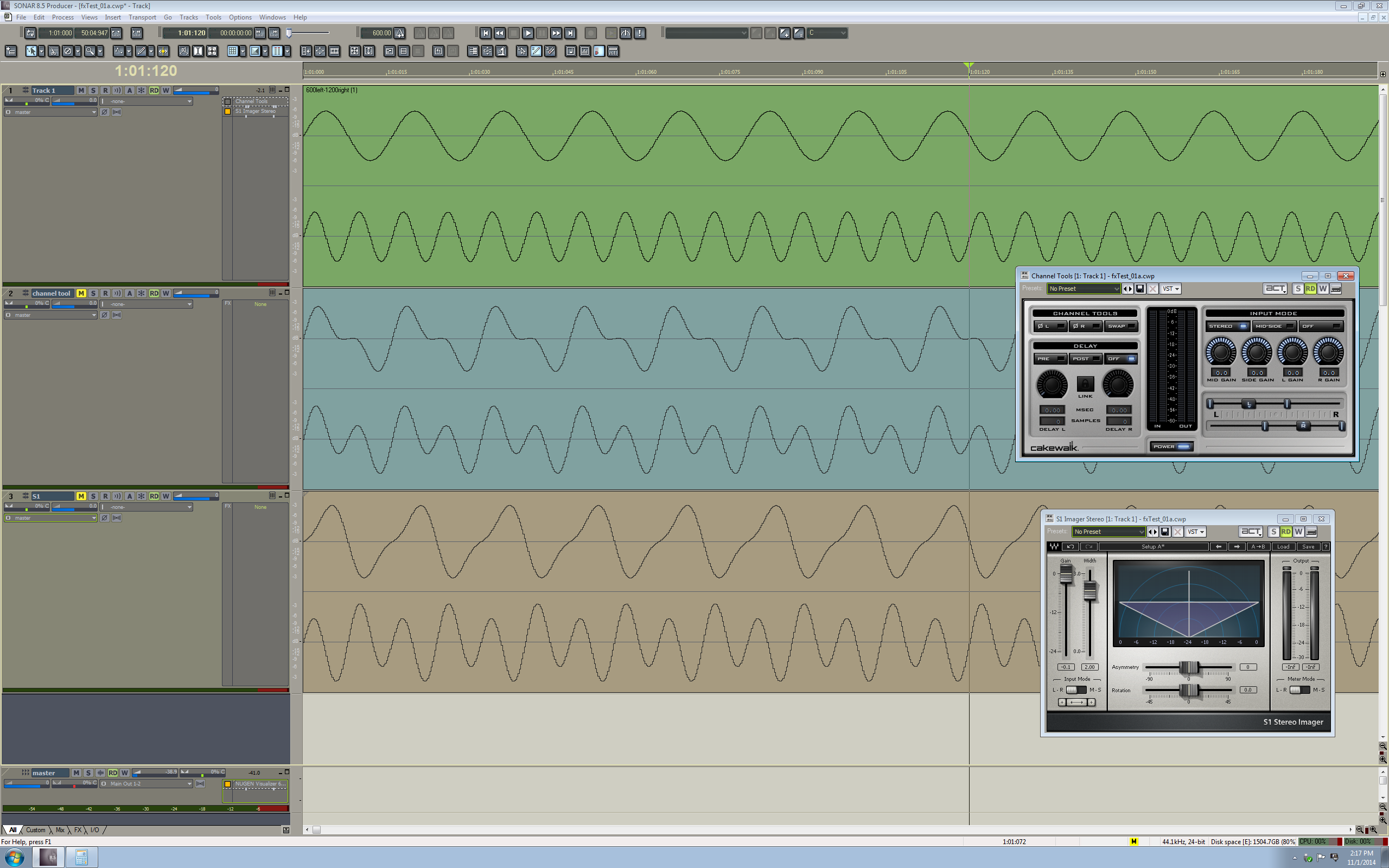
 

I suggest using a right click view image to see it at full scale
 
The change in the waveforms makes me very curious about what happens in either of the "width" processes. I don't know how to interpret the shapes I am seeing so I want to share it as it seems like some sort of specific result and maybe someone can share some ideas with us.
 
I found it interesting that increasing the "width" of channel tools made my level meters indicate an increase in output while increasing the "width" in Waves S-1 made my level meters indicate a decrease in output levels, although neither of the bounced tracks seem to clearly illustrate the difference I saw on the master bus level meters when I played the source track with one or the other dsp set as active.


© 2026 APG vNext Commercial Version 5.1

Use My Existing Forum Account

Use My Social Media Account