2013/09/04 21:47:10
complexsimple
Does anybody know if I am able to group track colors? For example, I have all my drum tracks in one folder. Am I able to make all the track colors in a specified folder (or just tracks that aren't in a folder) the same? This would help when it comes time for mixing since all the different parts of the song would be different colors and easy to tell apart.
2013/09/05 00:53:45
heydan
complexsimple
Does anybody know if I am able to group track colors? For example, I have all my drum tracks in one folder. Am I able to make all the track colors in a specified folder (or just tracks that aren't in a folder) the same? This would help when it comes time for mixing since all the different parts of the song would be different colors and easy to tell apart.


Hey Complex,
Altho many of the user color selections are no longer customizable in X1/X2, some of them still are. You just have to try them out to see which ones will change for you.  For instance, I find that the track header color in track view can't be changed unless using Panu's popular SonarMod tweaks.  On the other hand, TV/CV track header & folder text names & backgrounds can be user changed in Preferences/Colors menu as well as in the Track Inspector.  Both audio & midi track clip foreground/background colors can still be changed which you should find useful for your purpose. I use one color for audio clips & another for midi clips to help keep things visually straight. Of course, to each his own on the color code/setup they find that works for them.
Best, HeyDan  
2013/09/05 03:34:07
Seth [DAWGURU]
Best thing to do is group colors of the clips. This can be done in the Clip Properties in the inspector. Use Quick Groups to change the foreground color of clips on multiple tracks at the same time. The default foreground color selection is sloppy but you can get into the custom menu and select what yuo want from there.
2013/09/05 04:58:40
ston
You can load a solid colour image as the track's icon, which is one way of applying custom colours to tracks and buses.  I think that if you quick-group first then load a solid-colour image icon with CTRL held down, that would apply the image/icon to all tracks.
2013/09/05 06:31:56
icontakt
ston
You can load a solid colour image as the track's icon, which is one way of applying custom colours to tracks and buses.


Actually, this sounds like a great idea to me. Can the small icon to the left of each track name in TV be edited individually? Will try it when I get home.
2013/09/05 08:25:17
icontakt
Nope. The small icons aren't changeable. How sad.
Wish the track name text/background colors were changeable per track. Maybe in X3...
2013/09/05 08:36:02
The Maillard Reaction
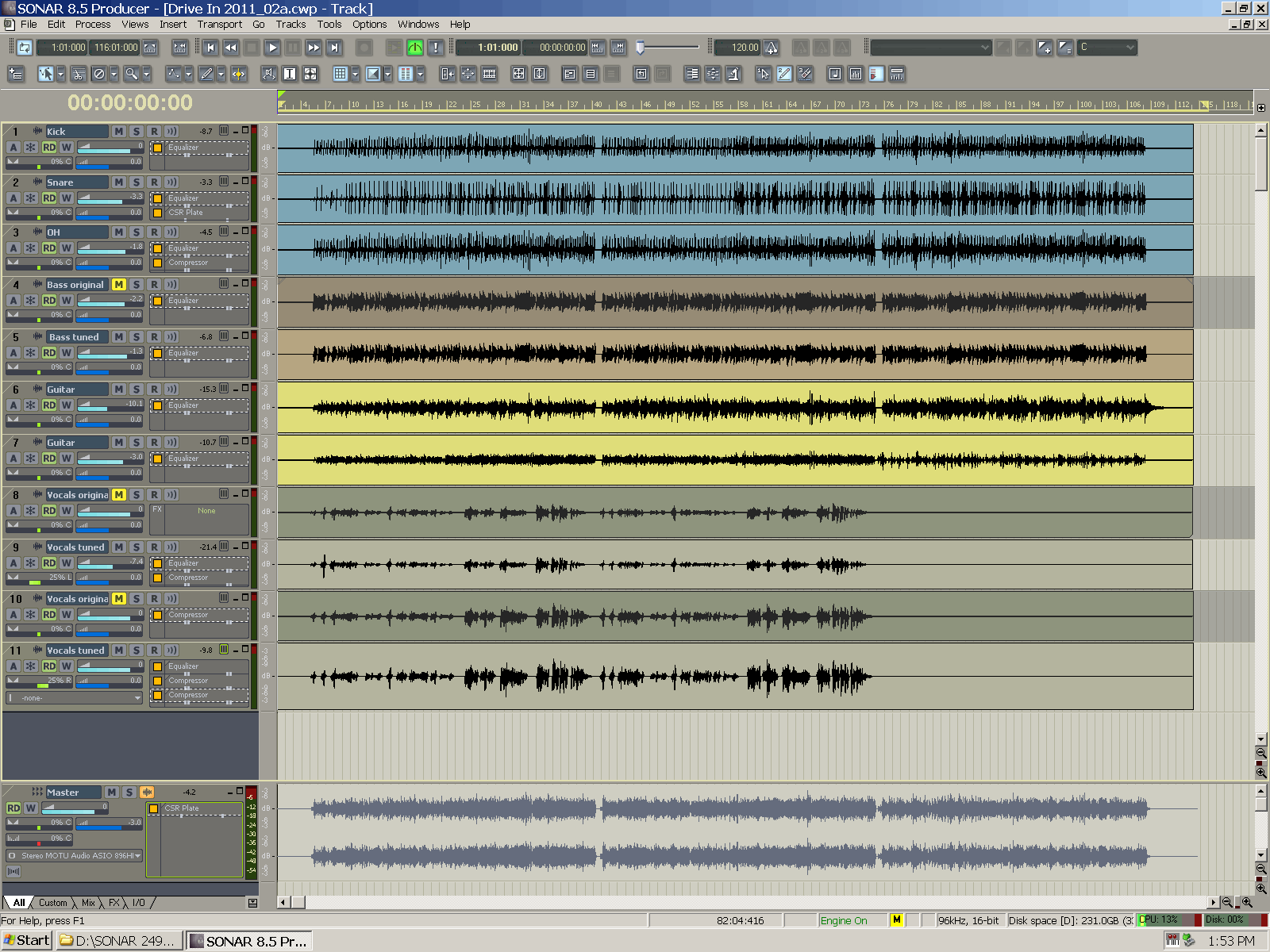
I want to change the background colors and leave the foreground colors the same.
 
I don't want a bunch of different color wave forms. It is incohesive and it deemphasizes the idea that each waveform drawing is a meter that provides valuable information about how the mix levels will sum.
 
I want a bunch of different color "Clips" that help me manage and visualize the routing in my project.
 
I use blue for drums, brown for bass, yellow for guitar, grey for vocals, purple for keys etc.
 
Like this:


2013/09/05 13:12:30
Seth [DAWGURU]
Jlien X
Nope. The small icons aren't changeable. How sad.
Wish the track name text/background colors were changeable per track. Maybe in X3...


You can have the small icons follow the large icons, which is what I do. It is a global setting and can be changed in View | Icons menu, IIRC.
 
SP
2013/09/05 17:44:53
VariousArtist
mike_mccue
I want to change the background colors and leave the foreground colors the same.
 
I don't want a bunch of different color wave forms. It is incohesive and it deemphasizes the idea that each waveform drawing is a meter that provides valuable information about how the mix levels will sum.
 
I want a bunch of different color "Clips" that help me manage and visualize the routing in my project.
 
I use blue for drums, brown for bass, yellow for guitar, grey for vocals, purple for keys etc.
 
Like this:


I like your colour choices here Mike.  And I agree with the concept of associating colours with instruments (or which are routed to certain busses etc.).  
 
I do wish we could colour-code the track itself, so these are visible in the track view even when there is no wave form present, as well as in the console.
2013/09/06 03:57:46
lawp
Does cakewalk not provide a list if which elements' colours are still customisable, or is it a case of try them and see? If there's some doc could someone link it? Thx
© 2026 APG vNext Commercial Version 5.1

Use My Existing Forum Account

Use My Social Media Account