• SONAR
  • SOLVED!! Sample Rate/Clocking Issue.
2014/09/07 12:31:22
pinguinotuerto
I'm getting clicking sounds randomly in my audio regardless of buffer size because my Line 6 UX8 and Sonar X3e seem to not be "talking" to each other properly. I'm running at 48/24 in AD2 and Sonar, but have a discrepancy in the sample rate and bit depth reported by the control panel for my UX8 which says that when Sonar is running the sampling rate is being converted down to 44.1. Wondering if anyone has any ideas to correct this? Line 6 doesn't support the UX8 anymore and the drivers are crap, but I'm wondering if there's something that can be done within Sonar (ini file) or Windows. See examples below.
 
If I open Addictive Drums 2 standalone, the UX8 control panel shows this:
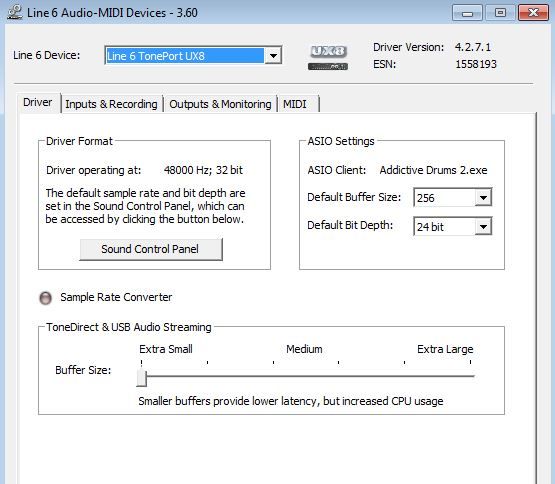


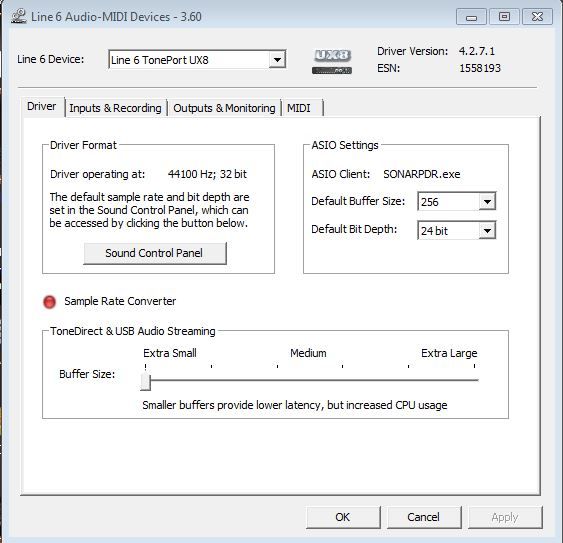
If I open Sonar, the control panel shows that the UX8 is in sample rate conversion mode, and although this time is showing Sonar as the Asio client, sometimes Asio client is blank. Also with both AD2 and Sonar the UX8 control panel shows 32 bit although both programs are running at 48 Khz 24 bit.
 

2014/09/07 12:58:16
scook
The images only show half the story. Both AD2 and SONAR have a configuration pages too. The sample rate and bit depth are set in AD2 and SONAR, it is the UX8 driver's job to use the sample rate and bit depth requested by AD2 and SONAR. The useful SONAR page is Preferences > Audio > Driver Settings. The settings on this page are either the default settings or, if a project is loaded, the project settings. The settings are stored per project.
2014/09/07 13:07:54
pinguinotuerto
Correction: Scook, I had omitted the 48 khz part. My apologies.
2014/09/07 13:12:29
scook
I did not see any reference to the actual sample rates set by either AD2 or SONAR in the original post. What happens if the sound control panel is opened in the driver format area in the second image and the sample rate set to 48k?
2014/09/07 13:15:53
pinguinotuerto
There's a discrepancy between what Sonar is set to and what the UX8's control panel reports. With AD2 running standalone, they both report 48, but with Sonar at 48 the UX8 reports 44.1 and the Sampling Rate conversion light turns red.
2014/09/07 13:17:29
pinguinotuerto
I'm beginning to wonder if this has something to do with the AD2 vst running within Sonar?
2014/09/07 13:19:41
scook
I see that. I do not have the device so this is why I asked about the Driver Format section and the Sound Control Panel button to establish the default setting.
2014/09/07 13:20:52
pinguinotuerto
Scook,
I reworded the post to state the problem more clearly. Thanks.
2014/09/07 13:23:33
scook
pinguinotuerto
I'm beginning to wonder if this has something to do with the AD2 vst running within Sonar?


How so? To the device driver, SONAR and the standalone AD2 are peers. The plug-ins inside SONAR are unaware an audio driver exists and the audio driver has no idea what a DAW plug-in is.
2014/09/07 13:28:19
pinguinotuerto
scook
pinguinotuerto
I'm beginning to wonder if this has something to do with the AD2 vst running within Sonar?


How so? To the device driver, SONAR and the standalone AD2 are peers. The plug-ins inside SONAR are unaware an audio driver exists.


Good to know. I wasn't aware of that. The reason I was wondering was because this just started happening and I have the AD2 plugin running in that song. Need to check to see if it happens with a song without AD2.
© 2026 APG vNext Commercial Version 5.1

Use My Existing Forum Account

Use My Social Media Account