• SONAR
  • I just want to record audio like I'm using an old 8 track recorder ...
2018/01/31 02:13:40
MDShinn
is there a basic format or template for me to use or set-up to use as for recording 8 or 16 tracks live audio in?
 
I know the question is kinda lame but I'm old school and a better musician than I am a recording engineer.
 
My wife and I just want to make great recordings of originals for ourselves. using a drum machine, me on keys, bass and guitar and her and I on vocals ......  any basic and straight forward advice is welcomed. 
 
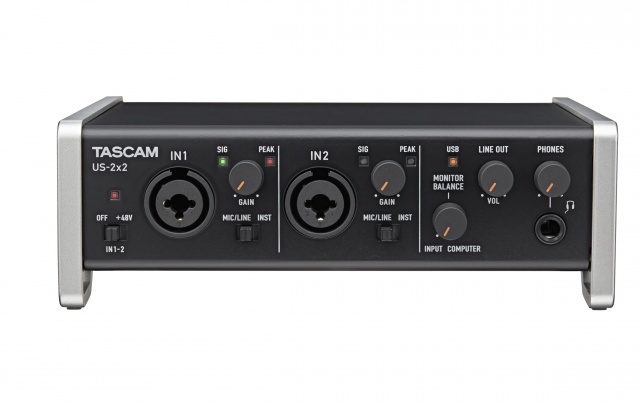
we just bought a new laptop, 1TB storage and fast everything .... I have a great mixing board and a Tascam 2x2 audio interface.
 
I don't know how to setup good headphone levels that result in good recording levels 
 
Thanks in advance for any kind words of advice
 
 
2018/01/31 02:55:40
Jesse G
You can select, "File New" and select the 4 or 16 track template to use and add the mic input to the audio I/O and then record 1 or 2 tracks at a time since you have the Tascam 2x2 audio interface.    You don't have to have all 8 tracks appear first.  Watch the "Using Templates" video to learn how to create a custom template for your own workflow or add once track at a time.
 
Watch First - How to record in Sonar
Watch Next  - Using Templates to get started in Sonar

Additional Videos to watch
Adding Tracks to Sonar
Cakewalk TV Channel  (A host of Cake tutorial Videos)
 
That Should Keep the both of you busy for a while.


2018/01/31 12:03:57
anydmusic
Sounds like the best plan would be to set up one or more templates for the typical instrumentation that you use. It's pretty easy to do and will help you to get off to a quick start.
2018/01/31 12:26:37
The Maillard Reaction

2018/01/31 13:23:22
fireberd
Most of what I do with Sonar is a "tape recorder".  I took one of the stock templates and modified it for my own use.  
There are no track effect chains in my template.  Just the 8 tracks (since I have 8 inputs on my recording interface unit) and I add VST's as needed.  If I need more or less tracks for a specific project, I add or delete as needed.
 
  
2018/01/31 17:24:29
Cactus Music
The big thing here in what you say is you'll be using a drum machine. There's a few ways to make a huge improvement over the typical sounds those make. It might be worth your time to learn just a little bit of midi so you can create a very realistic drum track using Sonar and midi. 
 
You can use the drum machine sounds as well and with a little setting up you can sync that to Sonar so Sonars tempo drives the machine using midi sync. I have mine set up that way. I use it just to get the song rolling and then replace that with a midi drum track latter. And you mentioned keyboards so that's another reason to use midi. 
I made a simple tutorial on using Midi in Sonar if you want to kick the tires. 
http://www.cactusmusic.ca/Sonarmidi.htm
 
 
Typically I make a bed track of all the music and then record the vocals. 
The bed track can be audio or midi or both. 
The headphone mix is as simple as setting the direct record input level in balance with the output of your bed track playback. 
On your interface the output is called  Input- Computer. Just adjust this to achieve the correct balance. 


2018/01/31 19:53:07
fireberd
I use either an Alesis SR-16 or SR-18 for drum tracks.  Sometimes I'll use PX-64 Percussion Strip plug-in and modify the Alesis drum track.
2018/02/01 01:01:22
tlw
The old Alesis machines do still have their uses and contain quite a few good sounds. I still use an SR16 I bought in the 90s sometimes for percussion sounds. Usually as a MIDI controlled module though, rather than attempting to program it via it’s own pretty horrible interface.

For synth-style drums I use a MachineDrum or an older model MFB which has some very solid kick sounds in it.

I wouldn’t attempt to make a track that sounded like a human played it on a kit on any of those though, that’s a job for customisable algorithmic tools like Logic’s Drummer instrument or Jamstix as far as I’m concerned. Then take what comes out of them and edit the MIDI as required. Far, far faster and easier than spendign hours programming an entire “realistic” 10 minute drum part from scratch.
2018/02/01 03:14:13
stratman70
I still use my trusty Roland Sc88VL for some things with drums. But mostly have mobved to ez drummer 2, Steven Slate Drums, addictive drums and session drummer.
 
Not sure what version of Sonar you have. But if you have Session Drummer you might want to give that a listen. Very easy to use. Actually TTS-1 are similar to the drums in Sound canvas's.
2018/02/01 11:28:09
fireberd
As I primarily record "traditional" (old style) country, the Alesis SR-16 "31A" program is my go to for many.  I use others but that is my most used.  The SR-18 has built in 3/4 (Waltz) program that they forgot to include in the SR-16 factory programs.  I have a 3/4 user program in my SR-16 that the salesman at a local music store programmed for me.
12
© 2025 APG vNext Commercial Version 5.1

Use My Existing Forum Account

Use My Social Media Account