Hi! That was avery good deal!! it sound amazing and will let you make awesome records no doubt about it!
1. Be sure you have the latest firmware installed
How to check the installed firmware on the VS-700R IO:Windows:- Make sure the VS-700R is connected to your computer and the power is on
- Click on Start or the Windows Logo in your Task Bar
- Navigate to All Programs | VS-700R IO Editor and click on VS-700R IO Editor to launch the application
- In the VS-700R IO Editor, click Help | About VS-700R I/O...
- The currently installed firmware for your CPU, DSP as well as FANTOM VS will be listed
Lastest firmware are:
- The VS-700 CPU/DSP System Program Ver.1.30 or later
- The VS-700 FANTOM VS System Program Ver.1.30 or later
- The VS-700C Console System Program Ver.1.31 or later
Once you're ok with this, be sure you have the Fantom/ARX editor installed, in case you want to use the Fantom. If you don't have an ARX card, untick ARX in the installer.
http://www.cakewalk.com/Support/kb/reader.aspx/2007013246 Last, be sure you have installed driver 2.00 and NOT driver 2.01. The latest is for using the vs700r with an updated octa capture only.
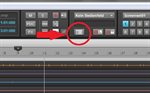
And to answer your question loll, granted all the previous steps are ok, the editor for the preamps and the mixer are accessed by clicking this icon:
Attached Image(s)