• SONAR
  • [Solved] MIDI input no longer getting to Sonar
2017/07/08 00:16:39
midori4000
Hi,
 
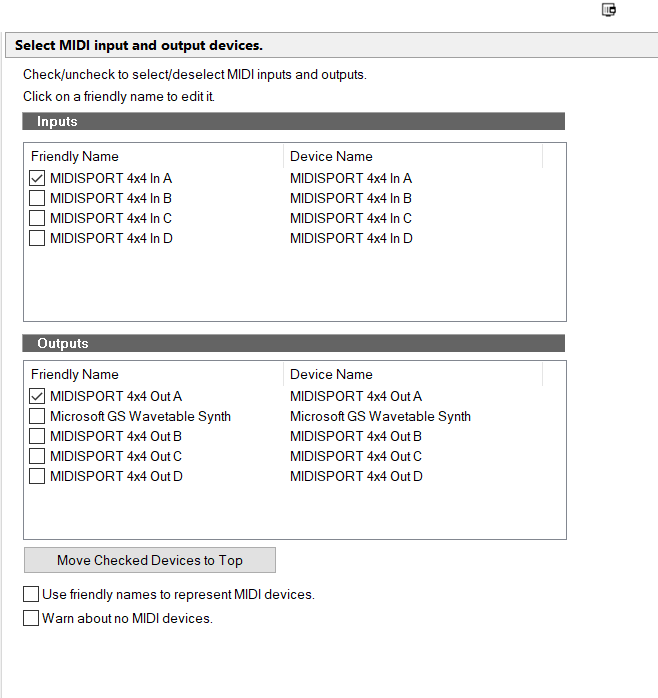
I'm using Sonar Pro 20 on a Windows 10 box. M-Audio 4X4 MIDISPORT as MIDI-to-USB adapter.
 
Following a recent Windows 10 update, you know, the ones that interrupt your day, I can no longer get a MIDI signal from my Yamaha S80 into Sonar. It was working fine quite recently.
 
I've noticed some extra "devices" showing up in Device Manager. See attached. I've tried disabling, or uninstalling them but it doesn't fix the problem, and they appear on restart. They may exist because I'm running rtpMIDI but I suspect they are in error.
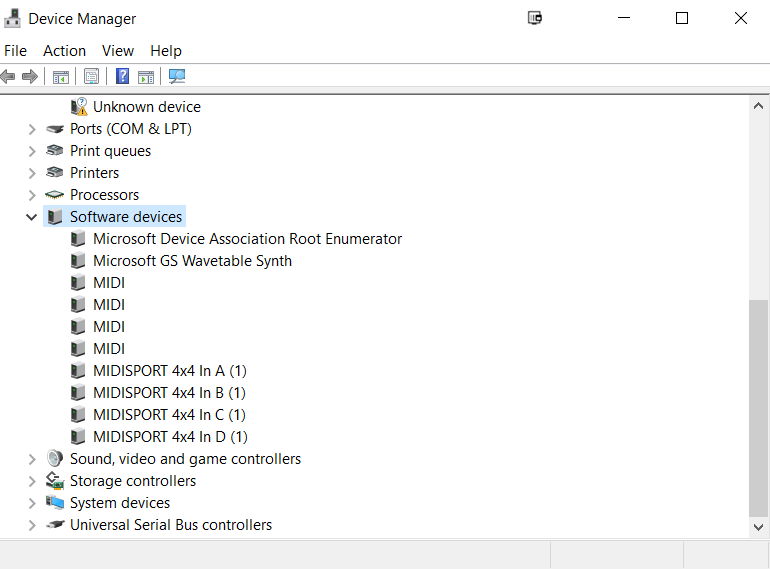


Any ideas, crowd?
 
Thanks,
 
Ben
P.S. I believe the MIDISPORT is still supported and should work, but if it's suspect, I'll happily drop $20 on a new MIDI interface to get this working again.
 
2017/07/08 02:12:09
chuckebaby
You'd be better off dropping 50 and upgrading to Sonar home studio.
Im guessing sonar 6 is running out of time man. im surprised it still works on windows 10.
2017/07/08 02:28:14
midori4000
Whoops. I meant to say I'm using Sonar Pro 20! I'll update my post.
2017/07/08 11:38:39
chuckebaby
Have you tried checking your connection first ? That's where I would start. Typically when something goes array, we tend to think its the software, drivers, or an update issue but some times it can be a failed connection, a failed USB/Midi cable or even a failed USB/Midi port.
 
However..
If you do think its update related, you can try removing the Windows update, or do a system restore (though I tend to stay away from that). You can also try rolling back. If you are running the latest sonar (version 23.6.0.24) and believe it could be update related, just roll back (using Command center) to see if that fixes the problem.
2017/07/08 12:10:04
RexRed
Your device manager says you have an "unknown device" with an exclamation point, what is that? Fix that... it may be conflicting with your IRQ's and causing the problem.
 
Go to your PC's web page and make sure all the drivers are installed, get rid of that first.
 
Even if it worked before with that there it could have redirected and changed its internal routing and now be causing a conflict.
2017/07/08 13:56:10
chuckebaby
RexRed
Your device manager says you have an "unknown device" with an exclamation point, what is that? Fix that... it may be conflicting with your IRQ's and causing the problem.


I saw that as well but according to the queue/list in Device manager that would be where "Network adapters" would be. I cant imagine that would be causing any Midi issue.
 
midori4000
I've noticed some extra "devices" showing up in Device Manager. See attached. I've tried disabling, or uninstalling them but it doesn't fix the problem.


2017/07/09 19:24:07
midori4000
@Chuck Jones: Thanks!! It looks like I had a bad MIDI port. Switching from A to B seems to have solved the problem.
2017/07/09 20:19:44
chuckebaby
The same thing happened to me last year. it drove me fricken crazy trying to figure out what was wrong.
My issue was I plug my USB cord in the same port 5 times a day. after doing that for 2 years, it was toasted.
So I came up with a device which allows me to leave everything plugged in and 1 switch turns all my gear on, avoiding having to plug/unplug anything anymore.
 
In most interfaces, midi devices, exc it is critical to always use the same port you installed the drivers to.
glad your back on the road and running.
2017/07/09 23:31:30
Anderton
chuckebaby
My issue was I plug my USB cord in the same port 5 times a day. after doing that for 2 years, it was toasted.


If you want to sleep well at night, don't look a the specs for guaranteed number of insertions with USB ports. It's better just not to know 
© 2026 APG vNext Commercial Version 5.1

Use My Existing Forum Account

Use My Social Media Account