• SONAR
  • Can one use a pen with a desktop and multi-touch screen? (p.2)
2017/06/11 19:34:13
John
w.joyce
Hi john I can't see a button on that stylus for selecting notes or other mouse features?

My understanding is with a button you will need a much more expensive pen. One from Microsoft for example.  You may also need a battery in some with a button. The stylus I have with X220 came with it and it has a button. However it wont work with out the screen driver from Watcom and that wont work on just any touch screen.
 
You will need to do some research on just what are the requirements for your setup.   
2017/06/11 20:00:21
w.joyce
Thanks for the reply. Like I said I have a normal pen that works for everything except adding notes or drawing automation or moving clips.
But that's why I have wrote on here I know not everyone uses touchscreen monitors yet but they are alot more inexpensive than having to spend thousands on a surface.
So why only make it work for certain hardware? I belive it should work for any touch device.
2017/06/11 20:10:56
w.joyce
I really hope they take these things into account with newer updates this year. It would make navigating and using sonar much more intuitive for everyone.
I'm not trying to complain.
I love this software I just get frustrated when I'm sat there for a while using my vsts recording stuff in then have to stop to pick up my keboard to move a clip or edit a note in the prv. I could have much worse problems lol.
2017/06/11 21:18:38
Brando
w.joyce
Thanks for the reply. Like I said I have a normal pen that works for everything except adding notes or drawing automation or moving clips.
But that's why I have wrote on here I know not everyone uses touchscreen monitors yet but they are alot more inexpensive than having to spend thousands on a surface.
So why only make it work for certain hardware? I belive it should work for any touch device.

I have voiced my displeasure concerning Cakewalk's implementation of touch previously. 
I agree with you though - doesn't it seem ridiculous that a user can enter notes at an acceptable resolution with a mouse, but can't do the same with a simple capacitative stylus on a multi-touch screen monitor? If I zoom in enough, why can't I enter notes with my finger? My touchscreen monitor was essentially a waste of money, and is used as a simple display now. Until Cakewalk sorts this out I'll wait and see what they come up with before going down another hardware dead end, but I have scary visions of some abomination involving touch, pen, mouse and keyboard shortcuts... The octopuses will love it I'm sure.
Really not as bitter as this sounds - it might not sound like it but I love Sonar Platinum and have lifetime updates. (But I hope there's a vote before they start working on their new LFO....)
 
2017/06/11 21:35:02
w.joyce
Thanks brando. I'm sure there is others with the same problem too. It's a shame they stopped working on normal touch features when they first announced it i was well happy and and thought they would be going in more of touch direction. But it seems they fallen behind other daw's like fl studio in this area. My friend uses it and he can pretty much do everything with touch. But I can't get on with the program it's awful to use when you have got used to using a traditional daw.
2017/06/11 23:44:04
cparmerlee
John
The one I posted above should work.

I have ordered a couple (I will lose one of them for sure.)  They certainly are cheap enough.  What is with that disc on the end?  Is that just to protect the screen?
 
I have 2 27" monitors (plus a small monitor) on the machine where I run Sonar. The monitor my right is multi-touch and the other is just a monitor.  I tend to put the main stuff on the non-touch screen with the mixer window on the touch monitor.  Without a pen, that's probably backward from what a person would want because the fingers are mainly useful just for scrolling the transport.  I am hoping Cake adds a lot more pen/touch support.  I am planning to replace that non-touch monitor whenever there is better support for touch/pens.
 
Off topic a little, I watched that video with Noel and the Microsoft guy.  I know there has been a lot of disappointment with the decision to not bring a Mac product to market, but one really has to be impressed with Microsoft's commitment to making Windows 10 a very good platform for DAWs.  It seems this rather flips the script for Apple.  Forever, Apple was known as the niche product that was great for artistic things (drawing and music) while Microsoft was the platform for business and boring old reliability.  With these advancements in latency and user interface, it seems that Windows is becoming the "serious" platform.  I do hope that both Microsoft and Cakewalk come to realize that a Surface Pro just isn't the platform for big DAW projects.  We need the bigger systems to have the UI of the Surface while providing much greater glass.
2017/06/12 00:08:57
John
My main system uses two monitors neither is a touch screen so I don't use touch on it. Where I do use touch is with other things such as Kindle for example on my tablet and laptop. Both my touch screen computers are good for using touch but not for Sonar and touch. A Surface Studio might be the ideal setup for Sonar and touch plus pen.  
 
As to your comment about Windows and Microsoft, I agree with you. 
 
 
2017/06/13 11:04:22
mudgel
The latest pens work with Bluetooth but still need a capacitive touch screen to work on.

It's a big subject I too am looking into. I suggest you do a lot more research. That's what I'm doing.
2017/06/14 20:29:41
cparmerlee
John
I too have a multi touch tablet and I found this to work  with All capacitive touch screens devices. The Smalleye -island works with my tablet.
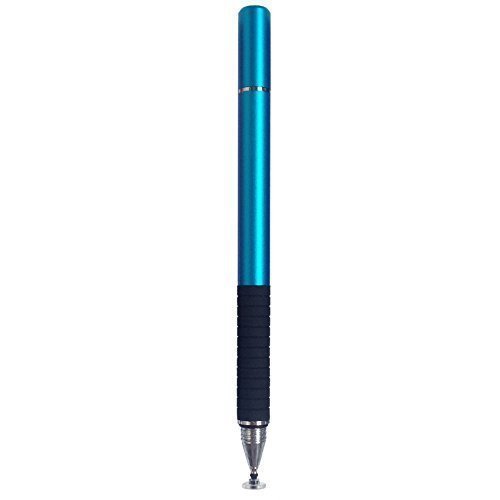


I received the SmallEye stylus today and it does work with that Dell touch monitor.  It works very well for anything on a push-button nature (mute button, e.g.).  Things that involving or a more delicate touch don't work so well.  For example, I have the Aria player on screen.  If I use the stylus to touch the simulated keyboard, the keys always show the touch, but I can only get them to sound about 1 time out of 20.  I don't do much better with my finger.  If I slide my finger or stylus along the simulated keyboard, all the notes play a gliss.  If I click with the mouse, I get sound 100% of the time.  I wonder if there is another Windows API the developer has to implement in order to make the touch as reliable as mouse clicks.
Likewise I put the Ozone equalizer on the screen.  It was possible to use the stylus to drag the parametric nodes, but it was really tedious -- not nearly as easy as with a mouse.  The pen comes with 3 tips, so I may try the other two to see if they make a difference in the above cases.
 
And of course, none of this registers pressure.
 
I have continued to search.  It seems there are supposedly some Bluetooth pens out there that work like the SmallEye stylus (passively) to register location on the monitor, but also send Bluetooth commands to register pressure detected at the pen.  Every one I have seen refers to Apple pads and books.  I haven't seen any product of this type that explicitly has Windows support.  Has anybody else found such a pen yet?  I guess there is very limited need for such a device in SONAR today -- only in the PRV where the pressure can set the controller levels.
12
© 2026 APG vNext Commercial Version 5.1

Use My Existing Forum Account

Use My Social Media Account