• SONAR
  • How do I setup two delays for a single track?
2017/05/27 14:56:48
Marc2109
I want to setup two delays, panned L and R for a single instrument track.  Should I insert the delays in the FX bin, or use a bus for each delay and send the track to both?  What is the best way to do this?   I apologize this has probably been answered many times, but I my search didn't yield, probably because my terminology is wrong.
Any help greatly appreciated.
2017/05/27 15:07:55
bitflipper
Why, specifically, do you need two of them?
 
Most delays are stereo, and to varying degrees allow you to set up left and right channels independently. However, I can imagine scenarios where you might want them to be completely independent, so that each can be effected separately. In that case, I would place them on aux tracks or busses and thus have total freedom to do anything I want, either to the signal going in or coming out of the delay. 
2017/05/27 15:35:51
Marc2109
Thanks for answering.  I want the delays to be set to different times.  I don't think any I have would allow me to set two different times, panned hard L and R. If any does, I am not seeing how to do it.   Of course, I could be wrong.  
Per your advice, I set up two buses, delay 1 panned hard L and Delay 2 panned hard right.  I sent the track signal to both delays.  
 
Should I pan the the track send as well?
2017/05/27 15:42:13
Anderton
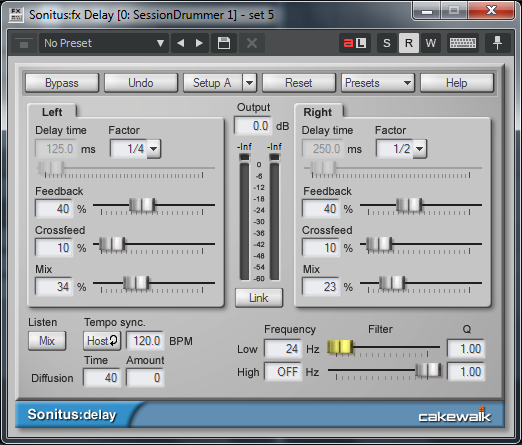
I believe the Sonitus Delay will do what you want. It has two independent delays, one for each channel.
2017/05/27 19:24:19
chuckebaby
Craig is correct the S/D will do different times on different sides. Though the Sonitus Delay is a dated plug in, I find it one of my more valuable tools not only because of its flexibility but also its easy of use.
2017/05/27 23:54:31
THambrecht
I make a copy of the track, insert a delay-plugin (100% wet) and apply the effect to the track. Then I have a "delay-track". If I need two or three delays, I make 2 or 3 copies and apply the effect to this tracks.
That gives me the advantage for different equalizing and panning each delay-track and other special effects with the delay like swelling, reverb, phasing .... and I can cut, split, edit the delay-tracks.
Then I give this delay-tracks to the mix.
 
2017/05/28 01:57:15
tlw
One reason for using sends to aux tracks carrying one delay ieach rather than a single stereo delay on the source audio track is that the single delay in fx bin method can cause unwanted behaviour if the dry signal isn't panned in the centre. The "pan" control on a stereo source is actually a balance control between left and right sides. If the audio in the track is identical in left and right channels then the balance pot does sound like a pan rather than balance control, but if left and right have different content, which they will of different delay tomes are used, the balance pot will boost one side's delay volume and reduce that of the other side
2017/05/31 15:26:51
Marc2109
Thank you all for you suggestions and help!!
2017/06/01 13:10:40
Slugbaby
The BlueTubes Tempo Delay that comes with SPlat has up to 3 delays that you can set to various points on the pan.
2017/06/01 14:48:38
Cactus Music
To add it depend on what your trying to achieve with the delay. There's actually a few ways to take a mono track and send it flying all over the place, Bins, Busses copy tracks. Each will give different results and each will offer varing amounts of control. 
 
As said most delay plug ins are mono to stereo and have at least 2 delay lines. To me this is the easiest way to have a different delay in the left and right because you should have all the controls you need built in to the Plug in. 
 
The Sonitus is a good one for this and what I do is set it to grab the timing from the songs tempo. 
Now it's a simple matter of changing the delay note value, say left side is a 1/4 note and right side 1/2 note. 
There's even  controls so these can be hard left and right or blended. You can adjust the feedback for each side and the wet/dry everything is there. 
 

12
© 2026 APG vNext Commercial Version 5.1

Use My Existing Forum Account

Use My Social Media Account