• SONAR
  • SR-16 drums into Sonar X2
2017/05/17 00:37:35
schonebaby
Hi all,
 
Hopefully this forum is an acceptable place for my dilemma, if not I will gladly move it. 
 
I have an Alesis SR-16 and I want the drum patterns I create on this device to record directly into Sonar X2. I have the '16 hooked up to a Behringer UMC204HD as follows:
 
'16 Main Left        -> 204 Insert 1
'16 Main Right      -> 204 Insert 2
'16 Midi Out/Thru -> 204 Midi In
'16 Midi In           -> 204 Midi Out 
 
I'm pretty inexperienced with midi and basically all studio hardware so I'm not sure if this is connected correctly, but it seemed like the logical way to do it. Here are photos of the back of each device for reference:
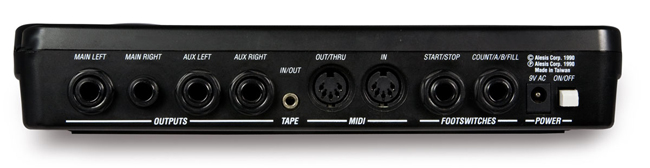
 

My nightmare truly begins, though, when trying to figure out what midi settings to use on the SR-16 and how to have my midi device settings and midi tracks configured in Sonar. One forum post I found from 2001 told me to have the midi setup on the Sr-16 as follows: 
 
"If you are recording a song or pattern to cw you should have:
clock in - off clock out - on
drum in - on drum out - off
You should have the sr set to midi channel 10"
 
Great, so I did that. I also configured my midi track in Sonar to be on channel 10, and set the 204 as my default midi device, etc. When I play a pattern on the 16 I get solid red on the 204's front "midi in" light, indicating that the 204 is receiving some kind of signal. If I use different midi settings on the 16, I can also get the "midi in" light to light up when I hit the pads. So, something's happening in there! Unfortunately, I have no audio whatsoever and my midi track in Sonar is also not registering a signal. I've also seen forum posts about setting up Sonar as the "master" and the SR-16 as the "slave" but I have no idea how to do this. 
 
So that's about it--I could continue messing around with different settings for hours on end, but I thought maybe someone who knows more about these things than I do may be able to offer some guidance. Thanks a lot. 
 
 
2017/05/17 07:13:40
Boydie
Do you want to record the "sound" of the SR16 drums (i.e. The SR16 playing the patterns and then recording the audio)

OR

Do you want to record the MIDI patterns into SONAR as MIDI so that you can use the patterns to drive other drum synths (e.g. Session Drummer in SONAR)

If you only want to record the audio then you don't need to worry about the MIDI

If you only want the MIDI but not the audio you only need the MIDI lead connected as you have described

Here is a guide for FL Studio, which you should be able to translate to SONAR: http://forum.image-line.com/viewtopic.php?t=45709

I would suggest loading a drum synth (e.g. Session Drummer) so that you can hear what is happening and check the drums are playing when you configure the MIDI track - if you have nothing else "MIDI" connected just select "Omni" as the input in Sonar, which will then listen to all channels

If you start hearing sounds your next problem may be that sonar play the wrong drum (e.g. Snare instead of hi hat etc.) - I would personally just record the pattern and then use PRV to manually move entire lines of notes to the right kit piece

If you have lots to do you can learn about drum maps but I would get to this stage first
2017/05/17 07:21:49
karhide
First thing I notice is that you have connected the audio outs of the SR16 to the Inserts on the Audio Interface and you should connect to the inputs and then you will be able to get audio.  
 
I have an old SR16 somewhere in the house and I can't remember the midi settings on it because it's been a long time since I have used it. I will dig out the manual and have a quick look.
2017/05/17 07:27:14
karhide
I have just quickly downloaded the SR16 Manual and you want to have a look at Chapter 6 - MIDI Setup.  This covers setting up the SR16 to accept an external clock etc
 
http://5a18fcdc5c8aa26179...uments/sr16_manual.pdf
 
2017/05/17 08:45:55
tlw
If you just want to record the SR-16 patterns as audio the only MIDI it needs t receive is MIDI clock. Sending MIDI clock is in Sonar's project preferences.

Another way to use it is as a drum sound module, where Sonar handles all the drum patterns and the SR-16 acts simply as a sound source - which they are surprisingly good at and it's an easier way to work with them than the horrible SR-16 programming system For that you do need to get the Sr-16 receiving MIDI note data on the correct channel.
2017/05/17 10:37:43
fireberd
I use both an SR16 and SR18 frequently to record.  I connect the Main (analog) out (Left) or both Left and Right if I want more than one track directly to the analog inputs on my recording interface unit.  No MIDI is needed.   I've done it for years this way.
2017/05/17 13:57:41
35mm
SR16 - heck I last used one of those with an Atari ST running C-Lap Notator in a studio in the 90's :) Just take the analogue out to the line in on your audio interface (not the insert). You will also need the MIDI out from the computer to the MIDI in on the SR16 for clock.
2017/05/17 14:20:12
Cactus Music
Yes as said your using the wrong audio inputs,, but that said you really just need to transfer the midi data into sonar and then use those to trigger much better sounding drums with a VST. 
 
You therefore only need the midi cables in/out and get the clock set up so Sonar drives the drum machine. 
Record that data to a midi track and there you go. 
 
Lots of folks mistake inserts as being inputs. 
2017/05/17 14:56:33
fireberd
I never use MIDI from the SR16 for recording.  Analog only.
 
The only time I've ever used the MIDI was to load some user programs into another SR16 (such as a 3/4 that was not included in the factory programs).
 
2017/05/17 15:33:31
Anderton
When using MIDI, SONAR wants to be the master clock. You don't want to try to slave SONAR to the SR-16, but slave the SR-16 (clock in on, clock out off) to SONAR.
12
© 2026 APG vNext Commercial Version 5.1

Use My Existing Forum Account

Use My Social Media Account