• SONAR
  • Insert Synth, all box icons are black.
2017/03/25 20:16:54
tsbol39
I was messing around cleaning out my D drive with un locker when suddenly I noticed Sonar Platinum icons any version show as black now.. Is there a way to refresh those.
2017/03/25 20:41:32
chuckebaby
To be honest I have never seen a situation like this.
Is your cakewalk content (like Icons, exc) stored on your D drive ?
 
2017/03/25 21:02:18
tsbol39
It's on C drive.  This happened when I unlocked and deleted some winblows stuff on D ..then it refreshed the app and all boxes are black.......thanks for response
2017/03/25 21:56:13
chuckebaby
This should have been the first thing you wrote in your OP: What version of Windows and what version of Sonar are you running ?
 
First check to make sure everything is still there. Icons are located in C:\Cakewalk Content\SONAR Platinum\Track Icons. You can try refreshing them by going to track preferences and turning them on/off again. im not sure its going to help but it might be some strange glitch. The Icons use a .BMP format. I would also open an icon within Windows just to make sure its not some association issue where BMP and windows can no longer associate it.
So open up a Sonar icon in windows explorer preview to see if it can be viewed normally first.
 
Didn't you have this same problem once before ?
http://forum.cakewalk.com/Insert-Synth-in-Sonar-Platinum-are-all-black-icons-after-I-goofed-up-and-erased-my-D-drive-m3530531.aspx
 
Im guessing you have seen this thread as well ?
http://forum.cakewalk.com/black-icons-fixed-Thanks-all-m191900.aspx
2017/03/25 22:04:24
tsbol39
Yes, the problem never got fixed.  Its just irratating,, other then that everything works great.  I have a pic but its not letting me post it.  thx
2017/03/26 00:43:15
tsbol39
I checked I have track icons,, and all the icons of the synths... BTW Ive tried uninsatling and reinstalling Sonar same thing.  Im only having problem with when you go to insert synth its black icon next to the synths.  This is bothering my cocd.  How about if I uninsatll and reinsatll into a new folder ?
2017/03/26 15:54:39
tsbol39
Im using WIndowz 10 x64 and Sonar Platinum x64 2017  Feb.
2017/03/26 15:56:38
scook
tsbol39
BTW Ive tried uninsatling and reinstalling Sonar same thing.  Im only having problem with when you go to insert synth its black icon next to the synths.


Was it a clean re-install?
2017/03/26 17:39:55
paulo
tsbol39
I checked I have track icons,, and all the icons of the synths... BTW Ive tried uninsatling and reinstalling Sonar same thing.  Im only having problem with when you go to insert synth its black icon next to the synths.  This is bothering my cocd.  How about if I uninsatll and reinsatll into a new folder ?


And all those typos don't ? lol! 
 
Anyway, is this what you mean.......?
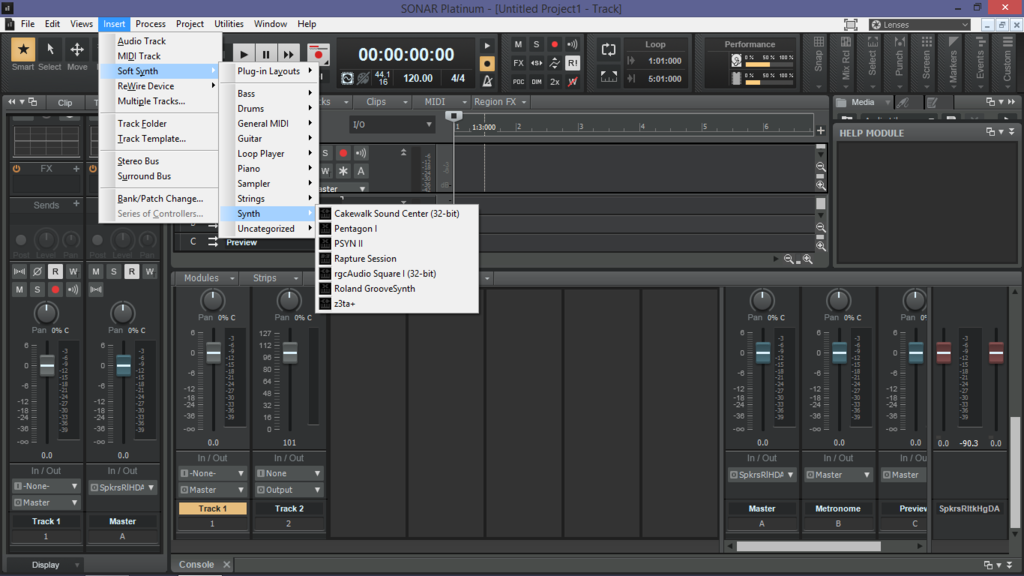


If it is, then I don't think it's related to anything that you did, it just how Plat is now, or at least that's how it has been for me since I installed it ( 2016.12). It's actually a little plug-in logo if you look closely, though admittedly a not very clear one. 
2017/03/26 17:44:01
tsbol39
YES YES, that is exactly what I mean.  Exactly like this.  Black icons.  Can I fix this.  Thanks
 
Clean install.  Uninsatll Sonar, then reinstall the same direcetory.  Should I install to another folder.  Also will all plugins all work.   Thans
© 2026 APG vNext Commercial Version 5.1

Use My Existing Forum Account

Use My Social Media Account